OPEN-SOURCE SCRIPT
Mis à jour Sector/Industry
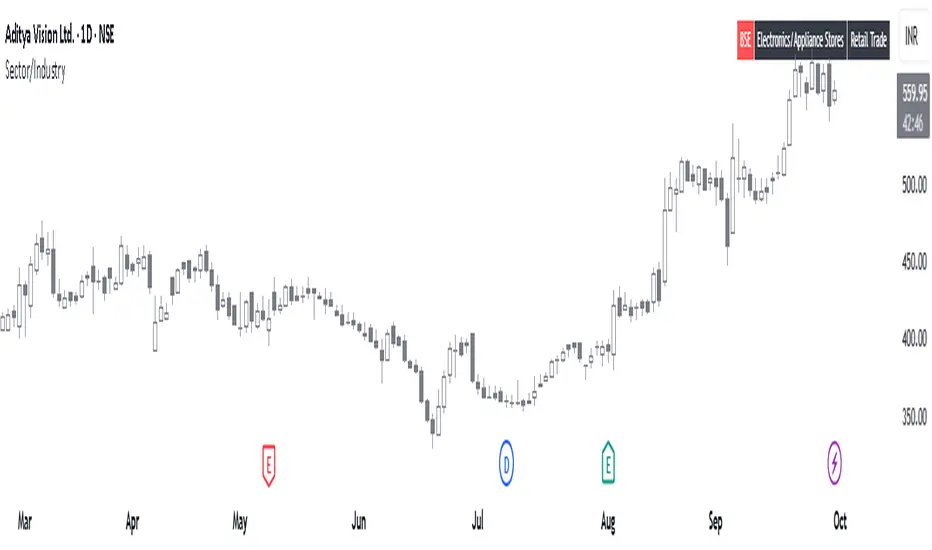
This is a simple script that displays a symbol's sector and industry in a table at bottom right area of the chart.
Notes de version
Added options to customize table on the chart as per preference.The position of table on the chart can be changed.
The background color and text color can be changed.
The text size can be changed.
The layout of the table can be changed now to Vertical or Horizontal.
Notes de version
📊 Sector/Industry Info with BSE Listing CheckThis Pine Script displays the sector and industry of a stock directly on the chart, along with a smart check to identify old BSE-listed stocks newly available on NSE, which are often misidentified as IPOs.
🔍 Key Features:
Sector & Industry Panel: Shows classification for quick reference.
BSE Listing Detection: Flags stocks that were previously BSE-only and are now trading on NSE — helping avoid false IPO assumptions.
Customizable Table: Choose layout, position, text size, and colors.
Perfect for traders analyzing newly listed stocks and wanting accurate context.
Script open-source
Dans l'esprit TradingView, le créateur de ce script l'a rendu open source afin que les traders puissent examiner et vérifier ses fonctionnalités. Bravo à l'auteur! Bien que vous puissiez l'utiliser gratuitement, n'oubliez pas que la republication du code est soumise à nos Règles.

Clause de non-responsabilité
Les informations et publications ne sont pas destinées à être, et ne constituent pas, des conseils ou recommandations financiers, d'investissement, de trading ou autres fournis ou approuvés par TradingView. Pour en savoir plus, consultez les Conditions d'utilisation.
Script open-source
Dans l'esprit TradingView, le créateur de ce script l'a rendu open source afin que les traders puissent examiner et vérifier ses fonctionnalités. Bravo à l'auteur! Bien que vous puissiez l'utiliser gratuitement, n'oubliez pas que la republication du code est soumise à nos Règles.
Clause de non-responsabilité
Les informations et publications ne sont pas destinées à être, et ne constituent pas, des conseils ou recommandations financiers, d'investissement, de trading ou autres fournis ou approuvés par TradingView. Pour en savoir plus, consultez les Conditions d'utilisation.