ATR Stop Distance (Ticks, mintick-based)A simple script that calculates stop distance in ticks for any given instrument.Indicateur Pine Script®par screaminbug3
Neighboring Trailing Stop [LuxAlgo]The Neighboring Trailing Stop indicator provides a dynamic, data-driven trailing stop-loss mechanism by analyzing the local distribution of prices relative to the current market position. It uses a "k-nearest neighbors" approach to identify support and resistance levels based on historical price clusters, offering a unique alternative to standard volatility-based stops like ATR. 🔶 USAGE The indicator helps traders identify trend reversals and manage open positions by providing a protective stop that adjusts based on where price has historically "congested" near the current level. 🔹 Trend Interpretation Bullish Trend: When the stop-loss line is below the price (colored green), the market is in a bullish state. The trailing stop will only move upward, securing profits as the price creates new local distribution highs. Bearish Trend: When the stop-loss line is above the price (colored red), the market is in a bearish state. The trailing stop will only move downward, following the price as it explores lower distribution zones. 🔹 Signals The script plots "B" (Buy) and "S" (Sell) labels at the point of trend reversals. These occurs when the price breaks through the current "neighboring" distribution boundary, suggesting a shift in the local market structure. 🔶 DETAILS The methodology behind this indicator is rooted in non-parametric statistics and price distribution analysis rather than simple moving averages or volatility. 🔹 Price Distribution & K-Neighbors The script maintains a "Historical Buffer" of recent prices in a sorted array. For every new bar, it identifies the position of the current price within this sorted distribution. It then looks at k neighbors above the price and k neighbors below the price. 🔹 Percentile Bands Within these local "neighborhoods" of price data, the script calculates a specific percentile. This allows the indicator to ignore outliers and focus on where the bulk of historical price action occurred near the current level. If the price moves into a "discovery" phase where it exceeds the range of its historical neighbors, a trend reversal is triggered. 🔹 Trailing Logic The resulting levels are smoothed via an SMA to prevent erratic jumps. The trailing stop is "ratcheted"—meaning it can only move in the direction of the trend (up for long, down for short)—ensuring that realized gains are protected even if the distribution neighborhood expands. 🔶 SETTINGS Historical Buffer (Bars): Determines how many historical price points are kept in the distribution memory. A larger buffer considers more history, leading to more stable but slower-reacting levels. Neighboring Range (K): The number of price points to analyze immediately above and below the current price. Smaller values make the stop more sensitive to local price changes. Percentile: Controls the depth within the neighborhood used for the stop level. A higher percentile (e.g., 90) places the stop further away from the current price. Smoothing: Applies a Simple Moving Average (SMA) to the raw distribution levels to create a smoother trailing line. Indicateur Pine Script®par LuxAlgo22406
Evasive SuperTrend [LuxAlgo]The Evasive SuperTrend indicator provides a modernized approach to trend following by implementing a unique "evasive" logic designed to reduce premature trend flips during periods of high market noise and consolidation. Unlike the traditional SuperTrend which can only move closer to the price (or stay flat), this tool identifies when price action gets too close to the volatility band and "evades" the price by pushing the band further away, effectively giving the current trend more breathing room. 🔶 USAGE The indicator can be used similarly to a standard SuperTrend to identify trend direction and potential trailing stop levels, but with added intelligence regarding market noise. 🔹 Identifying Trend and Noise Solid Line: Indicates a standard trend phase where the price is maintaining a healthy distance from the volatility band. Dotted Line: Indicates the "Evasive" mode is active. This occurs when price action enters a "Noise Zone," causing the indicator to proactively push the band away to prevent a false breakout. Gradient Fill: The background fill provides a visual heat map of the trend strength relative to the source price, with higher transparency indicating proximity to a potential trend flip. 🔹 Trading Signals Users can look for "BULL" and "BEAR" labels which mark the points where price successfully penetrates the evasive band. Because the band actively retreats during noise, a trend flip often carries more significance as it requires price to overcome an adaptive volatility threshold. 🔶 DETAILS The core innovation of this script is the "Noise Avoidance Logic." Standard SuperTrends are strictly monotonic (they only move up in a bull trend and down in a bear trend). This often leads to "whipsaws" where a minor price spike touches the band and flips the trend unnecessarily. The Evasive SuperTrend calculates a Noise Threshold . If the distance between the price and the band is less than this threshold (calculated in ATR units), the band is pushed back by a specified Expansion Alpha . This allows the trend to persist through choppy sideways movement that would otherwise trigger a reversal. 🔶 SETTINGS 🔹 Supertrend Settings ATR Length: Determines the lookback period for the Average True Range calculation used to set the band distance. Base Multiplier: Sets the initial distance of the band from the price. Higher values result in fewer, longer-term trend signals. 🔹 Noise Avoidance Logic Noise Threshold (xATR): Defines the "danger zone" around the band. If price enters this ATR-based range, the band begins to evade. Expansion Alpha (xATR): The distance the band moves away from the price when noise is detected. Higher values make the indicator more "stubborn" against trend changes. 🔹 Visualization Show Signal Labels: Toggles the visibility of the BULL and BEAR trend change labels. Show Gradient Fills: Toggles the dynamic background coloring between the price and the band. Indicateur Pine Script®par LuxAlgo55 1.7 K
SuperTrend Recovery [LuxAlgo]The SuperTrend Recovery indicator provides a modified version of the classic SuperTrend algorithm that incorporates a dynamic "recovery" mechanism designed to adjust the trailing stop when price action moves significantly against the current trend. This script aims to help traders manage volatile environments by tightening the trend band when the market experiences deep pullbacks without triggering a full trend reversal. 🔶 USAGE The indicator can be used similarly to a standard SuperTrend to identify market direction and potential trailing stop-loss levels. However, the unique recovery logic allows for a more adaptive response to price deviations. 🔹 Trend Detection When the price is above the band, the indicator signals a BULL trend. When the price is below the band, the indicator signals a BEAR trend. Trend switches are marked with "BULL" or "BEAR" labels and a colored circle at the switch point. 🔹 Recovery Mechanism In a standard SuperTrend, the band stays flat if price moves against the trend (but doesn't break it). In the SuperTrend Recovery version, if the price drops significantly below the "Switch Price" (for a bull trend) or rises above it (for a bear trend), the band begins to move toward the price based on the Recovery Alpha . This allows the trailing stop to "catch up" during high-volatility pullbacks, potentially securing a faster exit if the recovery fails. 🔶 DETAILS The core of this indicator lies in its two-stage calculation: the Base SuperTrend and the Recovery Logic. 🔹 Base Logic The indicator calculates a base upper and lower band using the Average True Range (ATR) multiplied by a user-defined factor. Under normal conditions, the band follows the classic rules: it can only move up during a bull trend and only down during a bear trend. 🔹 Recovery Logic When price enters a "loss" state relative to the price where the trend initially started (the Switch Price), the script checks if the deviation exceeds the Recovery Threshold . If the threshold is met, the band is calculated as an exponential moving average (EMA) of the current price and the previous band value, weighted by the Recovery Alpha : targetBand = alpha * close + (1.0 - alpha) * prevBand This creates a "tapering" effect where the band aggressively tightens toward the price during deep retracements, helping to mitigate drawdown by providing an earlier exit signal compared to the standard static band. 🔶 SETTINGS 🔹 Supertrend Settings ATR Length : The lookback period used to calculate market volatility. Base Multiplier : The factor applied to the ATR to determine the distance of the band from the price. 🔹 Recovery Logic Recovery Alpha (%) : Determines how quickly the band adjusts toward the price when the recovery logic is active. Higher values make the band more reactive. Recovery Threshold (xATR) : The distance (in ATR units) the price must deviate from the switch price before the recovery mechanism activates. 🔹 Visualization Show Gradient Fills : Toggles the background gradient between the price (source) and the SuperTrend band. Show Signal Labels : Toggles the "BULL" and "BEAR" labels at trend reversal points. Indicateur Pine Script®par LuxAlgo55 1.6 K
Volatility-Based Stop CalculatorVolatility-Based Stop Calculator Daily volatility-based stop distance and target levels with regime awareness using VIX-derived stress features Overview Volatility-Based Stop Calculator is a daily risk-sizing helper that computes ATR-based stop distances and target levels using a volatility regime score built from VIX momentum, VIX acceleration, and SPY realized volatility. It is not a signal or entry tool; it provides a consistent stop distance and target ladder for the current session. Key Features Volatility Regime Scoring: Uses VIX momentum (5‑day change), VIX acceleration, and SPY realized volatility to create a daily severity score. Quantile Buckets: Maps the severity score into 4 volatility buckets (LOW / NORMAL / ELEVATED / EXTREME). Dynamic k Multiplier: Adjusts stop distance via VIX percentile, gap risk (ETFs only), realized vol ratio, and VIX9D term stress. ATR-Based Stops: Final stop distance is ATR × k, rounded to tick size. Targets Ladder: Plots TP1/TP2/TP3 and stop levels from a reference price (daily close or live price). Overlap Consolidation: In Both mode, overlapping long/short levels are merged into a single line/label. Live Lines + Labels: Uses dynamic lines and labels (not plot lines) for clean chart overlays. Table Summary: Monospace table showing regime, k, ATR, stop distance, and volatility stats. How It Works Daily Data Pull: Uses daily bars for all volatility calculations to match the original daily model. Severity Score: Ranks VIX momentum, VIX acceleration, and SPY realized vol, then blends them with weights. Bucket Mapping: Converts severity into 4 quantile buckets and selects base k per bucket. Dynamic Adjustments: Adds VIX percentile, ETF gap risk, asset vs market realized vol, and VIX9D term stress. Stop + Targets: Computes stop distance and applies 1R/2R/3R targets from the reference price. Use Cases Stop Placement: Avoid stops that are too tight in high volatility or too wide in low volatility. Risk Sizing: Use the stop distance with your own risk model to size positions. Daily Context: Track volatility regime shifts without needing a separate regime model. Consistent Execution: Standardize stop/target placement across sessions. Settings Volatility Inputs: VIX Symbol, VIX9D Symbol SPY Symbol (market baseline) NQ/ES Baseline Symbols (futures baselines) Stop Model: ATR EMA Span VIX Percentile Window Severity Lookback Bucket Lookback Gap Lookback (ETFs) Bucket Smoothing Display: Show Levels (Long/Short/Both) Use Live Price (current chart) or Daily Close Level Line Style/Width Label Size and Position Long/Short/Overlap colors Table Styling: Background, header, border, frame, and text settings Table position and text size Technical Notes All volatility calculations are based on daily data; intraday charts use daily series under the hood. Futures gap adjustment is disabled; ETFs include gap risk. This is a risk sizing helper, not a trade signal generator. Best Practices Use daily regime output to set stops, then execute on your preferred timeframe. Confirm symbol mappings for VIX/VIX9D/ES/NQ in your data feed. If levels feel too wide or tight, adjust the k inputs rather than ATR length first. A daily volatility‑based stop calculator that adapts stop distance and targets to the current regime. Indicateur Pine Script®par mindyourbuisnessMis à jour 2268
Dynamic Strike Selection Indicator [ARJO]Dynamic Strike Selection Indicator OVERVIEW The Dynamic Strike Selection Indicator is a visual analysis tool designed for traders observing NSE (National Stock Exchange of India) instruments, particularly those interested in options. It displays a trend-based oscillator in the lower chart pane and automatically calculates option strike prices , presenting them in an easy-to-read table. The indicator helps users observe trend changes and understand how option strikes might be selected based on current market conditions. IT has a dashboard that shows you: Where the trend might be heading (through the oscillator) What option strikes align with the current price level When trend transitions occurred CONCEPTS This indicator combines several technical analysis concepts in a beginner-friendly format: 1. Trend Observation (Chandelier Exit) The indicator uses a method called "Chandelier Exit" which observes price volatility to identify potential trend directions. When the indicator shows green, it suggests an upward trend pattern; red suggests a downward pattern. These are reference points, not predictions. 2. Smoothed Price Movement Raw price data can be noisy. This indicator applies mathematical smoothing (called "Ehlers 2-Pole filter") to reduce short-term fluctuations, making it easier to observe the underlying trend direction. 3. Momentum Oscillator The oscillator (displayed as bars and lines in the lower pane) shows the difference between smoothed price and its moving average. Positive values suggest upward momentum; negative values suggest downward momentum . This is similar to how MACD or LBR works. 4. Strike Price Calculation For option traders , the indicator automatically calculates: ATM (At-The-Money): The strike price closest to the current underlying price OTM (Out-of-The-Money): Strike prices at a distance from ATM, based on your settings These calculations use standard rounding methods based on each instrument's official strike interval. FEATURES Visual Components: Color-Coded Oscillator: Green/teal for potential uptrend, purple/red for potential downtrend Histogram Display: Visual bars showing momentum strength Chandelier Exit Lines: Plotted on the main price chart as reference levels Information Table: Displays calculated strikes, timestamps, and optional tracking data Supported Instruments: Major indices: NIFTY, BANKNIFTY Popular stocks: RELIANCE, HDFCBANK, ICICIBANK, INFY, TCS, SBIN, and more Any NSE instrument (using manual strike interval setting) Flexible Configuration: Choose between "Sell Mode" and "Buy Mode" perspectives Customize strike interval for any instrument Adjust sensitivity of trend detection Modify visual appearance (colors, table position, text size) Track entry prices and observe P&L calculations (for reference only) Features: Automatic strike interval detection for predefined instruments Manual override option for custom requirements Real-time option premium fetching (where available) Timestamp recording of trend transitions Active trade highlighting based on current trend HOW TO USE Step 1: Adding the Indicator Open your TradingView chart with an NSE instrument (e.g., NIFTY, BANKNIFTY, or any stock) Search for " Dynamic Strike Selection Indicator " in the Indicators menu Click to add it to your chart You'll see an oscillator appear in a pane below your price chart and a table in the corner Step 2: Basic Settings Click the settings (gear icon) on the indicator. Here are the key settings to understand: Symbol Settings: Symbol Source: Keep it on " Use Chart Symbol " to analyze whatever instrument is on your chart Custom Symbol: Only change if you want to analyze a different instrument while viewing another chart Expiry Date: Set the expiry date of the option contracts you're observing Use the dropdown menus for Day, Month, and Year Example: For 30th January 2025, select Day: 30, Month: 01, Year: 25 Trade Entry (Optional): Trade Mode: Choose "Sell" or "Buy" based on your observation perspective Lot Size: Enter your intended lot size for P&L calculation reference PUT/CALL Entry Price: Manually enter prices if you want to track reference P&L OTM Strike Distance: Default is 4 (means 4 strikes away from ATM) Increase for further OTM strikes, decrease for closer strikes Step 3: Understanding the Display The Oscillator (Lower Pane): Green/Teal Bars: Suggest bullish momentum characteristics Purple/Red Bars: Suggest bearish momentum characteristics Zero Line: The reference point - above suggests strength, below suggests weakness Color Change: When the oscillator changes from red to green (or vice versa), it indicates a potential trend transition Active Row Highlighting: In Sell Mode: Green background on PUT row during uptrend, Red background on CALL row during downtrend In Buy Mode: Green background on PUT row during downtrend, Red background on CALL row during uptrend This helps you observe which strike aligns with the current trend direction Visual Customization: Change oscillator colors under "Color Settings" Adjust table position, size, and transparency under "Table Settings" Modify table colors to match your chart theme NOTES FOR BEGINNERS Start Simple: Use default settings first. Don't change too many parameters initially. Paper Trade First: Observe the indicator for several days before considering any real trades. Note how often trend transitions occur and how strikes align. Understand Your Instrument: Know the strike interval for your chosen stock/index. NIFTY/BANKNIFTY use 100, most stocks use 10, 20, or 50. Timeframe Matters: The indicator behaves differently on different timeframes. A 5-minute chart will show more transitions than a 1-hour chart. Use with Other Analysis: This indicator is one tool among many. Combine with price action, support/resistance, and volume analysis. Don't Chase: Just because a transition occurs doesn't mean you must act. Observe the quality of the move. Backtest Observations: Use TradingView's replay feature to observe how the indicator performed historically. CONCLUSION The Dynamic Strike Selection Indicator serves as an educational tool for observing trend-based oscillator patterns and understanding how option strikes might be mathematically selected based on current market conditions. It combines visual trend analysis with structured strike price calculations, helping users study the relationship between momentum patterns and option strike references. The indicator is designed to enhance chart interpretation skills and provide transparency into strike selection methodologies. It does not predict future price movements or guarantee any outcomes. Users are encouraged to use it as one component of a broader analytical approach, always conducting independent research and maintaining realistic expectations about market analysis tools. DISCLAIMER This indicator is strictly for educational and analytical observation purposes. It is NOT a trading system, signal generator, or financial advisory service. What This Indicator Does NOT Do: Does not predict future price movements with certainty Does not guarantee profitable trades or outcomes Does not constitute financial, investment, or trading advice Does not replace the need for independent research and analysis Does not eliminate trading risks or ensure success What You Must Understand: All calculated strikes, P&L values, and trend observations are informational references only Option trading involves substantial risk and can result in complete loss of invested capital Past indicator performance does not predict future results Trend transitions shown are historical observations, not predictions The "active" highlighting is a visual reference tool, not a trade recommendation Conduct thorough independent research before taking any trading decision. and consult qualified, licensed financial professionals for personalized advice. The creator of this indicator is not a registered investment advisor, broker, or financial planner. This tool is provided "as is" without warranties of any kind. By using this indicator, you acknowledge that you understand these risks and limitations, and you agree that all trading decisions and their consequences are solely your responsibility. If you do not fully understand these risks or are unsure about options trading, do not use this indicator for live trading . Indicateur Pine Script®par ARJO_201926
Profit Punch: Risk & Target Planner (ATR + Fixed R)Profit Punch: Risk & Target Planner (ATR + Fixed R) This indicator is a complete trade planning tool designed to visualize your Risk (R) and Reward levels instantly. Whether you use a volatility-based strategy (ATR) or precise manual levels, this tool draws your roadmap directly on the chart. It solves the problem of calculating "R-Multiples" manually and ensures every trade plan is consistent. Key Features 1. Smart Risk Calculation Auto Mode (ATR): Uses the stock's daily volatility (ATR) to automatically suggest a logical Stop Loss. Manual Mode: Lets you type in your exact Stop Loss price (e.g., below a recent low), and the tool automatically adjusts your Profit Targets to match that specific risk. 2. Hybrid Targeting (The "Nuance") You can set a tight manual stop but keep your profit targets based on daily volatility (ATR). This allows for "Hybrid" setups where you risk a small amount (tight stop) but aim for a standard volatility move (ATR targets). 3. Backtesting Friendly Use the "Target Date" feature to apply the tool to any past candle. It will calculate the targets based on what the volatility was on that specific day , allowing you to accurately review past trades. 4. Clean & Customizable Editable Labels: Rename "1R" to "Goal 1" or "Take Profit". Clean Look: Toggle any line on/off to keep your chart simple. Timeframe Independent: Calculations are always anchored to Daily data for consistency, even if you are viewing a 5-minute chart. How to Use Step 1: Add to Chart. The lines will appear on the latest bar by default. Step 2: Set Entry. In Settings, check "Use Manual Entry" to type your exact buy price, or leave unchecked to use the closing price. Step 3: Set Stop. Choose "Auto (ATR)" for a volatility-based stop, or "Manual Price" to type in your specific stop level. Step 4: Visualize. The tool draws your 1R, 3R, 5R, and 7R targets instantly. Settings Guide Risk Factor: Multiplier for the ATR calculation (Default is 1.5). Target Base: Choose whether profit targets are multiples of your Stop Distance (Classic) or Fixed ATR (Volatility). Custom Labels: Change the text displayed on the chart (e.g., "Safe Exit" instead of "1R"). Who is this for? This tool is built for swing traders, educators, and anyone who uses "R-Multiples" (Risk Units) to manage their portfolio. It is especially useful for creating consistent trade plan screenshots.Indicateur Pine Script®par vssebuyungoMis à jour 7776
Luminous Volatility Flux [Pineify]``` Luminous Volatility Flux - Dynamic ATR Bands with Hull Moving Average Baseline The Luminous Volatility Flux indicator is a sophisticated trend-following and volatility analysis tool that combines the responsiveness of the Hull Moving Average (HMA) with adaptive ATR-based bands that expand and contract based on real-time market volatility conditions. This indicator helps traders identify trend direction, volatility regimes, and potential breakout opportunities with high-probability entry signals. Key Features Hull Moving Average baseline for low-lag trend detection Dynamic volatility bands that breathe with market conditions Flux Factor system comparing short-term vs long-term ATR Volatility-filtered breakout signals to reduce false entries Gradient-filled zones for intuitive visual analysis Real-time bar coloring based on trend direction How It Works The indicator operates on three core calculation layers: 1. Hull Moving Average Baseline The foundation of this indicator is the Hull Moving Average, calculated using the formula: WMA(2*WMA(n/2) - WMA(n), sqrt(n)). Unlike traditional moving averages, the HMA dramatically reduces lag while maintaining smoothness. This makes it ideal for identifying trend changes earlier than conventional EMAs or SMAs. When the HMA is rising, the baseline turns green indicating bullish momentum; when falling, it turns red for bearish conditions. 2. Volatility Flux Factor The unique aspect of this indicator is the Flux Factor calculation. It compares short-term ATR (default 14 periods) against long-term ATR (default 100 periods) to determine the current volatility regime: Flux Factor > 1.0 = Volatility Expansion (market is more volatile than usual) Flux Factor < 1.0 = Volatility Compression (market is in a squeeze) This ratio creates a dynamic multiplier that causes the bands to expand during high volatility periods and contract during consolidation phases. 3. Dynamic Band Calculation The upper and lower bands are calculated as: Baseline ± (Short ATR × Multiplier × Flux Factor). This means the bands automatically widen when volatility increases and tighten during quiet market conditions, providing context-aware support and resistance levels. Trading Ideas and Insights Trend Following: Trade in the direction of the baseline color. Green baseline suggests looking for long opportunities; red baseline suggests short opportunities. Volatility Breakouts: The indicator plots "Flux" signals when price breaks above the upper band (bullish) or below the lower band (bearish) during volatility expansion phases. These signals indicate potential momentum continuation. Mean Reversion: During compression phases (tight bands), prices often revert to the baseline. Consider taking profits near the bands and re-entering near the baseline. Squeeze Detection: When bands are unusually tight (Flux Factor < 1), the market is coiling for a potential explosive move. Prepare for breakout trades. How Multiple Indicators Work Together This indicator integrates three distinct technical analysis concepts into a cohesive system: The Hull Moving Average provides the trend direction foundation with minimal lag. The dual ATR comparison (short vs long) creates the Flux Factor that measures relative volatility. The dynamic bands combine both elements, using the HMA as the center and ATR-based deviations that scale with the Flux Factor. The synergy works as follows: The HMA identifies the trend, the Flux Factor determines market regime (expansion vs compression), and the bands provide dynamic support/resistance levels. Breakout signals only trigger when all components align - price breaks the band AND volatility is expanding. This multi-layered approach filters out many false signals that would occur with static bands or simple moving average crossovers. Unique Aspects Unlike Bollinger Bands that use standard deviation, this indicator uses ATR ratio-based dynamic bands that better capture directional volatility The Flux Factor concept is original - comparing two ATR timeframes to create a volatility regime indicator Breakout signals are filtered by volatility expansion, reducing false signals during choppy, low-volatility conditions Gradient fills provide instant visual feedback on the strength of the bullish or bearish zones How to Use Add the indicator to your chart. It works on all timeframes and instruments. Observe the baseline color for overall trend direction (green = bullish, red = bearish). Watch for band expansion/contraction to gauge volatility regime. Look for "Flux" signals for potential breakout entries - these appear only during volatility expansion. Use the gradient zones to identify potential support (lower green zone) and resistance (upper red zone) areas. Customization Baseline Length (default: 24) - Controls the HMA period. Lower values = more responsive but noisier; higher values = smoother but more lag. ATR Length (default: 14) - Short-term ATR period for band calculation. Standard setting works well for most markets. Flux Multiplier (default: 2.0) - Controls band width. Increase for wider bands (fewer signals), decrease for tighter bands (more signals). Flux Sensitivity (default: 100) - Long-term ATR period for Flux Factor calculation. Higher values create a more stable volatility reference. Conclusion The Luminous Volatility Flux indicator offers traders a comprehensive view of market conditions by combining trend detection, volatility analysis, and signal generation into one elegant tool. Its adaptive nature makes it suitable for various market conditions - from trending markets where it identifies direction and momentum, to ranging markets where it highlights compression and potential breakout zones. The volatility-filtered signals help traders focus on high-probability setups while the visual gradient fills make chart analysis intuitive and efficient. Note: This indicator is designed as a technical analysis tool. Always use proper risk management and consider multiple factors before making trading decisions. Past performance does not guarantee future results. ``` Indicateur Pine Script®par Pineify35
ATR Stop LinesATR Stop Lines Plots dynamic stop-loss levels on the price chart based on ATR (Average True Range). Optionally adjusts stop distance based on volatility regime. ━━━━━━━━━━━━━━━━━━━━━━━━━━━━━━ 🎯 WHAT IT DOES Green line — Long stop (Close − ATR × multiplier) Red line — Short stop (Close + ATR × multiplier) Lines move with price and volatility. When regime-adjust is enabled, stop distance widens in high volatility and tightens in low volatility. ━━━━━━━━━━━━━━━━━━━━━━━━━━━━━━ 📐 REGIME-ADJUSTED MULTIPLIERS When enabled, the multiplier auto-adjusts based on the ATR percentile: LOW (< 25th pctl) — 1.0× ATR — Tight stops, small moves expected NORMAL (25–50th pctl) — 1.5× ATR — Standard distance HIGH (50–75th pctl) — 2.0× ATR — Wider to avoid noise EXTREME (> 75th pctl) — 2.5× ATR — Widest, or skip the trade Disable regime-adjust to use a fixed multiplier for all conditions. ━━━━━━━━━━━━━━━━━━━━━━━━━━━━━━ 📈 HOW TO USE Entry: Note stop line level when entering a trade. Set stop-loss at or beyond that level. Trailing: Move stop to new line level as price advances in your favor. Sizing: Wider stop = smaller position to maintain constant risk. Example: BTC Daily, ATR = \$2,000, Regime = HIGH (2.0×) Entry: \$50,000 → Long stop: \$46,000 / Short stop: \$54,000 ━━━━━━━━━━━━━━━━━━━━━━━━━━━━━━ 📊 STATUS LABEL VOL — Current regime (LOW / NORMAL / HIGH / EXTREME) ATR — Raw ATR value in price units Mult — Active multiplier Stop Dist — Current stop distance in price units ━━━━━━━━━━━━━━━━━━━━━━━━━━━━━━ ⚙️ SETTINGS ATR Settings: ATR Length (default: 14) Percentile Lookback (default: 100) Timeframe: Use Fixed Timeframe — Lock to specific TF Fixed Timeframe (default: D) Stop Settings: Regime-Adjusted Multiplier — Toggle auto-adjust on/off Base ATR Multiplier — Used when regime-adjust is off LOW/NORMAL/HIGH/EXTREME Multipliers — Customize per regime Display: Show Long Stop / Show Short Stop Show Status Label Long/Short Stop Colors ━━━━━━━━━━━━━━━━━━━━━━━━━━━━━━ 🔔 ALERTS Vol → EXTREME Vol → LOW ━━━━━━━━━━━━━━━━━━━━━━━━━━━━━━ 💡 COMPANION INDICATOR Use with ATR Volatility Regime (separate pane) for full context: Pane indicator → percentile visualization, zone backgrounds This indicator → actionable stop levels on price chart Both use identical ATR/percentile logic and stay in sync. ━━━━━━━━━━━━━━━━━━━━━━━━━━━━━━ 📝 NOTES Works on any timeframe Stops are dynamic — recalculate each bar Not a signal generator — use with your own entry logic ━━━━━━━━━━━━━━━━━━━━━━━━━━━━━━ 🏷️ TAGS ATR, stop-loss, volatility, risk-management, position-sizing, trailing-stop, swing-tradingIndicateur Pine Script®par gokcenbuy5
Yang-Zhang Stop Lines Yang-Zhang Stop Lines - Advanced Volatility Indicator 📊 Description The Yang-Zhang Stop Lines is an advanced technical indicator that uses the Yang-Zhang volatility estimator to calculate dynamic stop loss and take profit levels. Unlike traditional methods such as ATR or Bollinger Bands, Yang-Zhang considers multiple components of market volatility, offering a more accurate and robust measurement. 🎯 Key Features Superior Volatility Calculation: Implements the complete Yang-Zhang estimator, considering overnight volatility, open-close, and Rogers-Satchell components More accurate than traditional ATR for markets with gaps and distinct sessions Automatically adapts to market conditions Intelligent Levels: Buy Stop (Green): Lower level calculated for long position protection Sell Stop (Red): Upper level calculated for short position protection Mirrored Levels: Additional projections based on daily amplitude Continuous Bands: Real-time visualization of intraday volatility Daily Anchoring: Fixed levels calculated at the beginning of each day Facilitates trade planning with stable references Horizontal lines extending throughout the trading session ⚙️ Configurable Parameters Calculation Timeframe: Defines the period for volatility analysis (default: 60min) Period: Lookback window for statistical calculations (default: 20) Multiplier: Adjusts level sensitivity (default: 1.0) Base Price: Reference for stop calculations (default: close) Visual Options: Bands, fixed lines, labels, fill, and customizable colors 💡 How to Use For Day Traders: Use daily fixed levels as reference for stop loss and targets Watch for price crossovers at levels for reversal signals Mirrored levels serve as extended targets For Swing Traders: Configure higher timeframes (4h, daily) for medium-term analysis Use the multiplier to adjust to your risk/reward objectives Combine with trend analysis and support/resistance Risk Management: Position stops just below/above calculated levels Adjust position size based on amplitude Monitor the info table to check current volatility 📈 Information Table The indicator displays in the top-right corner: Current Yang-Zhang Volatility (in %) Buy Stop Level Sell Stop Level Calculated Amplitude 🔔 Included Alerts Alert when price crosses Buy Stop Alert when price crosses Sell Stop 🎨 Visual Customization Independent colors for each element Adjustable line width Optional fill between bands Optional informative labels 📝 Technical Notes This indicator correctly implements the complete Yang-Zhang estimator formula, including: Overnight variance Open-close variance Rogers-Satchell component Optimized k weighting Ideal for traders seeking a scientific and statistically robust approach to stop definition and volatility analysis. Compatible with all assets and timeframes. Recommended for liquid markets.Indicateur Pine Script®par SonicTheHedgehog12
ATR Trailing StopATR Trailing Stop (Dynamic Volatility Regimes) ============================================== This indicator implements an adaptive ATR-based trailing stop for long positions. The stop automatically adjusts based on stock volatility, tightening during fast movements and widening during calm periods. It is designed as a trade management tool to help protect profits while staying aligned with strong trends. How It Works ------------ * Tracks the highest high over a configurable lookback window and ensures this “top” never moves downward. * Computes the trailing stop as:**Top – ATR × Dynamic Multiplier** * The ATR multiplier changes depending on volatility: * Low volatility → Wide stop (slower trailing) * Medium volatility → Standard trailing * High volatility → Tight stop (faster trailing) * The trailing stop only moves upward; it never decreases. * If price falls significantly below the stop (default: 5%), the system resets and begins trailing from a new top. * An optional price-scale label displays: * Current stop value * Volatility regime (LOW / MID / HIGH) * ATR percentage and active multiplier Alerts ------ Two alert conditions are included: ### Trailing Stop – Near Triggers when price moves within a user-defined percentage above the stop. ### Trailing Stop – Hit Triggers when price touches or closes below the stop. How to Use ---------- 1. Add the indicator to any chart (daily timeframe recommended). 2. Configure: * ATR length * Lookback bars * Volatility thresholds * ATR multipliers 3. Set alerts for early warnings or stop-hit events. 4. Use the stop line as a dynamic risk-management tool to guide exit decisions and protect profits. Notes ----- * Designed for long-only trailing logic. * This indicator does not generate entry signals; it is intended for stop management.Indicateur Pine Script®par mike_penzinMis à jour 52
Adaptive Volatility Stop by Pedro Paulo de MeloStop ATR is a clean and reliable volatility-based trailing stop system, built to adapt dynamically to market conditions using the Average True Range (ATR). It identifies trend direction, adjusts the stop level using stair-step logic, and automatically flips the stop when price reversals occur. How it works Uses ATR × Multiplier to calculate an adaptive volatility buffer Tracks trend direction internally Recomputes and repositions the stop when a trend flip is detected Plots separate lines for bullish and bearish stop states Works on any market and timeframe (crypto, forex, commodities, indices, stocks) Why it’s useful This Stop ATR implementation is extremely stable and visually clean. It is particularly effective for: Trend following Position management Swing and position trading Systematic stop placement Unlike many ATR-based stop versions, this script uses a corrected flip-handling method that prevents stop misalignment and ensures consistent trend state tracking. Inputs Period — ATR length Multiplier — ATR factor that defines stop distance Author Developed by Pedro Paulo de Melo, open-source version.Indicateur Pine Script®par pedro_demeloMis à jour 27
XAUUSD Multi-Timeframe Supertrend Alert v2**Indicator Overview: XAUUSD Multi-Timeframe Supertrend Alert v2** **Core Components:** 1. **Multi-Timeframe Supertrend System** - Two Supertrend indicators (ST1 & ST2) with customizable timeframes - ST1 typically set to Daily, ST2 to Weekly as main trend - Visualized with distinct colors and background fills 2. **Customizable SMA** - Adjustable period and timeframe - Plotted as blue line for additional trend reference 3. **Neutral Zone System** - Creates a neutral line offset from ST1 by customizable tick distance - Yellow dashed line that adjusts based on ST1 trend direction - **Alert Conditions:** - **Test Buy Zone**: Both ST1 & ST2 in uptrend AND price enters neutral zone above ST1 - **Test Sell Zone**: Both ST1 & ST2 in downtrend AND price enters neutral zone below ST1 4. **Distance Lines from ST2** - Upper/lower lines at customizable tick distance from ST2 - Purple dashed lines with touch alerts **Trading Signals:** - **Bullish Signal**: Price above ST2 but below ST1 (potential buy) - **Bearish Signal**: Price below ST2 but above ST1 (potential sell) - **Neutral Zone Alerts**: Price enters defined zone when both trends align - **Line Touch Alerts**: Price touches distance lines from ST2 **Alert System:** - Limited to 3 consecutive alerts per signal type - Visual markers (triangles, diamonds, circles) - Background coloring for signal zones - Separate alert conditions for each signal type **Visual Features:** - Candles colored green/red based on signals - Clear trend visualization with colored backgrounds - Real-time alert markers without information table clutter This indicator provides multi-timeframe trend analysis with precise entry zone detection and comprehensive alert system for XAUUSD trading. SAM89 M15, ST1 (5:10) M5, ST2 ( 1,5:20) H1, Test Buy Sell 7000, Line 15000Indicateur Pine Script®par Debayako50
ATR Trailing Stop with Entry Date & First-Day MultiplierATR based trailing stop based on a X post of Aksel Kibar.Indicateur Pine Script®par FelixJuggler23
Risk ModuleThis indicator provides a visual reference for position sizing and approximate stop and target placement. It supports trade planning by calculating equalized risk per trade and maintaining consistent exposure across different markets. For more information about the concept, see the post Position Sizing and Risk Management . Fixed Fractional Risk The indicator calculates the number of shares that can be traded to maintain consistent monetary risk. The formula is based on the distance between the current price and stop reference, adjusting position size proportionally. A closer stop results in a larger position size, while a wider stop results in a smaller one. Position Size = (Account Size × Risk %) ÷ (Entry Price – Stop Price) Stop and Target Stop placement is derived from volatility using the Average True Range (ATR). The target is plotted as a multiple of the stop distance, defining the risk-to-reward relationship in R units. Stop = Price ± ATR × Multiplier Target = Price ± (R × Risk Distance) Chart Elements The stop and target levels are plotted above and below the current price, with the stop marked by a red dot and the target by a green dot. The information table displayed on the chart shows the number of shares to trade, stop level, and target level. Setup and Configuration This configuration only needs to be set once, but can be adjusted later if preferred. 1. Start by setting the account size and risk percentage per trade to define the monetary amount risked on each trade. These values form the basis for position size calculation. 2. Set the ATR multiplier to determine stop distance, common values range between 1 and 3 ATR. Lower values place stops closer to price, increasing sensitivity but risking short-term noise. Higher values widen the stop, which reduces noise impact but extends time in risk. 3. Set the R-multiple to determine target distance relative to the stop. A value of 1 represents a 1:1 risk-to-reward relationship. Lower values reduce potential reward but tend to increase win rate, whereas higher values increase potential reward but tend to reduce win rate. The selection depends on system characteristics and trade expectancy. When the parameters are defined, the indicator displays the stop, target, and calculated position size on the chart. All that remains is to enter the trade with the number of shares shown in the table and place bracket orders at the plotted stop and target levels. Settings Overview Account Size / Risk %: Defines account capital and per-trade exposure. ATR Multiplier: Adjusts stop distance relative to volatility. R Multiple: Sets target distance relative to stop (risk-reward ratio). Position: Choose Long or Short direction. Table Position: Controls information table placement and scale. Indicateur Pine Script®par StockLeaveMis à jour 10
Multi-Timeframe Trend ImprovedMulti-Timeframe Trend Improved — Volatility Stop & Trend Change Alerts This script tracks trend direction across four customizable timeframes using a Volatility Stop method based on ATR. It displays: VolStop levels and trend direction (Uptrend/Downtrend) per timeframe. Bars since the last trend change in each timeframe. A customizable table showing all data with color-coded trends. Visual alerts via triangle shapes on the chart when a trend change occurs. 🔧 Fully configurable: Timeframes (e.g., 65min, 4H, Daily, Weekly) ATR length, multiplier, and smoothing Table location, font size, border width, and label color Ideal for traders who want a clear multi-timeframe overview of market trends and volatility-based support/resistance levels.Indicateur Pine Script®par ikendlerMis à jour 16
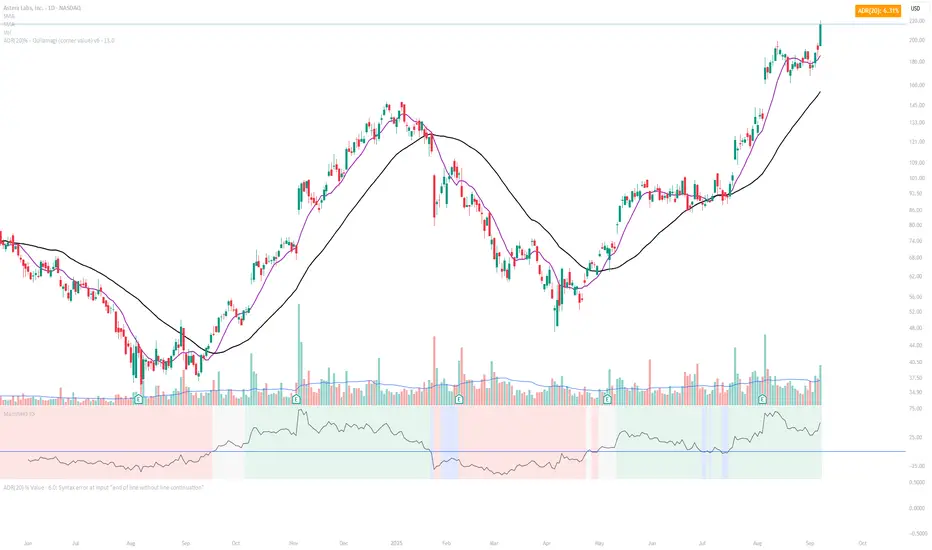
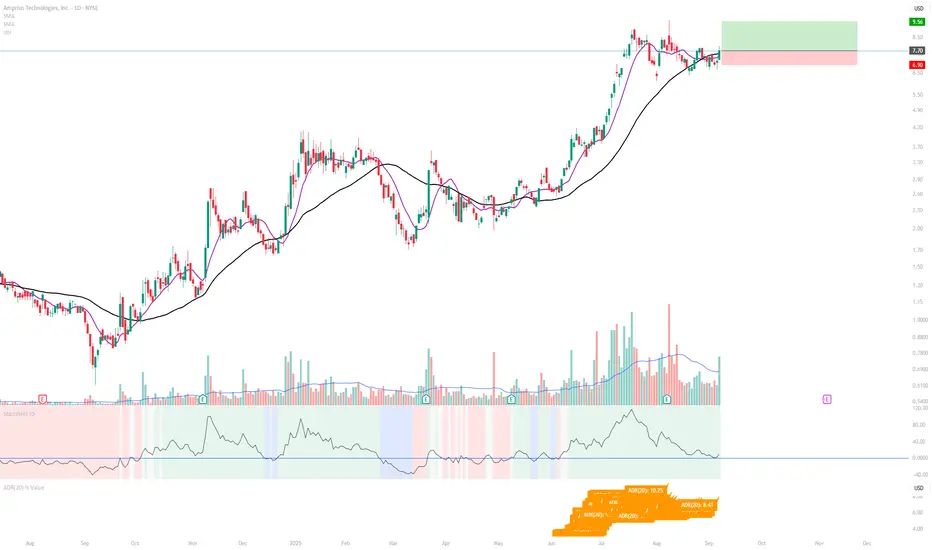
ADR(20)% - Qullamagi (corner value) v6This indicator displays the 20-bar Average Daily Range (ADR) either as a percentage of price or in raw dollar terms, shown in a clean corner box on the chart. Switch between % ADR and $ ADR with a single checkbox. Place the output box in any chart corner. Useful for volatility assessment, stop-loss sizing, and stock selection. Inspired by the trading approach of Kristjan Qullamägi (Qullamaggie), who uses ADR(20) both to filter high-momentum stocks and to size risk (stops should generally be ≤ 1×ADR).Indicateur Pine Script®par ashishnandi859
ADR(20)% - Qullamagi (corner value) v6Description: This indicator calculates the 20-day Average Daily Range (ADR) as a percentage (or in raw $) and displays it in a clean corner table on the chart. Formula: average of (High ÷ Low – 1) over the last 20 bars. Use % or $ mode via settings. Position the box in any chart corner. Inspired by Kristjan Qullamägi (Qullamaggie), who uses ADR to filter strong movers and size stop-losses (stops should generally be ≤ 1×ADR).Indicateur Pine Script®par ashishnandi8540
ADR(20) % ValueDisplays the 20-day Average Daily Range (ADR) as a % of price, following the method popularized by Kristjan Qullamägi (Qullamaggie). The ADR value updates dynamically and is printed directly on the chart for quick reference.Indicateur Pine Script®par ashishnandi854
ATR Dynamic Stop (Table + Plot + ATR %)📊 This script displays dynamic stop levels based on ATR, designed for active traders. Features: - Shows long and short stop levels (price ± ATR × multiplier). - Displays values as a floating table on the top-right corner. - Optional plot lines directly on the chart. - Option to calculate based on realtime price or last close. - Displays the ATR value both in price units and as a percentage of the selected price. - Fully customizable table: text size, text color, background color. Inputs: - ATR Multiplier and Length. - Show/hide stop lines on the chart. - Select price source (realtime or last close). - Table appearance options. Ideal for: - Traders who want a clear visual stop guide. - Combining volatility with risk management.Indicateur Pine Script®par avitawill51
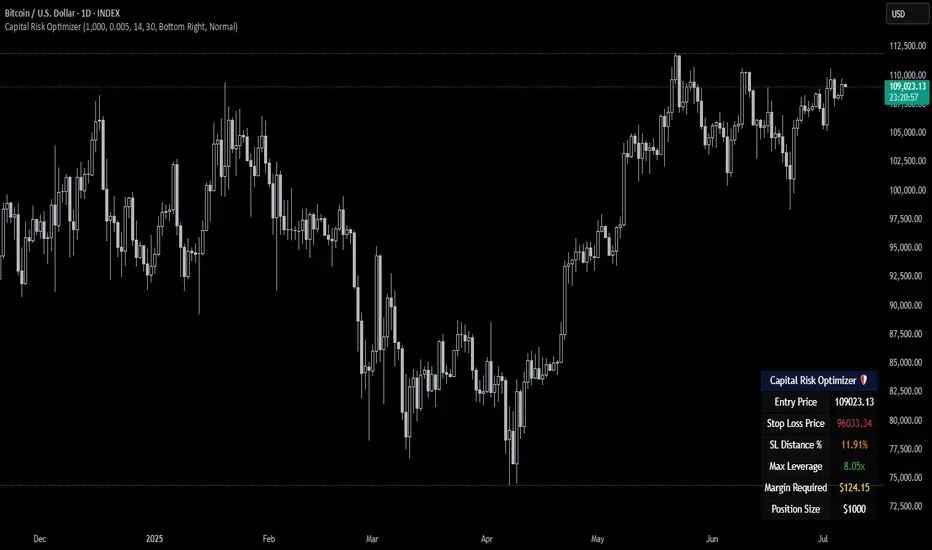
Capital Risk OptimizerCapital Risk Optimizer 🛡️ The Capital Risk Optimizer is an educational tool designed to help traders study capital efficiency, risk management, and scaling strategies when using leverage. This script calculates and visualizes essential metrics for managing leveraged positions, including: Entry Price – The current market price. Stop Loss Level – Automatically derived using the 30-bar lowest low minus 1 ATR (default: 14-period ATR), an approach designed to create a dynamic, volatility-adjusted stop loss. Stop Loss Distance (%) – The percentage distance between entry and stop. Maximum Safe Leverage – The highest leverage allowable without risking liquidation before your stop is reached. Margin Required – The amount of collateral necessary to support the desired position size at the calculated leverage. Position Size – The configurable notional value of your trade. These outputs are presented in a clean, customizable table overlay so you can quickly understand how position sizing, volatility, and leverage interact. By default, the script uses a 14-period ATR combined with the lowest low of the past 30 bars, providing an optimal balance between sensitivity and noise for defining stop placement. This methodology helps traders account for market volatility in a systematic way. The Capital Risk Optimizer is particularly useful as a portfolio management tool, supporting traders who want to study how to scale into positions using risk-adjusted sizing and capital efficiency principles. It pairs best with backtested strategies, and does not directly produce signals of any kind. How to Use: Set your desired position size. Adjust the ATR and lookback settings to fine-tune stop loss placement. Study the resulting leverage and margin requirements in real time. Use this information to simulate and visualize potential trade scenarios and capital allocation models. Disclaimer: This script is provided for educational and informational purposes only. It does not constitute financial advice and should not be relied upon for live trading decisions. Always do your own research and consult with a qualified professional before making any trading or investment decisions.Indicateur Pine Script®par RWCS_LTD20
ATR Buy, Target, Stop + OverlayATR Buy, Target, Stop + Overlay This tool is to assist traders with precise trade planning using the Average True Range (ATR) as a volatility-based reference. This script plots buy, target, and stop-loss levels on the chart based on a user-defined buy price and ATR-based multipliers, allowing for objective and adaptive trade management. *NOTE* In order for the indicator to initiate plotted lines and table values a non-zero number must be entered into the settings. What It Does: Buy Price Input: Users enter a manual buy price (e.g., an executed or planned trade entry). ATR-Based Target and Stop: The script calculates: Target Price = Buy + (ATR × Target Multiplier) Stop Price = Buy − (ATR × Stop Multiplier) Customizable Timeframe: Optionally override the ATR timeframe (e.g., use daily ATR on a 1-hour chart). Visual Overlay: Lines are drawn directly on the price chart for the Buy, Target, and Stop levels. Interactive Table: A table is displayed with relevant levels and ATR info. Customization Options: Line Settings: Adjust color, style (solid/dashed/dotted), and width for Buy, Target, and Stop lines. Choose whether to extend lines rightward only or in both directions. Table Settings: Choose position (top/bottom, left/right). Toggle individual rows for Buy, Target, Stop, ATR Timeframe, and ATR Value. Customize text color and background transparency. How to Use It for Trading: Plan Your Trade: Enter your intended buy price when planning a trade. Assess Risk/Reward: The script immediately visualizes the potential stop-loss and target level, helping assess R:R ratios. Adapt to Volatility: Use ATR-based levels to scale stop and target dynamically depending on current market volatility. Higher Timeframe ATR: Select a different timeframe for the ATR calculation to smooth noise on lower timeframe charts. On-the-Chart Reference: Visually track trade zones directly on the price chart—ideal for live trading or strategy backtesting. Ideal For: Swing traders and intraday traders Risk management and trade planning Traders using ATR-based exits or scaling Visualizing asymmetric risk/reward setups How I Use This: After entering a trade, adding an entry price will plot desired ATR target and stop level for visualization. Adjusting ATR multiplier values assists in evaluating and planning trades. Visualization assists in comparing ATR multiples to recent support and resistance levels. Indicateur Pine Script®par abbadon9Mis à jour 65
ATR Screener with Labels and ShapesWeekly Daily ATR Pine Scanner To find out tightness or contraction in a stock we needs to check if volatality is decreasing as well as compared to previous 14 or 10 bars volatility . we check this for weekly and then for Daily , so that we can enter in a stock which is tightest in recent times. Condition is : 1. Weekly Candle ATR x 0.8 < 10 Week ATR 2. Daily Candle ATR x 0.6 < 14 Day ATR When both of the conditions are met then they signifies that the stock has tightened in weekly and daily aswell . so now we can find ways to enter during max squeeze. How to scan in Pine Scanner ? FIrst add indicator as favourite and Go to pine scanner page in trading view and then scan your watchlist and there you will see 3 columns 1 with only Weekly conditions met , 2 with only Daily and 3rd with Both conditions met . Select stocks and move to new watchlist and now you have those stocks which has contracted the most in recent times .Indicateur Pine Script®par RohitNain28