OPEN-SOURCE SCRIPT
US Sessions - New Age
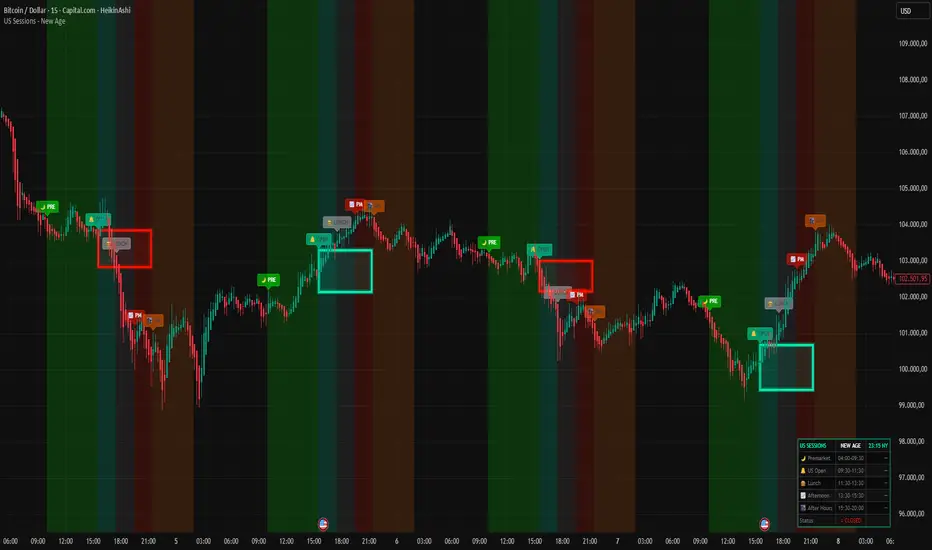
🚀 US SESSIONS - NEW AGE [R4D1]
Finally. A session indicator that doesn't look like it was made in 2005.
Welcome to the New Age. 🔮
━━━━━━━━━━━━━━━━━━━━━━━━━━━━━━━━━━━━━━━━━━━━━━
🎯 WHAT IT DOES
Visualizes US market sessions with NEON style backgrounds:
🌙 Premarket (04:00-09:30 NY) — Bright Green
🔔 US Open (09:30-11:30 NY) — Cyan
🍔 Lunch Break (11:30-13:30 NY) — Silver
📈 Afternoon (13:30-15:30 NY) — Red
🌃 After Hours (15:30-20:00 NY) — Orange
All times are automatically synced to New York timezone (EST/EDT).
No more manual calculations. No more confusion. Just works.™
━━━━━━━━━━━━━━━━━━━━━━━━━━━━━━━━━━━━━━━━━━━━━━
⭐ BONUS: ORB BOX (Opening Range Breakout)
This is the secret weapon. 🔥
The indicator automatically draws a NEON GLOWING box around the first 15 minutes of trading (9:30-9:45 NY). This is the Opening Range — one of the most powerful concepts in day trading.
📦 HOW THE ORB BOX WORKS:
- Box shows the HIGH and LOW of the first 15-minute candle
- Box extends from 9:45 until 15:30 (end of regular session)
- 🔵 CYAN GLOW = Price is ABOVE the ORB → Bullish bias
- 🔴 RED GLOW = Price is BELOW the ORB → Bearish bias
The color changes LIVE as price moves. Instant visual feedback!
Why does this matter?
→ 70%+ of the time, price will break and HOLD one side of the ORB
→ The direction of the first breakout often defines the trend for the day
→ Use it as dynamic support/resistance
━━━━━━━━━━━━━━━━━━━━━━━━━━━━━━━━━━━━━━━━━━━━━━
⚙️ SETTINGS
🕐 SESSION TIMES
→ Toggle each session ON/OFF with one click
→ All sessions enabled by default
📦 ORB BOX
→ Show/Hide the Opening Range Box
→ Enable/Disable the Neon Glow effect
→ Hover over settings for detailed info
🏷️ LABELS
→ Size: tiny, small, normal, large, huge
→ Height: Distance above candles (ATR based)
→ Transparency: 0% (solid) → 80% (subtle)
📊 DASHBOARD
→ Live NY time display
→ Shows active session
→ Market status indicator
→ Moveable to any corner
🎨 NEON COLORS
→ Fully customizable
→ Default: Cyan/Red theme
━━━━━━━━━━━━━━━━━━━━━━━━━━━━━━━━━━━━━━━━━━━━━━
🔔 ALERTS
- 🌙 Premarket Start
- 🔔 US Market Open
- 🌃 After Hours Start
Never miss a session change again.
━━━━━━━━━━━━━━━━━━━━━━━━━━━━━━━━━━━━━━━━━━━━━━
💡 PRO TIPS
1. Use ORB breakouts as entry signals
2. Avoid trading during Lunch (low volume = choppy)
3. Best moves happen at US Open and Afternoon
4. Premarket shows overnight sentiment
5. Combine with your favorite strategy
━━━━━━━━━━━━━━━━━━━━━━━━━━━━━━━━━━━━━━━━━━━━━━
Because good trading deserves good design. ✨
Made with 🔥 by R4D1
Part of the NEW AGE indicator collection.
Finally. A session indicator that doesn't look like it was made in 2005.
Welcome to the New Age. 🔮
━━━━━━━━━━━━━━━━━━━━━━━━━━━━━━━━━━━━━━━━━━━━━━
🎯 WHAT IT DOES
Visualizes US market sessions with NEON style backgrounds:
🌙 Premarket (04:00-09:30 NY) — Bright Green
🔔 US Open (09:30-11:30 NY) — Cyan
🍔 Lunch Break (11:30-13:30 NY) — Silver
📈 Afternoon (13:30-15:30 NY) — Red
🌃 After Hours (15:30-20:00 NY) — Orange
All times are automatically synced to New York timezone (EST/EDT).
No more manual calculations. No more confusion. Just works.™
━━━━━━━━━━━━━━━━━━━━━━━━━━━━━━━━━━━━━━━━━━━━━━
⭐ BONUS: ORB BOX (Opening Range Breakout)
This is the secret weapon. 🔥
The indicator automatically draws a NEON GLOWING box around the first 15 minutes of trading (9:30-9:45 NY). This is the Opening Range — one of the most powerful concepts in day trading.
📦 HOW THE ORB BOX WORKS:
- Box shows the HIGH and LOW of the first 15-minute candle
- Box extends from 9:45 until 15:30 (end of regular session)
- 🔵 CYAN GLOW = Price is ABOVE the ORB → Bullish bias
- 🔴 RED GLOW = Price is BELOW the ORB → Bearish bias
The color changes LIVE as price moves. Instant visual feedback!
Why does this matter?
→ 70%+ of the time, price will break and HOLD one side of the ORB
→ The direction of the first breakout often defines the trend for the day
→ Use it as dynamic support/resistance
━━━━━━━━━━━━━━━━━━━━━━━━━━━━━━━━━━━━━━━━━━━━━━
⚙️ SETTINGS
🕐 SESSION TIMES
→ Toggle each session ON/OFF with one click
→ All sessions enabled by default
📦 ORB BOX
→ Show/Hide the Opening Range Box
→ Enable/Disable the Neon Glow effect
→ Hover over settings for detailed info
🏷️ LABELS
→ Size: tiny, small, normal, large, huge
→ Height: Distance above candles (ATR based)
→ Transparency: 0% (solid) → 80% (subtle)
📊 DASHBOARD
→ Live NY time display
→ Shows active session
→ Market status indicator
→ Moveable to any corner
🎨 NEON COLORS
→ Fully customizable
→ Default: Cyan/Red theme
━━━━━━━━━━━━━━━━━━━━━━━━━━━━━━━━━━━━━━━━━━━━━━
🔔 ALERTS
- 🌙 Premarket Start
- 🔔 US Market Open
- 🌃 After Hours Start
Never miss a session change again.
━━━━━━━━━━━━━━━━━━━━━━━━━━━━━━━━━━━━━━━━━━━━━━
💡 PRO TIPS
1. Use ORB breakouts as entry signals
2. Avoid trading during Lunch (low volume = choppy)
3. Best moves happen at US Open and Afternoon
4. Premarket shows overnight sentiment
5. Combine with your favorite strategy
━━━━━━━━━━━━━━━━━━━━━━━━━━━━━━━━━━━━━━━━━━━━━━
Because good trading deserves good design. ✨
Made with 🔥 by R4D1
Part of the NEW AGE indicator collection.
Script open-source
Dans l'esprit TradingView, le créateur de ce script l'a rendu open source afin que les traders puissent examiner et vérifier ses fonctionnalités. Bravo à l'auteur! Bien que vous puissiez l'utiliser gratuitement, n'oubliez pas que la republication du code est soumise à nos Règles.

Clause de non-responsabilité
Les informations et publications ne sont pas destinées à être, et ne constituent pas, des conseils ou recommandations financiers, d'investissement, de trading ou autres fournis ou approuvés par TradingView. Pour en savoir plus, consultez les Conditions d'utilisation.
Script open-source
Dans l'esprit TradingView, le créateur de ce script l'a rendu open source afin que les traders puissent examiner et vérifier ses fonctionnalités. Bravo à l'auteur! Bien que vous puissiez l'utiliser gratuitement, n'oubliez pas que la republication du code est soumise à nos Règles.
Clause de non-responsabilité
Les informations et publications ne sont pas destinées à être, et ne constituent pas, des conseils ou recommandations financiers, d'investissement, de trading ou autres fournis ou approuvés par TradingView. Pour en savoir plus, consultez les Conditions d'utilisation.