OPEN-SOURCE SCRIPT
Mis à jour XT Basic MA Crossover
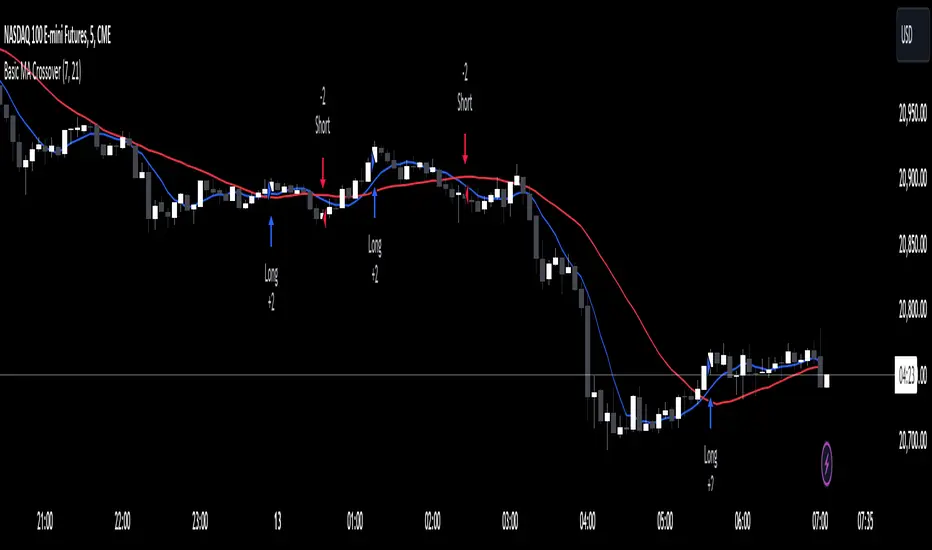
The XT Basic MA Crossover is designed to introduce the use of dynamic variables to your alert messages. Unlike the XT Up/Down Bar Indicator, which preloads the payload into the TradingView alert Message field, strategies do not support this functionality.
You will need to copy and paste into the message window for the alert to work using the strategy actions.
Example Alert Message:
```
key=Your CrossTrade Secret Key;
command=PLACE;
account=sim101;
instrument=ES 12-24;
action={{strategy.order.action}}
qty={{strategy.order.quantity}};
order_type=MARKET;
tif=DAY;
flatten_first=true;
```
You'll need to add your secret key to the message between = and ;
Correct: key=123456789123456789;
Incorrect: key=Your CrossTrade Secret Key123456789123456789;
You'll also need to add your webhook URL to the Notifications tab on the alert.
Visual Signals: The strategy is a simple moving average crossover using a 2 period MA to simulate a lot of frequent trades.
You can also add stops and targets to your strategy alerts by adding "take_profit" and "stop_loss" values to the message. This can be supplied as numerical values, percentages, or tick based values. Learn More.
If you need help: Here is a LINK to our TradingView alerts Help Doc.
Disclaimer: This indicator is designed and offered purely as an educational resource to showcase how to structure your alert messages. We do not suggest, advise, or recommend using this indicator in production with live capital.
You will need to copy and paste into the message window for the alert to work using the strategy actions.
Example Alert Message:
```
key=Your CrossTrade Secret Key;
command=PLACE;
account=sim101;
instrument=ES 12-24;
action={{strategy.order.action}}
qty={{strategy.order.quantity}};
order_type=MARKET;
tif=DAY;
flatten_first=true;
```
You'll need to add your secret key to the message between = and ;
Correct: key=123456789123456789;
Incorrect: key=Your CrossTrade Secret Key123456789123456789;
You'll also need to add your webhook URL to the Notifications tab on the alert.
Visual Signals: The strategy is a simple moving average crossover using a 2 period MA to simulate a lot of frequent trades.
You can also add stops and targets to your strategy alerts by adding "take_profit" and "stop_loss" values to the message. This can be supplied as numerical values, percentages, or tick based values. Learn More.
If you need help: Here is a LINK to our TradingView alerts Help Doc.
Disclaimer: This indicator is designed and offered purely as an educational resource to showcase how to structure your alert messages. We do not suggest, advise, or recommend using this indicator in production with live capital.
Notes de version
Removed the QTY input to simplify the scriptNotes de version
Updated to Pine Script V6Notes de version
Updated to provide inputs for the MA length and plotting on the chartNotes de version
Swapped the NT8 instrument format for the Pine Script {{ticker}} variable now that CrossTrade supports continuous contracts and will automatically convert the ticker into NT8s format.Script open-source
Dans l'esprit TradingView, le créateur de ce script l'a rendu open source afin que les traders puissent examiner et vérifier ses fonctionnalités. Bravo à l'auteur! Bien que vous puissiez l'utiliser gratuitement, n'oubliez pas que la republication du code est soumise à nos Règles.

Clause de non-responsabilité
Les informations et publications ne sont pas destinées à être, et ne constituent pas, des conseils ou recommandations financiers, d'investissement, de trading ou autres fournis ou approuvés par TradingView. Pour en savoir plus, consultez les Conditions d'utilisation.
Script open-source
Dans l'esprit TradingView, le créateur de ce script l'a rendu open source afin que les traders puissent examiner et vérifier ses fonctionnalités. Bravo à l'auteur! Bien que vous puissiez l'utiliser gratuitement, n'oubliez pas que la republication du code est soumise à nos Règles.
Clause de non-responsabilité
Les informations et publications ne sont pas destinées à être, et ne constituent pas, des conseils ou recommandations financiers, d'investissement, de trading ou autres fournis ou approuvés par TradingView. Pour en savoir plus, consultez les Conditions d'utilisation.