Swing Elite - Futures to CFD calculatorThis utility indicator solves a common challenge faced by traders who analyze futures markets but execute trades through CFD brokers. Since futures contracts and their corresponding CFD instruments trade at different price levels due to factors like contract specifications, rollover timing, and broker pricing models, manually converting trade levels between the two can be time-consuming and error-prone.
The indicator uses a dynamic offset calculation method to convert futures price levels to their CFD equivalents in real-time. When the user selects three reference points on the chart, the tool calculates the price differential and applies this offset consistently across all trade levels. This ensures that entry, stop loss, and take profit levels maintain their relative distances when translated to the CFD instrument.
The conversion methodology works by establishing a fixed offset between the futures price and the CFD price at the moment of setup. This offset is then applied uniformly to all specified trade levels, preserving the original risk-to-reward structure of the trade. The indicator automatically detects whether the trade is long or short based on the relationship between entry and stop loss levels, and calculates the target price according to the user-defined risk-to-reward ratio.
The tool includes automatic instrument detection for major futures contracts including E-mini S&P 500, E-mini Nasdaq 100, E-mini Dow, Russell 2000, Crude Oil, and Gold futures, displaying the corresponding CFD instrument name for quick reference. A visual overlay shows the trade levels directly on the chart with color-coded zones indicating risk and reward areas.
This indicator is designed for traders who prefer the liquidity and price discovery of futures markets for their analysis while utilizing CFD platforms for trade execution due to accessibility, leverage options, or account size considerations.
Educational

XAU Seasonality + Setup Quality + Month Strength | WarRoomXYZXAU Seasonality Engine is a technical analysis indicator developed for the study of recurring, calendar-based behavior on XAUUSD (Gold).
The tool blends month-of-year seasonality statistics with higher-timeframe context and a setup-quality gate to help users observe when market conditions historically lean strong, weak, or neutral — and how strict trade selection should be during each regime.
Indicator Concept
An indicator for XAUUSD that combines:
1. Seasonality Regime (Month-of-Year Bias)
► Classifies the current month as Strong / Weak / Neutral based on either:
• Preset months (user-defined)
or
• Auto mode (computed from historical monthly performance)
► Strong months suggest a bullish tailwind (not a signal).
► Weak months suggest headwind / caution and require stricter setup quality.
2. Monthly Performance Engine (Under the Hood)
► Uses the symbol’s monthly timeframe data to compute, per calendar month:
• Average monthly return (%)
• Win rate (%) — how often that month closes positive
• Month Strength Score (0–100) — a blended score derived from performance data
► The score is designed to provide a relative strength snapshot of seasonality by month.
3. Month Strength Histogram
► Plots a histogram (0–100) of the current month’s strength score.
• Higher bars = historically stronger month tendency
• Lower bars = historically weaker month tendency
► Optional horizontal reference lines mark “strong” and “weak” zones to make regimes obvious at a glance.
4. Setup Quality Meter (Confluence Filter)
► The indicator calculates a Setup Quality Score (0–100) using market structure and momentum components, such as:
• EMA trend alignment
• Momentum confirmation (EMA fast vs slow)
• Structure break confirmation (BOS)
• Liquidity sweep behavior
• Candle confirmation logic
► This score is intended as a trade-selectivity filter , not a trade executor.
5. Adaptive Rules for Weak Months (Strict Mode)
► When the indicator detects a weak seasonal regime, conditions automatically tighten:
• The A+ threshold increases (adaptive thresholding)
• Optional rule: Weak months require BOS + Sweep + FVG simultaneously before any A+ condition is considered valid
This forces the user into “higher-quality-only” behavior during historically weaker seasonal periods.
🔹1 Visual Components Included
• Seasonality regime label (Strong / Weak / Neutral)
• Optional background shading based on regime
• Month Strength Score histogram (0–100)
• Current month stats: Avg return + win rate
• Setup Quality Meter value (0–100)
• Adaptive A+ threshold display
• Weak-month confluence gate status (BOS / Sweep / FVG pass/fail)
• Optional alerts when strict criteria are met
➣What Means in the XAU Indicator
🔹 Definition (in THIS indicator)
Win Rate = the percentage of historical months that closed positive for the same calendar month.
It is NOT:
trade win rate ❌
signal accuracy ❌
It is a s tatistical seasonality metric .
How It’s Calculated
For each calendar month (January, February, etc.), the indicator:
1.Looks at historical monthly candles (Monthly timeframe).
2. Counts how many times that month:
•Closed higher than it opened (or higher than previous month close).
3. Divides:
Number of positive months
÷
Total number of observed months
× 100
Example: September
If over the last 20 years:
September closed green 14 times
September closed red 6 times
Then:
Win Rate = (14 / 20) × 100 = 70%
That’s what you see as in the dashboard.
What the Win Rate Is Used For
1️⃣ Part of the Month Strength Score
The indicator blends:
•Average Monthly Return (%) → measures magnitude
•Win Rate (%) → measures consistency
Combined into:
Month Strength Score (0–100)
This avoids a common trap:
•A month with 1 huge rally but many losses ≠ reliable
•A month with steady positive closes = higher quality environment
What Win Rate Tells You
High Win Rate (e.g. 65–75%)
•Gold more often closes higher in this month
•Continuation is statistically more likely
•Pullbacks are more likely to resolve in trend direction
Low Win Rate (e.g. 35–45%)
•Gold more often fails to close higher
•More chop, deeper retracements, false breakouts
•Continuation trades statistically struggle
What It Does NOT Tell You
🚫 It does NOT mean:
•“You will win 70% of your trades”
•“Every setup in this month works”
•“Direction is guaranteed”
Seasonality is context, not prediction.
Why This Is Powerful When Combined With Your System
On its own, win rate is just data.
But in your indicator, it’s used to:
•🔒 Raise the A+ threshold in weak months
•🧠 Force BOS + Sweep + FVG confluence
•❌ Block marginal setups automatically
So instead of guessing:
-“Why is gold so choppy this month?”
You know:
-“This month historically underperforms SO I must be stricter.”
➣What Means in the XAU Seasonality Indicator
🔹 Definition (in THIS indicator)
Avg Monthly Return = the average percentage gain or loss of XAUUSD for a specific calendar month, calculated across many years.
It measures magnitude , not frequency.
It is NOT:
•trade profit ❌
•expected return for the next month ❌
•guaranteed performance ❌
It is a historical seasonality tendency.
How It’s Calculated
For each calendar month (January, February, etc.), the indicator:
1.Takes every historical occurrence of that month.
2.Calculates the percentage change of the monthly candle:
(Monthly Close − Previous Monthly Close)
÷ Previous Monthly Close × 100
3. Adds all those percentage changes together.
4. Divides by the total number of observations.
Example: September
Assume over 20 years:
+2.4%, +1.1%, −0.6%, +3.0%, +1.8%, ...
If the sum of all September returns = +28% across 20 years:
Avg Monthly Return = +1.40%
That’s the number displayed in the indicator.
What Avg Monthly Return Is Used For
1️⃣ Measuring Strength of Movement
•Win Rate → “How often does it close green?”
•Avg Monthly Return → “How big are the moves when it works?”
Both are needed.
A month can:
•Win often but move very little
•Move a lot but only occasionally
The indicator combines both to avoid misleading conclusions.
How to Interpret Avg Monthly Return
Positive Avg Return (e.g. +0.8% to +2.0%)
•Gold tends to expand during this month
•Continuation phases are more likely
•Pullbacks are often absorbed
Near-Zero Avg Return (e.g. −0.2% to +0.2%)
•Market is statistically balanced
•Expect chop, rotations, false breaks
•Continuation is less reliable
Negative Avg Return (e.g. −0.5% or worse)
•Downward pressure or heavy mean reversion
•Rallies often fade
•Risk of aggressive stop hunts
What Avg Monthly Return Does NOT Mean
🚫 It does NOT mean:
•“Price will move +1.4% this month”
•“You should buy because the number is positive”
•“This is a guaranteed edge”
It describes historical behavior, not future certainty.
Why Avg Monthly Return Matters More Than People Think
Two months can have the same win rate but behave very differently:
Example:
Month Win Rate Avg Return Reality
Month A 65% +0.2% Small, choppy wins
Month B 55% +1.6% Fewer wins, but strong expansions
Your indicator would rank Month B as stronger, which is correct for continuation-based strategies.
How It Feeds the Month Strength Score
The indicator blends:
•60% Avg Monthly Return (normalized)
•40% Win Rate
This means:
•Big moves matter more than small consistency
•But consistency still matters enough to prevent distortion
Result:
Month Strength Score (0–100)
Which is then used to:
•tighten or relax A+ thresholds
•activate weak-month strict rules
•control trade frequency
🔹2. Intended Use
The indicator is designed as a discretionary analysis tool to support study of:
• seasonal bias and calendar tendencies
• relative strength/weakness across months
• how strict trade selection should be across different regimes
• confluence behavior when seasonal conditions are unfavorable
The tool does not generate forecasts, does not guarantee outcomes, and should not be relied upon as a stand-alone decision mechanism.
🔹3.How to Use XAU Seasonality Engine
Recommended charts: XAUUSD, intraday (5m–15m) with a HTF context (1H–4H).
1. Identify the Seasonal Regime
• Strong month → you can allow more continuation bias (still require structure).
• Neutral month → trade normally, standard criteria.
• Weak month → tighten selection, demand clean A+ conditions only.
2. Read the Month Strength Histogram
• If the score is high (e.g., 70+), the month has historically shown stronger tendency.
• If the score is low (e.g., 40 and below), expect slower conditions, deeper pullbacks, or more chop — and reduce marginal trades.
3. Use the Setup Quality Meter as the Gate
► In normal/strong months:
• A+ threshold is moderate (e.g., 70)
► In weak months:
• A+ threshold is higher (e.g., 80+)
• Optional strict mode: must also pass BOS + Sweep + FVG alignment
4. Example Trade Logic (Framework, Not Signals)
► Bullish framework in a Strong Month:
• Seasonal regime = Strong (tailwind)
• Structure supports bullish continuation (trend alignment)
• Sweep occurs into demand / liquidity grab
• Setup Quality reaches A+ threshold
• Entry: confirmation candle or retrace to key level
• SL: beyond sweep low / invalidation
• TP: nearest liquidity / prior highs / HTF level
► Weak Month rule-set (Strict Mode):
• Seasonal regime = Weak (headwind)
• Only consider trades if:
✅ BOS confirms direction
✅ Sweep occurs and rejects cleanly
✅ FVG exists recently (or is mitigated if you choose that model)
✅ Setup Quality exceeds the elevated adaptive threshold
If any one is missing → no trade
This is not meant to “predict” gold — it’s meant to enforce discipline when seasonality historically underperforms.
🔹4.Limitations and User Responsibility
► The indicator does not represent financial advice or imply performance expectations.
► Seasonality is statistical tendency, not certainty — macro conditions can override it.
► Results vary by broker feed, timeframe, and settings.
► Users should test thoroughly in simulation before applying to live markets.
► All trading decisions, risk management, and execution remain solely the responsibility of the user.
🔹5. Alerts
Optional alerts can notify when:
• a new month begins and the seasonal regime changes
• A+ criteria are met
• weak-month strict conditions pass (BOS + Sweep + FVG)
Alerts are informational only and do not constitute actionable recommendations.
Disclaimer
This script is provided for informational and educational purposes only . It does not provide financial, investment, or trading advice, and it does not guarantee profits or future performance. All decisions made based on this script are solely the responsibility of the user.
This script does not execute trades, manage risk, or replace the need for trader discretion. Market behavior can change quickly, and past behavior detected by the script does not ensure similar future outcomes.
Users should test the script on demo or simulation environments before applying it to live markets and must maintain full responsibility for their own risk management, position sizing, and trade execution.
Trading involves risk, and losses can exceed deposits. By using this script, you acknowledge that you understand and accept all associated risks.

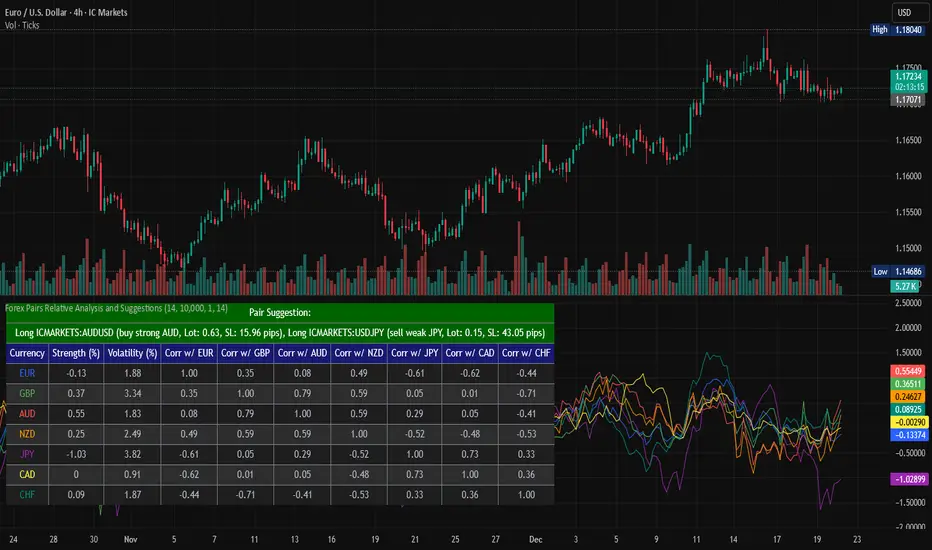
Forex Pairs Relative Analysis and SuggestionsThis Pine Script (version 5) indicator, titled "Forex Pairs Relative Analysis and Suggestions," is designed for use on TradingView charts. It provides real-time analysis of major forex pairs sourced from the IC Markets exchange, facilitating relative value or pair trading strategies by evaluating currency strengths against the US Dollar (USD). The script focuses on seven major currencies—EUR, GBP, AUD, NZD, JPY, CAD, and CHF—through their respective pairs: EURUSD, GBPUSD, AUDUSD, NZDUSD, USDJPY, USDCAD, and USDCHF.
Key features include:
Relative Currency Strengths: Calculated using the Rate of Change (ROC) over a user-defined lookback period (default: 14 bars), normalized to reflect performance versus USD. Positive values indicate strengthening, while negative values denote weakening.
Annualized Volatilities: Derived from the standard deviation of logarithmic returns, annualized assuming 252 trading days, and expressed as percentages to compare risk levels across pairs.
Full Pairwise Correlations: A comprehensive matrix displaying Pearson correlation coefficients between all pairs over the lookback period, aiding in identifying hedging opportunities (e.g., low or negative correlations for diversification).
Automated Pair Suggestions: Identifies the strongest and weakest currencies, proposing a long position in the pair to buy the strong currency and a short position (or opposite direction) to sell the weak currency against USD. Suggestions include estimated lot sizes based on user-input account balance, risk percentage (default: 1%), and a stop-loss proxy using 1x Average True Range (ATR).
Visual Elements: A table displays all metrics with color-coded rows for readability (optimized for dark mode), alternating backgrounds, and merged cells for suggestions. Strengths are also plotted in a separate pane with matching colors for trend visualization.
Customization: Users can adjust the lookback length, ATR period, account balance, and risk percentage via indicator settings to tailor the analysis.
Ensure access to IC Markets data in your TradingView account. The table appears in the top-left position by default and updates on the last bar. This tool is intended for educational and analytical purposes, supporting informed decision-making in forex trading by highlighting relative strengths, risks, and potential hedges.
Guidance on Choosing a Timeframe:
The indicator adapts to the chart's timeframe, with the lookback period influencing the historical window for metrics. Select based on your strategy:
Short-Term (Intraday/Scalping): Use 15-minute to 1-hour charts for timely signals; adjust lookback to 5–10 for responsiveness.
Medium-Term (Swing Trading): Opt for 4-hour to daily charts (recommended default) for balanced trends; 14-bar lookback covers days to weeks.
Long-Term (Position Trading): Choose weekly or monthly charts for macro views; increase lookback to 20–50 for smoother data.
Test across timeframes via backtesting to align with your risk and objectives.
Disclaimer:
This script is provided for informational and educational purposes only and does not constitute financial, investment, or trading advice. Trading forex involves significant risk of loss and is not suitable for all individuals. Past performance is not indicative of future results. The calculations, suggestions, and metrics (including lot sizes) are based on historical data and simplified assumptions, such as using ATR for stop-loss estimation, and may not account for real-time market conditions, slippage, commissions, or other factors. Users should conduct their own research, consult with qualified financial professionals, and verify the script's outputs before making any trading decisions. The author assumes no responsibility or liability for any losses incurred from the use of this script.
ODR BoxThis indicator automates the Opening Range Definition (ODR) based on the Ali Khan / ICT Model 1 framework. By capturing the 07:00-09:25 AM Dealing Range, it projects institutional quadrants and standard deviation targets. It is designed to filter out 'retail noise' and highlight the mathematical levels where price delivery is most likely to accelerate or reverse.

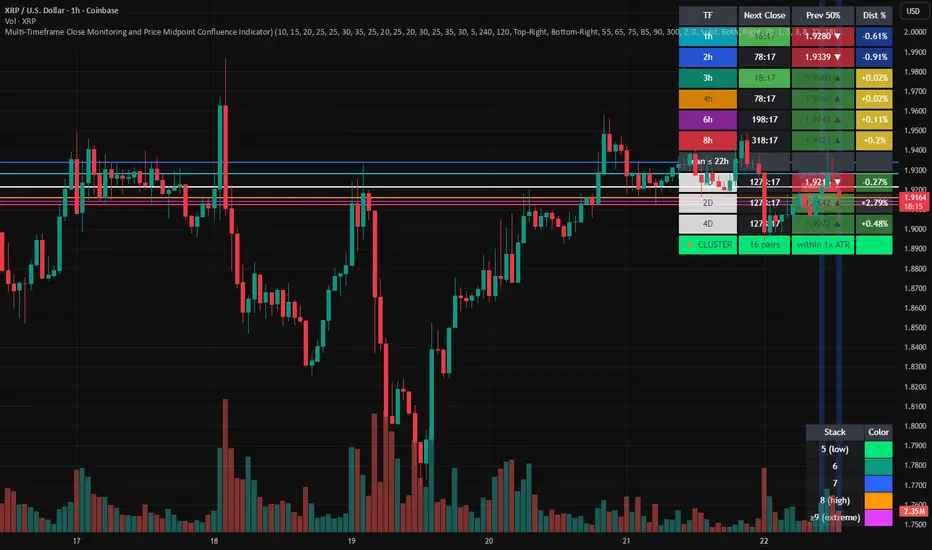
Multi-Timeframe Close and Midpoint ConfluenceMulti-Timeframe Close Monitoring and Price Midpoint Confluence Indicator
This indicator is designed to assist traders in monitoring multiple timeframe candle closes and identifying areas where price midpoints (50% levels) from different timeframes cluster together.
The tool focuses on timing awareness and structural context, helping users observe periods where multiple timeframe events occur close together, which may coincide with increased market activity.
What the Indicator Tracks
The indicator monitors candle close timing and price context across multiple timeframes, including:
Intraday timeframe closes (30m, 1h, 2h, 3h, 4h, 6h, 8h)
Higher-timeframe closes (Daily, Weekly, Monthly) when within a defined scan window
The midpoint (50%) of the previous candle for each tracked timeframe
The distance between current price and each midpoint level
This information is evaluated independently for each timeframe.
Timeframe Close Confluence
When multiple timeframes are approaching a candle close within a short window, the indicator highlights this period visually.
These moments can be useful for observing potential shifts in activity or volatility, particularly when combined with other forms of analysis.
Visual markers and optional alerts are used to draw attention to these timing clusters.
Midpoint (50%) Level Clustering
The indicator also evaluates whether multiple 50% levels from different timeframes are located within a user-defined proximity.
When several midpoints cluster closely together, the area is highlighted as a zone of interest for further observation, as overlapping price references may act as areas of interaction.
Countdown & Information Panel
An optional on-chart panel displays:
A live countdown to upcoming timeframe closes
Relative urgency based on proximity to each close
Whether current price is above or below each midpoint
Distance metrics to help gauge proximity
Color coding is used to improve readability rather than indicate trade direction.
Visual Context Tools
Additional visual options include:
Background shading when multiple timing or midpoint conditions overlap
Adjustable thresholds to control sensitivity
Customizable colors, opacity, and panel placement
These visuals are intended to provide contextual awareness, not trade signals.
Intended Use
Style: Multi-timeframe analysis and timing awareness
Markets: Forex, crypto, equities, futures
Purpose:
Monitor upcoming timeframe closes
Observe overlapping price reference zones
Improve preparation around potential activity windows
The indicator is best used as a supplementary tool alongside independent analysis.
Important Notes
This script is provided for educational and analytical purposes only.
It does not predict market outcomes and should not be used as a standalone decision-making tool. Users are encouraged to apply appropriate risk controls and confirm observations with additional analysis.
Jim Kombein Ph.D. Core Engine (Invite-Only)This invite-only script is a research-oriented framework for analyzing market structure and price dynamics.
It is intended solely for educational and informational use.
No trading advice, buy/sell recommendations, or profit guarantees are provided.
All decisions and associated risks remain the sole responsibility of the user.

Quant_DCA**Quant_DCA - Smart Dollar-Cost Averaging with Dynamic Position Sizing**
Designed for SPY,QQQ,BTC
Transform your DCA strategy with intelligent dip-buying. Instead of buying a fixed amount every week, Quant_DCA identifies quality dips and scales position sizes dynamically - buying more during significant corrections.
**✨ KEY FEATURES**
• 4% Minimum Threshold - Quality dips only, eliminates noise
• Volume Confirmation - Requires 2x average volume spike
• Volatility Confirmation - ATR and StdDev elevation required
• 9-Tier Multiplier System - 1x to 20x based on dip severity
• Conservative Risk - Max 20x multiplier, not extreme
• Capital Efficient - Deploys ~60% of DCA capital, not 2-3x more
• Real-Time Comparison - See DCA vs Quant performance live
• Color-Coded Signals - Visual strength indicators
• Smart Alerts - Detailed execution instructions
**💰 POSITION SIZING**
4% dip → 1.0x
7.5% dip → 2.0x
10% dip → 2.8x
17% dip → 5.5x
28% dip → 10.5x
35% dip → 15.0x
Max → 20.0x
**📈 EXPECTED RESULTS (Realistic)**
Based on QQQ 4H, 2022-2024 backtest:
✅ +10-20% share advantage vs DCA
✅ 15-20% better average cost
✅ ~60% capital deployment (similar to DCA)
✅ 30-45 quality signals per year
✅ +15-30% ROI advantage over 5-10 years
**💡 CAPITAL REQUIREMENTS**
**⚙️ QUICK START**
1. Add to QQQ 4H chart (optimized timeframe)
2. Keep default settings (pre-optimized)
3. Backtest from 2022-01-01 to present
4. Verify 10-20% share advantage shown
5. Create alerts for buy signals
6. Start with 50% position size
7. Execute ALL signals for 3 months
8. Scale to 100% after confidence built
**🎯 WHO IS THIS FOR**
✅ Long-term investors (5+ year horizon)
✅ Accounts $25k+ (preferably $50k+)
✅ Those wanting better DCA results
✅ Disciplined traders who execute all signals
✅ Comfortable buying during crashes
✅ SPY/QQQ/GLD/BTC or any Index that always goes up over the long period of time
❌ NOT for: Day traders
**⚠️ IMPORTANT DISCLAIMERS**
• works best in volatile conditions
• Requires 75%+ signal execution to achieve results
• Need liquid reserves (5x max buy) ready at all times
• Some years will lag DCA (wins over full market cycles)
• Past performance does not guarantee future results
• This is NOT financial advice - educational purposes only
• Always do your own research and consult a financial advisor
**🔧 SETTINGS**
Pre-optimized for QQQ 4H timeframe. All settings are customizable:
Dip Detection:
• Min Dip: 4.0% (adjustable 1-10%)
• Lookback: 10 bars
• Fast EMA: 20 / Slow EMA: 50
• Volume: 2.0x threshold
• Volatility: 1.5x threshold
Multipliers:
• 9 customizable tiers
• Conservative 1-20x range
• Exponential scaling
Strategy:
• Base: $1,000 (match your DCA)
• DCA Frequency: Weekly
• Start Date: Any backtest period
**📊 RESULTS TABLE**
Real-time metrics displayed:
• Portfolio values (DCA vs Quant)
• ROI percentages
• Capital deployed (with ratio)
• Share counts (with advantage %)
• Average cost per share
• Buy frequency and averages
• Winner declaration
**💡 PRO TIPS**
1. Execute within 1 hour of signal
2. Keep 5x max buy in liquid reserves
3. Don't skip signals - even small dips matter
4. Track actual vs backtest monthly
5. Think long-term (5-10 years)
6. Accept that some years lag DCA
7. Start conservative (50% size)
8. Build to 100% over time
**🎓 WHY THIS WORKS**
Academic research shows buying dips beats random timing over long periods:
• Price advantage from buying declines
• Psychological edge (buy fear)
• Mean reversion tendency
• Volume spikes mark capitulation
• Volatility premium rewards patience
Quant_DCA systematizes this with objective rules, quality filters, and conservative position sizing.
**📝 VERSION INFO**
Version: 1.0 - Balanced Edition
License: Mozilla Public License 2.0
Author: Sahebson
Optimized For: QQQ 4H timeframe
**💬 FEEDBACK WELCOME**
Share your backtest results or real-world performance in the comments! Questions? Ask below.
Like this indicator? Give it a boost! 👍
Have suggestions? Comment! 💬
---
*Disclaimer: This indicator is for educational purposes only and does not constitute financial advice. Trading involves risk of loss. Past performance does not guarantee future results. Always do your own research and consult with a qualified financial advisor before making investment decisions. The author is not responsible for any trading losses incurred using this indicator.*
---
**Tags:** #DCA #SmartInvesting #DipBuying #QQQ #LongTerm #PositionSizing #RiskManagement #TradingStrategy

ALIEN WARP CORE [ULTIMATE] ALIEN WARP CORE is a multi-engine oscillator designed for chart analysis and visual clarity.
It lets you switch between several popular momentum engines and provides consistent visuals, optional filters, and clear signal markers.
What it includes
Multiple engines (selectable): Laguerre RSI, Connors RSI, Stochastic RSI, MFI, TDI, Standard RSI, and MACD (MT5-style).
Two-line systems: Signal line support in Stoch RSI / TDI / Standard RSI / MACD modes.
Trinity Color Logic: A dynamic gradient that helps visualize momentum bias (sell → neutral → buy).
Optional visual layers: “Nebula mist” bands and background warp color for easier reading.
Signals & markers: Buy/Sell labels, divergence markers, and midline retest markers (optional).
Filters (optional)
This script can apply extra confirmation filters:
EMA 200 trend filter
Momentum EMA filter (EMA 10 vs EMA 12)
ADX strength filter
RSI “safety” filter (blocks buys in extreme overbought, blocks sells in extreme oversold)
You can also enable Specific Signals for Standard RSI and MACD crossovers.
If Bypass Global Filters is enabled, those crossover signals can work independently from EMA/ADX filters.
How to use
Choose your preferred Engine in the settings.
Adjust lengths and visuals (line width, solid/gradient, mist opacity).
Enable filters if you want fewer signals and more confirmation.
Use divergence and retest markers as context, not as standalone trade triggers.
Important notes
This indicator is for educational and informational purposes only and does not provide financial advice.
Signals are not guaranteed and may repaint visually around pivot-based divergence detection.
Always backtest and combine with your own risk management.

SMC SNI LAP ULTRA This indicator is a multi-tool market-structure and confluence signal assistant designed for EDUCATIONAL PURPOSES ONLY. It combines Smart Money Concepts (SMC) and classic technical confirmations to help visualize context, zones, and potential trade ideas.
What it shows
• Market Structure: Swing/Internal pivots, BOS / CHoCH / MSS labels and structure lines
• Liquidity Concepts: EQH/EQL style areas and liquidity sweep detection (when enabled)
• Zones & Areas of Interest: Supply/Demand, Order Blocks (OB), Fair Value Gaps (FVG) and key levels (depending on settings)
• Confirmation Tools: Pin bar / engulfing patterns, RSI-based filters and optional divergence
• Confluence Scoring (AI-like): A rule-based scoring system that weights multiple conditions (trend alignment, momentum strength, volume spike, sweep, zone location, RR quality, etc.)
• Risk Visualization: Optional Entry / TP / SL guide lines based on selected TP/SL modes and RR settings
• Alerts: Optional alerts that can be used for notifications or webhook integrations (signals only)
About “AI” / Scoring
The “AI” features in this script are NOT machine learning and do NOT predict the future. They are rule-based calculations that assign a score from multiple factors and track simple win/loss statistics based on user-defined TP/SL logic. Results depend on market conditions and your settings.
Important Disclaimer
This indicator does NOT provide financial advice and does NOT guarantee profits. Trading involves risk and you can lose money. Any signals, scores, or projections are informational and for research/testing only. Always do your own analysis, manage risk properly, and consider using a demo account for evaluation.
Recommended Use
Use it as a context tool:
1) Identify structure (BOS/CHoCH) and trend bias
2) Mark zones (OB/FVG/Supply-Demand)
3) Wait for confirmation (candle patterns, RSI/divergence, volume, etc.)
4) Use the scoring as a filter—not as a guarantee
If you need automated execution, connect alerts to your own external system at your own responsibility. This script itself is an indicator (not an auto-trading system).

Triangles [Bulkowski v6]Title: Ascending & Descending Triangles (v6)
Description:
Overview This indicator automates the detection of Ascending and Descending Triangles, two of the most reliable chart patterns documented in Thomas Bulkowski’s Encyclopedia of Chart Patterns. By utilizing Pine Script v6 and an Object-Oriented architecture, this tool scans market structure in real-time to identify valid "Flat Limit" setups that manual charting often misses.
The Theory: How It Works Pattern recognition is often subjective. This script removes the guesswork by applying strict algorithmic rules based on Bulkowski’s statistical findings:
Ascending Triangles (Green): The script looks for a "Flat Top" (Resistance) where price hits a similar level multiple times, coupled with "Rising Bottoms" (Higher Lows). This creates a squeeze indicating potential bullish accumulation.
Descending Triangles (Red): The script looks for a "Flat Bottom" (Support), coupled with "Falling Tops" (Lower Highs). This indicates sellers are becoming more aggressive while buyers are barely holding the floor.
Key Features
Smart "Flatness" Detection: Markets are rarely perfect. The script includes a Tolerance (%) input, allowing you to define how "flat" a resistance or support line must be to qualify.
Strict Trend Validation: It checks for rising or falling pivots specifically within the timeframe of the flat level, ensuring the geometry of the triangle is valid.
Pine Script v6 Architecture: Built using the latest User-Defined Types (UDTs) and Methods for optimized performance and memory management.
Historical Logging: Draws patterns on historical data (within the buffer limit) so you can backtest the visual reliability of the signals.
Settings & How to Use
Pivot Left / Pivot Right: Determines the "size" of the pattern.
Lower values (5-10): Finds smaller, intraday triangles.
Higher values (15-20): Finds macro, swing-trading structures.
Flatness Tolerance (%): The most critical setting.
Default (1.5%): Requires the flat side of the triangle to be very precise.
Increase (2.0% - 3.0%): Allows for "messier" wicks and creates more pattern detections.
Trading Tips (Based on Bulkowski)
Wait for the Breakout: Triangles are coiling mechanisms. While Ascending triangles have a bullish bias, they can break downward (and vice versa). Professional traders often wait for a candle close outside the triangle boundary.
False Breakouts: Be aware of "Premature Breakouts" where price pierces the flat line but retreats.
Volume: Watch for declining volume as the triangle develops and an expansion of volume on the break.
Disclaimer This tool is for educational purposes and chart analysis assistance only. Automated pattern recognition should always be verified by the human eye. Past performance of a pattern does not guarantee future results.

VWAP TOOL KIT (RyanTradesES)VWAP TOOL KIT — RyanTradesES
The VWAP Tool Kit is a session-aware, intraday market structure indicator designed for futures and active index traders who rely on VWAP, opening range behavior, and RTH context to frame high-probability trades.
This tool consolidates multiple VWAP regimes, key session levels, and adaptive EMA smoothing into a single, clean overlay—removing the need to stack multiple indicators or scripts.
Core Features
Opening Range (9:30–9:45 NY)
Automatically tracks and shades the Opening Range
Extends through RTH to provide a clear structural reference
Rendered behind price for clarity (non-intrusive)
VWAP Suite
Overnight VWAP (resets at 6:00 PM NY)
24-Hour NY VWAP (resets at 9:30 AM NY)
Previous Day NY VWAP (calculated from prior RTH)
Anchored VWAP with manual date/time control
Each VWAP can be independently enabled, styled, and sourced.
RTH High / Low
Tracks Regular Trading Hours (9:30–16:00 NY)
Updates dynamically and resets daily
Useful for range expansion, rejection, and bias confirmation
EMA + Advanced Smoothing
Base EMA with adjustable length, source, and offset
Optional EMA-based smoothing layer:
SMA
EMA
RMA (SMMA)
WMA
VWMA
SMA + Bollinger Bands
Bollinger Bands adapt directly to EMA behavior, not raw price
Legend / HUD
Compact, auto-updating legend in the chart corner
Displays only active modules
Fully optional and customizable
Design Philosophy
This indicator is built for clarity and context, not signals.
It is meant to help traders:
Identify VWAP acceptance vs rejection
Frame bias using session structure
Align EMA behavior with VWAP positioning
Reduce chart clutter while increasing information density
All components are modular—use everything, or only what fits your strategy.
Recommended Use
Intraday futures (ES, NQ, RTY, YM)
VWAP-based mean reversion and trend continuation
Opening range and RTH structure trading
Discretionary or rules-based execution
Notes
Times are calculated using New York session logic
This indicator does not generate trade signals
Designed for educational and analytical use
How I Personally Use This
I use this tool primarily for context, not entries. My focus is on how price behaves around the Overnight VWAP, 24H NY VWAP, and Previous Day VWAP during the first part of RTH. I pay close attention to whether price is accepting above or below VWAPs rather than crossing them. The Opening Range gives me an early framework for volatility and directional intent, while RTH High/Low helps me stay aware of where price is expanding versus stalling. The EMA and smoothing layer are used to judge momentum quality—when EMA structure aligns with VWAP positioning, I’m more interested; when they diverge, I’m more patient.
Example Framework (Not Trade Advice)
One way this indicator can be used is by observing price behavior after the Opening Range is set. If price holds above the Overnight and 24H VWAPs and the EMA structure remains supportive, that suggests stronger acceptance during RTH. In contrast, repeated failure to reclaim VWAP levels while EMA smoothing rolls over may indicate weakening participation. Anchored VWAP can be used to measure response around specific events such as session opens, highs/lows, or high-volume turns. This framework is intended to help structure decisions, not automate them.

CGM - Options Trial [Basic] - by ChartGptMarathiCGM - Options Premium Trial - by ChartGptMarathi
Description:
The CGM - Options Premium Trial is the introductory version of the advanced CGM Sniper suite, designed specifically for Option Buyers who need clarity in a chaotic market.
This indicator allows you to plot and compare Call (CE) and Put (PE) option charts simultaneously on a single pane, providing a direct view of premium behavior without switching tabs. It includes essential trend-following tools to help you identify momentum shifts instantly.
Key Features:
Dual Charting: Visualizes both Call and Put option candles on one screen for real-time comparison.
Trend Confirmation: Includes a built-in 8 EMA to gauge short-term momentum.
Volume Analysis: Integrated VWAP (Volume Weighted Average Price) for institutional level tracking.
Spot Tracking: Monitors the underlying Spot symbol (e.g., NIFTY/BANKNIFTY) data for better context.
Visual Clarity: Clean, color-coded candles (Green/Red) with customizable widths and visibility toggles.
How to Use:
Add the indicator to your chart.
In the settings, select your Call (CE) and Put (PE) symbols (e.g., NIFTY24000CE, NIFTY24000PE).
Select the Spot Symbol (e.g., NSE:NIFTY) for underlying data reference.
Use the EMA and VWAP lines to determine trend direction. If the premium price is above both lines, the momentum is bullish for that option.
Disclaimer:
This indicator is for educational and analytical purposes only. It does not constitute financial advice. Trading options involves significant risk. Please perform your own due diligence before executing any trades.
All rights reserved with ChartGptMarathi. For any feedback or support, contact at: chartgptmarathi@gmail.com

DCA Destroyer[Sahebson]Smart DCA Signal Calculator with Dynamic Position Sizing: (Designed for SPY or QQQ)
Transform your dollar-cost averaging strategy with intelligent position sizing.
This indicator identifies market exhaustion points where price reversals are likely, then calculates optimal position sizes based on the severity of the correction. Instead of buying fixed amounts on fixed dates, it deploys capital strategically when assets show oversold conditions, automatically scaling investment amounts from small positions on minor dips to aggressive positions during major corrections.
Core Features:
Exhaustion Detection: Identifies reversal points using swing analysis and momentum indicators
Dynamic Position Sizing: 8-tier multiplier system (0.1x to 25x base amount) based on drawdown depth
Real-Time Comparison: Side-by-side performance tracking vs traditional DCA
Adaptive Scaling: Exponential curve matches market volatility patterns
Risk Management: Tracks average cost, share accumulation, and ROI metrics
Visual Signals: Color-coded buy arrows with multiplier and amount labels
How It Works:
Monitors price for exhaustion patterns (sustained selling pressure followed by reversal)
Measures current drawdown from recent highs
Calculates position multiplier based on correction severity
Displays buy signal with recommended purchase amount
Tracks cumulative performance vs baseline DCA strategy
Use Cases:
Systematic accumulation of long-term positions
Optimizing entry timing for core holdings
Capital-efficient portfolio building
Crash buying with predetermined rules
Emotion-free position sizing
Ideal For:
Long-term investors building positions
Traders seeking systematic dip-buying rules
Portfolio managers optimizing capital deployment
Anyone practicing dollar-cost averaging who wants better results
Customizable Parameters:
Adjust exhaustion sensitivity (swing length, bar count)
Configure multiplier tiers for your risk tolerance
Set lookback period for drawdown measurement
Define base position size and DCA comparison amount
Performance Metrics:
Real-time ROI comparison (strategy vs DCA)
Share accumulation efficiency
Average cost basis tracking
Signal quality analytics
Tier distribution analysis

Multi-TF ATR + ORB + EMA PRO ver. 3.0Multi-TF ATR + ORB + EMA PRO v3.0
Professional Trading Indicator Update - Complete Documentation
🎯 MAJOR ENHANCEMENTS OVERVIEW
1. ORB Logic Completely Redesigned
✅ Show Only Previous ORB - Extended line display of previous session's ORB
✅ Multi-Session Support - NY, EU, ASIA sessions with independent on/off toggles
✅ Dynamic Timeframe Selection - Switch between 4H, 1H, 30M, 15M, 5M in settings
✅ Previous Session Tracking - Separate variables for previous ORB highs/lows
2. Enhanced ATR Table with Color Signals
✅ Signal-Based Color Coding - Green (●) for active signals, Gray (○) for inactive
✅ Modern Design - Professional dark theme with gradient colors
✅ Quick Recognition - Color-coded cells for instant signal identification
✅ Fully Customizable - Position, size, and styling in settings
3. Full Syntax Validation & No Errors
✅ All Pine Script v6 syntax validated
✅ Proper type annotations on all variables
✅ Correct indentation (4 spaces throughout)
✅ Function declarations follow v6 standards
✅ Request.security() calls optimized


TP & SL Indicator [TheScalpingAnt]
Overview
TP & SL Levels Clean is a precision trade-management tool designed to instantly plot professional-grade Take Profit and Stop Loss levels directly on your chart. Whether you are scalping, swing trading, or managing high-risk execution, this indicator removes guesswork by automatically calculating your SL and up to three configurable TP targets, displaying them with clean price labels on the right side of the chart.
This tool is built for traders who demand clarity, discipline, and execution accuracy.
Core Concepts
This indicator is designed around three key trading principles:
• Risk Management First
A clearly defined Stop Loss is essential in every professional trading strategy. The indicator ensures your SL is always visible and precise.
• Structured Profit Taking
Instead of randomly exiting trades, the tool delivers predefined TP targets to support scaling out and disciplined exits.
• Clean Visual Execution
Levels are displayed with bold lines and price tags, ensuring immediate readability without cluttering the chart.
LONG and SHORT trading directions are fully supported, ensuring it fits any trading style and asset class.
Key Features
• Automatically plots:
o Entry price level
o Stop Loss level
o TP1 (mandatory)
o TP2 (optional)
o TP3 (optional)
• Works for:
o LONG & SHORT positions
• Adjustable percentages for:
o SL %
o TP1 %
o TP2 %
o TP3 %
• Toggle ON/OFF visibility for TP2 & TP3
• Clean professional design
• Smart decimal precision based on instrument price
• Stable drawing logic using only the latest bar (no historical clutter)
• Precise price labels aligned on the right side of the chart
• Customizable line width
• Lightweight, fast, and optimized for performance
Customization & Flexibility
The indicator allows full personalization to match your trading strategy:
• Manually set Entry Price or let the indicator auto-detect from current price
• Choose Trade Direction: LONG or SHORT
• Define your exact:
o Stop Loss %
o Take Profit % levels
• Enable or disable TP2 and TP3 depending on your strategy
• Adjust line thickness
• Automatically adjusts price label decimal formatting for Forex, Crypto, Indices, and Stocks
This gives you total flexibility to adapt the tool to scalping, day trading, swing trading, or long-term positioning.
How to Use
1. Apply the indicator to your chart
2. Set:
o Entry Price (or leave 0 for automatic detection)
o Trade Direction (LONG / SHORT)
3. Define SL %, TP1 %, and optionally TP2 & TP3 %
4. Enable TP2 / TP3 toggles if needed
5. The indicator instantly plots:
o Entry line
o Stop Loss line
o Take Profit levels
6. Trade with visual confidence knowing your execution levels are clearly defined
Example Use Case
A trader plans a LONG position at 1.20000.
They configure:
• SL = -1.20%
• TP1 = +0.90%
• TP2 = +0.90% (optional)
• TP3 = +0.90% (optional)
The indicator immediately displays:
• Entry Reference Level
• Stop Loss Zone
• Profit Targets
This gives the trader an instant, structured trading framework without manual calculations, improving discipline and execution speed.
Settings Breakdown
Inputs:
• Entry Price (0 = auto)
• Trade Direction (LONG / SHORT)
• Stop Loss %
• TP1 %
• TP2 %
• TP3 %
• Toggle ON / OFF TP2
• Toggle ON / OFF TP3
• Line Width
• Built-in intelligent decimal formatting
Visuals:
• Bold colored levels
• Clear labels with precise price values
• Transparent clean UI
• Optimal spacing for visibility
Conclusion
TP & SL Levels Clean is built for serious traders who understand that consistent profitability comes from structured execution, not emotions. By combining clarity, flexibility, and professional visualization, this indicator helps you manage trades with precision and confidence.
If you are looking to simplify your workflow, improve discipline, and present professional execution management on your charts, this tool is for you.
Disclaimer
This indicator does not provide financial advice or guaranteed profits. It is a technical tool designed to support trade planning and execution. Trading involves risk, and users should always conduct their own analysis and manage risk responsibly

CRT 4H-DAY (Candle Range Theory)CRT 4H-DAY (Candle Range Theory) is a clean, price-based analytical tool designed to help traders contextualize market structure across multiple time horizons.
The indicator highlights key reference levels derived from recent market ranges and visualizes them directly on the chart in a minimal, non-intrusive way.
Its purpose is to improve spatial awareness of price behavior rather than generate direct trading signals.
CRT Trading is built for discretionary traders who prefer to combine contextual levels with their own analysis, price action, and risk management rules.
Key characteristics:
Multi-timeframe contextual reference levels
Clean and customizable visual layout
Works across crypto, forex, indices, and stocks
Designed for intraday and swing analysis
No repainting
No buy/sell signals
No future data usage
This indicator does not provide financial advice and should be used strictly as a supplementary analytical tool.
This indicator is for educational and analytical purposes only.
It does not provide trading signals or investment advice.
All trading decisions remain the sole responsibility of the user.

Fundamental Dashboard Publishing this script is a great idea because many traders in the Indian market struggle with TradingView's lack of data for SME (Small and Medium Enterprise) stocks.
Here is a professional, detailed description you can use for the Publishing Page. I have broken it down into sections that highlight the unique "Hybrid" technology of your script.
Title Idea: Fundamental Dashboard Pro: SME & Hybrid Live Valuation
Description:
Overview
The Fundamental Dashboard Pro is a high-performance financial analysis tool specifically designed for the Indian Stock Market (NSE/BSE). It solves the biggest problem faced by TradingView users in India: Missing or delayed data for SME and mid-cap stocks.
While standard TradingView indicators rely solely on built-in data feeds (which are often "N/A" for stocks like Alpex Solar, Oriana Power, or Insolation Energy), this script uses a Custom Hybrid Engine. It prioritizes a built-in, high-accuracy database of ~1,700 stocks while falling back to live TradingView data for everything else.
Key Features
📊 Accurate SME Data: Includes pre-loaded, professional-grade fundamental data (EPS, Net Profit, Debt/Equity, ROE) for over 1,600 Indian companies, including the SME segment.
⚡ Real-Time P/E Calculation: Unlike static dashboards, this script calculates the Price-to-Earnings (P/E) ratio dynamically. It takes the static EPS from the database and divides it by the live market price, ensuring your valuation metrics update every second.
🛡️ Intelligent Fallback Logic: If a ticker is not found in the custom database, the script automatically attempts to fetch live data from TradingView’s servers, ensuring you are never left without information.
🔍 Manual Ticker Search: Includes a "Manual Search" input in settings to bypass auto-detection. This is perfect for stocks that use different naming conventions between NSE and BSE (e.g., searching by code 543620 for Insolation Energy).
🚦 Automatic Rating System: A 5-point scoring system that evaluates a stock based on profitability, valuation, leverage, and efficiency, providing a visual "Buy/Sell/Neutral" rating.
How the Hybrid System Works
EPS/ROE/Debt: These metrics are quarterly and are pulled from a high-precision snapshot of Screener.in data embedded in the script.
Live Price: Pulled directly from the chart ticker.
Dynamic P/E: Calculated as Live Price / Stored EPS. This makes the valuation "Market-Live."
Scoring Criteria
The dashboard evaluates every stock against 5 fundamental pillars:
Profitability: Is the company making a Net Profit?
Earning Power: Is the EPS positive?
Valuation: Is the Live P/E below the user-defined threshold?
Debt Health: Is the Debt-to-Equity ratio below the safety limit?
Efficiency: Is the Return on Equity (ROE) above the target percentage?
Instructions for Use
Auto-Mode: Simply add the script to your chart. It will detect the ticker automatically.
Manual-Mode: If the dashboard shows "NOT FOUND" for a specific SME stock, go to Settings > Data & Thresholds and type the ticker name exactly as it appears on Screener (e.g., ALPEXSOLAR).
Customization: You can adjust the P/E, ROE, and Debt thresholds in the settings menu to match your specific investment criteria (e.g., Value vs. Growth investing).
Internal Note for Publishing (Technical):
Version: Pine Script v5
Optimization: The script uses string-compressed data chunks to remain within the 80,000 token limit while maximizing the stock database size.
Scope: Designed specifically for Indian markets but compatible with global tickers via the fallback engine.

Aroon (Any Source)Aroon (Any Source)
Overview
This indicator is an enhanced version of the classic Aroon Oscillator. It measures trend dominance based on the recency of highs and lows, with added flexibility to operate on any chosen source series and an optional price-scaling mechanism based on VWAP distance.
What the Indicator Does
The Aroon Oscillator compares how recently the most recent high and low occurred within a lookback window. The result is a bounded oscillator that indicates whether buyers or sellers are currently dominant.
This version adds: - Ability to run Aroon on any source - Optional smoothing to reduce noise - Optional VWAP-based price scaling
Core Outputs
• Aroon Up (0–100): Strength of recent highs
• Aroon Down (0–100): Strength of recent lows
• Aroon Oscillator (−100 to +100): Net dominance (Up − Down)
Inputs and Options
• Source: Input series used for calculations
• Aroon Length: Lookback window
• Use Source for High/Low: Enables Aroon-like mode on any series
• Show Oscillator: Toggles oscillator plot
• Show Aroon Up/Down: Toggles component lines
• Smooth Oscillator: Light smoothing (EMA/RMA/SMA)
• VWAP Price Scaling: Scales signal by VWAP distance normalized by ATR
How to Use It
Use the oscillator as a trend regime filter. Positive values indicate bullish dominance; negative values indicate bearish dominance. VWAP scaling helps suppress signals near equilibrium and emphasize extended moves.
Practical Notes
• Measures recency, not magnitude
• Best used as a regime or bias input
• Especially effective intraday with VWAP scaling

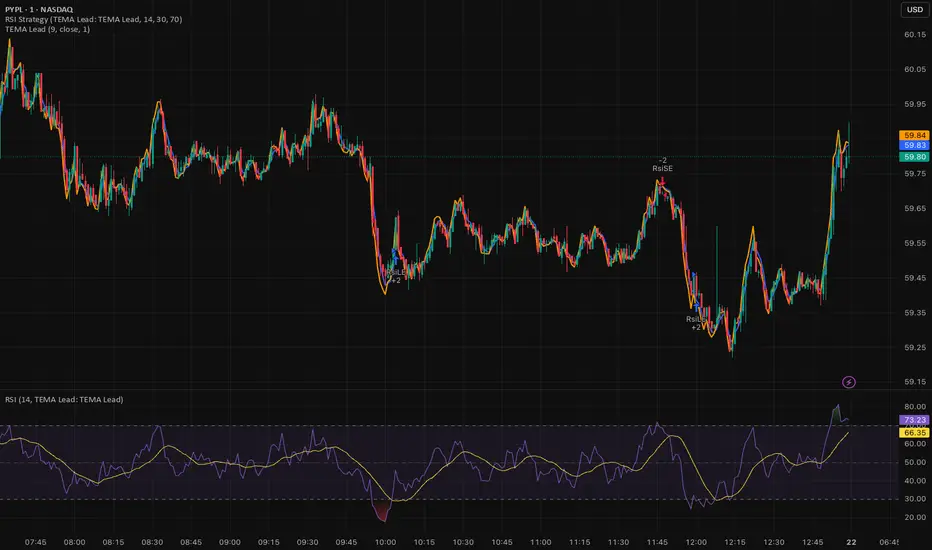
Triple EMA (TEMA) + Slope LeadThis indicator plots a standard Triple EMA (TEMA) and an optional slope-lead version. TEMA is a low-lag moving average built from three EMAs, allowing it to track price more closely than a single EMA. The Lead Strength (k) adds a small forward “push” based on the recent TEMA slope:
TEMA_lead = TEMA + k × (TEMA − TEMA ). Higher k values make the line react earlier but increase sensitivity in chop.
Used as a source for other indicators (RSI, MACD, stochastic, regime filters, etc.), TEMA or TEMA-Lead may improve signal quality by reducing noise, aligning momentum readings with trend direction, and producing earlier, cleaner transitions at turns, often without the excessive lag introduced by heavier smoothing.
Least Squares Moving Average Zero Lag LeadLSMA Zero‑Lag + Lead Indicator
This indicator is a modified Least Squares Moving Average (LSMA) designed to reduce lag and optionally introduce a controlled forward‑leaning (lead) component. It is intended to be used either directly on price or as a smoother, more responsive input source for other indicators such as RSI, MACD, or regime filters.
1. What LSMA Is Doing
LSMA (Least Squares Moving Average) fits a straight‑line regression to the last N bars and evaluates that line at the current bar. Unlike simple or exponential averages, LSMA implicitly models trend direction and slope, which makes it more responsive during directional moves.
2. Zero‑Lag Adjustment
The zero‑lag version applies a simple error‑correction technique:
ZL = 2 × LSMA − LSMA(previous)
This cancels part of the inherent regression delay, producing a smoother line that reacts faster to turns while remaining stable in trends.
3. Lead Component (Optional)
On top of the zero‑lag LSMA, a slope‑based lead is added:
Lead = ZL + k × (ZL − ZL(previous))
Here, the recent slope is projected forward by a user‑controlled factor (k). This does not predict price, but it shifts the average slightly in the direction of current momentum, improving responsiveness for signal generation.
4. Why This Helps RSI and Similar Indicators
RSI and many oscillators operate on raw price changes, which can be noisy and lag‑prone. Feeding RSI with LSMA ZL or LSMA ZL + Lead instead of raw close price:
• Reduces noise without excessive smoothing
• Aligns RSI swings with underlying trend direction
• Improves timing of overbought/oversold transitions
• Reduces late signals after sharp reversals
In practice, this produces an RSI that reacts faster in trends but stays calmer in chop.
5. Practical Usage Tips
• Use LSMA ZL as a clean, low‑lag replacement for price in oscillators
• Add small lead values (0.5–1.0) only if earlier signals are needed
• Avoid high lead values in choppy markets
• Combine with regime or volatility filters for best results
This indicator is best thought of as a signal‑conditioning layer rather than a standalone trading system.

My multiple MAs📈 My Multiple MAs — Multi-Timeframe Adaptive Moving Average
MY-MA is a multi-timeframe moving average indicator designed to help traders clearly identify trend direction, market cycles, and dynamic support & resistance using advanced MA logic.
This indicator combines Higher Timeframe Moving Averages with adaptive curve visualization, making it especially useful for swing trading, trend following, and market structure analysis.
🔹 Key Features
✅ Multi-Timeframe Moving Averages
- Plot moving averages from higher timeframes (e.g. 4H, 1D) directly on your current chart
- See the real trend context without switching timeframes
✅ Advanced MA Types
- Supports LMA (Least Moving Average) for smoother trend tracking
- Optional HIG / custom MA logic for cycle detection and turning points
✅ Market Cycle Visualization
- Curved MA behavior helps highlight trend expansion, exhaustion, and reversals
- Color-coded curves make bullish vs bearish phases easy to read
✅ Dynamic Price Labels
- Automatically displays MA price levels on the chart
- Helps identify key reaction zones and confluence areas
✅ Highly Customizable
- Control timeframe, MA length, source price, and offsets
- Toggle labels and lines independently for a clean chart
🔹 How to Use
- Above MA & rising → Bullish trend bias
- Below MA & falling → Bearish trend bias
- Price reacting near higher-TF MA → Potential support/resistance
- Curve flattening or bending → Possible trend exhaustion or reversal
- Best used together with price action, volume, or structure confirmation.
⚠️ Disclaimer
This indicator is a technical analysis tool only and does not provide financial advice. Always use proper risk management and confirmation before entering trades.

True Session Opens [TakingProphets]True Session Opens
- Description
- True Session Opens plots “true” session open levels (horizontal) for major trading windows
- Optional vertical session boundary markers and bottom session labels
- Built to keep charts clean with a timeframe visibility filter and lookback pruning
- What This Is (In Plain English)
- When a session starts (New York time), the script captures that candle’s open price
- A horizontal line is drawn from the session start and extended bar-by-bar to the current bar
- Optional vertical lines mark session start and end boundaries
- Optional bottom labels show ASIA, LONDON, NY.AM, and NY.PM near the midpoint of each session
-----------------------------------------------------------------------------------------------
Sessions Tracked (New York Time)
-----------------------------------------------------------------------------------------------
- ASIA - 20:00 to 00:00
- LONDON - 02:00 to 05:00
- NY.AM - 09:00 to 11:30
- NY.PM - 13:00 to 16:00
- IMPORTANT
- Session detection is anchored to America/New_York
- Adjust session windows in Session Definitions if your instrument requires different killzones
-----------------------------------------------------------------------------------------------
How To Use
-----------------------------------------------------------------------------------------------
- Add this indicator to intraday charts for clean session reference levels
- Use session opens as reaction levels, anchors, or confluence with your model
- Enable verticals for timing context, disable them for a minimal chart
- Recommended Workflow
- Keep ASIA and LONDON enabled during London / NY overlap
- Keep NY.AM and NY.PM enabled for New York session context
- Lower timeframes (1m–15m) are recommended for best clarity
-----------------------------------------------------------------------------------------------
Settings Guide
-----------------------------------------------------------------------------------------------
- General
- Lookback
- Controls how far back session verticals remain visible
- Options: 1 Day, 3 Days, 5 Days, 1 Week, 1 Month
- Older session markers are pruned automatically for performance and cleanliness
- Highest Timeframe Visibility
- Prevents session visuals from displaying on higher timeframes
- Example: if set to 15m, sessions will not appear on 30m, 1H, or higher
- When exceeded, existing visuals are removed to keep the chart clean
- Session Definitions
- Defines session time windows (New York time)
- Modify these inputs if you want custom session ranges
- Session Opens
- Individual toggles for ASIA, LONDON, NY.AM, and NY.PM
- Custom color per session
- Adjustable line style and line width
- Configurable open label size
- Session Verticals
- Toggle vertical lines at session start and end
- Customize vertical line color and style
- Toggle bottom session name labels
-----------------------------------------------------------------------------------------------
Visual Output
-----------------------------------------------------------------------------------------------
- Horizontal Open Lines
- Plotted at the opening price of each session
- Right-pinned labels using short codes
- asia.open
- lo.open
- nyam.open
- nypm.open
- Vertical Session Lines (Optional)
- Vertical markers at session start and end
- Managed by lookback pruning
- Bottom Session Labels (Optional)
- Session names printed at the bottom of the chart
- Positioned near the midpoint of each session window
-----------------------------------------------------------------------------------------------
Best Practices
-----------------------------------------------------------------------------------------------
- Use 1m–15m for clean intraday session structure
- Disable verticals if you only want
