Fundamental Dashboard Publishing this script is a great idea because many traders in the Indian market struggle with TradingView's lack of data for SME (Small and Medium Enterprise) stocks.
Here is a professional, detailed description you can use for the Publishing Page. I have broken it down into sections that highlight the unique "Hybrid" technology of your script.
Title Idea: Fundamental Dashboard Pro: SME & Hybrid Live Valuation
Description:
Overview
The Fundamental Dashboard Pro is a high-performance financial analysis tool specifically designed for the Indian Stock Market (NSE/BSE). It solves the biggest problem faced by TradingView users in India: Missing or delayed data for SME and mid-cap stocks.
While standard TradingView indicators rely solely on built-in data feeds (which are often "N/A" for stocks like Alpex Solar, Oriana Power, or Insolation Energy), this script uses a Custom Hybrid Engine. It prioritizes a built-in, high-accuracy database of ~1,700 stocks while falling back to live TradingView data for everything else.
Key Features
📊 Accurate SME Data: Includes pre-loaded, professional-grade fundamental data (EPS, Net Profit, Debt/Equity, ROE) for over 1,600 Indian companies, including the SME segment.
⚡ Real-Time P/E Calculation: Unlike static dashboards, this script calculates the Price-to-Earnings (P/E) ratio dynamically. It takes the static EPS from the database and divides it by the live market price, ensuring your valuation metrics update every second.
🛡️ Intelligent Fallback Logic: If a ticker is not found in the custom database, the script automatically attempts to fetch live data from TradingView’s servers, ensuring you are never left without information.
🔍 Manual Ticker Search: Includes a "Manual Search" input in settings to bypass auto-detection. This is perfect for stocks that use different naming conventions between NSE and BSE (e.g., searching by code 543620 for Insolation Energy).
🚦 Automatic Rating System: A 5-point scoring system that evaluates a stock based on profitability, valuation, leverage, and efficiency, providing a visual "Buy/Sell/Neutral" rating.
How the Hybrid System Works
EPS/ROE/Debt: These metrics are quarterly and are pulled from a high-precision snapshot of Screener.in data embedded in the script.
Live Price: Pulled directly from the chart ticker.
Dynamic P/E: Calculated as Live Price / Stored EPS. This makes the valuation "Market-Live."
Scoring Criteria
The dashboard evaluates every stock against 5 fundamental pillars:
Profitability: Is the company making a Net Profit?
Earning Power: Is the EPS positive?
Valuation: Is the Live P/E below the user-defined threshold?
Debt Health: Is the Debt-to-Equity ratio below the safety limit?
Efficiency: Is the Return on Equity (ROE) above the target percentage?
Instructions for Use
Auto-Mode: Simply add the script to your chart. It will detect the ticker automatically.
Manual-Mode: If the dashboard shows "NOT FOUND" for a specific SME stock, go to Settings > Data & Thresholds and type the ticker name exactly as it appears on Screener (e.g., ALPEXSOLAR).
Customization: You can adjust the P/E, ROE, and Debt thresholds in the settings menu to match your specific investment criteria (e.g., Value vs. Growth investing).
Internal Note for Publishing (Technical):
Version: Pine Script v5
Optimization: The script uses string-compressed data chunks to remain within the 80,000 token limit while maximizing the stock database size.
Scope: Designed specifically for Indian markets but compatible with global tickers via the fallback engine.
Educational

Aroon (Any Source)Aroon (Any Source)
Overview
This indicator is an enhanced version of the classic Aroon Oscillator. It measures trend dominance based on the recency of highs and lows, with added flexibility to operate on any chosen source series and an optional price-scaling mechanism based on VWAP distance.
What the Indicator Does
The Aroon Oscillator compares how recently the most recent high and low occurred within a lookback window. The result is a bounded oscillator that indicates whether buyers or sellers are currently dominant.
This version adds: - Ability to run Aroon on any source - Optional smoothing to reduce noise - Optional VWAP-based price scaling
Core Outputs
• Aroon Up (0–100): Strength of recent highs
• Aroon Down (0–100): Strength of recent lows
• Aroon Oscillator (−100 to +100): Net dominance (Up − Down)
Inputs and Options
• Source: Input series used for calculations
• Aroon Length: Lookback window
• Use Source for High/Low: Enables Aroon-like mode on any series
• Show Oscillator: Toggles oscillator plot
• Show Aroon Up/Down: Toggles component lines
• Smooth Oscillator: Light smoothing (EMA/RMA/SMA)
• VWAP Price Scaling: Scales signal by VWAP distance normalized by ATR
How to Use It
Use the oscillator as a trend regime filter. Positive values indicate bullish dominance; negative values indicate bearish dominance. VWAP scaling helps suppress signals near equilibrium and emphasize extended moves.
Practical Notes
• Measures recency, not magnitude
• Best used as a regime or bias input
• Especially effective intraday with VWAP scaling

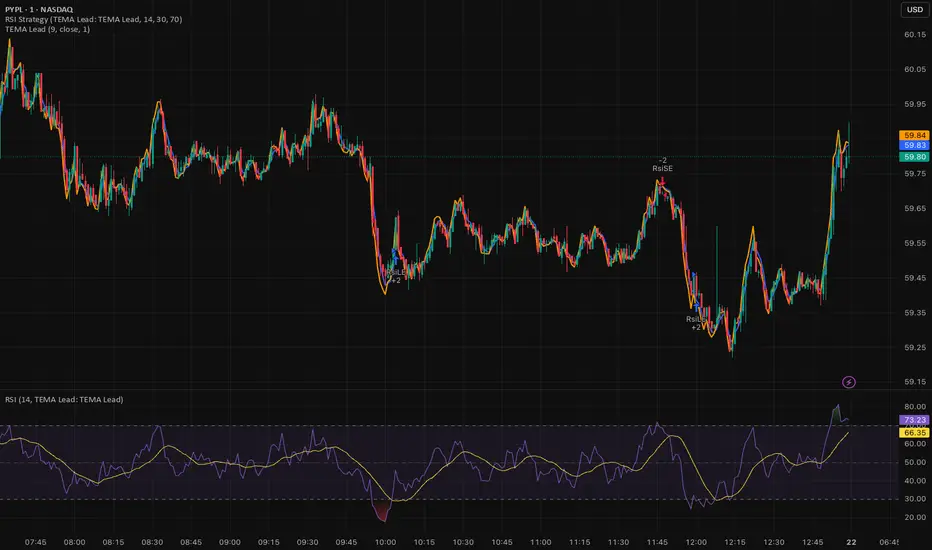
Triple EMA (TEMA) + Slope LeadThis indicator plots a standard Triple EMA (TEMA) and an optional slope-lead version. TEMA is a low-lag moving average built from three EMAs, allowing it to track price more closely than a single EMA. The Lead Strength (k) adds a small forward “push” based on the recent TEMA slope:
TEMA_lead = TEMA + k × (TEMA − TEMA ). Higher k values make the line react earlier but increase sensitivity in chop.
Used as a source for other indicators (RSI, MACD, stochastic, regime filters, etc.), TEMA or TEMA-Lead may improve signal quality by reducing noise, aligning momentum readings with trend direction, and producing earlier, cleaner transitions at turns, often without the excessive lag introduced by heavier smoothing.
Least Squares Moving Average Zero Lag LeadLSMA Zero‑Lag + Lead Indicator
This indicator is a modified Least Squares Moving Average (LSMA) designed to reduce lag and optionally introduce a controlled forward‑leaning (lead) component. It is intended to be used either directly on price or as a smoother, more responsive input source for other indicators such as RSI, MACD, or regime filters.
1. What LSMA Is Doing
LSMA (Least Squares Moving Average) fits a straight‑line regression to the last N bars and evaluates that line at the current bar. Unlike simple or exponential averages, LSMA implicitly models trend direction and slope, which makes it more responsive during directional moves.
2. Zero‑Lag Adjustment
The zero‑lag version applies a simple error‑correction technique:
ZL = 2 × LSMA − LSMA(previous)
This cancels part of the inherent regression delay, producing a smoother line that reacts faster to turns while remaining stable in trends.
3. Lead Component (Optional)
On top of the zero‑lag LSMA, a slope‑based lead is added:
Lead = ZL + k × (ZL − ZL(previous))
Here, the recent slope is projected forward by a user‑controlled factor (k). This does not predict price, but it shifts the average slightly in the direction of current momentum, improving responsiveness for signal generation.
4. Why This Helps RSI and Similar Indicators
RSI and many oscillators operate on raw price changes, which can be noisy and lag‑prone. Feeding RSI with LSMA ZL or LSMA ZL + Lead instead of raw close price:
• Reduces noise without excessive smoothing
• Aligns RSI swings with underlying trend direction
• Improves timing of overbought/oversold transitions
• Reduces late signals after sharp reversals
In practice, this produces an RSI that reacts faster in trends but stays calmer in chop.
5. Practical Usage Tips
• Use LSMA ZL as a clean, low‑lag replacement for price in oscillators
• Add small lead values (0.5–1.0) only if earlier signals are needed
• Avoid high lead values in choppy markets
• Combine with regime or volatility filters for best results
This indicator is best thought of as a signal‑conditioning layer rather than a standalone trading system.

My multiple MAs📈 My Multiple MAs — Multi-Timeframe Adaptive Moving Average
MY-MA is a multi-timeframe moving average indicator designed to help traders clearly identify trend direction, market cycles, and dynamic support & resistance using advanced MA logic.
This indicator combines Higher Timeframe Moving Averages with adaptive curve visualization, making it especially useful for swing trading, trend following, and market structure analysis.
🔹 Key Features
✅ Multi-Timeframe Moving Averages
- Plot moving averages from higher timeframes (e.g. 4H, 1D) directly on your current chart
- See the real trend context without switching timeframes
✅ Advanced MA Types
- Supports LMA (Least Moving Average) for smoother trend tracking
- Optional HIG / custom MA logic for cycle detection and turning points
✅ Market Cycle Visualization
- Curved MA behavior helps highlight trend expansion, exhaustion, and reversals
- Color-coded curves make bullish vs bearish phases easy to read
✅ Dynamic Price Labels
- Automatically displays MA price levels on the chart
- Helps identify key reaction zones and confluence areas
✅ Highly Customizable
- Control timeframe, MA length, source price, and offsets
- Toggle labels and lines independently for a clean chart
🔹 How to Use
- Above MA & rising → Bullish trend bias
- Below MA & falling → Bearish trend bias
- Price reacting near higher-TF MA → Potential support/resistance
- Curve flattening or bending → Possible trend exhaustion or reversal
- Best used together with price action, volume, or structure confirmation.
⚠️ Disclaimer
This indicator is a technical analysis tool only and does not provide financial advice. Always use proper risk management and confirmation before entering trades.

True Session Opens [TakingProphets]True Session Opens
- Description
- True Session Opens plots “true” session open levels (horizontal) for major trading windows
- Optional vertical session boundary markers and bottom session labels
- Built to keep charts clean with a timeframe visibility filter and lookback pruning
- What This Is (In Plain English)
- When a session starts (New York time), the script captures that candle’s open price
- A horizontal line is drawn from the session start and extended bar-by-bar to the current bar
- Optional vertical lines mark session start and end boundaries
- Optional bottom labels show ASIA, LONDON, NY.AM, and NY.PM near the midpoint of each session
-----------------------------------------------------------------------------------------------
Sessions Tracked (New York Time)
-----------------------------------------------------------------------------------------------
- ASIA - 20:00 to 00:00
- LONDON - 02:00 to 05:00
- NY.AM - 09:00 to 11:30
- NY.PM - 13:00 to 16:00
- IMPORTANT
- Session detection is anchored to America/New_York
- Adjust session windows in Session Definitions if your instrument requires different killzones
-----------------------------------------------------------------------------------------------
How To Use
-----------------------------------------------------------------------------------------------
- Add this indicator to intraday charts for clean session reference levels
- Use session opens as reaction levels, anchors, or confluence with your model
- Enable verticals for timing context, disable them for a minimal chart
- Recommended Workflow
- Keep ASIA and LONDON enabled during London / NY overlap
- Keep NY.AM and NY.PM enabled for New York session context
- Lower timeframes (1m–15m) are recommended for best clarity
-----------------------------------------------------------------------------------------------
Settings Guide
-----------------------------------------------------------------------------------------------
- General
- Lookback
- Controls how far back session verticals remain visible
- Options: 1 Day, 3 Days, 5 Days, 1 Week, 1 Month
- Older session markers are pruned automatically for performance and cleanliness
- Highest Timeframe Visibility
- Prevents session visuals from displaying on higher timeframes
- Example: if set to 15m, sessions will not appear on 30m, 1H, or higher
- When exceeded, existing visuals are removed to keep the chart clean
- Session Definitions
- Defines session time windows (New York time)
- Modify these inputs if you want custom session ranges
- Session Opens
- Individual toggles for ASIA, LONDON, NY.AM, and NY.PM
- Custom color per session
- Adjustable line style and line width
- Configurable open label size
- Session Verticals
- Toggle vertical lines at session start and end
- Customize vertical line color and style
- Toggle bottom session name labels
-----------------------------------------------------------------------------------------------
Visual Output
-----------------------------------------------------------------------------------------------
- Horizontal Open Lines
- Plotted at the opening price of each session
- Right-pinned labels using short codes
- asia.open
- lo.open
- nyam.open
- nypm.open
- Vertical Session Lines (Optional)
- Vertical markers at session start and end
- Managed by lookback pruning
- Bottom Session Labels (Optional)
- Session names printed at the bottom of the chart
- Positioned near the midpoint of each session window
-----------------------------------------------------------------------------------------------
Best Practices
-----------------------------------------------------------------------------------------------
- Use 1m–15m for clean intraday session structure
- Disable verticals if you only want

SFI Follow Trend Level 1 ( SFI Academy )“SFI Trading Level 1 Indicator is a proprietary indicator used by SFI Academy for its students, in combination with SFI Academy’s exclusive capital management toolset.”

Fundamental Dashboard [Standalone]Overview
The Fundamental Strength Dashboard is a streamlined utility designed to evaluate the fundamental health of a stock directly on your chart. Instead of relying solely on price action, this indicator fetches real-time financial data to assess profitability, valuation, and financial stability.
It aggregates five core financial metrics into a single "Fundamental Score" (0-5) and displays a clear rating (Strong Buy, Buy, Neutral, or Weak/Sell) in a customizable dashboard table.
How It Works
The script analyzes the following 5 Key Fundamental Metrics. For a stock to receive a "point" for a specific metric, it must meet the criteria defined in your settings:
Net Income (Profitability): Checks if the company is actually profitable (Net Income > 0).
EPS (Earnings Per Share): Ensures the company has positive Earnings Per Share (TTM).
P/E Ratio (Valuation): Checks if the stock is valued reasonably compared to your maximum threshold (default: < 45).
Debt-to-Equity (Leverage): Analyzes financial risk. Lower is better (default: < 0.5).
ROE (Efficiency): Measures how effectively management uses equity to generate profit (default: > 15%).
The Scoring System
The indicator calculates a cumulative score based on how many of the above criteria are met:
Score 5/5 → STRONG BUY: The stock meets all profitability, valuation, and stability criteria.
Score 4/5 → BUY: The stock misses only one criterion but is otherwise fundamentally sound.
Score 0-3 → WEAK / SELL: The stock fails multiple fundamental checks (e.g., negative earnings, high debt, or overvaluation).
Features & Customization
Every trader has different risk appetites and sector preferences. You can fully customize the thresholds in the Settings menu:
Max P/E Threshold: Adjust this based on the sector (e.g., Tech stocks typically have higher P/Es than Utilities).
Min ROE %: Set your requirement for management efficiency.
Max Debt/Equity: Tighten or loosen leverage requirements.
Visuals: Change the table position (Top Right, Bottom Right, etc.) and color scheme to match your chart theme.
How to Use
Add the indicator to your chart.
Open the Settings (Gear icon).
Adjust the Dynamic Thresholds to fit the sector you are trading.
Look at the dashboard on the chart to see a snapshot of the stock's fundamental health.
Disclaimer
This script is for educational and informational purposes only. It relies on third-party financial data provided by TradingView, which may occasionally be missing or delayed. Always do your own research (DYOR) before making investment decisions.

SETUP HMTR ZONESETUP HMTR ZONE
This indicator highlights high-probability market extremes by detecting a rare alignment between independent heatmap engines.
Captures volatility squeeze, trend exhaustion, and pressure asymmetry.
🎯 What the indicator does
🔵 Cold Match (Blue)
Appears when all engines detect cooling, fear, and liquidity contraction.
Often forms near accumulation phases, oversold washes, structural resets, discount zones.
🔴 Hot Match (Red)
Appears when all components show overheating, exhaustion, and aggressive pressure.
Often precedes distribution phases, liquidity grabs, blow-off tops, or trend fatigue.
✨ Why this matters
This tool does not give buy/sell entries.
It provides contextual confirmation of:
emerging accumulation or distribution
cooling or overheating phases
liquidity-driven stress points
behavioral extremes
regime shifts in trend structure
Use it as a market overlay layer, not as a standalone entry trigger.
🔔 Alerts Included
Cold zone
Hot zone
Signals fire only on confirmed candle close.
✔️ Best for traders who value:
risk-aware positioning
cycle and regime analysis
structural confirmation
heatmap-based market context
smart-money aligned behavior

PERP Flow Radar PERP Flow Radar is a multi-asset monitoring tool designed to track real-time capital flow pressure across 30 major perpetual futures markets.
Instead of focusing on a single chart, the radar visualizes how buying and selling pressure evolves simultaneously across many assets, helping traders understand broad market behavior with a single glance.
The radar uses directional volume flow to map cumulative pressure for each asset, resetting daily to highlight fresh momentum and intraday rotation.
This allows traders to clearly see:
• which assets attract aggressive long activity
• which markets show persistent selling pressure
• early signs of trend strength or weakness
• synchronized movements across multiple PERP pairs
• intraday shifts in flow dominance
• comparative strength vs. weakness inside the crypto market
Every asset line can be independently toggled, recolored, or resized, creating a customizable environment for flow-based market observation.
CVD PERP Radar (30) does not provide buy or sell signals.
It functions as a contextual monitoring tool — a way to observe how intraday flows, rotation, and market pressure unfold across the perpetual futures market.
The radar is built for traders who value:
• multi-asset flow analysis
• intraday rotation awareness
• pressure-based interpretation
• momentum tracking
• clean, unobtrusive visualization
• cross-market confirmation
By condensing 30 PERP markets into one unified panel, this tool helps traders stay aware of developing flow regimes, strengthening trends, and weakening structures across the crypto futures landscape.

SETUP HMTRSETUP HMTR (Heatmap Market) is a multi-layered market-structure framework designed to visualize how risk, sentiment, and phase behavior evolve across a market cycle.
Instead of using traditional oscillators, HMTR presents a heatmap of dynamic zones reflecting shifts in accumulation, expansion, distribution, overheating, and deep fear environments.
• early accumulation and recovery phases
• neutral equilibrium zones
• expansion stages with rising momentum
• distribution and trend exhaustion
• periods of euphoria or market overheating
• capitulation, fear, and deep discount environments
Color transitions are adaptive, highlighting how the market’s internal temperature changes over time.
This makes it possible to see cycle maturity, weakening structures, potential reversals, and zones where long-term or short-term opportunities historically emerge.
HMTR is not a signaling tool.
It does not provide buy or sell instructions.
Instead, it functions as a contextual framework, helping traders understand:
• when risk is structurally low
• when the market enters uncertainty or instability
• when accumulation zones may begin forming
• when overheating or distribution is developing
• how crowd psychology affects trend phases
The indicator provides a holistic view of market conditions that cannot be captured by a single oscillator or linear model.
HMTR is intended for traders who study market cycles, sentiment behavior, capital rotation, and structural risk dynamics.

SETUP ZONESETUP ZONE is a minimalistic market pressure indicator that highlights moments when the market enters zones of elevated aggression, imbalance, or momentum extremes.
These areas often precede the beginning of strong setups, trend expansions, or sharp corrective moves.
Instead of focusing on signals or traditional oscillators, SETUP ZONE visualizes pressure conditions that appear when buy or sell activity becomes unusually dominant.
When these conditions exceed normal market behavior, the chart background shifts into distinct zones:
• Green Zone strong upside pressure, often seen near expansion phases or aggressive buying conditions.
• Red Zone strong downside pressure, often appearing near exhaustion, distribution, or panic-driven selling.
These zones do not represent entries or exits.
They serve as contextual markers, helping traders understand when the market is transitioning into structurally important phases where significant setups tend to originate.
SETUP ZONE is useful for traders who focus on:
• momentum and aggression analysis
• liquidity and pressure behavior
• phase transitions
• trend continuation or reversal potential
• clean visual cues without clutter
The indicator does not provide buy/sell signals.
It functions as a market-context tool a way to quickly see when pressure becomes unusual enough to mark the beginning of an opportunity zone.

Setup Crypto RadarSetup Crypto Radar is a multi-asset, multi-timeframe dashboard designed to visualize how different parts of the crypto market transition through phases of pressure, imbalance, exhaustion, and potential setup formation.
Instead of analyzing each chart individually, Setup Crypto Radar aggregates structural behavior across key market assets and compresses it into a clean, real-time matrix.
Each horizontal row represents an asset, while each column reflects a specific timeframe creating a unified overview of emerging long and short conditions across the market.
The radar highlights moments when assets move into:
• expansion pressure
• aggressive sell or buy behavior
• market imbalance and overextension
• zones where strong setups may begin forming
• periods of relief, cooling, or stabilization
By observing how signals cluster across timeframes, traders can quickly identify:
• assets entering strong directional phases
• synchronized market pressure across multiple charts
• early transitions from neutral conditions to potential setups
• environments where trend continuation or reversal may develop
• points of elevated risk caused by macro-level pressure
Setup Crypto Radar does not generate buy or sell signals.
It provides a structural map of pressure conditions, helping traders recognize when the market is shifting into zones where setups commonly originate.
This tool is designed for traders who value:
• multi-timeframe context
• cross-asset alignment
• structural pressure analysis
• early recognition of opportunity zones
• a clean, non-intrusive visual framework
Setup Crypto Radar is not a forecasting or signaling indicator.
It is a context engine, allowing you to see how pressure, imbalance, and setup conditions unfold across the crypto market in real time.

Kijun Sen Standard Deviation | QuantLapse SystemsOverview
The Kijun Sen Standard Deviation indicator by QuantLapse Systems is a volatility-aware trend-following framework that combines the structural equilibrium of the Kijun Sen (基準線) with statistically adaptive standard deviation bands.
By anchoring trend detection to market structure and confirming direction through volatility expansion, the indicator delivers a cleaner, more reliable regime classification across varying market conditions.
Rather than reacting to short-term noise, the system focuses on identifying statistically justified trend phases , making it well-suited for disciplined, rule-based trading.
Technical Composition, Calculation, Key Components & Features
📌 Kijun Sen (基準線) – Structural Trend Baseline
Calculated as the midpoint between the highest high and lowest low over a user-defined period.
Represents market equilibrium and structural balance rather than short-term momentum.
Naturally adapts to expanding and contracting price ranges.
Provides a stable baseline for regime detection and volatility validation.
Acts as the anchor for deviation bands and persistent trend-state logic.
Unlike fast or reactive moving averages, the Kijun Sen emphasizes price structure and equilibrium , making it especially effective for higher-quality trend confirmation.
📌 Volatility Adjustment – Standard Deviation Bands
Standard deviation is calculated over a configurable lookback to measure current price dispersion.
Upper and lower envelopes are formed by applying a deviation multiplier to the Kijun Sen.
Band width expands during volatility surges and contracts during consolidation.
Creates proportional, volatility-aware thresholds instead of static offsets.
Visually represents market energy through expanding and compressing channels.
These adaptive bands ensure that trend signals only occur when volatility supports directional movement.
📌 Trend Signal & Regime Calculation
Bullish Trend is confirmed when price closes above the upper deviation band.
Bearish Trend is confirmed when price closes below the lower deviation band.
Once established, the trend state persists until an opposing volatility break occurs.
This persistence reduces whipsaws and improves regime stability.
Trend state is reinforced with color-coded lines, envelopes, and background shading.
This volatility-confirmed persistence model is visible in the chart, where trends remain intact through minor pullbacks and only flip on decisive expansion.
How It Works in Trading
✅ Volatility-Confirmed Trend Detection – Requires expansion beyond deviation bands.
✅ Noise Suppression – Filters low-energy price movement within volatility envelopes.
✅ Regime Persistence – Maintains trend state until statistical invalidation.
✅ Immediate Visual Context – Direction, strength, and transitions are clear at a glance.
Visual Representation
Trend signals are displayed directly on price using both line and background context:
🟢 Green / Teal Kijun & Envelope → Confirmed bullish regime.
🔴 Red / Pink Kijun & Envelope → Confirmed bearish regime.
Semi-transparent band fill visualizes volatility expansion and compression.
Buy and Sell labels appear only on confirmed regime transitions.
The lower panel includes:
Strategy equity curve based on trend exposure.
Buy & Hold equity for performance comparison.
Background regime shading synchronized with trend state.
Features and User Inputs
The Kijun Sen Standard Deviation framework offers a focused yet powerful set of configurable inputs:
Kijun Sen Length – Controls structural trend sensitivity.
Standard Deviation Controls – Adjust lookback length and multiplier for regime strictness.
Backtesting & Date Filters – Define evaluation periods and starting conditions.
Display Options – Toggle labels, equity curves, and background shading.
Color Customization – Fully configurable buy/sell colors for trends and equity curves.
These controls allow users to balance responsiveness, stability, and clarity without overfitting.
Practical Applications
The Kijun Sen Standard Deviation indicator is designed for traders who prioritize structure, volatility confirmation, and regime awareness.
Primary Trend Filtering – Identify and stay aligned with dominant market direction.
Volatility-Aware Trend Following – Participate only when price expansion confirms intent.
Risk-Managed Exposure – Avoid chop during compression and transitional phases.
Systematic Strategy Development – Use as a regime engine or higher-timeframe filter.
Performance Evaluation – Compare trend-following equity against buy-and-hold benchmarks.
This framework bridges classical Ichimoku structure with modern statistical validation.
Conclusion
The Kijun Sen Standard Deviation indicator by QuantLapse Systems represents a refined evolution of Ichimoku-based trend analysis.
By integrating the structural equilibrium of the Kijun Sen with adaptive standard deviation confirmation, the system delivers clearer regime classification, reduced noise, and more reliable trend participation.
Rather than attempting to predict price, it focuses on confirming when trends are statistically justified .
Who should use Kijun Sen Standard Deviation:
📊 Trend-Following Traders – Stay aligned with dominant market structure.
⚡ Momentum & Swing Traders – Enter only on volatility-backed expansions.
🤖 Systematic & Algorithmic Traders – Ideal as a regime filter or trend-state engine.
Past performance is not indicative of future results.
Disclaimer: All trading involves risk, and no indicator can guarantee profitability.
Strategic Advice: Always backtest thoroughly, optimize parameters responsibly, and align settings with your timeframe, asset class, and risk tolerance before live deployment.

Ram Key Levels (Daily Horizontals) + Day SeparatorsRam Key Levels (Daily Horizontals) + Day Separators

AVAX Bot-Safe SuperTrend FastConfirm v1 (No Repaint for BOT)BETA version - (still in testing)
AVAX Bot-Safe SuperTrend FastConfirm v1 is a TradingView indicator designed to generate stable, non-repainting trade signals for automated execution, while also offering optional visual “early” cues for discretionary monitoring. The script combines a SuperTrend trend engine with a FastConfirm mechanism based on lower-timeframe closes, plus optional confirmation via Hull Moving Averages (HMAs) and risk overlays (ATR-based SL/TP) for execution planning.
1) Core Trend Engine (SuperTrend)
The indicator computes a SuperTrend using ATR (Wilder ATR via ta.atr() by default, optional SMA-TR alternative).
It tracks a binary trend state:
* Trend = bullish when price is above the trailing bearish band.
* Trend = bearish when price is below the trailing bullish band.
“Early” SuperTrend flips (trend change points) can be shown as visual-only markers, intended for human observation rather than bot execution.
2) Hull Moving Averages (Context / Optional Confirmation)
* Two Hull MAs are calculated:
* Fast Hull (short length)
* Slow Hull (longer length)
* Hull alignment is used as an optional confirmation layer (recommended for AVAX) to reduce whipsaws:
* Bullish bias when Fast Hull > Slow Hull
* Bearish bias when Fast Hull < Slow Hull
* Hull lines can be plotted for trend structure and momentum context.
3) Momentum Burst (Visual Only)
* The script includes a momentum “burst / continuation” visual module:
* Measures impulse using either ATR-normalized movement (default) or percentage change.
* Flags continuation patterns (e.g., consecutive rising/falling closes after a burst).
* These markers are not used for bot execution, and are intended to assist human interpretation.
4) Optional Filters (Only Applied to BOT if Enabled)
The script contains optional execution filters that can be applied to bot signals (toggleable):
* Volume filter: compares current volume to a volume moving average.
* RSI filter: avoids entries in overstretched conditions.
* ADX filter: requires a minimum trend strength.
A dedicated switch (“BOT: apply Volume/RSI/ADX if enabled”) determines whether these filters impact automated entries.
5) Bot-Safe Signal Logic (No Repaint)
The indicator’s primary purpose is to produce bot-safe entries that do not “blink” intrabar:
A. Candidate trigger (stable bands + buffer)
* Uses previous bar SuperTrend levels and an ATR-based buffer to avoid micro-touch signals.
* Detects whether price action meaningfully penetrates the relevant band.
B. FastConfirm via lower timeframe closes
* Pulls lower-TF closes inside the current candle (e.g., 1m confirmations) and requires N consecutive closes beyond the threshold level.
* This is intended to reduce false flips while still entering earlier than pure bar-close logic.
C. Two execution modes
* FastConfirm: faster entries, confirmation from lower timeframe closes (recommended for latency-sensitive automation).
* BarClose: waits for bar close confirmation (slowest but maximally conservative).
D. Latching + cooldown
* Signals are latched per bar so they do not disappear within the same candle.
* A direction lock and cooldown prevents immediate opposite signals in rapid chop.
6) Risk Levels (ATR-Based SL/TP + JSON Payload)
* On each bot signal, the indicator calculates:
* Stop Loss = ATR-multiple away from price
* Take Profit = based on a configurable risk:reward ratio
* SL/TP lines can be plotted for a limited number of bars after the signal for clarity.
* For automation, the script can send dynamic JSON alerts via alert() including:
* action (BUY/SELL), symbol, timeframe, confirmation TF, suggested entry, SL, TP, and latency cushion.
A configurable latency cushion (%) adjusts the “entry” field to account for real execution delay/slippage (useful when routing signals to bots/exchanges with a few seconds latency).
Recommended Usage (TradingView + Bot Execution)
Best practice for bot safety
* Use Bot Signal Mode = FastConfirm for earlier entries while keeping confirmations.
* Keep FastConfirm TF = 1m and start with Confirm Bars = 2 (then tune to 3 if too many false signals).
* Maintain a modest ATR buffer (e.g., 0.10–0.20 × ATR ) to reduce noise triggers.
How to set alerts
* For bot routing that expects structured data: enable Send JSON via alert(), and create the TradingView alert using:
* “Any alert() function call”
* For simpler setups: use the built-in alertcondition() alerts (“AVAX BOT BUY/SELL”).
Filter policy (risk control)
* If you trade during choppy ranges, consider enabling ADX and/or Hull alignment.
* Enable Volume/RSI/ADX filters for the bot only if you accept fewer trades in exchange for higher selectivity.
Operational notes
* Prefer lower chart timeframes (e.g., 1m–5m) with FastConfirm to limit reaction time.
* Calibrate latency cushion (%) to match your observed end-to-end delay (TradingView → webhook → bot → exchange).
* Always validate settings in BarClose mode first to benchmark “safest behaviour,” then switch to FastConfirm and tune confirm bars/buffer.
!!!! - The algorithm was designed with ChatGPT 5.2 Pro

CandleMapTF - Automatic Candle Structure Tool [PRO]Description:
This Pine Script creates an "Automatic Candle Structure Tool " for TradingView that visually manages market structure and dealing ranges across multiple timeframes.
All elements, including colors, opacity, and displayed levels are fully customizable.
Disclaimer:
This script is for educational and informational purposes only and does not
constitute financial advice, investment advice, or a trading recommendation.
Use at your own risk.

Udta Teer MKCIts normal vwap which is already available in TradingView. Now we have modified it with help of AI for bands

Scalping ~ Maniesh🔥 Fibonacci Scalping Indicator
This indicator is built for precision scalping using ACR (Average Candle Range) combined with Fibonacci-based premium & discount zones.
It helps traders identify high-probability reaction areas instead of chasing random moves.
🧠 Indicator Logic
Calculates ACR to understand current market volatility
Uses Fibonacci levels on the ACR range
Clearly marks Premium & Discount zones
Helps filter overextended price moves
Designed for reaction-based scalping, not blind entries
⏱ Best Timeframes
1m / 3m
Works best during London & New York sessions
📌 How to Use
Look for price reaching Fib
Wait for price reaction or confirmation
Enter scalps with tight stop-loss
Ideal for quick entries & partial exits
This indicator does not give buy/sell signals.
It is a framework tool to improve execution and timing.
⚠️ Disclaimer
Trading involves risk.
Always use proper risk management and backtest before live trading.

ATR CANDLESDynamic support and resistance are formed by the bodies and wicks of ATR candles, creating price zones with “height” rather than exact lines where price often pulls back and reacts. For a trailing stop, trades are held as long as candle color remains in the trend direction, with stops placed beyond the previous ATR candle; an opposite-color candle signals exit.

Udta Teer Its normal vwap which is already available in tradingview. But it has added bands with help of AI

Trinity Swing Trading Buy and SellThis is a simple little Heiken Ashi MA + ADX & MACD trend-following trading system designed to capture medium- to longer-term moves while filtering out noise and weak trends. It combines modified Heiken Ashi candles (for smoother trend detection) with a moving average alignment, plus optional confirmation from ADX (trend strength) and MACD (momentum).
In practice, the indicator works well on higher timeframes (e.g., 1H, 4H, daily) where trends are more sustained. It performs best in trending markets and naturally avoids choppy/range-bound conditions thanks to the ADX filter (requiring ADX > 20 by default). All key components are fully customizable, so you can disable filters or adjust parameters to suit different instruments (stocks, forex, crypto, futures).
Default settings are:
16 HMA
8,17,9 MACD
15,20 ADX
Recommend to add an additional longer term EMA like 200 for long term trend confirmation.
Adjust inputs in the settings panel as needed:
Toggle MA, ADX, or MACD filters on/off.
Change MA type/length, MACD parameters, ADX threshold
- Use the visual blue diamonds (below bars) for long entries and purple diamonds (above bars) for short entries as confirmation of signals.
- Set alerts on the "Buy Alert" and "Sell Alert" conditions if you want real-time notifications.
This setup gives you a complete, rule-based system that avoids emotional trading and repetitive entries, making it suitable for both backtesting and live trading with proper risk management.

SK BAND SK BAND is a powerful TradingView indicator designed to generate clear and reliable Buy & Sell signals by identifying market trend and price momentum. It helps traders make disciplined and confident trading decisions across different market conditions.
🔹 Key Features
✔ Clear BUY and SELL signals on the chart
✔ Works on Stocks, Indices, Forex, Crypto & Commodities
✔ Suitable for Intraday, Swing, and Positional trading
✔ Helps identify trend direction and momentum
✔ Simple, clean, and beginner-friendly
📈 How It Works
BUY signal appears when bullish momentum strengthens
SELL signal appears when bearish momentum increases
For better accuracy:
Use proper risk management
Confirm signals with support & resistance or higher timeframes
Avoid sideways or low-volume markets
⚠ Disclaimer
This indicator is for educational purposes only.
SK BAND does not provide financial advice. Trading involves risk—always confirm signals with your own analysis.
