ATM PROThe world’s strongest indicator that combines multiple indicators together, providing you with entry points, targets, and stop-loss levels with extreme accuracy. You can adjust its inputs to suit Forex and crypto pairs according to your needs. It contains these tools, and you can modify them based on your requirements.
المؤشر الاقوى عالميا الذي جمع عدة مؤشرات معا , من خلاله سيعطيك نقاط ( دخول واهداف وايقاف خسارة ) بدقة متناهية وتستطيع ان تعدل المدخلات ليتناسب مع ازواج الفوركس والكريبتو بشكل يتناسب مع ما تحتاجه
يحتوي على هذه الادوات ويمكنك تعديلها حسب متطلباتك
SHORT EMA
LONG EMA
TREND EMA
MACD SHORT
MACD LONG
MACD SIGNAL
RSI LENGTH
ATR LENGTH
VOLUME MULTIPLIER
ATR TARGET 1.2.3.4.5
STOP LOSS MULTIPLIER
BY ATM TEAM
Moyennes mobiles

Support Line [by rukich]🟠 OVERVIEW
The indicator displays a floating line that acts as a support level. It's important to remember that any support level can be broken.
🟠 COMPONENTS
The indicator is based on the percentage difference between the closes of the n-th bar back and the current bar. The resulting percentage is smoothed to remove noise.
The indicator is displayed as a green-red line (the colors don’t carry meaning — they are used just for visual variety). When the price touches the support level, the bar background turns green.
For convenience, there is a label on the right side of the indicator showing the current value of the line.
🟠 HOW TO USE
The indicator includes several settings that can be adjusted, though optimal defaults are provided.
Settings:
Timeframe — specifies which timeframe’s data is used to calculate the line.
Candles back — specifies how many bars back from the current one are used.
The indicator should be used according to general support-zone logic. Since no support zone guarantees a price bounce, the optimal approach is to confirm the reaction after the price touches the line.
Example of use:
In the current example, the Timeframe in the indicator settings is set to 1 hour, and the currently open chart is 5 minutes. This means that on the 5-minute chart we see a 1-hour line. After the price touches the support line, you need to see a confirmation of the reaction to understand whether the support zone is holding the price.
In the examples, reaction confirmation is shown through: the formation of an M5 shift and the invalidation of an FVG M5- (the latter is more risky than the M5 shift):
🟠 CONCLUSION
The indicator shows a floating support zone, and when tested, you should confirm the reaction on a lower timeframe.

DTR Trend EntryDTR Trend Entry is a trend-based entry tool designed to highlight market conditions and generate clear long and short signals based on price behavior around a moving average. It helps traders quickly identify bullish trends, bearish trends, consolidation zones, and potential breakout entries.
The indicator uses a simple moving average (SMA) of user-defined length to determine trend direction. A bullish trend is confirmed when the price stays above the moving average for consecutive bars, while a bearish trend is confirmed when the price stays below it. ATR (Average True Range) is also calculated, and price proximity to the moving average is used to detect consolidation, marking periods where the market is likely ranging and preparing for a move.
The chart background is shaded green during bullish trends, red during bearish trends, and yellow during consolidation to make market conditions easy to see at a glance. Entry signals appear when price crosses the moving average in the direction of the established trend: a crossover above the moving average triggers a long entry signal in a bullish zone, and a crossunder triggers a short entry signal in a bearish zone. These signals are marked on the chart with labels and can also be sent as alerts.
DTR Trend Entry is useful for traders who prefer trend-following approaches, breakout strategies, or structure-based entries. It works well on most timeframes and helps avoid late or low-quality trades by filtering entries through trend confirmation and volatility conditions.

XAU Power Meter + HTF FVG SystemWhat is this?
XAU Power Meter + HTF FVG System is an execution-support tool for XAUUSD that combines:
Local trend & momentum on your entry timeframe (e.g. 5m)
Volatility regime (ATR)
Higher-timeframe FVG bias (e.g. 1H)
The goal is simple: filter out low-quality trades and size up only when the market actually moves.
Core Components
1. LTF Trend (MA Stack 20 / 50 / 200)
The indicator builds a “stacked trend” using three MAs:
Bullish trend → price > MA20 > MA50 > MA200
Bearish trend → price < MA20 < MA50 < MA200
Anything else → RANGE
This gives a clean directional bias for intraday execution.
2. CCI Impulse (“Power”)
The CCI block measures the strength of the current move via |CCI| and classifies it into 4 bands:
LOW – weak momentum, usually not worth it
MEDIUM – acceptable impulse
HIGH – strong impulse
EXTREME – very strong, potential blow-off / late entry zone
These bands are used both for signal quality (Grade) and for position size guidance.
3. ATR Volatility Regime
ATR(14) is compared against its own SMA(100) to classify volatility:
QUIET – ATR < K * ATR_slow
NORMAL
ACTIVE – ATR > K * ATR_slow
You don’t want to size up in a dead market. ATR regime is used inside the Grade calculation.
4. Grade System (A / B / C / X)
The indicator compresses Trend + CCI + ATR into a single Grade:
A – In trend, strong impulse (HIGH/EXTREME), active volatility → top setups
B – In trend, at least MEDIUM impulse, acceptable volatility → good setups
C – In trend, but weaker conditions → borderline, be selective
X – Out of trend or no momentum → avoid
Internally, execution signals require Grade ≥ B for two bars in a row, to avoid one-bar “fake” spikes.
5. HTF FVG Bias (e.g. 1H)
On a higher timeframe (default: 1H), the script runs a Fair Value Gap engine with:
EMA 50/200 trend filter
ATR-based body filter (minimum candle strength)
Wilder ADX filter (trend strength)
Deep retest requirement inside the FVG zone
Optional zone auto-expiry and delete-on-use
It returns:
BUY (bullish HTF FVG confirmed)
SELL (bearish HTF FVG confirmed)
NONE (no valid zone active)
You can control how strict this bias is used via a “Strict: require active HTF FVG for entry” checkbox:
Strict OFF (default) → HTF bias can block trades against a strong HTF signal, but allows trades when HTF is neutral.
Strict ON → LTF entries are allowed only when HTF has an active FVG in the same direction (very selective).
HTF events are shown on the chart as HTF BUY / HTF SELL markers.
Execution Signals (LTF LONG / SHORT)
On your entry timeframe (e.g. 5m), the script generates LONG / SHORT arrows when:
Trend is clearly bullish or bearish (MA stack aligned),
Grade ≥ B for two consecutive bars,
HTF bias conditions are satisfied (depending on the strict mode).
These arrows are not a full auto-strategy, but a high-quality execution cue:
“Trend OK + Momentum OK + Volatility OK + HTF not against you.”
Dashboard
A compact dashboard in the corner shows, in real time:
Trend – UP / DOWN / RANGE (20/50/200 stack)
Impulse (CCI) – LOW / MEDIUM / HIGH / EXTREME
Volatility (ATR) – QUIET / NORMAL / ACTIVE
Size Multiplier – suggested risk sizing factor based on impulse
Grade – A / B / C / X
HTF FVG – BUY / SELL / NONE
This lets you sanity-check the context before pressing the button, not after the loss.
Recommended Use
Instrument: XAUUSD
Timeframe: 5m (scalping / intraday), but can be tested on 15m/1H as well
HTF: 1H by default (can experiment with 4H)
Focus on:
Grade A/B only
Strict mode ON for more institutional, fewer but higher-quality trades
Size up only when both impulse and volatility are supportive
Disclaimer
This script is a decision-support tool, not financial advice and not a guarantee of profit.
Always forward-test, understand the logic, and use your own risk management.

Z-EMA Fusion BandsDesigned with crypto markets in mind, particularly Bitcoin , it builds on the concept that the 1-Week 50 EMA often serves as a long-term bull/bear market threshold — an area where institutional bias, momentum shifts, and cyclical rotations tend to occur.
🔹 Core Components & Synergies:
1. 1W 50 EMA (Higher Timeframe)
- This EMA is calculated on a weekly timeframe, regardless of your current chart.
- In crypto, price above the 1W 50 EMA typically aligns with long-term bull market phases, while extended periods below can signify bearish macro structure.
- The slope of the EMA is also analyzed to add directional confidence to trend strength.
2. ±1 Standard Deviation Bands
- Surrounding the 50 EMA, these bands visualize normal price dispersion relative to trend.
- When price consistently hugs or breaks outside these bands, it often reflects market expansion, volatility events, or mean-reversion opportunity.
3. Z-Score Gradient Fill
- The area between the bands is filled using a Z-score-based gradient, which dynamically adjusts color based on how far price is from the EMA (in terms of standard deviations).
- Color shifts from aqua (near EMA) to fuchsia (far from EMA) help you spot price compression, equilibrium, or overextension at a glance.
- The fill also uses transparency scaling, making it fade as price stretches further, emphasizing the core structure.
4. Directional EMA Coloring
- The EMA line itself is colored based on:
- The slope of the EMA (rising/falling)
- Whether the HTF candle is bullish or bearish
- This provides intuitive color-coded confirmation of momentum alignment or potential exhaustion.
5. Price/EMA Divergence Detection
- The script detects bullish and bearish divergence between price and the EMA (rather than using a traditional oscillator).
- Bullish Divergence: Price makes a lower low, EMA makes a higher low.
- Bearish Divergence: Price makes a higher high, EMA makes a lower high.
- These signals often mark transitional zones where momentum fades before a trend reversal or correction.
📊 Suggested Uses:
🔸 Swing and Position Trading:
- Use the 1W 50 EMA as a macro-trend anchor.
- Stay long-biased when price is above with positive slope, and short-biased when below.
- Consider entries near band edges for mean-reversion plays, especially if confluence forms with divergence signals.
🔸 Volatility-Based Filtering:
- Use the Z-score fill to identify volatility compression (near EMA) or expansion (edge of bands).
- Combine this with breakout strategies or dynamic position sizing.
🔸 Divergence Confirmation:
- Combine divergence markers with HTF EMA slope for high-probability setups.
- Bullish div + EMA flattening/rising can signal the start of accumulation after a macro dip.
🔸 Multi-Timeframe Analysis:
- Works well as a structural overlay on intraday charts (1H, 4H, 1D).
- Use this indicator to track long-term bias while executing lower timeframe trades.
⚠️ Disclaimer:
This indicator is designed for educational and informational purposes only. It does not constitute financial advice or a recommendation to buy or sell any asset.
Always use proper risk management, and combine with your own analysis, tools, and strategy. Performance in past market conditions does not guarantee future results.

Simple Price ChannelSimple Price Channel
This indicator plots a basic volatility-based channel around a moving average.
Features:
Midline using Simple Moving Average (SMA)
Upper & lower bands using ATR or true range
Channel fill for easy trend visualisation
This script is designed for educational and analytical purposes only.
It does not provide signals, alerts, or financial advice.

HTF Scanner Pro | High Tight Flag | Leif Soreide📊 HTF Scanner Pro| High Tight Flag Pattern Detector
🎯 Overview
HTF Scanner Pro is a professional-grade pattern recognition indicator designed to identify one of the most powerful and rare chart patterns in technical analysis: the High Tight Flag (HTF). Based on the rigorous research of William O'Neil (founder of Investor's Business Daily and creator of CANSLIM) and refined by Leif Soreide's extensive pattern studies, this indicator provides institutional-level pattern detection with a premium visual experience.
The High Tight Flag pattern historically delivers 69-85% success rates when properly identified, making it one of the most reliable bullish continuation patterns. However, it's extremely rare—you might only see 2-5 valid setups per year across thousands of stocks. This indicator does the heavy lifting of scanning and scoring potential setups so you never miss an opportunity.
----------------------------------------------------------------------------------------------
⚡ Key Features
🔬 6-Component Scoring System (0-10 Scale)
Each potential HTF pattern is analyzed across six critical dimensions:
│ Pole │ 25% │ Explosive advance (90-120%+ in 4-8 weeks)
│ Flag │ 25% │ Tight consolidation (10-25% pullback, above 50-MA)
│ Volume │ 20% │ Heavy pole volume, dry flag volume, breakout surge
│ Technical │ 15% │ New highs, relative strength, MA positioning
│ Breakout │ 10% │ Proximity to pivot, R:R ratio, target potential
│ Catalyst │ 5% │ Fundamental catalyst proxy via price/volume action
📈 Pattern Detection Criteria (O'Neil/Soreide Standards)
THE POLE (Flagpole):
- ✅ Minimum 90% advance (100-120%+ is ideal)
- ✅ Occurs within 4-8 weeks (20-40 trading days)
- ✅ Heavy volume (40-100%+ above average)
- ✅ More up days than down days (clean advance)
- ✅ Usually triggered by fundamental catalyst
THE FLAG (Consolidation):
- ✅ Shallow pullback of only 10-25% from pole high
- ✅ Duration: 1-3 weeks ideal, max 5 weeks
- ✅ MUST stay above 50-day moving average
- ✅ Volume dries up significantly (supply exhaustion)
- ✅ Tight, low-volatility price action
BREAKOUT CONFIRMATION:
- ✅ Price breaks above flag high + $0.10 (classic O'Neil rule)
- ✅ Volume surges 50%+ above average
- ✅ Risk/Reward typically 3:1 or better
----------------------------------------------------------------------------------------------
🎨 Premium Visual Features
Interactive Dashboard
- Real-time pattern scoring with letter grades (A+ to F)
- Component-by-component breakdown with color coding
- Trade setup display (Entry, Target, Stop, R:R)
- Status indicators for flag tightness and pole recency
- Customizable position (6 locations)
Pattern Zone Highlighting
- Pole Zone: Subtle green/blue gradient background
- Flag Zone: Subtle gold/orange gradient background
- Ghost transparency to not obscure price action
Price Level Visualization
- Entry Line (Blue): Flag high + $0.10 breakout level
- Target Line (Green): Projected measured move target
- Stop Line (Red): Below flag low for risk management
Signal Labels
- Large green label for valid HTF signals
- Orange label for partial/forming setups
- Complete trade plan in label (Entry, Target, R:R)
----------------------------------------------------------------------------------------------
📊 How to Use
Signal Interpretation
┌─────────┬───────────────────────────┐
│ Score │ Grade │ Signal │ Action ├─────────┼─────────┼─────────────────┤
│ 8.0+ │ A-/A/A+ │ HIGH TIGHT FLAG │ Valid setup - prepare for entry │
├─────────┼───────────────────────────┤
│ 5.5-7.9 │ C/B │ PARTIAL SETUP │ Monitor - some criteria missing │
├─────────┼─────────┼─────────────────
│ <5.5 │ D/F │ NO SIGNAL │ Not an HTF pattern │
└─────────┴─────────┴────────────────┘
Entry Strategy
- Wait for Setup: Score reaches 8.0+ with all major criteria met
- Entry Point: Buy on breakout above the blue ENTRY line with volume confirmation
- Stop Loss: Place stop just below the red STOP line (flag low)
- Target: Use the green TARGET line as your profit objective
- Position Size: Calculate based on the displayed R:R ratio
Component Checklist
Before entering, verify in the dashboard:
- ✅ Pole shows ✓ with 90%+ gain
- ✅ Flag shows ✓ (above 50-MA)
- ✅ Volume shows ✓ (1.4x+ pole volume)
- ✅ Technical shows ✓ (above 50-MA)
- ✅ Footer shows "◆ TIGHT" and "◆ RECENT"
----------------------------------------------------------------------------------------------
⚙️ Input Settings
Pattern Detection
- Pole Min Period: Minimum pole duration (default: 20 days / 4 weeks)
- Pole Max Period: Maximum pole duration (default: 40 days / 8 weeks)
- Minimum Gain %: Minimum pole advance (default: 90%)
- Good Gain %: Strong pole advance (default: 100%)
- Excellent Gain %: Exceptional pole advance (default: 120%)
Flag Consolidation
- Min Pullback %: Minimum flag pullback (default: 10%)
- Max Pullback %: Maximum flag pullback (default: 25%)
- Min Duration: Minimum flag duration (default: 5 days)
- Max Duration: Maximum flag duration (default: 25 days)
Signal Thresholds
- HTF Signal: Score threshold for valid HTF (default: 8.0)
- Partial Setup: Score threshold for partial setup (default: 5.5)
Visual Settings
- Show Dashboard: Toggle analysis dashboard
- Show Pattern Zones: Toggle pole/flag highlighting
- Show Price Levels: Toggle entry/target/stop lines
- Show Signal Labels: Toggle pattern labels
- Show Moving Averages: Toggle 50 & 200 MA display
- Dashboard Position: Choose from 6 positions
Technical Parameters
- 50-day MA: Period for 50-day moving average
- 200-day MA: Period for 200-day moving average
- RS Period: Lookback for relative strength (default: 126 days / 6 months)
----------------------------------------------------------------------------------------------
🔔 Alerts
Four built-in alert conditions:
- 🚀 HTF BREAKOUT: Price breaks above entry level with volume confirmation
- ⚡ HTF Setup Ready: Valid HTF at pivot, watch for breakout
- ⚡ Early Entry Signal: Volume expanding near pivot (Leif's specialty)
- ◇ Partial Setup: Forming setup worth monitoring
----------------------------------------------------------------------------------------------
📚 Educational Notes
Why HTF Patterns Work
The High Tight Flag represents the ultimate supply/demand imbalance:
- Explosive Pole: Institutions aggressively accumulate, driving price up 100%+
- Tight Flag: Weak hands sell, but no significant supply emerges
- Breakout: Remaining supply absorbed, price explodes to new highs
Historical Performance
According to O'Neil's research and Soreide's studies:
- Success rate: 69-85% when all criteria are met
- Average gain from breakout: 100-200%+
- Failure rate increases significantly if criteria are relaxed
Common Mistakes to Avoid
❌ Buying before breakout confirmation
❌ Ignoring volume requirements
❌ Trading flags that broke below 50-MA
❌ Accepting pullbacks deeper than 25%
❌ Trading old poles (flag must form immediately afterpole)
----------------------------------------------------------------------------------------------
This indicator is a tool to assist with pattern identification and should not be considered financial advice. Always:
- Conduct your own due diligence
- Manage risk appropriately
- Use proper position sizing
- Consider fundamental analysis alongside technical signals
Past performance of the High Tight Flag pattern does not guarantee future results.
📝 Credits & References
- William O'Neil - "How to Make Money in Stocks", CANSLIM methodology
- Leif Soreide - HTF Masterclass, pattern refinement research
- Investor's Business Daily - Pattern recognition standards

APEX TREND: Macro & Hard Stop SystemAPEX TREND: Macro & Hard Stop System
The APEX TREND System is a composite trend-following strategy engineered to solve the "Whipsaw" problem inherent in standard breakout systems. It orchestrates four distinct technical theories—Macro Trend Filtering, Volatility Squeeze, Momentum, and Volatility Stop-Loss—into a single, hierarchical decision-making engine.
This script is not merely a collection of indicators; it is a rules-based trading system designed for Swing Traders (Day/Week timeframes) who aim to capture major trend extensions while strictly managing downside risk through a "Hard Stop" mechanism.
🧠 Underlying Concepts & Originality
Many trend indicators fail because they treat all price movements equally. The APEX TREND differentiates itself by applying an "Institutional Filter" logic derived from classic Dow Theory and Modern Volatility Analysis.
1. The Macro Hard Stop (The 200 EMA Logic)
Origin: Based on the institutional mandate that “Nothing good happens below the 200-day moving average.”
Function: Unlike standard super trends that flip constantly in sideways markets, this system integrates a 200-period Exponential Moving Average (EMA) as a non-negotiable "Hard Stop."
Synergy: This acts as the primary gatekeeper. Even if the volatility engine signals a "Buy," the system suppresses the signal if the price is below the Macro Baseline, effectively filtering out counter-trend traps.
2. The Volatility Engine (Squeeze Theory)
Origin: Derived from John Carter’s TTM Squeeze concept.
Function: The script identifies periods where Bollinger Bands (Standard Deviation) contract inside Keltner Channels (ATR). This indicates a period of potential energy build-up.
Synergy: The system only triggers an entry when this energy is released (Breakout) AND coincides with Linear Regression Momentum, ensuring the breakout is genuine.
3. Anti-Chop Filter (ADX Integration)
Origin: J. Welles Wilder’s Directional Movement Theory.
Function: A common failure point for trend systems is low-volatility chop. This script utilizes the Average Directional Index (ADX).
Synergy: If the ADX is below the threshold (Default: 20), the market is deemed "Choppy." The script visually represents this by painting candles GRAY, signaling a "No-Trade Zone" regardless of price action.
4. The "Run Trend" Stop Loss (Factor 4.0 ATR)
Origin: Adapted from the Turtle Trading rules regarding volatility-based stops.
Function: Standard Trailing Stops (usually Factor 3.0) are too tight for crypto or volatile equities on daily timeframes.
Optimization: This system employs a wider ATR Multiplier of 4.0. This allows the asset to fluctuate naturally within a trend without triggering a premature exit, maximizing the "Run Trend" potential.
🛠 How It Works (The Algorithm)
The script processes data in a specific order to generate a signal:
Check Macro Trend: Is Price > EMA 200? (If No, Longs are disabled).
Check Volatility: Is ADX > 20? (If No, all signals are disabled).
Check Volume: Is Current Volume > 1.2x Average Volume? (Confirmation of institutional participation).
Trigger: Has a Volatility Breakout occurred in the direction of the Macro Trend?
Execution: If ALL above are true -> Generate Signal.
🎯 Strategy Guide
1. Long Setup (Bullish)
Signal: Look for the Green "APEX LONG" Label.
Condition: The price must be ABOVE the White Line (EMA 200).
Execution: Enter at the close of the signal candle.
Stop Loss: Initial stop at the Green Trailing Line.
2. Short Setup (Bearish)
Signal: Look for the Red "APEX SHORT" Label.
Condition: The price must be BELOW the White Line (EMA 200).
Execution: Enter at the close of the signal candle.
Stop Loss: Initial stop at the Red Trailing Line.
3. Exit Rules (Crucial)
This system employs a Dual-Exit Mechanism:
Soft Exit (Profit Taking): Close the position if the price crosses the Trailing Stop Line (Green/Red line). This locks in profits during a trend reversal.
Hard Exit (Emergency): Close the position IMMEDIATELY if the price crosses the White EMA 200 Line against your trade. This prevents holding a position during a major market regime change.
⚙️ Settings
Momentum Engine: Adjust Bollinger Band/Keltner Channel lengths to tune breakout sensitivity.
Apex Filters: Toggle the EMA 200 or ADX filters on/off to adapt to different asset classes.
Risk Management: The ATR Multiplier (Default 4.0) controls the width of the trailing stop. Lower values = Tighter stops (Scalping); Higher values = Looser stops (Swing).
Disclaimer: This script is designed for trend-following on higher timeframes (4H, 1D, 1W). Please backtest on your specific asset before live trading.

Pradeep Bonde (Stockbee) Momentum Pro TradingView Description for "Pradeep Bonde (Stockbee) Momentum Pro"
-----------------------------------------------------------------------------------------------
Pradeep Bonde (Stockbee) Momentum Pro
The Complete Momentum & Episodic Pivot Trading System
Based on the proven methodology of Pradeep Bonde (Stockbee) — the legendary momentum trader and "Mentor to $100 Million Traders."
----------------------------------------------------------------------------------------------
📈 OVERVIEW
This indicator implements Stockbee's complete momentum trading system, designed to identify high-probability swing trade setups. It combines Episodic Pivots, Momentum Bursts, Anticipation Setups, and IBD-style Relative Strength analysis into a single professional tool.
----------------------------------------------------------------------------------------------
🔥 KEY FEATURES
1. EPISODIC PIVOT DETECTION (EP)
The crown jewel of Stockbee's methodology:
- Detects 10%+ gaps on massive volume (2x+ average) — true catalyst-driven breakouts
- Identifies Delayed EP Breakouts — consolidation after initial gap, then secondary breakout
- Tracks days since EP for optimal entry timing
- PEAD (Post Earnings Announcement Drift) opportunities
2. MOMENTUM BURST SIGNALS
- 4%+ moves on volume 40%+ above average
- Quality filters: Requires narrow range before breakout, close near high of day
- Tiered signals: Momentum Burst → Strong Momentum → Exceptional Momentum
- "Quality" prefix (★) indicates setups with all filters passed
3. ANTICIPATION SETUP DETECTION
Pre-breakout coiling patterns:
- Detects 1-3 week tight consolidations after prior 15-25%+ advances
- Volume dry-up analysis during consolidation (< 60% of prior average)
- Anticipation score helps identify coiled springs before they break out
4. IBD-STYLE RELATIVE STRENGTH
- Custom RS Rating (1-99 scale) weighted by recent performance
- RS New High detection — signals institutional accumulation
- Weighted calculation: 40% Q1, 20% Q2, 20% Q3, 20% Q4 performance
5. BAG HOLDER PROTECTION ⚠️
Stockbee's cardinal rule: "Never buy after 3+ consecutive up days"
- Automatic detection of late entries
- Visual warnings on chart
- Quality score penalty for bag holder territory
6. EXIT SIGNAL SYSTEM
- First down day after 3+ up days = EXIT
- Close below 5-day MA trigger
- Clear visual EXIT labels on chart
Signal Thresholds:
- 🎯 PERFECT: Score ≥ 8.5 (highest probability trades)
- 💪 STRONG BUY: Score ≥ 7.5
- BUY: Score ≥ 6.5
- WATCH: Score 5.0 - 6.5
- ⚠️ LATE ENTRY: High score but in bag holder territory
- BEARISH: Score ≤ 3.0 and below trend MA
----------------------------------------------------------------------------------------------
🎨 VISUAL ELEMENTS
Chart Labels
- 🔥 EP — True Episodic Pivot (10%+ gap)
- ★EM / ★MB — Quality Exceptional/Momentum Burst
- ★BO — Quality Breakout
- ⚡ — Coiling setup (pre-breakout)
- RS↑ — Relative Strength new high
- LATE — Bag holder warning
- EXIT — Exit signal
Chart Elements
- Moving Averages: 5, 10, 20, 50, 200 MA with professional styling
- Consolidation Boxes: Shows prior consolidation range on breakouts
- Stop/Target Lines: Automatic levels on active signals
- Background Colors: Gradient highlighting for signal strength
Dashboard (Top Right)
Professional 3-column display showing:
- Signal status & total score
- Visual score bars for each component
- Key metrics (RS Rating, Volume Ratio, Close Position)
- Filter status (Trend, Entry Day)
- Trade setup (Risk/Reward ratio)
----------------------------------------------------------------------------------------------
⚙️ CUSTOMIZABLE SETTINGS
General
- Show/hide labels, backgrounds, consolidation boxes
- Trend filter (50 MA, 200 MA, or Both)
- Bag holder avoidance toggle
Momentum Burst
- Threshold percentages (4%, 6%, 8%+)
- Require narrow range before breakout
- Close near high threshold
Episodic Pivot
- Consolidation period (20-60 days)
- Consolidation range (5-20%)
- Gap threshold (10%+)
- Volume multiple (2x+)
Narrow Range / Contraction
- Lookback period
- Range threshold
- Days required before breakout
Volume Analysis
- Average period (50 days)
- Spike threshold (1.4x = 40% above average)
- Volume vs previous day requirement
- Dry-up threshold for consolidation
Relative Strength
- Minimum RS rating (80)
- Strong RS rating (90)
- EPS growth minimum filter
Display Options
- Toggle for each signal type
- Debug panel for troubleshooting
- Color customization
----------------------------------------------------------------------------------------------
🔔 ALERTS
Comprehensive alert conditions:
- 🔥 True Episodic Pivot — The most important signal
- 🎯 Perfect Setup
- 💪 Strong Buy Signal
- Buy Signal
- Quality Momentum Burst
- Consolidation Breakout
- RS New High
- ⚠️ Bag Holder Warning
- Exit Signal
- Gap Up/Down
----------------------------------------------------------------------------------------------
📚 STOCKBEE METHODOLOGY SUMMARY
Core Principles:
- Buy Day 1 of breakout, not Day 3+ (bag holder territory)
- Focus on $10-$100 stocks with RS > 80
- Prefer breakouts after tight consolidation or negative day
- Close near high of day on breakout confirms strength
- Volume > previous day volume on breakout
- Exit on first down day after 3+ up days
- Hold 2-5 days typically for 8-40% gains
MAGNA Criteria:
- Massive earnings (100%+ EPS/Sales growth)
- Gap up (4%+ on 100k+ pre-market volume)
- Neglected (low prior volume, minimal institutional ownership)
- Analyst upgrades
----------------------------------------------------------------------------------------------
💡 USAGE TIPS
- For best results: Use on daily timeframe with stocks $10-$100
- Focus on: 🔥 EP and ★ (quality) signals
- Avoid: Entries showing "LATE" warning
- Combine with: Fundamental screening (EPS growth 25%+)
- Use trend filter: Prefer stocks above 50-day MA
----------------------------------------------------------------------------------------------
⚠️ DISCLAIMER
This indicator is for educational purposes. Past performance is not indicative of future results. Always use proper risk management and position sizing. Not financial advice.
----------------------------------------------------------------------------------------------
Based on the research and methodology of Pradeep Bonde at Stockbee.com

SHOPPA trendBuy and Sell indicator based on golden cross and death cross. exit signals for LX (long exit) and SX (short exit)

Multi EMA (up to 6) - JamilThis indicator plots six customizable Exponential Moving Averages (EMA 1 to EMA 6) designed to help traders quickly identify market direction, trend strength, and dynamic support/resistance levels.
🔹 Key Features
Plots six EMAs simultaneously for multi-timeframe trend clarity
Helps detect trend reversals, pullbacks, and continuation setups
Ideal for scalping, intraday, swing trading, and funded challenges
Works on all markets (Gold, Forex, Crypto, Indices)
Customizable lengths and colors
Clean and lightweight — doesn’t affect chart performance
🔹 How to Use
When all EMAs are aligned and fanning out → Strong Trend
EMA compression → Low volatility / possible breakout setup
Price above all EMAs → Bullish zone
Price below all EMAs → Bearish zone
Perfect for traders who want a simple yet powerful trend-reading tool.

ATR Based TMA Bands [NeuraAlgo]ATR-Based TMA Bands
ATR-Based TMA Bands is a volatility-adaptive channel system built around a smoothed Triangular Moving Average (TMA).
It identifies trend direction, momentum shifts, and reversal opportunities using a combination of TMA structure and ATR-driven channel expansion.
Perfect for traders who want a clean, intelligent, and adaptive market framework.
Made by NeuraAlgo.
🔷 How It Works
1. 🔹 TMA Midline (Core Trend)
The indicator builds a smooth and stable midline using:
📐 Triangular Moving Average
🔄 Additional EMA smoothing
This creates a low-noise trend curve that reacts cleanly to real momentum changes.
2. 📈 Volatility-Adjusted Bands
The channels are built from:
📊 Standard Deviation × Expansion Multiplier
📏 Three ATR-based outer layers
These bands:
Expand in high volatility
Contract in stable markets
Reveal pullbacks, breakout zones, and exhaustion points
3. 🔁 Trend Tilt Algorithm
Slope is measured using an ATR-normalized tilt formula:
atrBase = ta.atr(smoothLen)
tilt = (midline - midline ) / (0.1 * atrBase)
This classifies the trend into:
Bullish
Bearish
Neutral
The bar colors and midline adjust automatically to match market direction.
4. 🔄 Reversal Detection (Turn Signals)
The indicator flags directional flips:
Turn Up → bearish → bullish shift
Turn Down → bullish → bearish shift
These are early reversal alerts ideal for swing traders.
5. 🎯 Flip Buy / Flip Sell Signals
Deep volatility extensions create high-probability re-entry zones:
Flip Buy → price rebounds from oversold ATR zone
Flip Sell → price rejects from overbought ATR zone
Great for:
Mean-reversion entries
Trend re-tests
Pullback trades
Exhaustion signals
📌 How to Use This Indicator
✔ Trend Trading
Follow trend using tilt-colored candles
Use midline as dynamic trend filter
Use channels for breakout/pullback entries
✔ Reversal Trading
Watch for Turn Up / Turn Down labels
Flip signals show where the market is over-stretched
✔ Risk Management
ATR channels automatically adjust to volatility
Helps with smarter SL/TP placement
⭐ Best For
Trend traders
Swing traders
Reversal hunters
Volatility lovers
Anyone wanting a smart, clean technical framework
💡 Core Features
TMA-smoothed trend detection
Multi-layer ATR expansion channels
Intelligent trend tilt algorithm
Turn Up / Turn Down reversal markers
Flip Buy / Flip Sell exhaustion signals
Adaptive bar coloring
Clean and professional visual design

The Trade Plan 9 & 15 EMA⭐ What Are EMAs?
An Exponential Moving Average (EMA) gives more weight to recent prices, making it more responsive than a simple moving average.
9-EMA = very fast, reacts quickly to price changes
15-EMA = slightly slower, smooths short-term noise
Together they help identify momentum shifts.
📈 How the 9/15 EMA Strategy Works
1. Buy Signal (Bullish Crossover)
You enter a long (buy) trade when:
➡ 9 EMA crosses above the 15 EMA
This suggests momentum is shifting upward and a new uptrend may be forming.
2. Sell Signal (Bearish Crossover)
You enter a short (sell) trade or exit long positions when:
➡ 9 EMA crosses below the 15 EMA
This suggests momentum is turning downward.
🔧 How Traders Typically Use It
Entry
Wait for a clear crossover.
Confirm with price closing on the same side of EMAs.
Some traders add confirmation using RSI, MACD, or support/resistance.
Exit
Several options:
Exit when the opposite crossover occurs.
Exit at predetermined risk-reward levels (e.g., 1:2).
Use trailing stop below/above EMAs.
👍 Strengths
Easy to follow
Good for fast-moving markets
Works well on trending markets
Minimal indicators needed
👎 Weaknesses
Whipsaws in sideways markets
Many false signals on very low timeframes
Works best with additional filters
🕒 Common Timeframes
Scalping: 1m, 5m
Day trading: 5m, 15m
Swing trading: 1H, 4H

BaraaCoOL's Multi-Timeframe Signals**BaraaCoOL's RTD - Real-Time Direction Indicator**
© BaraaCoOL 2025 | Version 1.0
**🎯 What Does This Indicator Do?**
RTD shows you the market direction across multiple timeframes in one simple dashboard. When all timeframes align, you get clear BULLISH or BEARISH signals to help you make better trading decisions.
**📊 What You See on Your Chart:**
1. **Dashboard Table** - Shows 6 timeframes (M5, M15, M30, H1, H4, D1)
- **R Row** = Momentum strength (green = bullish, red = bearish)
- **T Row** = Trend acceleration (green = accelerating up, red = accelerating down)
- **D Row** = Direction status (▲ = up, ▼ = down, ● = neutral)
- **TREND Row** = Overall signal (BULLISH/BEARISH/NEUTRAL)
2. **Colored Zones** - Show you where price is relative to trend
- Green zones = Price above trend (bullish area)
- Red zones = Price below trend (bearish area)
3. **Trend Line** - Main reference line
- Cyan color = Price is above (bullish)
- Pink color = Price is below (bearish)
4. **Signal Arrows** (optional)
- ▲ Green arrow = Potential buy signal
- ▼ Red arrow = Potential sell signal
**🔔 How to Get Alerts:**
**Quick Setup (Single Symbol):**
1. Add the indicator to your chart
2. Click the Alert button (⏰) at the top
3. Select "BaraaCoOL's RTD" → "Dashboard BULLISH/BEARISH"
4. Click Create
**For Multiple Symbols:**
1. Make a watchlist with symbols you want to monitor
2. Click Alert button (⏰)
3. In "Symbol" dropdown → Choose your watchlist
4. In "Condition" → Select "BaraaCoOL's RTD" → "Dashboard BULLISH/BEARISH"
5. Click Create
You'll get notified whenever ANY symbol in your watchlist turns BULLISH or BEARISH!
**💡 How to Trade With It:**
**Simple Strategy:**
- Dashboard shows **BULLISH** → Look for BUY opportunities
- Dashboard shows **BEARISH** → Look for SELL opportunities
- Dashboard shows **NEUTRAL** → Stay out or wait for confirmation
**Best Results:**
- Wait for the TREND row to show BULLISH or BEARISH
- This happens when M5, M15, and M30 all align in the same direction
- The stronger the alignment, the better the signal
**⚙️ Settings You Can Change:**
- **Dashboard Position** - Move it to any corner of your chart
- **Dashboard Size** - Compact (phone), Normal (desktop), Large (tablet)
- **Show/Hide Elements** - Turn on/off zones, trend line, or arrows
- **Colors** - Customize all colors to match your style
- **Sensitivity** - Adjust how fast the indicator responds to price changes
**✅ Works On:**
- All markets (Forex, Crypto, Stocks, Indices, Commodities)
- All timeframes (1-minute to Monthly)
- All trading styles (Scalping, Day Trading, Swing Trading)
**⚠️ Important:**
- Use proper risk management
- Don't risk more than you can afford to lose
- This indicator is a tool to help analysis, not a guarantee of profits
- Combine with your own analysis and strategy
**Need Help?** Send me a message on TradingView!

The Lighthouse Protocol (Fortress)This is the official live trading overlay for the Lighthouse Protocol system. It is designed to keep your charts clean and distraction-free while processing institutional trend data in the background.
Purpose: Unlike the "Auditor" (which is for backtesting), The Compass is built for daily execution. It removes the historical trade lines and focuses solely on the current market state.
Visual Features:
The Beam: A color-coded Cloud (Blue/Orange) that visualizes the H1/H4 Institutional Trend.
The Anchor: Clear ⚓ BUY and ⚓ SELL signal labels that only appear when all safety filters (Horizon, Beam, Tide) are aligned.
The Fog Light: If the background turns Gray, the market is in "Chop/Fog" (Low ADX). Do not trade.
The Night Watch: If the background turns Black, it is the Asian Session. The system is resting.
Risk Management:
Automatically draws the suggested Stop Loss line (Red Line) based on the 2.5 ATR "Safe Harbor" calculation.
How to Use:
Apply to GBPUSD or EURUSD on the 4-Hour (4h) timeframe.
Wait for a valid "Anchor" signal.
Set your Stop Loss at the Red Line provided.
Set Alerts on the script to be notified instantly.
Invite-Only Script.

Call Put on same chart [FREE]Description:
This innovative indicator provides a unique, real-time visualization of both Call and Put option prices for the same strike price directly on your TradingView chart. Designed for active options traders, it simplifies the analysis of price action for specific strikes, helping you quickly identify significant levels and potential shifts in market interest.
important : choose only put option call option automatically plot on chart
This indicator works with Indian market (nifty , banknifty ,sensex ,crudeoil , naturalgas )
Key Features:
Integrated Call & Put Prices: Clearly displays the prices of both Call and Put options for a user-defined strike price within the same indicator pane, offering an immediate side-by-side comparison.
Real-time Data: Plots live option price updates, allowing you to monitor the dynamic interplay between Calls and Puts throughout the trading session.
Intuitive Visualization: Transforms complex options data into easily digestible lines on your chart, making it easier to spot trends, relative strength, and support/resistance levels at crucial strikes.
User-Friendly Inputs: Simple input fields allow you to easily select the underlying symbol, expiry date, and the specific strike price you wish to monitor.
Enhanced Options Analysis: A valuable tool for gauging market participants' expectations and positioning at key psychological or technical levels.
How to Use:
Add the "Call Put on same chart" to your chart.
The indicator will then plot the corresponding Call and Put prices on your chart in real time.
Important Note:
This indicator provides a visual tool for options analysis and does not constitute financial advice.
Options trading involves significant risk and may not be suitable for all investors.
Users are encouraged to combine this tool with their own comprehensive analysis and risk management strategies.


Just SetupJust Setup — Modular Multi-Timeframe MA + Intraday Levels
Just Setup is a modular multi-timeframe tool that combines customizable Moving Averages with key intraday market levels.
It is designed for traders who need a flexible, clean and highly configurable structure that adapts naturally to any trading style — intraday or swing.
🎛️ Main Features
1️⃣ Four Fully Independent MA Groups
Each MA group includes:
On/Off toggle
Independent visibility range (Min TF / Max TF)
Up to 3 MA lines per group
10+ MA types (EMA, SMA, HMA, TEMA, DEMA, VWMA, WMA, SMMA, ZLEMA, LSMA)
Custom period, color and width
Dynamic labels with automatic text contrast
All MAs are calculated directly on the active chart (no request.security), meaning no repainting or sliding values.
2️⃣ Automatic MA Labels
Shows MA type + length
Adjusts text color based on background for maximum readability
Appears only on the last candle to keep charts clean
3️⃣ Previous Day High & Low (PDH / PDL)
Automatically detects previous day’s high & low
Extends levels across the current session
Optional labels
Supports multi-day history
Useful for identifying reactive liquidity zones and structural S/R context.
4️⃣ Premarket High & Low (PMH / PML)
Detects premarket range (04:00–09:30 ET)
Locks levels at market open
Extends lines throughout the trading day
Optional labels
Automatic session reset
5️⃣ All-Time High (ATH) Line
Automatically tracks and updates ATH
Clean visual line with optional label
No history shifting or distortion
⚙️ Ideal Use Cases
Multi-TF trend context
MA confluence framework
Intraday levels (PDH/PDL, PMH/PML)
Higher timeframe swing structure
Clean, configurable chart layouts
System building and backtesting environments
🚫 Disclaimer
This indicator does not generate buy/sell signals and should not be considered financial advice. It is a visual analysis tool meant to support independent decision-making.

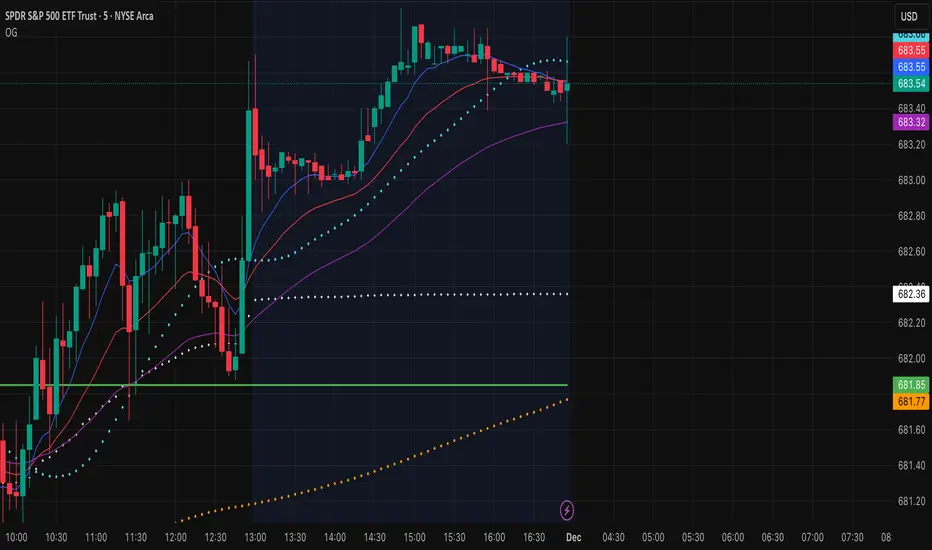
OG INDICATORTrade Legacy All-in-One Institutional Indicator
Unlock institutional-grade trading with this comprehensive Pine Script indicator. Seamlessly integrates multiple EMAs, SMAs, VWAPs, and ORB displays into one effortless panel—mimicking pro standards for quick, intuitive analysis.
Per Trade Legacy (Jackie): "This is the only indicator you need for profitability." Pair it with your strategy for powerful confluence, boosting edge and profits.
Simple setup, zero clutter. Premium access via invite-only.
5-Day SMAPine Script v5 indicator that plots a 5-day Simple Moving Average with configurable styling options:
Features:
5-Day SMA: Calculates the simple moving average of the closing price over 5 periods
Configurable Line Color: Choose any color for the line through the settings
Configurable Line Style: Select between Solid, Dashed, or Dotted lines
Line Width: Adjustable from 1 to 5 pixels
The SMA will automatically adjust to your chart's timeframe - whether you're viewing 1-minute, 1-hour, daily, or any other timeframe, it will calculate the moving average over the last 5 periods of that timeframe.

EMAs Bullish/Bearish Confluence [Trend Bias]EMA Confluence Zones
This indicator is designed to simplify trend identification by visually highlighting "Confluence Zones" —areas where short-term, medium-term, and long-term momentum are fully aligned.
While traders can manually add three Moving Averages to a chart, identifying the exact moment all three align (the "Perfect Stack") can be visually difficult during live trading. This script automates that process, converting complex line crosses into simple background color zones and providing actionable alerts for the exact moment a trend alignment begins.
🛠 How It Works
The script utilizes three customizable Exponential Moving Averages (EMAs) to detect the market bias:
Short EMA: Represents immediate price action/momentum.
Medium EMA: Represents the intermediate trend.
Long EMA: Represents the major trend baseline.
Calculations & Logic
The indicator checks for a specific hierarchical alignment (Stacking) of these averages:
1. 🟢 Bullish Confluence (Buy Zone):** Returns true when `Short > Medium` AND `Medium >Long`. This confirms that momentum is rising across all three monitored timeframes.
2. 🔴 Bearish Confluence (Sell Zone):** Returns true when `Short < Medium` AND `Medium < Long`. This confirms that momentum is falling across all three monitored timeframes.
3. ⚪ Neutral (No Color): Any other state indicates a choppy or consolidating market where the EMAs are intertwined.
---
🚀 Key Features
*Visual Bias Confirmation: The background highlights Green (Bullish) or Red (Bearish) only when the "Perfect Stack" conditions are met.
Trend Start Alerts: Unlike standard EMA cross alerts, this script includes custom alert conditions that trigger only on the first bar where the confluence becomes valid. This prevents spam alerts during a prolonged trend.
Full Customization: Users can adjust the lengths of all three EMAs to fit specific strategies (e.g., Scalping vs. Swing Trading).
Clean Chart Mode: Includes options to hide the EMA lines entirely and rely solely on the background color for a minimalist "Naked Trading" setup.
🎯 How to Use
1. Trend Filter: Use the background color to determine your directional bias. If the background is Green, look only for Long setups on lower timeframes. If Red, look only for Short setups.
2. Breakout Confirmation: If price breaks a key level, wait for the background color to flip. This confirms that the Moving Averages have caught up to the move, validating the breakout strength.
3. Exit Signal: If you are in a trend trade and the background color disappears (turns transparent), it indicates the trend momentum is fading and the EMAs are beginning to cross/compress.
⚙️ Settings
EMA Lengths: Default is 20, 50, 100. These can be changed to common combinations like (9, 21, 55) or (50, 100, 200).
Visuals: Toggle lines or background colors on/off and adjust transparency to keep your chart readable.
---
Disclaimer: This script is for informational purposes only. Past performance of a trend following method does not guarantee future results. Always use proper risk management.

The Magic MAOverview
The Magic MA is a smart, adaptive trend-following indicator designed to simplify market structure into a single, highly intuitive visual system. It blends multiple dynamic trend signals into one composite output — giving traders a clean view of momentum, direction, and overall trend health at a glance.
Instead of juggling multiple moving averages, The Magic MA condenses them into a unified scoring model that updates in real-time, highlighting when the market is strong, weakening, or about to shift.
How It Works
Powered by a proprietary algorithm, The Magic MA analyzes trend direction and momentum using three core concepts:
- Trend Slope — Are trends strengthening or losing steam?
- Market Positioning — Is price aligned with the dominant direction?
- Relative Trend Structure — Are short-term dynamics supporting or contradicting the larger move?
These components combine into a 0–100 trend score, continuously recalculated to reflect the live market environment.
The system adapts based on volatility and trend consistency — more responsive during strong moves, smoother when markets get noisy.
What You See
The Magic MA Line
A smoothed, adaptive trend baseline:
Green when upward momentum dominates
Red when downward momentum prevails
The Trend Fill
A color-graded zone that reveals trend strength:
Bright Green — Strong uptrend, momentum expanding
Green — Bullish bias, healthy trend
Orange — Neutral / transition zone
Red — Bearish conditions, momentum negative
The fill not only shows direction — its thickness can help gauge conviction in current price movement.
Trend Score Display
A clean scoreboard panel showing current trend strength (0–100) to support quick decision-making.
How To Use It
Trend Bias
Score > 70 → High-probability bullish environment
Score 50–70 → Favor long setups
Score 30–50 → Caution — market may be reversing or consolidating
Score < 30 → Bearish environment — avoid longs or consider shorts
Signal Concepts
Bullish trigger → Score rising above the midline with the Magic MA turning green
Bearish trigger → Score falling below the midline with the Magic MA turning red
Momentum exits → Trend score pulling back from extremes
Best Practices
Align trades with the trend fill direction
Use score shifts to confirm breakouts or reversals
Validate setups with structure levels (S/R, swing highs/lows)
Credits
Core logic draws inspiration from recognized adaptive trend research and digital signal processing techniques, including the work of Kaufman and Ehlers. Code by Alex Orekhov (everget) and LuxAlgo.

Sabitri GuideIndicator - "Sabitri Guide"
It's a colaboration of more than one Indicator.
Applicable for all sectors.
Just follow the signal.
After appear "Buy" signal when next green candle crosses high and close to the signal candle then active buy.
And after appear "Sell" signal when next red candle crosses low and close to the signal candle then active sell.
