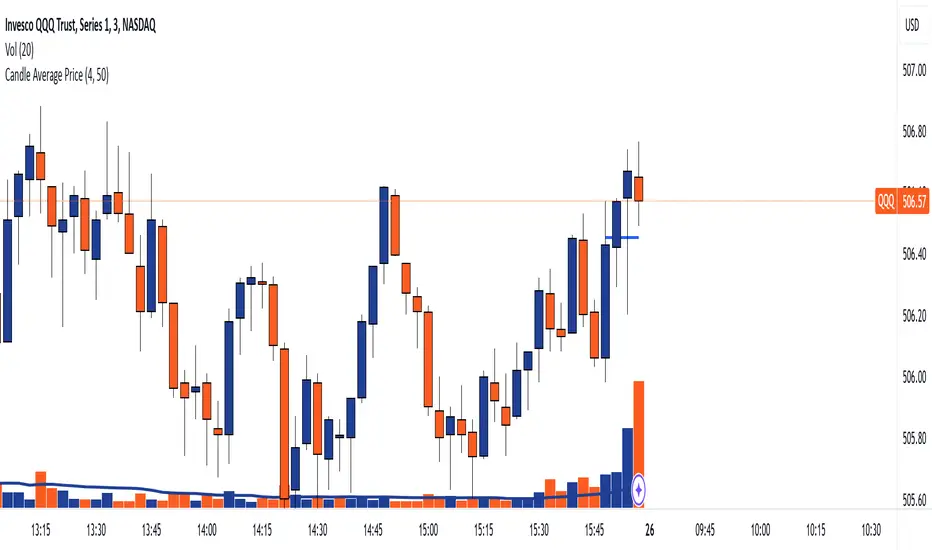
Jason's Simple Moving Averages WaveUnderstanding the Script:
Purpose: This script identifies potential trend direction and momentum using a moving average and wave amplitude calculation. It shows a green line when the price is trending upwards and a red line when trending downwards.
Strategy: This script doesn't provide a complete trading strategy. It's an indicator designed to be used alongside other tools.
Parameters: You can adjust the "Moving Average Length" input to change the sensitivity of the indicator. A shorter length will react quicker to price changes, while a longer length will be smoother but less responsive.
How to Use it:
Load the Script: In TradingView, navigate to the indicator creation section and paste the provided script code.
Adjust Parameters: Set the "Moving Average Length" based on your preferred timeframe and trading style.
Combine with Other Tools: Use the indicator along with other technical indicators or price action analysis to confirm potential entry and exit points for trades.
Here are some additional points to consider:
Crossovers: You could look for buy signals when the price crosses above the green line and sell signals when it crosses below the red line. However, these can be prone to false signals.
Divergence: Look for divergences between the price movement and the wave indicator. For example, a rising price with a falling wave could indicate overbought conditions and a potential reversal.
Confirmation: Don't rely solely on this indicator. Use it alongside other confirmations from price action, volume analysis, or other indicators to identify higher probability trades.
Important Note:
Recherche dans les scripts pour "the script"

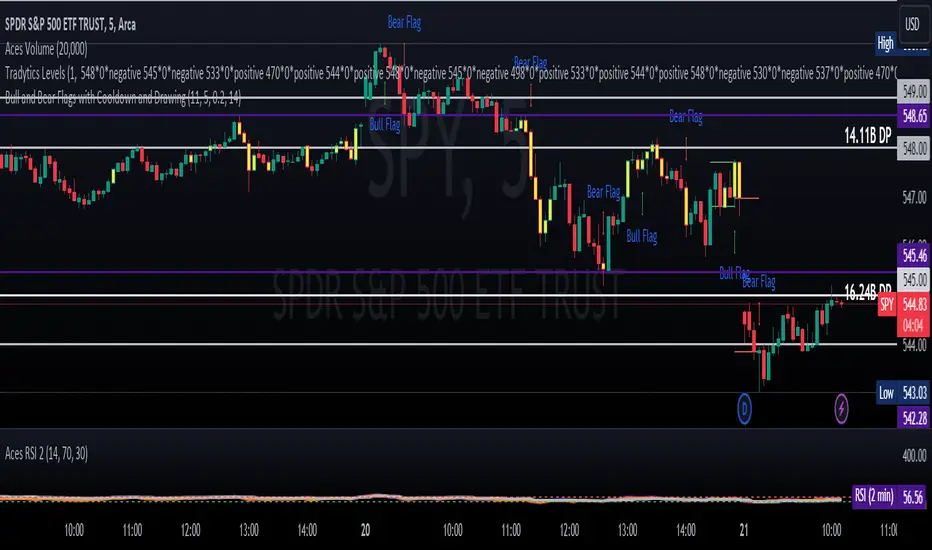
ET's FlagsPurpose:
This Pine Script is designed for the TradingView platform to identify and visually highlight specific technical chart patterns known as "Bull Flags" and "Bear Flags" on financial charts. These patterns are significant in trading as they can indicate potential continuation trends after a brief consolidation. The script includes mechanisms to manage signal frequency through a cooldown period, ensuring that the trading signals are not excessively frequent and are easier to interpret.
Functionality:
Input Parameters:
flagpole_length: Defines the number of bars to consider when identifying the initial surge in price, known as the flagpole.
flag_length: Determines the number of bars over which the flag itself is identified, representing a period of consolidation.
percent_change: Sets the minimum percentage change required to validate the presence of a flagpole.
cooldown_period: Specifies the number of bars to wait before another flag can be identified, reducing the risk of overlapping signals.
Percentage Change Calculation:
The script calculates the percentage change between two price points using a helper function percentChange(start, end). This function is crucial for determining whether the price movement within the specified flagpole_length meets the threshold set by percent_change, thus qualifying as a potential flagpole.
Flagpole Identification:
Bull Flagpole: Identified by finding the lowest close price over the flagpole_length and determining if the subsequent price rise meets or exceeds the specified percent_change.
Bear Flagpole: Identified by finding the highest close price over the flagpole_length and checking if the subsequent price drop is sufficient as per the percent_change.
Flag Identification:
After identifying a flagpole, the script assesses if the price action within the next flag_length bars consolidates in a manner that fits a flag pattern. This involves checking if the price fluctuation stays within the bounds set by the percent_change.
Signal Plotting:
If a bull or bear flag pattern is confirmed, and the cooldown period has passed since the last flag of the same type was identified, the script plots a visual shape on the chart:
Green shapes below the price bar for Bull Flags.
Red shapes above the price bar for Bear Flags.
Line Drawing:
For enhanced visualization, the script draws lines at the high and low prices of the flag during its formation period. This visually represents the consolidation phase of the flag pattern.
Debugging Labels:
The script optionally displays labels at the flag formation points, showing the exact percentage change achieved during the flagpole formation. This feature aids users in understanding why a particular segment of the price chart was identified as a flag.
Compliance and Usage:
This script does not automate trading but provides visual aids and potential signals based on historical price analysis. It adheres to TradingView's scripting policies by only accessing publicly available price data and user-defined parameters without executing trades or accessing any external data.
Conclusion:
This Pine Script is a powerful tool for traders who follow technical analysis, offering a clear, automated way to spot potential continuation patterns in the markets they monitor. By emphasizing visual clarity and reducing signal redundancy through cooldown periods, the script enhances decision-making processes for chart analysis on TradingView.
Smart Money Analysis with Golden/Death Cross [YourTradingSensei]Description of the script "Smart Money Analysis with Golden/Death Cross":
This TradingView script is designed for market analysis based on the concept of "Smart Money" and includes the detection of Golden Cross and Death Cross signals.
Key features of the script:
Moving Averages (SMA):
Two moving averages are calculated: a short-term (50 periods) and a long-term (200 periods).
The intersections of these moving averages are used to determine Golden Cross and Death Cross signals.
High Volume:
The current trading volume is analyzed.
Periods of high volume are identified when the current volume exceeds the average volume by a specified multiplier.
Support and Resistance Levels:
Key support and resistance levels are determined based on the highest and lowest prices over a specified period.
Buy and Sell Signals:
Buy and sell signals are generated based on moving average crossovers, high volume, and the closing price relative to key levels.
Golden Cross and Death Cross:
A Golden Cross occurs when the short-term moving average crosses above the long-term moving average.
A Death Cross occurs when the short-term moving average crosses below the long-term moving average.
These signals are displayed on the chart with text color changes for better visualization.
Using the script:
The script helps traders visualize key signals and levels, aiding in making informed trading decisions based on the behavior of major market players and technical analysis.
Custom candle lighting(CCL) © 2024 by YourTradingSensei is licensed under CC BY-NC-SA 4.0. To view a copy of this license.

Liquidations Meter [LuxAlgo]The Liquidation Meter aims to gauge the momentum of the bar, identify the strength of the bulls and bears, and more importantly identify probable exhaustion/reversals by measuring probable liquidations.
🔶 USAGE
This tool includes many features related to the concept of liquidation. The two core ones are the liquidation meter and liquidation price calculator, highlighted below.
🔹 Liquidation Meter
The liquidation meter presents liquidations on the price chart by measuring the highest leverage value of longs and shorts that have been potentially liquidated on the last chart bar, hence allowing traders to:
gauge the momentum of the bar.
identify the strength of the bulls and bears.
identify probable reversal/exhaustion points.
Liquidation of low-leveraged positions can be indicative of exhaustion.
🔹 Liquidation Price Calculator
A liquidation price calculator might come in handy when you need to calculate at what price level your leveraged position in Crypto, Forex, Stocks, or any other asset class gets liquidated to add a protective stop to mitigate risk. Monitoring an open position gets easier if the trader can calculate the total risk in order for them to choose the right amount of margin and leverage.
Liquidation price is the distance from the trader's entry price to the price where trader's leveraged position gets liquidated due to a loss. As the leverage is increased, the distance from trader's entry price to the liquidation price shrinks.
While you have one or several trades open you can quickly check their liquidation levels and determine which one of the trades is closest to their liquidation price.
If you are a day trader that uses leverage and you want to know which trade has the best outlook you can calculate the liquidation price to see which one of the trades looks best.
🔹 Dashboard
The bar statistics option enables measuring and presenting trading activity, volatility, and probable liquidations for the last chart bar.
🔶 DETAILS
It's important to note that liquidation price calculator tool uses a formula to calculate the liquidation price based on the entry price + leverage ratio.
Other factors such as leveraged fees, position size, and other interest payments have been excluded since they are variables that don’t directly affect the level of liquidation of a leveraged position.
The calculator also assumes that traders are using an isolated margin for one single position and does not take into consideration the additional margin they might have in their account.
🔹Liquidation price formula
the liquidation distance in percentage = 100 / leverage ratio
the liquidation distance in price = current asset price x the liquidation distance in percentage
the liquidation price (longs) = current asset price – the liquidation distance in price
the liquidation price (shorts) = current asset price + the liquidation distance in price
or simply
the liquidation price (longs) = entry price * (1 – 1 / leverage ratio)
the liquidation price (shorts) = entry price * (1 + 1 / leverage ratio)
Example:
Let’s say that you are trading a leverage ratio of 1:20. The first step is to calculate the distance to your liquidation point in percentage.
the liquidation distance in percentage = 100 / 20 = 5%
Now you know that your liquidation price is 5% away from your entry price. Let's calculate 5% below and above the entry price of the asset you are currently trading. As an example, we assume that you are trading bitcoin which is currently priced at $35000.
the liquidation distance in price = $35000 x 0.05 = $1750
Finally, calculate liquidation prices.
the liquidation price (longs) = $35000 – $1750 = $33250
the liquidation price (short) = $35000 + $1750 = $36750
In this example, short liquidation price is $36750 and long liquidation price is $33250.
🔹How leverage ratio affects the liquidation price
The entry price is the starting point of the calculation and it is from here that the liquidation price is calculated, where the leverage ratio has a direct impact on the liquidation price since the more you borrow the less “wiggle-room” your trade has.
An increase in leverage will subsequently reduce the distance to full liquidation. On the contrary, choosing a lower leverage ratio will give the position more room to move on.
🔶 SETTINGS
🔹Liquidations Meter
Base Price: The option where to set the reference/base price.
🔹Liquidation Price Calculator
Liquidation Price Calculator: Toggles the visibility of the calculator. Details and assumptions made during the calculations are stated in the tooltip of the option.
Entry Price: The option where to set the entry price, a value of 0 will use the current closing price. Details are given in the tooltip of the option.
Leverage: The option where to set the leverage value.
Show Calculated Liquidation Prices on the Chart: Toggles the visibility of the liquidation prices on the price chart.
🔹Dashboard
Show Bar Statistics: Toggles the visibility of the last bar statistics.
🔹Others
Liquidations Meter Text Size: Liquidations Meter text size.
Liquidations Meter Offset: Liquidations Meter offset.
Dashboard/Calculator Placement: Dashboard/calculator position on the chart.
Dashboard/Calculator Text Size: Dashboard text size.
🔶 RELATED SCRIPTS
Here are some of the scripts that are related to the liquidation and liquidity concept, for more and other conceptual scripts you are kindly invited to visit LuxAlgo-Scripts .
Liquidation-Levels
Liquidations-Real-Time
Buyside-Sellside-Liquidity

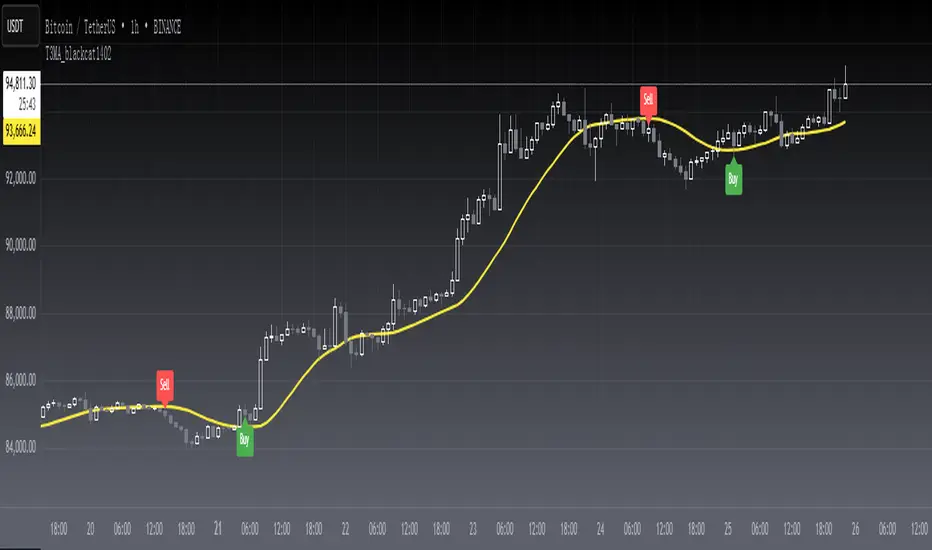
[blackcat] L1 T3 MA Lite Version
Tilson T3 Moving Average (T3MA) is a type of moving average line designed to reduce lag and improve the accuracy of trend identification. It is based on a combination of multiple smoothed moving averages, with each subsequent smoothed moving average having a higher weight than the previous one. The T3MA formula includes three different smoothing coefficients and a volume coefficient or volatility coefficient, which can be adjusted according to user preferences. T3MA is commonly used by traders and investors to identify trends and generate trading signals.
The calculation method for T3MA requires the use of exponential moving averages (EMA). In Pine scripts in the TradingView community, over 90% of them use the EMA function to calculate T3MA. Specifically, in Pine scripts, it is necessary to define the length and volatility coefficient of T3MA, then calculate three different lengths of EMA separately. Next, three constants need to be calculated that are related to volatility. Finally, the weighted average value of the three EMAs and three constants is added together to obtain the value of T3MA. If you want to customize the length and volatility of T3MA, you just need to modify the parameters in the code. Overall, T3MA is a very useful technical indicator that can help traders better understand market trends and improve trading efficiency.
The improved version introduced today mainly addresses my perception that traditional T3 algorithms are too redundant with high computational complexity leading to delayed reactions. Therefore, I have developed a lightweight version called L1 T3 MA Lite Version. This doesn't bring about any qualitative changes; it simply makes adjustments in terms of computational resources and response speed. To illustrate its advantages compared with traditional T3 MA indicators, I will provide a comparison using Everget's script from TradingView community blogger everget.
The difference between these two scripts for calculating T3 Moving Average lies in their implementation methods. The first script (Everget) uses a more complex calculation formula, which requires calculating three different lengths of EMA and computing three constants based on volatility. Finally, they are weighted averaged to obtain T3MA. This complex calculation formula can enhance the sensitivity of the T3MA indicator, thereby better identifying price trends. On the other hand, the second script (Blackcat1402) uses a relatively simple calculation formula that only requires calculating three different lengths of EMA and computing three constants based on volatility. Finally, they are weighted averaged to obtain T3MA as well. This simple calculation formula reduces computational complexity and speeds up calculations. Both have slightly different effects and calculation methods; users can choose the script that suits their needs.
In summary, T3 Moving Average is a very useful technical indicator that can help traders better understand market trends and improve trading efficiency. Users can choose scripts suitable for themselves according to their needs and flexibly adjust the length and volatility coefficient of T3MA to adapt to different markets.
BUY/SELL + ADVANCE DECLINEThis script is a custom trading view indicator that helps to identify potential buy and sell signals based on the RSI (Relative Strength Index) and SMA (Simple Moving Average) indicators. The script also identifies potential reversals using a combination of RSI and price action. It plots buy, sell, and reversal signals on the chart along with an SMA line. Additionally, it provides alerts based on the buy, sell, and reversal conditions.
Changes made to the original script:
Fixed the undeclared identifier 'c' error by calculating the difference between the current closing price and the previous closing price: c = close - close .
Added an "ADD Value Floating Label" to the chart. The label shows the difference between the current and previous closing prices (ADD value) along with a "Bullish" or "Bearish" indicator based on the value of 'c'. The label is positioned at the top right of the visible chart area and remains static.
Here's a summary of the major components of the script:
Input settings: Define the input parameters for RSI and SMA.
Calculation of RSI and SMA: Compute the RSI and SMA values based on the input parameters.
Color definitions: Define colors for different conditions and levels.
Condition definitions: Define various conditions for buy, sell, reversal, and other criteria.
Buy and sell conditions: Determine buy and sell signals based on RSI, SMA, and price action.
Reversal conditions: Identify potential reversals using RSI and price action.
Plot signals: Display buy, sell, and reversal signals on the chart.
Bar colors: Color the bars based on the identified signals.
Plot SMA: Display the SMA line on the chart.
Alert conditions: Set up alerts for buy, sell, and reversal conditions.
ADD Value Floating Label: Add a label to the chart showing the ADD value and a "Bullish" or "Bearish" indicator.

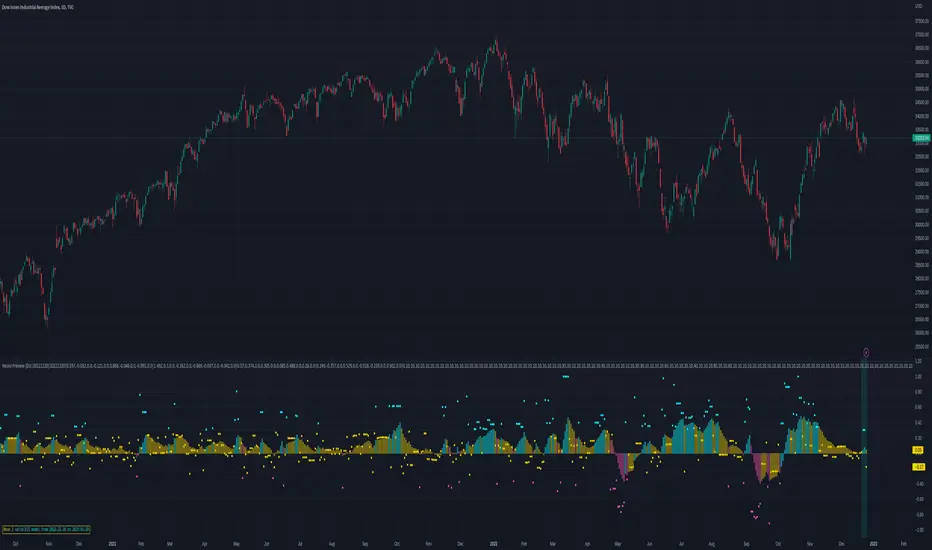
Neon Juliet - PreviewThere is no TLDR, but there is a summary at the end. I strongly encourage to read full description before trying it out. Enjoy!
Background
=========
Having successful and adamant trading systems typically consists of two (oversimplified) elements: signals and risk management system. In most zero-sum games, such as trading, signals must offer an advantage against the market, and risk management system provides a safety mechanism to allow the system to exist in the future. Let me explain.
Say, I have a solid risk management system: it is diversified, with take profit and stop loss thresholds set for low risk, on average I trade less than 3% of my assets, and there’s a loss recovery mechanism, etc. Hypothetically, it’s pristine. Now, let’s trade this portfolio against a flip of a coin, essentially a signal that provides 50% probability of things turning out in my favour. How profitable is such system? My answer: it isn’t. I might be able to sustain this system for some time, but eventually this system is going to have to loosen risk restrictions to stay ahead of the commissions and borrowing costs, resulting in overtime detrimental trend.
Conversely, if the signals provide greater than 50% confidence of things turning out in my favour, but risk management is poor, I’d expect such system to end up in a disaster soon, perhaps after a few euphoric gains. (I’d isolate a top-notch signals, say >90% confidence, in another bucket, but this idealistic system is non-achievable in my practice, so I’ll leave it be)
Neon Juliet was developed to offer an advantage against given markets. Probabilities generated by this model are statistical historical outcomes. This model developed using only price action and is unable to consume any other data or price data across instruments. In other words, it doesn’t know anything you don’t see already on a chart.
Neon J performs best on complex instruments where there’s great diversity of actors and considerable daily volume .
Methodology
==========
In principle, Neon J is based on Bayes’ Theorem. Simply put, prior knowledge of price action ( aka patterns) provides basis for probability of future price action development (ex. long or short trend).
The training process is implemented outside of this script mainly due to Pine Script limitations. This script, however, contains inference portion of the model.
As input for training, daily candle data is used. From this data, feature engineering step of the training develops features, like price average divergence/convergence (think MACD ), price strength (think RSI , ADX ); multiple periods used to diversify long and short patterns. This is done to develop a “state” that is reflective of recent price development. Ex. what we’d call a trend is just a strong and consistent upward price action, but we’d need to look at most recent N candles and their pattern to know that.
Once features are developed, I train a model using Reinforcement Learning technique. Simply put, this technique allows an agent to interact with a trading simulator and take actions (ex. go long, go short, etc.). After many iterations, the agent learns conditions (patterns) that lead to positive outcomes and those that lead to negative outcomes. This learning is quantitative, which means there’s a way to tell which probabilities are strong and which are weak. These probabilities are indicated by this script.
Trained Neon J models are instruments-specific. Meaning, that model for DJI is not compatible with SP500 or any other instrument. Experimentally, I proved that such approach over-performs generalizable models (those that are trained on data from multiple instruments)
Neon J currently only support daily time frame. The limitation is purely practical to reduce the development load and model size.
Results
======
Tests show 60%-70% success rate (on average, some instruments are worse than that, some better) of individual signal when threshold is set to 0.3 (roughly equivalent to 65% probability). This is calculated with Pine Script Strategy with the following entry/exit rules:
Entry when individual signal (a dot) is above 0.3 (long) or below -0.3 (short)
Exit when 14-period smooth signal (a column) is above 0.0 (short exit) or below 0.0 (long exit)
No stop loss or take profit levels.
Pyramiding is set to 100 (to allow unrestricted action of all signals)
All trades are closed on last tested bar (to conclude all signals in-flight)
Percent Profitable is what we take as success rate in the context of this assessment. This number represents how many signals were profitable vs all signals actioned.
It is also worth noting that this assessment was performed on a time period previously unseen by the model. Simply put, we only train a model with data up until date X, then we test starting from date X onward. This ensures that the assessment is unbiased by the model already “knowing” the future. In practice, this gives confidence that future (unknown) market dynamics is going to be representative of our test results.
Be aware, the above “strategy” is not my recommended usage of this signal, it is simply an assessment technique that is meant to be as simple and unconstrained as possible.
How to use this script
================
The script calculates a probability. A term probability here is used in a loose form and means “a numeric value in roughly -1 to 1 space that represents the likelyhood of bullish or bearish price action”. Keep in mind that probability values can go over 1.0 or below -1.0. This is due to the fact that these value are normalized to -1/1 space using 95-percentile (this detail is largely unimportant for usability’s sake).
Indications
--------------
Dots (circles) indicate individual probability value on any given bar. Indicated value on a given bar indicates the probability of future price action. High (positive) values indicate high probability of long action in the future. Low (negative) values indicate high probability of short action in the future. You should interpret future as a gradient (a trend developing slowly over time) instead of being isolated to what’s immediately follows (ex. next bar)
Columns (histogram) provided as convenient view of smoothed probabilities of last N bars. This is controlled by the Smoothing parameter and defaults to 14.
Parameters
---------------
Model parameter is the backbone of this script. It is a required parameter and it is unique for each instrument. Example models provided at the end (see below). This parameter is a long 10000+ character representation of a model.
The script has two additional parameters for configuring interpretation: Threshold and Smoothing.
Threshold controls the level at which values change color (ex. above 0.3, turn neon blue, and below -0.3 turn neon purple).
Smoothing parameter provides a way to smooth out individual probabilities into a exponential moving average with the periods provided. This average is indicated using columns on the indicator.
Model expiration
----------------------
Models are valid for 1 month after training. This is done by design to prevent model deterioration. A month is proven to be a maximum period of time to hold model performance steady. After that, deterioration is likely to occur. Optimal time for model lifetime is 10 days (this is what I use for live trading), and of course most optimal (but unpractical for now) is to re-train daily.
Validity indicated with blue-tinted indicator background, while red-tinted background indicates expired period.
Preview
======
This script is released as a public script for anyone to try. My motives for this release are two-fold:
To subject the model to a variety of conditions, including traders with different experiences trading different instruments (subject to specific models offered of course). Essentially, my own testing is not enough to grasp a full breadths of scenarios. I’d like to harden it and understand where it is strong and where it might fall short (pun intended).
Get an idea on how Neon J might be useful when making trading decision. I tried to make the representation of the signals unconstrained and unopinionated, so there’s room to explore and experiment. I found that Neon J can be packaged in a number of different ways.
At this moment the script is closed-source. I might consider open-sourcing this script in future depending on how much feedback I get from this submission and whether it’d be deemed useful to others.
Summary
=======
Neon J is a set of probabilistic models for predicting future price action with ~65% accuracy. It indicates individual signals (circles) for probability of price action in a foreseeable future, while smoothed signals (columns) are provided for a more dynamic view of probable price action. Blue circle - strong long probability; Purple circle - strong short probability. Blue column - strong long trend ahead or in-progress; Purple column - strong short trend ahead or in-progress.
To use it, copy models below and provide them an input to “model” parameter when applying to a chart. Models are instrument-specific. Only daily (D) charts should be used.
The script is provided for evaluation purposes.
Models!
======
At last, here are the models (a piece of text you need to input in script parameters for each instrument)
TVC:DJI :
DJI|20121220|20221220|0.597,-0.032,0.0,-0.121,0.0,0.866,-0.046,0.0,-0.091,0.0|1.492,0.1,0.0,-0.162,0.0,-0.669,-0.037,0.0,-0.042,0.0|0.07,0.374,0.0,0.305,0.0,0.085,0.488,0.0,0.26,0.0|0.249,-0.257,0.0,0.529,0.0,-0.018,-0.233,0.0,0.502,0.0|0,10,10,10,10,10,10,10,10,10,10,10,10,10,10,10,10,10,10,10,10,10,10,10,10,10,10,10,10,10,10,10,10,30,10,10,10,10,10,10,10,30,10,10,10,10,10,10,30,30,10,10,10,10,60,10,10,10,20,10,40,10,10,10,80,10,10,60,10,10,10,10,10,10,20,10,10,10,10,10,10,10,10,20,20,10,10,10,10,10,10,20,10,10,10,10,10,10,10,10,20,10,10,10,10,10,10,10,10,10,10,10,10,10,10,10,10,10,10,10,10,10,10,10,10,10,10,10,10,10,10,20,10,10,10,20,10,10,10,20,10,10,10,10,20,10,20,10,10,10,10,10,10,10,10,10,10,10,10,10,10,10,10,10,10,10,10,10,10,10,10,10,10,10,30,10,10,10,10,20,50,10,10,10,10,10,10,30,10,10,10,10,10,10,10,30,10,10,10,10,10,10,10,10,10,10,10,10,10,10,30,10,10,10,10,10,10,10,10,10,10,10,10,10,10,10,10,10,10,20,10,10,10,10,10,10,10,20,10,10,10,10,10,10,10,10,10,20,30,10,10,10,10,10,50,10,10,10,10,60,10,10,10,10,10,40,10,10,10,10,10,20,30,10,10,10,10,60,10,10,10,10,10,20,10,10,10,10,10,10,10,40,10,10,10,10,10,10,10,30,10,10,10,10,10,10,10,20,10,10,10,10,10,10,10,10,10,30,10,10,10,10,10,10,10,40,10,10,10,10,10,10,40,10,10,10,10,10,50,10,10,10,10,10,50,10,10,10,10,50,10,10,10,10,10,40,10,10,10,10,10,10,40,10,10,10,10,10,10,40,10,10,10,10,10,10,10,30,10,10,10,10,10,10,10,20,20,10,10,10,10,10,10,10,20,10,10,10,10,10,10,10,40,10,10,10,10,10,10,40,10,10,10,10,10,10,30,10,10,10,10,10,10,40,10,10,10,10,10,40,10,10,10,10,10,10,10,30,10,10,10,10,10,10,20,20,10,10,10,10,10,10,10,10,10,10,10,10,10,10,10,10,10,10,10,10,10,10,10,10,10,10,10,10,10,10,10,10,10,10,10,10,10,10,10,10,10,10,10,10,10,10,10,10,10,20,10,10,10,10,10,10,10,10,10,10,10,10,10,10,10,10,10,10,10,10,10,10,10,10,10,30,10,10,10,10,10,10,10,20,10,10,10,10,10,10,20,10,10,10,10,10,10,10,10,10,10,10,10,10,10,10,10,10,10,10,10,10,10,10,10,10,10,10,10,10,10,10,20,10,10,10,10,10,10,10,20,10,10,10,10,10,10,10,10,20,20,10,10,10,10,10,10,10,20,10,10,10,10,10,10,10,10,10,10,10,10,10,10,10,10,10,30,10,10,10,10,10,10,40,10,10,10,10,10,20,20,10,10,10,10,10,10,40,10,10,10,10,10,10,10,10,30,10,10,10,10,10,30,20,10,10,10,10,10,20,20,10,10,10,10,10,10,10,10,30,10,10,10,10,10,10,10,10,10,10,10,10,10,10,10,10,10,20,10,10,10,10,10,10,10,30,10,10,10,10,10,10,40,10,10,10,10,10,10,40,10,10,10,10,10,50,10,10,10,10,20,40,10,10,10,70,10,10,10,10,60,10,10,10,10,10,10,40,10,10,10,10,10,10,10,10,20,10,10,10,10,10,10,10,30,10,10,10,10,10,10,40,10,10,10,10,10,10,40,10,10,10,10,10,50,10,10,10,10,70,10,10,10|-645,-188,-7,-97,-4,29,-18,90,60,-7,-30,117,-226,-82,-49,77,-245,53,78,221,-72,280,245,400,683,268,-74,-15,-106,-102,-3,251,302,536,47,3,-6,-179,-56,101,-62,172,176,98,-15,-71,-18,200,61,-249,-30,-38,1,94,-2,-9,47,79,-35,-15,34,-30,76,120,39,96,-47,-11,-61,-21,124,-704,0,-248,112,-193,143,-27,-14,133,170,-20,-17,-2,-120,61,-98,-32,-2,79,-2,109,-35,-16,132,-44,-63,-168,205,-28,919,235,-34,-53,-23,-243,-68,-26,-35,-54,60,-37,28,-91,-3,-21,-47,79,-127,229,61,59,-49,-139,-63,-43,91,201,-19,-80,-27,120,-122,-141,-100,-32,-25,-98,-27,50,-2,-65,-138,-7,-36,-9,53,-36,-36,-64,-11,216,-5,-664,-19,74,82,-83,-3,-66,21,386,-454,-1002,-282,-7,-52,-30,-9,-16,-148,-131,112,-484,-96,97,93,-13,-162,-49,38,31,-5,-199,-22,205,153,-29,14,-41,-222,-225,-145,107,70,-3,-8,-7,-20,-247,37,96,268,362,-95,706,-69,60,70,120,-34,-65,-152,-69,-7,69,-76,71,-5,384,109,-102,-484,-3,34,60,-20,380,244,678,292,-48,-2,-154,-17,-62,105,486,597,212,-26,-21,-310,-29,-22,-90,285,-204,-92,-290,-6,-516,-42,-16,127,-47,-7,-72,-247,76,-47,-13,43,-26,43,89,-38,30,-21,-106,-78,113,-19,-13,-8,-12,-12,362,247,-4,50,76,64,-14,-52,-16,-93,-172,53,-1,32,99,22,-75,-4,-9,31,70,116,-54,-61,-3,-55,-19,-15,176,143,-11,134,144,-11,-28,-47,-29,-136,-75,99,64,-9,-2,-24,-43,30,-161,-179,82,175,129,115,-71,-396,-202,101,-9,139,-6,-31,-312,-111,2,0,-234,-21,-52,-31,-12,-26,-37,-144,-23,68,23,-16,149,60,-64,10,-7,-8,46,210,393,-5,96,-56,89,48,475,176,20,-10,-31,-29,34,76,41,178,38,-32,-94,-33,76,-5,91,-15,123,72,-46,-13,-11,0,-37,-244,-161,155,-8,-3,165,23,77,16,-117,35,-74,-5,-107,-286,-24,-263,-14,-37,-5,-196,-290,-576,-188,41,-20,-98,-34,-45,-45,-242,40,60,-7,-10,-17,-43,73,48,-25,-8,-40,-27,-2,-5,42,73,-6,-23,8,-16,63,167,21,-99,-47,-119,-36,-59,192,158,115,123,54,-28,-1,-90,-169,-71,-72,114,156,-141,155,64,42,-88,69,-75,76,94,-4,65,102,152,-9,10,-17,-192,67,-10,-343,-90,-43,-106,12,-9,-79,-10,-73,-461,-509,-75,99,-57,0,-27,80,-156,-198,-642,-363,33,47,-28,-40,-43,-8,9,-27,-67,41,26,0,6,-49,-29,-60,32,70,34,-2,-9,-40,-240,-152,21,189,49,67,12,-12,-2,16,31,200,193,211,-150,-84,-45,58,75,44,260,128,105,-9,-11,-1,82,-94,184,-53,266,326,-55,-209,-9,54,85,308,-14,60,420,160,-39,-81,-17,-10,77,108,-28,257,-104,-53,-59,-128,-5,-13,8,119,-20,-130,-49,-9,-3,-23,-46,150,194,263,-214,-12,72,-6,-22,25,-10,290,-41,-21,-18,-1,-17,-42,-14,-21,0,-4,-23,-1,-1,-13,172,-9,224,86,-9,-2,-22,176,-6,33,186,-61,-187,-46,-33,94,172,0,16,-12,-37,59,103,118,194,1000,44,40,49,81,82,89,142,-34,-26,-2,-15,-19,0,271,-56,-45,-21,-96,-146,-5,-54,141,-11,-320,58,-23,-43,-14,-49,142,127,120,-285,-187,-102,-72,-11,-55,-25,44,52,-43,-13,20,-41,-23,-88,-25,-4,-23,11,-179,-9,96,-84,215,93,-5,-49,148,-2,-58,-14,24,-6,-33,-6,103,9,0,-61,-1,29,113,98,-97,-19,-52,87,-39,-146,-70,-72,-119,-844,-184,-45,-27,-96,-155,93,-56,-41,-20,-43,-63,-142,-89,263,66,21,-21,-32,-70,-70,-263,20,-99,-11,-32,-50,-122,-186,-159,-137,136,-77,-14,-814,-23,-22,-170,-137,-42,-36,-64,75,-123,-100,-53,68,133,124,-77,211,217,522|0,10,10,10,10,10,10,10,10,10,10,10,10,10,10,10,10,10,10,10,10,10,10,10,10,10,10,10,10,10,10,10,10,20,10,10,10,10,10,10,10,10,30,10,10,10,10,10,10,30,20,10,10,10,10,10,60,10,10,10,20,10,40,10,10,10,30,50,10,10,50,10,10,10,10,10,10,10,20,10,10,10,10,10,10,10,10,20,10,20,10,10,10,10,10,10,10,10,10,10,10,10,10,10,10,20,10,10,10,10,10,10,10,10,10,10,10,10,10,10,10,10,10,10,10,10,10,10,10,10,10,10,10,10,20,20,10,10,10,10,10,10,10,10,20,10,10,10,10,20,10,10,10,10,10,10,10,10,20,10,10,10,10,10,10,10,10,10,10,10,10,10,10,10,10,10,10,10,10,30,10,10,10,10,20,40,10,10,10,10,10,10,10,30,10,10,10,10,10,10,10,10,20,10,10,10,10,10,10,10,10,10,10,10,10,10,10,20,10,10,10,10,10,10,10,10,10,10,10,10,10,10,10,10,10,10,10,20,10,10,10,10,10,10,10,20,10,10,10,10,10,10,10,10,20,10,20,10,10,10,10,10,10,50,10,10,10,10,60,10,10,10,10,10,40,10,10,10,10,10,20,10,20,10,10,10,10,30,10,10,10,10,10,10,10,10,20,10,10,10,10,10,10,10,10,30,10,10,10,10,10,10,10,30,10,10,10,10,10,10,10,10,10,10,10,10,10,10,10,10,10,10,30,10,10,10,10,10,10,10,40,10,10,10,10,10,10,40,10,10,10,10,10,10,40,10,10,10,10,10,50,10,10,10,10,50,10,10,10,10,10,40,10,10,10,10,10,10,10,30,10,10,10,10,10,10,40,10,10,10,10,10,10,10,30,10,10,10,10,10,10,10,20,20,10,10,10,10,10,10,10,20,10,10,10,10,10,10,10,40,10,10,10,10,10,10,40,10,10,10,10,10,40,10,10,10,10,10,10,30,10,10,10,10,10,10,40,10,10,10,10,10,10,10,30,10,10,10,10,10,10,10,10,20,10,10,10,10,10,10,10,10,10,10,10,10,10,10,10,10,10,10,10,10,10,10,10,10,10,10,10,10,10,10,10,10,10,10,10,10,10,10,10,10,10,10,10,10,10,10,10,10,10,20,10,10,10,10,10,10,10,20,10,10,10,10,10,10,10,20,10,10,10,10,10,10,10,30,10,10,10,10,10,10,10,10,10,10,10,10,10,10,10,10,10,10,10,10,10,10,10,10,10,10,10,10,10,10,10,10,10,10,10,10,10,10,10,10,10,10,10,10,10,10,10,10,10,10,10,10,10,10,10,10,10,10,10,10,10,10,10,10,10,10,10,40,10,10,10,10,10,10,10,10,10,10,10,10,10,10,10,10,10,10,10,10,10,10,10,10,10,20,20,10,10,10,10,10,10,40,10,10,10,10,10,20,10,10,10,10,10,10,10,10,10,30,10,10,10,10,10,10,10,10,20,10,10,10,10,10,10,10,20,20,10,10,10,10,10,20,20,10,10,10,10,10,10,10,10,30,10,10,10,10,10,10,10,10,10,10,10,10,10,10,10,10,10,10,10,10,10,10,10,10,10,10,30,10,10,10,10,10,10,40,10,10,10,10,10,10,40,10,10,10,10,10,50,10,10,10,10,10,10,40,10,10,10,10,60,10,10,10,10,60,10,10,10,10,10,10,40,10,10,10,10,10,10,10,10,20,10,10,10,10,10,10,10,30,10,10,10,10,10,10,40,10,10,10,10,10,10,40,10,10,10,10,10,50,10,10,10,10,70,10,10,10|-73,-90,70,38,76,12,-269,-89,-47,-77,-43,-161,114,-83,-48,36,-18,-11,-2,-39,-239,-140,-40,-341,-106,-78,83,92,62,-34,-231,-381,-311,-15,-178,-49,-29,-29,-73,-44,-271,-2,-49,-102,-126,-65,-45,-51,-71,-75,-21,52,-19,-29,-24,-131,38,-79,-53,-8,271,43,-24,-60,-8,-8,-5,-15,8,21,-127,72,-16,-40,-43,-70,64,232,-28,172,-22,-27,-8,-100,-134,99,133,61,67,-37,-1,-7,-55,-75,108,-112,7,-70,469,-62,-12,116,-54,-259,-49,-150,-146,-58,-3,-5,-66,-45,-102,-17,-22,-71,-96,-27,0,-46,30,-22,-130,-233,-89,-189,-14,111,0,-9,12,-235,-178,-6,-9,27,-31,-70,-7,-7,-13,-71,27,-1,-14,-24,-101,-38,18,50,-79,-3,-191,-47,-2,-12,-12,112,24,-5,-93,-295,-80,0,-8,-1,115,112,200,235,114,67,-13,-37,-130,-96,85,71,232,141,-265,-137,-57,-8,81,391,-37,-68,-76,57,119,-240,-45,-102,53,40,-23,61,-71,-156,-26,-19,81,-123,-83,-59,104,0,-96,-7,-17,-34,-18,-11,0,-98,-52,-84,-8,-53,-11,48,-4,-34,-16,-143,-7,-31,-77,-44,-34,-15,-64,-65,-21,-152,-240,-26,-172,-50,-170,-32,-33,-1,-25,-15,-15,-91,-87,-231,-19,-34,-70,-59,55,17,-24,10,-29,-41,-2,-56,27,-134,-54,-41,-30,46,-3,-363,-20,-55,65,16,38,9,-79,-9,51,83,-97,-36,62,-5,-28,-73,-12,0,62,-198,-4,-20,-4,-17,-128,-34,68,-31,-247,-239,-21,-41,-93,-24,14,-81,-238,-165,-44,-40,-102,2,-99,661,-188,0,0,-9,-27,-20,27,33,639,-2,-20,-55,-99,-45,-31,-423,-152,-66,-30,-3,-86,-36,104,-45,-34,104,-227,-191,-80,-65,-56,-86,143,-26,-21,-80,-47,-23,73,165,-93,-7,-43,-9,70,123,-50,-5,-1,57,63,-36,-17,-62,-39,-14,-34,-5,-77,-37,-98,-45,-59,-49,4,-159,-74,-29,-16,-244,-486,-245,8,-13,-1,-34,-58,-182,-62,-695,372,44,-46,-5,-11,-156,-178,-64,-2,-67,-37,-24,-61,-57,-30,69,-27,-153,7,-19,-19,-78,-52,-31,231,-54,-18,-28,-40,51,117,117,-14,-84,-23,-38,134,197,-10,-51,-2,-71,-49,26,268,-15,-83,-49,-35,-29,-94,29,-39,-140,-167,-68,-1,-31,-120,0,74,-59,-116,-134,-37,-136,-154,-136,-303,6,44,-29,-32,-48,-7,-115,-667,-500,-242,0,-1,-30,-3,-21,119,-115,-565,-211,115,-9,-67,-84,-13,-68,-93,-80,-106,65,-8,-89,-417,-29,-27,-61,-27,-18,64,66,115,22,-57,-55,-1,-10,-18,-80,112,85,47,-28,-3,-75,-20,-69,-54,252,90,-63,-35,-12,-4,-15,-1,11,68,-23,-16,-95,-3,-3,-25,31,7,-101,-104,-63,-45,-91,-6,81,-6,-110,-70,49,-13,-85,-57,-179,-66,-92,-284,-152,-249,-80,45,-75,-158,-50,-115,-9,-22,-322,-124,-57,-64,-1,-100,-58,-104,-67,-106,-224,-45,287,-21,-314,-18,-50,-60,-19,-50,-74,-32,339,-8,-114,-164,-31,-16,-6,-37,-26,82,40,40,-13,-30,-75,-54,-124,-2,-37,-10,19,-67,-62,-307,-130,-153,44,-18,-15,-2,-5,-31,10,-11,-78,50,74,-1,-15,-35,-9,-29,-31,91,58,-45,-48,-14,-8,-123,-205,-7,-3,-15,-63,-17,-26,-48,-106,-153,-166,-7,-23,-116,-53,-50,-23,-6,-10,-22,3,-142,-251,-196,-80,-30,-21,75,-36,-6,-188,-28,-2,8,-6,-72,-40,-5,-49,-28,-4,-101,-12,49,33,-19,-96,-169,-58,-293,-201,-69,-25,-82,-17,0,-10,-149,-134,-41,-87,-12,-29,-10,-34,-30,35,59,-122,-5,9,24,0,-13,47,81,-47,104,-7,-17,-76,-34,-17,-49,-69,-47,-20,-26,-46,-49,-248,-35,51,-29,-15,-14,-9,-285,-46,-1,-51,-56,-45,-139,-17,-45,-22,-16,-35,-75,-5,-13,0,-5,-18,-13,2,-7,-10,89,-1,-3,-148,-16,-51,-5,-9,-10,33,37,-44,-125,-1,-7,-48,-20,-10,-1,61,65,100,43,-15,-6,-68,-9,-92,-47,-38,-47,-17,215,500,1000,45,-41,-45,-26,-91,73,24,-28,-27,-65,-102,-27,-96,-142,-34
VANTAGE:SP500 :
SP500|20121220|20221220|0.573,-0.033,0.0,-0.041,0.0,0.846,-0.045,0.0,-0.026,0.0|1.45,0.109,0.0,-0.119,0.0,-0.626,-0.007,0.0,-0.08,0.0|-0.06,0.475,0.0,0.142,0.0,0.089,0.612,0.0,0.13,0.0|0.214,-0.127,0.0,0.619,0.0,-0.057,-0.084,0.0,0.556,0.0|0,10,10,10,10,10,10,10,10,10,10,10,10,10,10,10,10,10,10,10,10,10,10,10,10,10,10,10,10,10,10,10,10,10,20,10,10,10,10,10,10,40,10,10,10,10,10,70,10,10,10,10,60,10,10,10,20,50,10,10,10,70,10,10,10,10,10,20,10,10,10,10,10,10,10,10,10,10,10,10,10,10,10,10,10,10,10,10,10,10,10,10,10,10,10,10,10,10,10,10,10,10,10,10,10,10,10,10,10,10,10,10,10,10,10,10,10,20,10,10,10,10,10,10,10,40,10,10,10,10,10,10,40,10,10,10,10,10,10,30,10,10,10,10,30,20,10,10,10,10,10,10,20,10,10,10,10,10,10,10,10,10,10,10,10,10,10,10,10,10,10,20,10,10,10,10,10,10,10,10,20,40,10,10,10,20,20,20,10,10,10,10,20,30,10,10,10,10,10,10,10,10,10,20,10,10,10,10,20,10,10,20,10,10,10,10,20,10,10,10,10,10,10,10,10,20,10,10,10,10,10,10,10,10,20,10,10,10,10,10,10,10,10,30,20,10,10,10,10,10,10,50,10,10,10,10,60,10,10,10,10,60,10,10,10,10,50,10,10,10,10,30,10,10,10,10,10,10,10,30,10,10,10,10,10,10,50,10,10,10,10,10,10,20,10,10,10,10,10,10,10,10,10,10,10,10,10,10,10,10,10,10,10,10,20,10,10,10,10,10,10,10,50,10,10,10,10,10,10,40,10,10,10,10,10,10,30,10,10,10,10,10,10,40,10,10,10,10,10,40,10,10,10,10,10,10,30,10,10,10,10,10,10,10,10,10,10,10,10,10,10,10,10,10,10,10,10,10,10,10,10,10,20,10,10,10,10,10,10,10,10,10,10,10,10,20,10,10,10,10,10,10,10,10,30,10,10,10,10,10,10,40,10,10,10,10,10,10,30,10,10,10,10,10,10,10,30,10,10,10,10,10,10,40,10,10,10,10,10,10,30,10,10,10,10,10,10,10,20,10,10,10,10,10,10,10,10,10,10,10,10,10,10,10,10,10,10,10,10,10,10,10,10,10,10,10,10,10,10,10,10,10,10,10,10,10,10,10,10,20,10,10,10,10,10,20,20,10,10,10,10,10,10,10,10,10,10,10,10,10,10,10,10,20,10,10,10,10,10,10,10,10,40,10,10,10,10,10,40,10,10,10,10,10,10,30,10,10,10,10,10,10,10,10,10,10,10,10,10,10,10,10,10,10,10,10,10,10,10,10,10,10,10,10,10,20,10,10,10,10,10,10,10,20,10,10,10,10,10,10,10,30,10,10,10,10,10,10,10,10,10,10,10,10,10,10,10,10,10,10,10,10,10,10,10,10,10,10,10,10,10,10,10,10,10,10,10,10,10,40,10,10,10,10,10,40,10,10,10,10,10,10,10,30,10,10,10,10,10,10,10,20,20,10,10,10,10,10,10,10,20,10,10,10,10,10,20,30,10,10,10,10,10,10,10,30,10,10,10,10,10,10,10,10,10,10,10,10,10,10,10,10,10,10,10,10,10,10,10,10,10,10,10,10,10,10,10,10,10,10,10,10,10,10,10,10,10,10,10,10,10,10,40,10,10,10,10,10,10,40,10,10,10,10,10,60,10,10,10,10,10,10,30,10,10,10,10,10,50,10,10,10,10,10,10,40,10,10,10,10,10,10,10,30,10,10,10,10,10,10,10,10,10,10,10,10,10,10,10,10,10,10,10,10,10,10,10,10,10,10,10,30,10,10,10,10,10,50,10,10,10,10,10,50,10,10,10,10,70,20,10,10|-94,-209,311,137,89,-128,-228,-15,79,-81,-631,743,252,116,128,-196,-100,-101,-6,207,237,724,345,190,118,-290,-17,-163,-33,-37,140,425,736,-17,-22,-61,-5,-20,85,150,-15,102,274,179,4,-58,-30,-161,-71,-17,-31,-44,-107,53,-3,-19,7,93,-153,-32,-3,-46,-16,-9,71,-131,396,-13,34,-83,-15,-11,-17,72,-457,-143,-67,63,-207,-155,-223,-48,-762,266,-66,339,503,-54,-303,-173,-45,-58,-5,-52,624,1000,496,85,-173,-51,-58,-71,46,92,127,-32,-70,-1,-45,-63,-84,-102,-79,-117,-1,-114,-39,52,-12,-18,-13,-2,192,153,190,-120,-147,-13,-75,-9,-54,-31,-7,-128,-39,-97,60,-29,-24,-23,-173,-133,-241,-118,22,-2,1,-2,-48,-12,-23,-89,-23,-37,-33,-10,-5,-60,-28,-80,-113,-128,184,-170,-93,-50,-7,-43,-52,-87,-143,37,-100,-39,-239,-24,-154,82,-27,100,766,-51,-23,168,-29,138,-35,-50,42,71,-23,38,-23,57,131,-16,-35,-12,-54,-15,181,128,127,131,-19,-47,-108,-43,84,-152,-5,-7,-10,-8,-20,59,53,-269,-44,-7,-67,-26,-13,-10,-116,-21,-49,87,-19,-8,-31,-35,-38,-13,170,185,-54,-4,-56,-85,-108,-147,-19,-15,76,-9,-59,-100,-36,-39,-31,-18,141,66,-85,-27,44,123,123,-13,-8,36,-13,-39,-13,8,189,82,-17,-33,-5,146,-100,-29,64,-20,-53,-23,-97,-2,-77,-89,-5,-21,-132,-31,-15,-47,-1,-8,32,-13,-39,-42,-27,-43,12,-97,-35,-29,-18,-32,152,41,-13,-39,-14,-13,-36,-10,-37,-25,49,109,97,118,85,-56,-59,-74,-21,-167,-145,-12,-5,-29,-63,-107,202,-15,-33,-46,-63,-89,-97,-56,17,-25,-74,-2,-101,-210,-127,-96,-15,-59,-105,-24,-106,-37,-52,-2,-25,-27,-47,-5,14,-8,51,-6,-32,-5,23,-57,-32,-17,39,-4,-20,-28,-42,-23,101,-8,-11,-30,-25,-165,-113,-53,-82,-4,-52,-3,-5,21,-22,-333,-3,94,25,-33,-14,-83,26,-26,-41,-43,-36,63,9,-343,-304,-231,-15,-54,44,-127,-182,139,-83,25,-30,-14,-36,-32,-84,-138,23,-49,-13,-17,-139,-168,-146,-2,-46,-54,-34,-17,-40,-132,-149,-79,-40,-116,-65,-50,-124,-69,37,-21,-29,-6,-48,-232,-84,-59,-3,-6,-13,-11,1,-6,-133,-252,-12,-44,-114,-25,-120,-24,128,-27,-166,-36,-47,-65,-43,-15,-3,-88,-170,-209,-58,-185,-101,-120,-106,65,-21,-40,-12,87,-104,-31,-333,-272,-177,43,-75,-89,-41,-65,-52,-29,3,-10,-44,-18,-11,-7,-46,-37,-7,-5,27,-19,-8,-55,85,54,-6,-141,19,-19,-19,-6,-55,1,-36,-148,-22,-66,-107,-13,-197,-36,39,117,94,31,-20,94,238,48,-18,-41,-9,-1,-24,-30,9,-6,232,-16,-16,79,-27,13,-15,-15,194,223,344,212,-33,13,49,136,-5,-7,227,-82,-42,155,65,86,-24,71,-38,-38,-10,-209,17,0,-41,-19,-87,-36,-18,-108,69,-38,-11,-25,-31,70,-10,135,62,-133,85,-1,-10,-14,-97,82,-5,-16,-81,-390,-83,-1,-35,-27,-115,-92,-4,130,145,-337,0,-1,-59,-32,-120,169,14,-34,25,-14,-30,7,-24,59,-5,35,-8,-11,-11,155,179,100,80,17,-6,-5,-46,-1,566,396,41,-13,-63,-10,53,60,253,820,325,202,-120,-23,18,-136,-42,6,-85,-26,-54,-60,0,14,-26,144,-24,-84,-12,-37,-37,25,134,157,-3,181,-23,-64,34,-10,53,-122,126,173,277,-323,-76,11,-8,-31,0,-5,156,-40,202,47,-33,22,-88,-127,-89,-171,-4,186,213,-24,-1,0,-17,-34,80,155,-53,-51,-113,-57,-36,-2,73,24,65,36,-21,191,-12,-42,-13,-16,-18,-13,90,541,125,-39,-1,-398,-43,-65,-496,-1,-11,-35,-21,-4,-68,-56,-78,66,-19,-51,51,39,330,-34,-173,11,18,-7,-24,-51,400,-19,173,-54,-208,-48,-29,-184,-34,-234,-26,178,178,-2,-63,-54,-71,-58,-91,-154,69,-40,-59,-136,-55,-122,-3,-18,-27,-203,-33,15,84,-10,-13,82,-93,317,0,215,80,37|0,10,10,10,10,10,10,10,10,10,10,10,10,10,10,10,10,10,10,10,10,10,10,10,10,10,10,10,10,10,10,10,10,10,20,10,10,10,10,10,10,50,10,10,10,10,10,60,10,10,10,10,60,10,10,10,20,50,10,10,10,70,10,10,10,10,10,20,10,10,10,10,10,10,10,10,10,10,10,10,10,10,10,10,10,10,10,10,10,10,10,10,10,10,10,10,10,10,10,10,10,10,10,10,10,10,10,10,10,10,10,10,10,10,10,10,30,10,10,10,10,10,10,10,40,10,10,10,10,10,10,40,10,10,10,20,10,30,10,10,10,10,30,20,10,10,10,10,10,10,20,10,10,10,10,10,10,10,10,10,10,10,10,10,10,10,10,10,10,20,10,10,10,10,10,10,10,10,20,10,30,10,10,10,20,50,10,10,10,20,10,30,10,10,10,10,10,10,10,30,10,10,10,10,20,10,10,20,10,10,10,30,10,10,10,10,10,10,10,10,30,10,10,10,10,10,10,10,20,10,10,10,10,10,10,10,10,30,20,10,10,10,10,10,10,50,10,10,10,10,60,10,10,10,10,60,10,10,10,10,50,10,10,10,10,30,10,10,10,10,10,10,10,30,10,10,10,10,10,10,40,10,10,10,10,10,10,10,20,10,10,10,10,10,10,10,10,10,10,10,10,10,10,10,10,10,10,10,10,20,10,10,10,10,10,10,10,10,40,10,10,10,10,10,10,40,10,10,10,10,10,10,30,10,10,10,10,10,10,40,10,10,10,10,10,40,10,10,10,10,10,10,30,10,10,10,10,10,10,10,10,10,10,10,10,10,10,10,10,10,20,10,10,10,10,10,10,20,10,10,10,10,10,10,10,10,10,10,10,10,10,10,10,10,10,10,10,10,10,10,30,10,10,10,10,10,10,40,10,10,10,10,10,10,30,10,10,10,10,10,10,10,20,10,10,10,10,10,10,10,40,10,10,10,10,10,10,30,10,10,10,10,10,10,10,20,10,10,10,10,10,10,10,10,10,10,10,10,10,10,10,10,10,10,10,10,10,10,10,10,10,10,10,10,10,10,10,10,10,10,10,10,10,10,10,10,20,10,10,10,10,10,20,20,10,10,10,10,10,10,10,10,10,10,10,10,10,10,10,10,20,20,10,10,10,10,10,10,40,10,10,10,10,20,30,10,10,10,10,10,10,40,10,10,10,10,10,10,10,10,10,10,10,10,10,10,10,10,10,10,20,10,10,10,10,10,10,10,10,20,10,10,10,10,10,10,30,10,10,10,10,10,10,10,10,10,10,10,10,10,10,10,10,10,10,10,10,10,10,10,10,10,10,10,10,10,10,10,10,10,10,10,10,10,10,20,10,10,10,10,10,10,50,10,10,10,10,10,40,10,10,10,10,10,10,10,10,20,10,10,10,10,10,10,10,20,20,10,10,10,10,10,10,10,20,10,10,10,10,10,10,10,30,10,10,10,10,10,10,10,40,10,10,10,10,10,10,10,10,10,10,10,10,10,10,10,10,10,10,10,10,10,10,10,10,10,10,10,10,10,10,10,10,10,10,10,10,10,10,10,10,10,10,10,10,50,10,10,10,10,10,10,40,10,10,10,10,10,60,10,10,10,10,10,10,30,10,10,10,10,10,50,10,10,10,10,10,50,10,10,10,10,10,10,10,30,10,10,10,10,10,10,10,10,10,10,10,10,10,10,10,10,10,10,20,10,10,10,10,10,10,40,10,10,10,10,10,50,10,10,10,10,10,50,10,10,10,10,10,60,20,10,10|-506,-65,-264,-239,-206,-1,45,-58,-192,-202,-134,-214,-304,-117,-129,-70,-148,-46,-2,-77,-253,-532,-138,-73,-6,-23,-6,-50,-94,-286,-213,-271,-190,107,150,-25,-46,-49,-121,-52,-166,-98,-54,-58,-100,-18,206,265,-58,-6,-137,163,-26,-152,-24,-52,3,-80,-71,-4,-20,-51,-42,-74,-111,93,-81,70,47,-51,-5,-93,-74,-139,-119,-11,-51,-17,438,252,-95,-52,-194,-175,-78,-285,-129,-310,-82,-75,-199,-36,-142,-186,-328,-371,-157,-57,175,0,-4,-142,-150,-36,-175,-22,-101,66,69,298,-39,-18,-37,100,-38,226,-50,-74,0,-58,-86,-80,-1,-104,153,62,-67,0,81,212,4,134,74,-121,-100,83,-2,94,-43,-36,-8,-27,2,-56,-8,-85,-35,-2,23,108,-15,452,-28,-15,-15,-60,-64,180,-98,64,-26,719,19,-91,-67,-149,-14,206,131,-201,276,319,185,-46,-176,-259,-57,-213,-149,-57,-96,-79,133,123,-13,-79,-164,-38,-68,69,-10,-19,-17,93,-20,-9,-61,-2,-19,-63,-164,-182,-16,-35,-115,-52,-4,-6,-28,-19,-162,-58,140,-30,26,49,-47,-78,-2,343,274,62,-61,-190,-1,-105,-98,-112,246,-98,-103,-165,-282,-5,-2,-142,-133,-41,-48,-23,-84,-250,-22,114,286,-22,-217,-149,-47,-135,-255,-26,-42,246,267,-130,-1,-32,-14,-50,-322,-62,-20,-135,-38,-51,-46,86,-23,-110,-155,-49,-9,14,-22,-23,135,-96,-51,-132,87,175,139,-14,-51,-53,-38,132,149,47,-97,-86,-65,-26,-70,-48,-11,-76,35,-149,-343,-163,-101,35,-4,-32,-3,-229,-102,-353,-94,-59,-157,-86,-22,-129,190,137,-79,-41,-136,-26,-10,-97,107,1,-56,-37,-35,-23,84,78,0,-9,75,-40,-41,-53,-23,80,88,-75,-114,-10,80,-21,-151,-67,-29,-87,-71,-42,-12,-67,-93,-47,-165,-98,-8,219,216,109,-9,-48,-161,-55,-83,9,-15,220,142,119,-24,-76,-97,-3,-57,-6,39,-7,-118,-186,-60,-10,-82,-50,-204,-47,-185,40,20,-83,-54,-9,55,-177,-18,289,568,228,15,-119,-172,-90,-35,-70,16,-51,-116,-43,-109,-32,-20,-14,-13,-142,-26,-36,-43,-81,-91,98,-27,155,130,-6,-26,-52,147,128,0,-74,-20,-149,-41,303,508,-21,-45,66,-130,-53,-69,657,105,104,-85,-95,-27,-8,-125,-268,312,-72,223,-78,-11,-79,-208,-147,-61,-505,-5,-4,-1,-10,-175,-259,-142,-178,-11,-102,72,83,306,-1,-5,-9,-72,-57,-5,-13,-119,239,776,567,46,-5,-53,-79,-25,-71,-24,93,-35,-10,-29,-160,-36,13,195,-34,80,-41,-2,-86,-116,-49,-1,-98,-52,-18,-36,-82,92,25,-3,158,-47,-56,-16,-61,118,450,-44,-132,-21,-28,-212,-202,-66,-25,-116,-228,-2,-140,-394,-10,-230,-120,32,-134,-140,-199,-99,-29,-437,-68,-32,-89,-134,-3,-28,-38,-3,-3,-521,-50,-66,-66,-24,-63,-74,-110,-80,-23,-4,-7,-21,-7,-73,-138,-29,-240,-109,-69,-77,-91,-10,-6,-26,-134,-82,-79,-92,-52,-112,69,-74,-89,-40,-8,-164,-271,-192,-45,110,246,-33,-83,-2,-59,-75,-9,-157,671,-43,-2,-9,39,-164,-85,-59,-84,-72,-83,-195,-180,36,-42,-37,-73,-58,-214,-78,-93,146,-27,-49,-5,-97,-31,-5,109,-111,-28,-36,-41,-90,-45,-123,-279,-338,-11,-150,-5,-72,-44,-7,-99,12,-279,-61,70,-173,-12,-45,-30,-19,-168,14,-231,-149,-58,-36,-84,-250,-160,-111,-28,-38,-129,-27,-116,-26,-409,-240,-89,-135,-64,-87,-95,-9,-65,-3,-7,-97,-203,-165,-52,-59,-41,-18,-7,-56,254,-44,-71,-40,207,-9,-41,-7,-85,-243,-18,-13,-67,-17,-41,-57,-1,-20,-20,-105,-120,-51,-29,-117,-72,-30,-44,-52,-33,-29,-172,-5,-28,-114,176,-14,-24,-137,-3,-157,18,-4,-194,-55,-159,-100,-195,-148,-60,-221,-46,-65,-5,-96,-10,-23,-17,-264,-79,-72,-70,-9,-45,-19,-15,196,262,-6,-207,17,-29,210,209,816,1000,84,-169,-112,-34,-3,-207,-92,-29,-61,0,209,-223,-91,-13,-5,-154,-124,-200,-64,22,-59,-58,-37
BINANCE:BTCUSD
BTCUSD|20121220|20221220|0.475,0.011,0.0,-0.003,0.0,0.881,0.013,0.0,-0.001,0.0|1.25,0.06,0.0,-0.022,0.0,-0.475,0.024,0.0,0.01,0.0|-0.077,0.46,0.0,0.231,0.0,0.015,0.566,0.0,0.169,0.0|0.034,-0.184,0.0,0.618,0.0,-0.004,-0.174,0.0,0.73,0.0|0,10,10,10,10,10,10,10,10,10,10,10,10,10,10,10,10,10,10,10,10,10,10,10,10,10,10,10,20,10,10,10,10,10,10,10,10,20,10,10,10,10,10,10,10,10,10,10,10,10,10,10,10,10,10,10,10,10,10,10,10,10,10,20,20,10,10,10,90,50,120,20,10,30,20,10,10,10,10,10,10,10,10,10,10,10,10,10,10,10,10,10,10,10,10,10,10,10,10,10,10,10,10,10,10,20,10,10,10,10,10,10,10,10,10,10,10,10,10,10,10,10,10,10,10,10,10,10,10,10,10,10,10,10,20,10,10,10,10,10,20,10,20,10,10,10,10,10,10,10,10,10,40,20,10,10,10,10,10,20,10,10,10,10,10,10,10,10,10,10,10,30,20,10,10,10,10,10,40,10,10,10,10,10,10,20,20,10,10,20,10,10,10,10,10,50,10,10,10,10,10,10,10,20,10,10,10,10,10,10,10,10,20,10,10,10,10,10,10,10,10,10,10,10,10,10,10,10,10,10,10,10,10,10,20,10,10,10,10,10,10,10,10,10,10,10,10,10,10,10,10,10,10,10,10,10,10,20,10,10,10,10,10,10,40,10,10,20,10,60,10,10,10,10,10,10,10,30,10,10,20,30,10,10,20,30,10,20,10,10,10,10,20,10,10,10,10,10,10,10,10,10,10,10,10,10,10,10,10,10,10,10,10,20,20,10,10,10,10,10,10,10,10,10,10,10,10,10,10,10,10,10,10,50,10,10,10,10,10,50,10,20,10,10,60,10,10,10,10,20,10,20,10,10,10,10,10,20,10,10,20,10,10,10,10,10,10,10,20,10,10,10,10,10,10,10,10,10,10,10,10,10,10,10,10,10,10,10,10,10,10,10,10,10,10,10,10,10,10,10,10,10,10,10,10,10,10,10,10,10,10,10,10,10,10,20,10,10,10,10,10,10,50,10,10,30,60,10,20,10,10,10,30,10,10,10,10,10,10,10,20,10,10,10,10,10,10,10,10,10,10,10,10,10,10,10,10,10,10,10,10,10,10,10,10,10,10,10,10,10,10,10,10,10,10,10,20,10,10,10,10,10,10,10,10,10,20,10,10,10,20,10,10,10,10,40,10,10,10,10,10,10,30,10,10,10,10,10,10,10,10,30,10,10,10,10,10,10,10,10,10,10,10,10,10,10,10,10,10,10,20,10,10,10,10,10,10,10,10,10,20,20,10,10,10,10,10,10,10,10,10,10,10,10,10,10,10,10,10,10,10,10,10,10,20,10,10,10,10,10,10,10,10,10,10,10,10,20,10,10,10,10,10,10,20,10,10,10,10,10,10,10,30,10,10,10,10,10,10,10,10,20,10,10,10,10,10,10,10,10,10,10,10,10,10,10,10,10,10,10,10,10,10,10,10,10,10,10,10,10,10,10,10,30,10,10,10,10,10,10,30,10,10,10,10,10,10,10,20,10,10,10,10,10,20,10,20,10,10,10,10,10,10,10,10,10,20,10,10,10,10,10,10,10,10,10,10,10,10,10,10,10,10,10,10,10,10,10,10,10,10,10,20,10,10,10,10,20,10,10,10,10,10,10,10,10,10,10,10,10,10,10,10,10,10,10,10,10,10,10,10,10,10,30,20,10,10,10,10,10,10,10,10,10,10,10,10,10,10,20,10,10,10,10,10,10,10,20,10,10,10,10,10,10,10,10,10,10,20,10,10,10,10,10,10,10,10,20,10,20,10,10,10,10,10,10,10,10,10,10,10,10,10,10,10,10,10,10,20,10,10,10,10,10,10,10,10,20,10,10,10,10,10,10,10,10,10,10,10,10,10,10,10,10,10,10,10,10,10,10,10,10,10,10,10,10,10,10,10,10,10,10,10,10,10,10,10,10,10,10,10,10,10,10,10,10,10,10|48,-117,85,77,-23,-43,-130,-18,-95,-108,-79,-29,-6,-14,-71,-12,-20,-101,-109,-202,-33,39,-52,-66,-249,-74,-47,-266,-10,-27,-9,-1,-15,-17,-4,-63,-115,-37,36,-4,-10,-32,-29,-15,-62,-219,-132,-6,-9,-76,-35,-47,-82,-36,-82,-117,-33,-1,-6,23,108,-52,-84,-3,-285,18,186,378,124,-135,79,-172,21,299,-34,-16,-3,-53,-209,-10,-14,85,-4,-105,-14,-101,-159,-319,-67,69,45,-18,-63,-202,-30,-142,-504,-125,14,74,-2,-6,-13,1,-8,-187,-8,-9,-5,-66,-102,12,-49,77,-58,-238,-41,-7,0,-117,-6,-53,-60,-32,-81,-414,-426,-139,-11,-139,-48,38,-7,170,-515,-442,-24,89,134,-21,-11,-155,102,-121,13,70,-10,-138,-62,-148,-323,-72,-4,-67,384,-183,-75,-18,51,52,0,11,97,1000,184,-6,18,-93,69,-25,42,267,-76,-45,-226,-81,57,20,22,-50,8,-113,-11,-6,79,-11,28,27,87,-14,5,23,-2,3,-2,145,84,66,-32,-42,52,-60,36,-18,-34,-107,63,-198,-551,-189,-3,227,28,-127,-4,-41,127,-176,-1,-95,35,27,152,42,42,43,41,-73,13,-108,-140,-24,60,40,-5,-20,-79,-230,-245,-5,-26,-6,36,33,-1,15,-23,-31,-193,21,-15,24,30,43,-14,26,-11,121,139,199,-53,-31,14,74,77,112,268,-63,2,156,308,76,17,0,14,4,0,11,343,-36,14,-87,-171,-2,41,-75,-33,-646,-1298,-725,32,37,-232,-119,-353,-25,-9,-401,-4,12,45,111,53,-83,-118,-81,-52,-5,-18,-16,21,43,50,105,-26,0,-19,-67,-9,47,-2,0,-3,10,-3,-2,-21,-19,-1,12,-8,8,33,54,64,19,-33,-27,-86,-85,44,46,-11,59,75,0,12,-2,-1,5,-2,186,69,-21,-8,-22,73,5,7,0,128,-6,-90,44,-28,34,-388,-235,89,40,-138,-378,-147,-76,51,65,222,-5,53,51,68,-53,58,-63,-5,-11,-5,-7,10,4,63,137,40,234,141,-18,-9,-5,-73,-46,36,44,21,23,-4,-33,-9,0,-27,-1,-4,5,-140,-7,-2,-4,0,-8,92,-1,-48,-26,-70,-78,-78,11,-63,0,-4,0,48,48,-1,72,281,-4,-1,-1,76,143,18,167,57,40,-8,-11,-7,-5,69,63,84,415,64,45,-109,-40,-27,-16,65,63,-49,66,53,56,56,-6,3,-7,-6,-8,35,44,56,-2,54,65,180,0,61,42,43,-24,-18,81,43,-12,10,32,-3,6,39,37,-35,-164,-68,-25,97,96,69,-6,-99,-7,-3,-6,-158,66,37,74,-70,32,59,-94,-136,-65,-60,-11,-2,58,63,53,-16,-3,-86,-43,-75,-4,52,64,70,68,-15,35,-28,-37,0,-3,10,-14,63,-5,21,-20,-74,-67,-86,-7,35,-13,-8,41,31,65,154,62,-11,-19,33,39,37,29,21,42,39,467,6,58,55,41,23,10,50,61,-29,7,7,-53,-78,21,11,56,-50,-56,-18,14,29,49,23,59,45,41,-31,-16,-2,32,-118,-27,51,15,-19,47,-1,94,-1,-155,-77,-26,-11,-20,39,51,-12,114,-10,-201,-164,-97,-36,-4,0,-35,45,-2,-27,-21,-34,-234,0,29,-8,-5,71,62,-41,-4,-30,-21,-10,-2,56,-23,14,-11,49,-25,6,60,71,71,22,-7,-4,-8,14,14,-317,-7,228,55,99,-92,-14,-8,-65,-368,-134,-76,33,55,-4,-12,-20,80,-46,2,104,57,185,140,-3,25,-22,-51,-18,-21,68,-53,22,140,125,-30,-1,81,-22,-20,-75,-42,-19,0,18,-1,-1,56,21,-22,-18,-41,48,0,29,-11,-6,-55,-18,-21,-41,-194,-99,56,129,-2,15,-1,-17,-47,-10,131,49,-30,-105,-116,-1,57,0,-3,-20,-17,62,68,-20,30,-5,-28,-91,-171,-74,-69,22,36,-19,61,-8,-110,-33,-77,-18,-205,-106,27,-25,62,-121,-150,-65,-6,72,72,57,5,36,0,-31,-17,145,-4,88,-30,75,85,39,38,-5,33,-5,-9,-2,-188,-48,29,32,-25,36,-2,-59,2,-9,11,-33,49,-15,-14,-31,-211,-122,-20,-12,-67,-32,-1,42,-8,-75,-43,-2,0,78,-14,17,-136,253,-31,-101,-380,-105,-1,42,23,-4,-46,-46,64,-7,-38,-22,37,44,37,-32,-43,-58,37,27,-7,-11,14,109,56,-13,-5|0,10,10,10,10,10,10,10,10,10,10,10,10,10,10,10,10,10,10,10,10,10,10,10,10,10,10,30,10,10,10,10,10,10,10,10,20,10,10,10,10,10,10,10,10,10,10,10,10,10,10,10,10,10,10,10,10,10,10,10,20,20,20,10,10,10,90,20,30,140,10,30,20,10,10,10,10,10,10,10,10,10,10,10,10,10,10,10,10,10,10,10,10,10,10,10,10,10,10,10,10,10,10,30,10,10,10,10,10,10,10,10,10,10,10,10,10,10,10,10,10,10,10,10,10,10,10,10,10,10,10,20,10,10,10,10,10,30,20,10,10,10,10,10,10,10,10,50,20,20,10,20,20,10,10,10,10,10,10,10,10,10,10,10,30,20,10,10,10,10,10,40,10,10,10,10,10,10,20,20,10,10,20,10,10,20,10,20,30,10,20,10,10,40,10,10,10,10,10,10,10,10,10,10,10,10,10,10,10,10,10,10,10,10,10,10,10,10,10,10,10,10,10,10,10,20,10,10,10,10,10,10,10,10,10,10,10,10,20,10,10,10,10,10,10,10,10,20,10,10,10,10,10,10,40,10,10,10,10,10,10,20,20,10,10,10,10,10,10,20,10,30,10,20,30,10,10,50,10,10,10,10,10,10,10,10,10,10,10,10,10,10,10,10,10,10,10,10,10,10,10,10,10,10,10,10,10,20,20,10,10,10,10,10,10,10,10,10,20,10,10,10,10,10,10,10,50,10,10,10,10,10,50,10,10,10,10,10,50,10,10,10,10,10,20,10,20,10,10,10,10,10,20,10,10,20,10,10,10,10,10,10,10,10,10,10,20,10,10,10,10,10,10,10,10,10,10,10,10,10,10,10,10,10,10,10,10,10,10,10,10,10,10,10,10,10,10,10,10,10,10,10,10,10,10,10,10,10,10,10,40,10,10,10,10,50,10,10,20,10,60,10,20,10,10,10,30,20,10,10,10,10,10,10,10,10,10,10,10,10,10,10,10,10,10,10,10,10,10,10,10,10,10,10,10,10,10,10,10,10,10,10,10,10,10,10,10,10,10,10,30,10,10,10,10,10,10,10,10,20,10,10,10,10,10,10,10,10,10,40,10,10,10,10,10,10,30,10,10,10,10,10,10,10,10,30,10,10,10,20,10,10,10,20,10,10,10,10,10,10,10,10,20,20,20,10,10,10,10,10,10,10,10,10,10,10,10,10,10,10,10,10,10,10,10,10,10,10,10,10,10,10,10,10,10,10,30,10,10,10,10,10,10,10,10,10,10,10,20,10,10,10,10,10,10,20,10,10,10,10,10,10,10,30,10,10,10,10,10,10,10,30,10,10,10,10,10,10,10,10,10,10,10,10,10,10,10,10,10,10,10,10,10,10,10,20,10,10,10,10,10,10,30,10,10,10,10,10,10,30,10,10,10,10,10,10,10,20,10,10,10,10,10,20,10,10,10,10,10,10,10,10,10,10,10,10,20,10,10,10,10,10,10,10,10,10,10,10,10,10,10,10,10,10,10,10,10,10,10,10,10,10,20,10,10,10,10,20,10,10,10,10,10,10,10,10,10,10,10,10,10,10,10,10,10,10,10,10,10,10,10,10,10,40,10,10,10,10,10,10,10,10,20,10,10,10,10,10,10,10,10,10,10,10,10,10,10,10,10,10,10,10,10,10,10,10,10,20,20,10,10,10,10,10,10,10,10,10,10,10,20,10,10,10,10,10,10,10,10,10,10,10,10,10,10,10,10,10,10,20,10,10,10,10,10,10,10,10,20,10,10,10,10,10,10,10,10,10,20,10,10,10,10,10,10,10,10,10,10,10,10,10,10,10,10,10,10,10,10,10,10,10,10,10,10,10,10,10,10,10,10,10,10,10,10,10,10,10|-97,-25,-103,-109,-104,-28,-6,167,37,-29,-123,-107,-11,-10,-21,-17,21,34,28,-2,-33,-7,44,95,83,109,64,-123,-118,-1,-13,55,2,-17,50,8,-34,-26,-24,-89,-17,-16,-24,55,38,29,-22,-14,-32,-12,-1,77,-3,44,47,-25,-29,-2,26,71,27,21,52,-108,-82,-86,-30,104,46,-39,-99,-64,-12,-179,63,47,-20,-49,-6,-28,-6,-3,-5,-4,17,59,-16,-16,-1,33,91,47,-10,25,96,59,-92,-62,-25,-6,44,-2,-6,-95,-18,-56,-12,-36,-42,-11,-12,36,40,-39,-44,0,173,58,-20,-4,22,49,62,77,-46,-14,-24,108,-10,-127,-8,66,-13,-42,-139,-82,-17,52,-125,0,-20,-23,76,97,57,44,50,50,65,51,78,11,-160,43,120,-50,-57,-10,17,50,-11,-124,-139,-42,-21,-53,29,30,-10,-97,-49,-3,-15,-7,79,1000,-5,-17,0,-9,-40,-24,40,-8,-14,-9,0,-21,-11,-12,173,105,-12,63,-10,52,-6,294,338,-14,-94,-65,-19,-50,-64,-6,-1,-97,329,30,-36,-25,-22,-112,-65,-65,-9,250,110,0,57,16,-56,-51,-9,25,185,-26,33,66,1,212,-44,-7,-20,67,50,-68,46,-23,36,34,5,-30,-84,81,-27,-31,-60,-4,-8,58,-23,-15,4,-34,-12,70,27,-58,10,-3,-5,-44,-2,28,-5,-2,-22,-6,-6,-3,42,-3,57,-3,3,66,351,16,187,48,-190,-104,-261,-132,-5,123,141,17,32,87,25,64,-51,-273,-135,57,-32,324,150,115,-4,-15,-168,-195,-63,-2,20,4,-65,4,-25,-170,-28,-30,15,-13,51,11,18,32,-14,-35,-144,-1,-60,-18,-79,-7,-76,19,-9,25,-52,0,-42,-10,-2,32,69,-16,-11,16,-8,-8,-1,-15,46,49,65,-1,-5,-9,-6,-16,41,43,-1,32,-22,-73,-3,0,-1,-63,-21,91,-59,-32,-37,-8,15,-9,-49,-209,-58,-47,-66,-60,-33,-12,-104,-1,-81,-31,-156,-2,-40,-6,-13,92,-3,-2,31,-118,-331,-166,-25,-32,44,120,-3,16,38,2,-48,-3,10,-7,36,-60,-25,-20,-19,68,39,39,24,-1,49,22,-20,33,-73,-98,5,-5,14,2,-12,-357,-40,-19,-3,0,-19,-6,20,-19,-138,-24,-158,-92,0,0,-28,-23,-13,-56,19,-21,-14,-43,22,-212,-104,-137,-74,-12,8,-13,-9,-109,-166,-293,-170,-54,-210,-99,-37,-98,-339,-215,-42,-3,-317,-450,-125,-77,-76,29,-4,-7,-45,-45,-95,63,106,-8,-51,-113,-107,-7,107,110,66,-168,101,-84,-21,-58,36,-34,-4,2,119,123,22,-2,-627,-75,-33,-14,79,28,0,-17,-111,-350,-234,-40,13,0,-6,-7,-373,-73,-99,-40,0,0,51,31,11,-29,-11,-11,-141,-40,31,-47,-12,-76,-22,-17,-58,-58,-196,-110,-186,-43,-30,-117,-17,12,-315,-148,-165,-11,-165,-287,-154,-20,0,-23,83,-90,-6,50,-190,-9,0,-3,-133,-101,-155,-71,-57,-57,-19,-4,143,-148,-226,-125,-22,-67,-52,-6,-109,16,-64,53,22,-72,-161,-116,-429,-126,-1,-20,-76,-5,41,22,-3,24,-111,-32,-86,31,-29,24,25,-7,-180,-142,-80,-294,-24,23,-2,-52,-34,-95,-29,-30,12,-6,71,-25,-5,-13,-11,-37,-14,-26,27,8,109,-1,127,38,-91,35,0,-24,-3,-3,-36,-21,0,124,-50,-183,0,-96,-7,-7,-10,-141,-256,-356,-322,-103,-2,-89,12,129,70,0,31,-45,-114,-48,-19,-88,-75,-2,-54,-1,8,69,38,-13,-61,-4,-63,55,34,-5,-11,0,-1,-14,6,-27,-76,-62,53,43,67,-4,48,-9,117,-36,-56,-17,-19,44,17,0,-19,-4,-6,-33,-6,63,278,-10,30,61,-1,-42,-5,-14,-3,-5,-1,-11,63,-2,-37,-128,-7,91,370,51,-12,-21,52,-2,-89,13,-21,129,26,52,55,-7,14,-62,-277,-196,-83,0,26,14,23,-11,-5,-64,-33,-20,-35,-1,-10,-13,-19,-9,-68,-17,-1,53,-9,45,-15,-11,-77,42,46,-6,-43,-28,-25,-21,-7,-14,31,41,33,-9,-20,338,594,182,-7,-2,12,27,2,90,-1,66,19,65,0,-44,40,8,77,67,-20,-13,23,42,8,-56,-25,-15,26,-79,-73,-201,-86,-8,-88,-113,-34,-32,64,-45,-9,-151,-7,17
OANDA:USDCAD :
USDCAD|20121220|20221220|0.503,-0.128,0.0,-0.383,0.0,1.0,-0.149,0.0,-0.22,0.0|1.151,0.499,0.0,-0.351,0.0,-0.492,0.163,0.0,-0.233,0.0|-0.723,0.493,0.0,-0.209,0.0,0.369,0.723,0.0,-0.206,0.0|0.373,0.141,0.0,0.498,0.0,0.214,0.334,0.0,0.23,0.0|0,10,10,10,10,10,10,10,10,10,10,10,10,10,10,10,10,10,10,10,10,10,10,10,10,10,10,10,10,10,10,10,10,10,10,10,10,10,10,10,10,10,10,10,10,10,10,10,10,10,10,10,10,10,10,10,10,10,10,10,10,10,10,10,10,10,10,10,10,10,10,10,10,10,10,10,10,10,10,10,10,20,10,10,10,10,10,10,10,10,20,10,10,10,10,10,10,10,10,10,10,20,10,10,10,10,10,10,10,10,10,10,10,10,10,10,10,10,10,10,10,10,10,10,10,10,10,10,10,10,10,10,10,10,10,10,10,10,10,10,10,10,10,10,10,10,10,10,10,10,10,10,10,10,10,10,10,10,10,10,10,10,10,10,10,10,10,10,10,10,10,10,10,10,10,10,10,10,10,10,10,10,10,10,10,10,10,10,10,10,10,10,10,10,10,10,10,10,10,10,10,10,10,10,10,10,10,10,10,10,10,10,10,10,10,10,10,10,10,10,10,10,10,20,10,10,10,10,10,10,10,10,10,10,10,10,10,10,10,10,10,10,10,10,10,10,10,10,10,10,10,10,10,10,10,10,10,10,10,10,10,10,10,10,10,10,10,10,10,10,10,10,10,10,10,10,10,10,10,10,10,10,10,10,10,10,10,10,10,10,10,10,10,10,10,10,10,10,10,10,10,10,10,10,10,10,10,10,20,10,10,10,10,10,10,10,10,10,10,10,10,10,10,10,10,10,10,10,10,10,10,10,10,10,10,10,10,10,10,10,10,10,10,10,10,10,10,10,10,10,10,10,10,10,10,10,10,10,10,10,10,10,10,10,10,10,10,10,10,10,10,10,10,10,10,10,10,10,10,10,10,10,10,10,10,10,10,10,10,10,10,10,10,10,10,10,10,10,10,10,10,10,10,10,10,10,10,10,10,10,10,10,10,10,10,10,10,10,10,10,10,10,10,10,10,10,10,10,10,10,10,10,10,10,10,10,10,10,10,10,10,10,10,10,10,10,10,10,10,10,10,10,10,10,10,10,10,10,10,10,10,10,10,10,10,10,10,10,10,10,10,10,10,10,10,10,10,10,10,10,10,10,10,20,10,10,10,10,10,10,10,10,10,10,10,10,10,10,10,10,10,10,10,10,10,10,20,10,10,10,10,10,10,10,10,10,10,10,10,10,10,10,10,10,10,10,10,10,10,10,10,10,10,10,10,10,10,10,10,10,10,10,10,10,10,10,10,10,10,10,10,10,10,10,10,10,10,10,10,10,10,10,10,10,10,10,10,10,10,10,10,10,10,10,10,10,10,10,10,10,10,20,10,10,10,10,10,10,10,10,10,10,10,10,20,10,10,10,10,10,10,10,10,10,10,10,10,10,10,10,10,10,10,10,10,10,10,10,10,10,10,10,10,10,10,10,10,10,10,10,10,10,10,10,10,10,10,10,10,10,10,10,10,10,10,10,10,10,10,10,10,10,10,10,10,10,10,10,10,10,10,10,10,10,10,10,10,10,10,10,10,10,10,10,10,10,10,10,10,20,10,10,10,10,10,10,10,10,10,10,10,10,10,10,10,10,10,10,10,10,10,10,10,10,10,10,10,10,10,10,10,10,10,10,10,10,10,10,10,10,10,10,10,10,10,10,10,10,10,10,10,10,10,10,10,10,10,10,10,10,10,10,10,10,10,10,10,10,10,10,10,10,10,10,10,10,10,10,10,10,10,10,10,10,10,10,10,10,10,10,10,10,10,10,10,10,10,10,10,10,10,10,10,10,10,10,10,10,10,10,10,10,10,10,10,10,10,10,10,10,10,10,10,10,10,10,10,10,10,10,10,10,10,10,10,10,10,10,10,10,10,10,10,10,10,10,10,10,10,10,10,10,10,10,10,10,10,10,10,10,10,10,10,10,10,10,10,10,10,10,10,10,10,10,10,10,10,10,10,10,10,10,10,10,10,10,10,10,10,10,10,10,10,10,10,10,10,10,10,10,10,10,10,10,10,10,10,10,10,10,10,10,10,10,10,10,10,10,10,10,10,10,10,10,10,10,10,10,10,10,10,10,10,10,10,10,10,10,10,10,10,10,10,10,10,10,10,10,10,10,10,10,10,10,10,10,10,10,10,10,10,10,10,10,10,10,10,10,10,10,10,10,10,10,10,10,10,10,10,10,10,10,10,10,10,10,10,10,10,10,10,10,10,10,10,10,10,10,10,10,10,10,10,10,10,10,20|53,-18,-312,-155,-60,-19,-11,-17,-6,-66,-2,-12,-35,22,49,-61,-15,235,-24,-79,-44,62,136,41,16,310,123,148,104,-47,114,159,300,229,82,58,-10,0,-5,-13,-37,-103,891,1000,-3,-47,-123,-19,86,155,-4,-71,-54,-22,-13,-16,-134,-29,71,87,35,-113,-20,-7,-21,-13,-7,279,28,57,8,-32,-54,56,-63,-34,3,-3,69,29,13,18,45,-86,-124,-8,8,-7,-54,-3,42,0,-17,31,-10,-4,-37,-40,-49,-4,-88,69,-42,-6,54,-49,11,-5,-9,116,26,19,33,28,-123,-159,-20,19,24,67,30,132,206,41,33,-100,35,71,5,15,102,136,115,49,-43,59,95,51,51,349,282,88,70,-29,-11,113,51,-7,-12,-28,96,-10,-44,-35,4,104,75,-7,-6,-16,-48,-52,-23,-25,-1,154,-25,25,-116,-18,-34,-43,-55,-3,36,134,68,0,-11,40,-5,-105,-62,-39,-7,47,65,63,39,14,48,-33,-28,-27,16,-132,3,103,-6,196,35,90,23,-8,-35,-29,-2,67,-12,631,142,75,-17,-5,-53,-42,-236,-85,249,150,40,33,71,-15,56,-14,84,-35,41,19,9,0,-54,-14,-16,78,-4,93,86,95,-50,97,-142,19,116,-68,-2,-73,325,0,-53,-29,-291,-65,36,-12,-62,-183,-34,39,62,-16,-22,-5,-13,103,-35,-60,-18,8,-6,41,40,-3,105,-36,-3,0,-16,-65,102,-31,-36,-32,-30,72,-62,63,-22,-11,38,37,-8,-76,-120,-66,87,62,-6,-45,68,-16,-32,-28,-195,63,-3,65,74,-2,-87,-1,-156,-473,-97,-59,156,-53,67,174,-86,30,-13,-25,-77,-1,67,46,59,-33,121,-2,-59,48,-95,-198,-99,19,-8,-101,75,31,5,-29,-236,-198,-223,-25,-95,-111,-42,-13,-5,36,-3,-17,-324,-153,-156,-25,-27,-13,14,92,-6,-8,-16,-5,-26,79,72,-31,4,140,-31,-27,-7,-40,-16,-7,34,-6,-20,90,-47,-12,-11,98,-15,-13,-92,-24,15,-33,-52,-117,-7,123,-24,-3,-57,19,17,-42,-86,-23,63,-34,51,-11,-40,-2,20,-51,-98,-210,31,-83,-102,-15,51,-29,0,-3,-297,-7,36,-32,-35,83,-35,-134,-141,-157,-151,-56,73,-22,-25,-4,75,-84,-152,-1,-150,-28,-80,15,2,-135,-27,-7,-6,0,-17,-12,-3,-3,-13,-10,-2,-1,-3,16,-70,-11,-9,71,-147,36,136,-45,-38,77,-5,55,-44,-5,-5,-19,51,-4,-12,-46,-9,-33,14,-43,-14,-57,-9,-15,-113,46,31,33,84,-63,-51,10,-202,-23,25,-3,122,170,-81,-104,-32,64,-78,-8,-38,95,-19,-64,-197,-77,-133,-29,-10,-32,-43,-55,115,24,-89,-89,-31,-24,-17,-73,-171,-22,49,12,-7,63,92,52,-50,-45,-58,-6,-16,-45,-18,21,-37,-42,-24,-93,-219,-17,-7,37,-9,-24,-30,0,-46,-102,-173,-16,65,-1,-34,1,-4,-8,-77,-66,-216,-14,54,-30,-11,-39,-2,-44,-119,8,-56,-106,64,-12,-16,0,-148,-53,79,-20,-56,-34,50,-23,-37,-136,-28,-14,-20,68,153,60,-7,-50,-6,-80,-46,47,-17,-116,135,113,-8,-162,-276,-107,-75,12,-114,-29,291,25,-9,61,-239,-33,-28,-30,-33,-10,57,49,-11,-1,-18,-26,-14,-31,-160,62,-55,44,38,36,-1,-13,-54,-129,-107,-6,-21,-104,-3,-22,-15,50,-19,-10,-97,-37,-8,-2,-47,-2,-55,-127,-85,-45,-44,-16,-61,-25,-44,-4,-16,-63,-4,-26,-66,-57,-9,46,28,-8,-11,-3,27,-75,-102,-51,-53,-19,22,41,-41,-6,-1,-18,-96,-4,-4,-22,-50,-1,-138,-16,53,-122,-349,-70,-20,-51,-46,-197,-14,-87,-21,-35,-243,95,61,-28,-5,-92,-53,-2,-43,-34,-35,-135,12,-12,-19,-63,-124,0,-40,-10,-32,10,-35,-29,-2,-60,-364,-19,71,-7,0,39,-131,-8,-59,-18,-16,-136,-17,-7,-4,-65,-37,-4,-26,48,11,-23,-201,-61,-12,-109,-10,3,-2,-5,558,12,-216,-21,44,-148,-1,-2,-61,54,185,-9,-1,14,-48,-86,-73,-17,-173,-96,148,110,-18,-66,-249,-46,-152,-41,-12,-71,-255,-28,-20,-29,-517,-25,0,-9,-1,-4,-16,-198,-39,-3,-29,-16,80,-8,-21,-16,-24,-331,-123,-45,-52,35,50,-18,-41,-3,9,48,131,-23,-21,-8,-14,-65,-21,-105,-15,-59,63,-2,-30,-23,-79,-5,0,-5,-149,-50,-51,26,-44,-24,-58,-19,-54,0,-109,-39,-149,-66,-40,-80,-110,-4,-5,-30,107,-11,-228,-13,17,-11,-33,47,-1,-5,151,-2,-26,-3,39,-72,-181,-5,-33,9,73,74,-26,-72,-3,-4,-19,-2,-37,64,-16,-36,-20,-5,-20,-96,-120,-80,25,-24,-4,-29,-31,87,-55,-28,-15,-60,-9,-116,-271,-307,-147,-23,-14,-8,44,-15,-15,-17,-9,-18,-141,-64,-59,-133,11,-126,-42,65,-33,72,38,-70,-24,-79,49,25,-151,-2,-48,-38,41,-27,-3,-2,-19,-3,-108,-9,-84,-150,-118,-65,-286,-111,-8,165,-45,110,137,-6,-19,-55,-52,60,5,48,270,89,105|0,10,10,10,10,10,10,10,10,10,10,10,10,10,10,10,10,10,10,10,10,10,10,10,10,10,10,10,10,10,10,10,10,10,10,10,10,10,10,10,10,10,10,10,10,10,10,10,10,10,10,10,10,10,10,10,10,10,10,10,10,10,10,10,10,10,10,10,10,10,10,10,10,10,10,10,10,10,10,10,10,10,10,10,10,10,10,10,10,10,10,10,10,10,10,10,10,10,10,10,10,10,10,10,10,10,10,10,10,10,10,10,10,10,10,10,10,10,10,10,10,10,10,10,10,10,10,10,10,10,10,10,10,10,10,10,10,10,10,10,10,20,10,10,10,10,10,10,10,10,10,10,10,10,10,10,10,10,10,10,10,10,10,10,10,10,10,10,10,10,10,10,10,10,10,10,10,10,10,10,10,10,10,10,10,10,10,10,10,10,10,10,10,10,10,10,10,10,10,10,10,10,10,10,10,10,10,10,10,10,10,10,10,10,10,10,10,10,10,10,10,10,10,10,10,20,10,10,10,10,10,10,10,10,10,10,10,10,10,10,10,10,10,10,10,10,10,10,10,10,10,10,10,10,10,10,10,10,10,10,10,10,10,10,10,10,10,10,10,10,10,10,10,10,10,10,10,10,10,10,10,10,10,10,10,10,10,10,10,10,10,10,10,10,10,10,10,10,10,10,10,10,10,10,10,10,10,10,10,10,10,10,10,10,10,10,10,10,10,10,10,10,10,10,10,10,10,10,10,10,10,10,10,10,10,10,10,10,10,10,10,10,10,10,10,10,10,10,10,10,10,10,10,10,10,10,10,10,10,10,10,10,10,10,10,10,10,10,10,10,10,10,10,10,10,10,10,10,10,10,10,10,10,10,10,20,10,10,10,10,10,10,10,10,10,10,10,10,10,10,10,10,10,10,10,10,10,10,10,10,10,10,10,10,10,10,10,10,10,10,10,10,10,10,10,10,10,10,10,10,10,10,10,10,10,10,10,10,10,10,10,10,10,10,10,10,10,10,10,10,10,10,10,10,10,10,10,10,10,10,10,10,10,10,10,10,10,10,10,10,10,10,10,10,10,10,10,10,10,10,10,10,10,10,10,20,10,10,10,10,10,10,10,10,10,10,10,10,10,10,10,10,10,10,10,10,10,10,10,10,10,10,10,10,10,10,10,10,10,10,10,10,10,10,10,10,10,10,10,10,10,10,10,10,10,10,10,10,10,10,10,10,10,10,10,10,10,10,10,10,10,10,10,10,10,10,10,10,10,10,10,10,10,10,10,10,10,10,10,10,10,10,10,10,10,10,10,10,10,10,10,10,10,10,20,10,10,10,10,10,10,10,10,10,20,10,10,10,10,10,10,10,10,10,10,10,10,10,10,10,10,10,10,10,10,10,10,10,10,10,10,10,10,10,10,10,10,10,10,10,10,10,10,10,10,10,10,10,10,10,10,10,10,10,10,10,10,10,10,10,10,10,10,10,10,10,10,10,10,10,10,10,10,10,10,10,10,10,10,10,10,10,10,10,10,10,10,10,10,10,10,30,10,10,10,10,10,10,10,10,10,10,10,10,10,10,10,10,10,10,10,10,10,10,10,10,10,10,10,10,10,10,10,10,10,10,10,10,10,10,10,10,10,10,10,10,10,10,10,10,10,10,10,10,10,10,10,10,10,10,10,10,10,10,10,10,10,10,10,10,10,10,10,10,10,10,10,10,10,10,10,10,10,10,10,10,10,10,10,10,10,10,10,10,10,10,10,10,20,10,10,10,10,10,10,10,10,10,10,10,10,10,10,10,10,10,10,10,10,10,10,10,10,10,10,10,10,10,10,10,10,10,10,10,10,10,10,10,10,10,10,10,10,10,10,10,10,10,10,10,10,10,10,10,10,10,10,10,10,10,10,10,10,10,10,10,10,10,10,10,10,10,10,10,10,10,10,10,10,10,10,10,10,10,10,10,10,10,10,10,10,10,10,10,10,10,10,10,10,10,10,10,10,10,10,10,10,10,10,10,10,10,10,10,10,10,10,10,10,10,10,10,10,10,10,10,10,10,10,10,10,10,10,10,10,10,10,10,10,10,10,10,10,10,10,10,10,10,10,10,10,10,10,10,10,10,10,10,10,10,10,10,10,10,10,10,10,10,10,10,10,10,10,10,10,10,10,10,10,10,10,10,10,10,10,10,10,10,10,10,10,10,10,10,10,10,10,10,10,10,10,10,10,10,10,10,10,10,10|-161,-70,111,67,-162,-38,-90,-134,18,-63,-66,-87,-33,-3,-13,-54,-58,-233,-88,-17,-144,-177,-76,-79,-8,-59,-151,-318,-62,-381,-113,0,-845,-93,-218,-81,-74,-190,-100,-41,10,-193,-1207,-87,-32,130,93,-349,-449,-205,-43,129,-269,-147,171,-7,125,-31,-392,-476,-200,58,144,-10,-37,-505,-28,-20,117,-20,266,-7,-46,-173,79,-206,-22,-361,-110,-158,-2,-108,-532,-90,-81,66,65,-7,-115,-85,-8,-11,-66,-68,20,-36,-72,-68,-4,-65,-40,-232,77,127,-116,87,-27,-23,-150,-47,-8,35,-54,-223,26,-251,-1,-364,-188,-109,-187,-137,-111,-228,-262,26,-193,-258,-8,-55,-252,0,-43,-807,-691,-642,-4,-25,-50,-2,-103,-613,-211,-357,-2,-11,-40,-175,-278,-110,34,-7,-556,-21,-29,-43,0,-245,-363,-4,-73,61,-9,-275,-329,-190,-58,-199,374,-15,-11,-43,-35,-187,-49,-212,-167,-495,-327,-48,102,-13,-184,-28,-185,-75,-416,-389,-204,-270,-172,-98,-33,-11,-637,-78,-142,-159,-32,-15,-10,104,-49,100,-252,-103,-58,-63,-245,-21,140,157,149,-46,-160,-203,100,29,-297,-220,58,160,-315,-51,-149,-22,23,-83,-282,47,-118,-143,-56,544,-40,-139,-582,-175,-272,-145,-54,-102,-301,-158,-26,-206,-466,-149,-304,-22,-16,-289,-8,247,112,197,-412,-33,91,100,129,113,-153,-223,0,-263,-34,-26,-274,293,-91,-739,-945,-260,-22,-9,-208,-205,-13,-198,-207,-220,-686,-126,-208,121,-496,-353,-686,-96,-413,-8,0,-411,-34,-126,181,52,-404,-416,-398,1,-237,-815,-38,117,77,-19,-22,71,119,-158,-2,-27,-56,182,-50,-87,-167,-751,-282,-416,-302,-11,-174,-153,-83,-57,-104,-24,-236,-568,-224,-60,-95,-97,-98,-175,-83,-343,-128,-166,-115,-75,-64,-28,-55,-216,232,-21,-153,-280,112,219,-29,-8,-40,-176,-60,192,108,-118,-531,-528,263,9,-60,-251,-115,-2,-177,-228,-903,-597,-168,-83,-284,-43,27,-134,-15,-146,-1055,-307,-5,-151,-146,-256,-4,-44,-164,-29,-75,-38,126,-38,-68,-423,-178,-231,-10,86,-56,-134,-14,-4,154,-149,-136,141,39,95,-16,-102,90,-14,-118,-92,-228,-253,-165,-269,53,-200,-248,-271,318,-405,-292,-131,-56,-236,-498,-487,-119,-230,154,134,-272,-59,152,-230,-228,-330,205,-85,-177,-95,-16,-74,-101,-271,-3,-143,-237,-326,-55,118,140,-56,-356,-292,-101,108,-15,-374,134,-84,426,-51,-216,-474,-667,-42,-70,-177,-16,-38,-154,-37,-91,-472,-450,-302,23,386,-216,-143,-112,-96,-51,-399,-13,-14,-9,-17,-711,-460,-572,-249,-228,-115,-38,-35,57,-71,-90,-864,-215,132,90,93,-29,-5,-20,282,-162,-293,-6,40,136,-116,-17,68,-165,18,-175,-107,-368,200,-4,-285,-743,-361,-234,79,-149,-313,-71,144,-780,-406,-839,-77,-121,90,-48,-5,-87,-57,-137,-321,-597,-258,-64,222,-148,96,-279,-369,-10,-62,-112,-32,-106,98,-15,-39,-483,-47,-2,-47,51,81,-32,147,-11,-249,-319,-277,-189,-45,289,155,-5,-7,-200,-43,-863,-25,-64,454,143,-131,-48,-637,-257,-21,36,813,371,64,0,46,-162,-805,-550,-5,83,198,0,-234,-523,-299,-484,-424,-200,-96,101,182,-6,-101,-84,-101,-63,-130,-130,-143,-192,-276,-394,-64,-265,-42,-19,-283,-77,-94,-300,-205,-164,-408,93,381,-65,-59,-527,-362,-109,-70,-62,401,700,-246,-63,-153,-203,-112,162,-32,-31,-93,-38,-100,-203,-73,-8,-90,-241,-80,-99,45,188,-64,-282,-33,-187,-58,-151,-11,-11,155,-28,-20,-102,-5,-65,-241,96,-117,223,155,-14,-90,105,-148,318,-91,66,-85,105,-9,111,-263,-56,113,156,197,-32,-263,-424,-314,-113,-205,-342,-33,-29,240,-27,-14,-268,-37,-203,-1085,-66,-267,-650,-525,-20,-16,-96,140,-52,-22,-51,-305,-40,-141,-44,-5,90,-65,-72,-28,-160,-147,-198,-1,82,-32,304,-55,-129,-23,-213,-2,-17,-14,-14,50,999,-132,-58,-97,-54,-145,59,-120,-130,375,368,484,-60,-149,-404,-27,-61,-165,210,106,-74,-161,240,-231,-74,-103,-23,-6,128,-10,-180,-439,187,328,153,280,-13,-75,236,-5,-28,-42,139,109,-9,-38,-19,141,-62,-83,-279,-163,-825,-10,69,-63,56,-73,141,188,139,-1774,-2845,-281,-2,-58,-14,-81,-36,196,89,-118,-319,-31,53,-45,-4,-82,-361,-25,-149,-263,-23,-49,-128,60,-82,-79,-97,-93,395,-1,-42,21,-22,-55,-247,0,164,258,912,-182,183,-78,-4,170,-51,-45,345,565,190,331,176,-380,-7,84,-46,-186,-200,112,-7,-72,66,-128,-82,-21,-34,-185,-1,-150,-93,-3,116,-5,-64,-18,-105,-87,-131,-77,-73,-57,137,-46,-8,-164,-101,-62,-108,-142,18,-35,-83,-5,77,-13,133,-1,83,-16,-72,-127,-87,-52,-26,-29,0,-50,87,103,-9,-206,27,-191,-54,-285,-255,-261,-197,-1,170,-64,-87,-42,-12,-133,-328,-293,-419,-110,-109,-39,115,56,-183,-3,-367,-159,-162,92,-17,-25,-91,-18,-19,-61,282,-28,-108,338,-107,110,-125,-163,-66,-242,-294,-667,-416,-435,-2,-43,-43,-295,-10,-105,-203,-133,-149
For more models, see a link on bio (description length limitation in this description restricts me to publish more).
Unimportant details
===============
“Neon” is the project code name, “J” is the iteration (versions “A” to “I” all led to a solid “J”)
Formatting options here make formatting very difficult, so forgive me poor readability.
Crossover Alerts for Yesterday O/H/L/C , Today Vwap [Zero54]This is a very simple script/indicator that trigger alerts every time the script triggers the following conditions.
1) Script crosses yesterday's (previous day's) high
2) Script crosses yesterday's (previous day's) low
3) Script crosses yesterday's (previous day's) open
4) Script crosses yesterday's (previous day's) close
5) Script crosses today's vwap.
I developed this to keep track of the scripts I follow and I find it useful. Hope you will find it useful too.
Steps to use:
1) Open the ticker for which you want to set the alerts.
2) Add this indicator to the chart.
3) Right Click on the text and set choose "Add Alert"
4) After you have done with setting up the alert, feel free to remove the indicator from the chart. It is not necessary for the indicator to be added in the chart in order for it to work.
5) Repeat 1-4 for all the scripts for which you want to set the alerts.
Be advised: During market open, if you have set alerts for multiple scripts, a tsunami of alerts may be triggered.
If you like this alert indicator, please like/boost it. Feel free to re-use this code however you may wish to. Cheers!

Chart VWAP█ OVERVIEW
This indicator displays a Volume-Weighted Average Price anchored to the leftmost visible bar of the chart. It dynamically recalculates when the chart's visible bars change because you scroll or zoom your chart.
If you are not already familiar with VWAP, our Help Center will get you started. The typical VWAP is designed to be used on intraday charts, as it resets at the beginning of the day. Our Rolling VWAP , instead, resets on a rolling time window. You may also find the VWAP Auto Anchored built-in indicator worth a try.
█ HOW TO USE IT
Load the indicator on an active chart (see the Help Center if you don't know how). By default, it displays the chart's VWAP in orange and a simple average of the chart's visible close values in gray. This average can be used as a companion to the VWAP, since both are calculated from the same set of bars. The script's settings allow you to hide it.
You may also use the script's settings to enable the display of the chart's OHLC (open, high, low, close) levels and the values of the high and low. These are also calculated from the range of visible bars. You can complement the high and low lines with their price and their distance in percent from the chart's latest visible close . You can use the levels to quickly identify the distances from extreme points in the visible price range, as well as observe the visible chart's beginning and end prices.
█ NOTES FOR Pine Script™ CODERS
This script showcases three novelties:
• Dynamic recalculation on visible bars
• The VisibleChart library by PineCoders
• The new `anchor` parameter of ta.vwap()
Dynamic recalculation on visible bars
This script behaves in a novel way made possible by the recent introduction of two new built-in variables: chart.left_visible_bar_time and chart.right_visible_bar_time , which return the opening time of the leftmost and rightmost visible bars on the chart. These are only two of many new built-ins in the `chart.*` namespace. See this blog post for more information, or look up them up by typing "chart." in the Pine Script™ Reference Manual .
Any script using chart.left_visible_bar_time or chart.right_visible_bar_time acquires a unique property, which triggers its recalculation when traders scroll or zoom their chart, causing the range of visible bars to change. This new capability is what makes it possible for this script to calculate its VWAP on the chart's visible bars only, and dynamically recalculate if the user scrolls or zooms their chart.
This script is just a start to the party; endless uses for indicators that redraw on changes to the chart will no doubt emerge through the hands of our community's Pine Script™ programmers.
The VisibleChart library by PineCoders
The newly published VisibleChart library is designed to help programmers benefit from the new capabilities made possible by the fact that Pine Script™ code can now tell when it is executing on visible bars. The library's description, functions and example code will help programmers make the most of the new feature.
This script uses three of the library's functions:
• `PCvc.vVwap()` calculates a VWAP for visible bars.
• `PCvc.avg()` calculates the average of a source value for visible bars only. We use it to calculate the average close (the default source).
• `PCvc.chartXTimePct(25)` calculates a time value corresponding to 25% of the horizontal distance between visible bars, starting from the left.
The new `anchor` parameter of ta.vwap()
Our script also uses this new `anchor` parameter to reset the VWAP at the leftmost visible bar. See how simple the code is for the VisibleChart library's `vVwap()` function.
Look first. Then leap.


CVD - Cumulative Volume Delta Candles█ OVERVIEW
This indicator displays cumulative volume delta in candle form. It uses intrabar information to obtain more precise volume delta information than methods using only the chart's timeframe.
█ CONCEPTS
Bar polarity
By bar polarity , we mean the direction of a bar, which is determined by looking at the bar's close vs its open .
Intrabars
Intrabars are chart bars at a lower timeframe than the chart's. Each 1H chart bar of a 24x7 market will, for example, usually contain 60 bars at the lower timeframe of 1min, provided there was market activity during each minute of the hour. Mining information from intrabars can be useful in that it offers traders visibility on the activity inside a chart bar.
Lower timeframes (LTFs)
A lower timeframe is a timeframe that is smaller than the chart's timeframe. This script uses a LTF to access intrabars. The lower the LTF, the more intrabars are analyzed, but the less chart bars can display CVD information because there is a limit to the total number of intrabars that can be analyzed.
Volume delta
The volume delta concept divides a bar's volume in "up" and "down" volumes. The delta is calculated by subtracting down volume from up volume. Many calculation techniques exist to isolate up and down volume within a bar. The simplest techniques use the polarity of interbar price changes to assign their volume to up or down slots, e.g., On Balance Volume or the Klinger Oscillator . Others such as Chaikin Money Flow use assumptions based on a bar's OHLC values. The most precise calculation method uses tick data and assigns the volume of each tick to the up or down slot depending on whether the transaction occurs at the bid or ask price. While this technique is ideal, it requires huge amounts of data on historical bars, which usually limits the historical depth of charts and the number of symbols for which tick data is available.
This indicator uses intrabar analysis to achieve a compromise between the simplest and most precise methods of calculating volume delta. In the context where historical tick data is not yet available on TradingView, intrabar analysis is the most precise technique to calculate volume delta on historical bars on our charts. Our Volume Profile indicators use it. Other volume delta indicators in our Community Scripts such as the Realtime 5D Profile use realtime chart updates to achieve more precise volume delta calculations, but that method cannot be used on historical bars, so those indicators only work in real time.
This is the logic we use to assign intrabar volume to up or down slots:
• If the intrabar's open and close values are different, their relative position is used.
• If the intrabar's open and close values are the same, the difference between the intrabar's close and the previous intrabar's close is used.
• As a last resort, when there is no movement during an intrabar and it closes at the same price as the previous intrabar, the last known polarity is used.
Once all intrabars making up a chart bar have been analyzed and the up or down property of each intrabar's volume determined, the up volumes are added and the down volumes subtracted. The resulting value is volume delta for that chart bar.
█ FEATURES
CVD Candles
Cumulative Volume Delta Candles present volume delta information as it evolves during a period of time.
This is how each candle's levels are calculated:
• open : Each candle's' open level is the cumulative volume delta for the current period at the start of the bar.
This value becomes zero on the first candle following a CVD reset.
The candles after the first one always open where the previous candle closed.
The candle's high, low and close levels are then calculated by adding or subtracting a volume value to the open.
• high : The highest volume delta value found in intrabars. If it is not higher than the volume delta for the bar, then that candle will have no upper wick.
• low : The lowest volume delta value found in intrabars. If it is not lower than the volume delta for the bar, then that candle will have no lower wick.
• close : The aggregated volume delta for all intrabars. If volume delta is positive for the chart bar, then the candle's close will be higher than its open, and vice versa.
The candles are plotted in one of two configurable colors, depending on the polarity of volume delta for the bar.
CVD resets
The "cumulative" part of the indicator's name stems from the fact that calculations accumulate during a period of time. This allows you to analyze the progression of volume delta across manageable chunks, which is often more useful than looking at volume delta cumulated from the beginning of a chart's history.
You can configure the reset period using the "CVD Resets" input, which offers the following selections:
• None : Calculations do not reset.
• On a fixed higher timeframe : Calculations reset on the higher timeframe you select in the "Fixed higher timeframe" field.
• At a fixed time that you specify.
• At the beginning of the regular session .
• On a stepped higher timeframe : Calculations reset on a higher timeframe automatically stepped using the chart's timeframe and following these rules:
Chart TF HTF
< 1min 1H
< 3H 1D
<= 12H 1W
< 1W 1M
>= 1W 1Y
The indicator's background shows where resets occur.
Intrabar precision
The precision of calculations increases with the number of intrabars analyzed for each chart bar. It is controlled through the script's "Intrabar precision" input, which offers the following selections:
• Least precise, covering many chart bars
• Less precise, covering some chart bars
• More precise, covering less chart bars
• Most precise, 1min intrabars
As there is a limit to the number of intrabars that can be analyzed by a script, a tradeoff occurs between the number of intrabars analyzed per chart bar and the chart bars for which calculations are possible.
Total volume candles
You can choose to display candles showing the total intrabar volume for the chart bar. This provides you with more context to evaluate a bar's volume delta by showing it relative to the sum of intrabar volume. Note that because of the reasons explained in the "NOTES" section further down, the total volume is the sum of all intrabar volume rather than the volume of the bar at the chart's timeframe.
Total volume candles can be configured with their own up and down colors. You can also control the opacity of their bodies to make them more or less prominent. This publication's chart shows the indicator with total volume candles. They are turned off by default, so you will need to choose to display them in the script's inputs for them to plot.
Divergences
Divergences occur when the polarity of volume delta does not match that of the chart bar. You can identify divergences by coloring the CVD candles differently for them, or by coloring the indicator's background.
Information box
An information box in the lower-left corner of the indicator displays the HTF used for resets, the LTF used for intrabars, and the average quantity of intrabars per chart bar. You can hide the box using the script's inputs.
█ INTERPRETATION
The first thing to look at when analyzing CVD candles is the side of the zero line they are on, as this tells you if CVD is generally bullish or bearish. Next, one should consider the relative position of successive candles, just as you would with a price chart. Are successive candles trending up, down, or stagnating? Keep in mind that whatever trend you identify must be considered in the context of where it appears with regards to the zero line; an uptrend in a negative CVD (below the zero line) may not be as powerful as one taking place in positive CVD values, but it may also predate a movement into positive CVD territory. The same goes with stagnation; a trader in a long position will find stagnation in positive CVD territory less worrisome than stagnation under the zero line.
After consideration of the bigger picture, one can drill down into the details. Exactly what you are looking for in markets will, of course, depend on your trading methodology, but you may find it useful to:
• Evaluate volume delta for the bar in relation to price movement for that bar.
• Evaluate the proportion that volume delta represents of total volume.
• Notice divergences and if the chart's candle shape confirms a hesitation point, as a Doji would.
• Evaluate if the progress of CVD candles correlates with that of chart bars.
• Analyze the wicks. As with price candles, long wicks tend to indicate weakness.
Always keep in mind that unless you have chosen not to reset it, your CVD resets for each period, whether it is fixed or automatically stepped. Consequently, any trend from the preceding period must re-establish itself in the next.
█ NOTES
Know your volume
Traders using volume information should understand the volume data they are using: where it originates and what transactions it includes, as this can vary with instruments, sectors, exchanges, timeframes, and between historical and realtime bars. The information used to build a chart's bars and display volume comes from data providers (exchanges, brokers, etc.) who often maintain distinct feeds for intraday and end-of-day (EOD) timeframes. How volume data is assembled for the two feeds depends on how instruments are traded in that sector and/or the volume reporting policy for each feed. Instruments from crypto and forex markets, for example, will often display similar volume on both feeds. Stocks will often display variations because block trades or other types of trades may not be included in their intraday volume data. Futures will also typically display variations.
Note that as intraday vs EOD variations exist for historical bars on some instruments, differences may also exist between the realtime feeds used on intraday vs 1D or greater timeframes for those same assets. Realtime reporting rules will often be different from historical feed reporting rules, so variations between realtime feeds will often be different from the variations between historical feeds for the same instrument. The Volume X-ray indicator can help you analyze differences between intraday and EOD volumes for the instruments you trade.
If every unit of volume is both bought by a buyer and sold by a seller, how can volume delta make sense?
Traders who do not understand the mechanics of matching engines (the exchange software that matches orders from buyers and sellers) sometimes argue that the concept of volume delta is flawed, as every unit of volume is both bought and sold. While they are rigorously correct in stating that every unit of volume is both bought and sold, they overlook the fact that information can be mined by analyzing variations in the price of successive ticks, or in our case, intrabars.
Our calculations model the situation where, in fully automated order handling, market orders are generally matched to limit orders sitting in the order book. Buy market orders are matched to quotes at the ask level and sell market orders are matched to quotes at the bid level. As explained earlier, we use the same logic when comparing intrabar prices. While using intrabar analysis does not produce results as precise as when individual transactions — or ticks — are analyzed, results are much more precise than those of methods using only chart prices.
Not only does the concept underlying volume delta make sense, it provides a window on an oft-overlooked variable which, with price and time, is the only basic information representing market activity. Furthermore, because the calculation of volume delta also uses price and time variations, one could conceivably surmise that it can provide a more complete model than ones using price and time only. Whether or not volume delta can be useful in your trading practice, as usual, is for you to decide, as each trader's methodology is different.
For Pine Script™ coders
As our latest Polarity Divergences publication, this script uses the recently released request.security_lower_tf() Pine Script™ function discussed in this blog post . It works differently from the usual request.security() in that it can only be used at LTFs, and it returns an array containing one value per intrabar. This makes it much easier for programmers to access intrabar information.
Look first. Then leap.

Volume X-ray [LucF]█ OVERVIEW
This tool analyzes the relative size of volume reported on intraday vs EOD (end of day) data feeds on historical bars. If you use volume data to make trading decisions, it can help you improve your understanding of its nature and quality, which is especially important if you trade on intraday timeframes.
I often mention, when discussing volume analysis, how it's important for traders to understand the volume data they are using: where it originates, what it includes and does not include. By helping you spot sizeable differences between volume reported on intraday and EOD data feeds for any given instrument, "Volume X-ray" can point you to instruments where you might want to research the causes of the difference.
█ CONCEPTS
The information used to build a chart's historical bars originates from data providers (exchanges, brokers, etc.) who often maintain distinct historical feeds for intraday and EOD timeframes. How volume data is assembled for intraday and EOD feeds varies with instruments, brokers and exchanges. Variations between the two feeds — or their absence — can be due to how instruments are traded in a particular sector and/or the volume reporting policy for the feeds you are using. Instruments from crypto and forex markets, for example, will often display similar volume on both feeds. Stocks will often display variations because block trades or other types of trades may not be included in their intraday volume data. Futures will also typically display variations. It is even possible that volume from different feeds may not be of the same nature, as you can get trade volume (market volume) on one feed and tick volume (transaction counts) on another. You will sometimes be able to find the details of what different feeds contain from the technical information provided by exchanges/brokers on their feeds. This is an example for the NASDAQ feeds . Once you determine which feeds you are using, you can look for the reporting specs for that feed. This is all research you will need to do on your own; "Volume X-ray" will not help you with that part.
You may elect to forego the deep dive in feed information and simply rely on the figure the indicator will calculate for the instruments you trade. One simple — and unproven — way to interpret "Volume X-ray" values is to infer that instruments with larger percentages of intraday/EOD volume ratios are more "democratic" because at intraday timeframes, you are seeing a greater proportion of the actual traded volume for the instrument. This could conceivably lead one to conclude that such volume data is more reliable than on an instrument where intraday volume accounts for only 3% of EOD volume, let's say.
Note that as intraday vs EOD variations exist for historical bars on some instruments, there will typically also be differences between the realtime feeds used on intraday vs 1D or greater timeframes for those same assets. Realtime reporting rules will often be different from historical feed reporting rules, so variations between realtime feeds will often be different from the variations between historical feeds for the same instrument. A deep dive in reporting rules will quickly reveal what a jungle they are for some instruments, yet it is the only way to really understand the volume information our charts display.
█ HOW TO USE IT
The script is very simple and has no inputs. Just add it to 1D charts and it will calculate the proportion of volume reported on the intraday feed over the EOD volume. The plots show the daily values for both volumes: the teal area is the EOD volume, the orange line is the intraday volume. A value representing the average, cumulative intraday/EOD volume percentage for the chart is displayed in the upper-right corner. Its background color changes with the percentage, with brightness levels proportional to the percentage for both the bull color (% >= 50) or the bear color (% < 50). When abnormal conditions are detected, such as missing volume of one kind or the other, a yellow background is used.
Daily and cumulative values are displayed in indicator values and the Data Window.
The indicator loads in a pane, but you can also use it in overlay mode by moving it on the chart with "Move to" in the script's "More" menu, and disabling the plot display from the "Settings/Style" tab.
█ LIMITATIONS
• The script will not run on timeframes >1D because it cannot produce useful values on them.
• The calculation of the cumulative average will vary on different intraday timeframes because of the varying number of days covered by the dataset.
Variations can also occur because of irregularities in reported volume data. That is the reason I recommend using it on 1D charts.
• The script only calculates on historical bars because in real time there is no distinction between intraday and EOD feeds.
• You will see plenty of special cases if you use the indicator on a variety of instruments:
• Some instruments have no intraday volume, while on others it's the opposite.
• Missing information will sometimes appear here and there on datasets.
• Some instruments have higher intraday than EOD volume.
Please do not ask me the reasons for these anomalies; it's your responsibility to find them. I supply a tool that will spot the anomalies for you — nothing more.
█ FOR PINE CODERS
• This script uses a little-known feature of request.security() , which allows us to specify `"1440"` for the `timeframe` argument.
When you do, data from the 1min intrabars of the historical intraday feed is aggregated over one day, as opposed to the usual EOD feed used with `"D"`.
• I use gaps on my request.security() calls. This is useful because at intraday timeframes I can cumulate non- na values only.
• I use fixnan() on some values. For those who don't know about it yet, it eliminates na values from a series, just like not using gaps will do in a request.security() call.
• I like how the new switch structure makes for more readable code than equivalent if structures.
• I wrote my script using the revised recommendations in the Style Guide from the Pine v5 User Manual.
• I use the new runtime.error() to throw an error when the script user tries to use a timeframe >1D.
Why? Because then, my request.security() calls would be returning values from the last 1D intrabar of the dilation of the, let's say, 1W chart bar.
This of course would be of no use whatsoever — and misleading. I encourage all Pine coders fetching HTF data to protect their script users in the same way.
As tool builders, it is our responsibility to shield unsuspecting users of our scripts from contexts where our calcs produce invalid results.
• While we're on the subject of accessing intrabar timeframes, I will add this to the intention of coders falling victim to what appears to be
a new misconception where the mere fact of using intrabar timeframes with request.security() is believed to provide some sort of edge.
This is a fallacy unless you are sending down functions specifically designed to mine values from request.security() 's intrabar context.
These coders do not seem to realize that:
• They are only retrieving information from the last intrabar of the chart bar.
• The already flawed behavior of their scripts on historical bars will not improve on realtime bars. It will actually worsen because in real time,
intrabars are not yet ordered sequentially as they are on historical bars.
• Alerts or strategy orders using intrabar information acquired through request.security() will be using flawed logic and data most of the time.
The situation reminds me of the mania where using Heikin-Ashi charts to backtest was all the rage because it produced magnificent — and flawed — results.
Trading is difficult enough when doing the right things; I hate to see traders infected by lethal beliefs.
Strive to sharpen your "herd immunity", as Lionel Shriver calls it. She also writes: "Be leery of orthodoxy. Hold back from shared cultural enthusiasms."
Be your own trader.
█ THANKS
This indicator would not exist without the invaluable insights from Tim, a member of the Pine team. Thanks Tim!
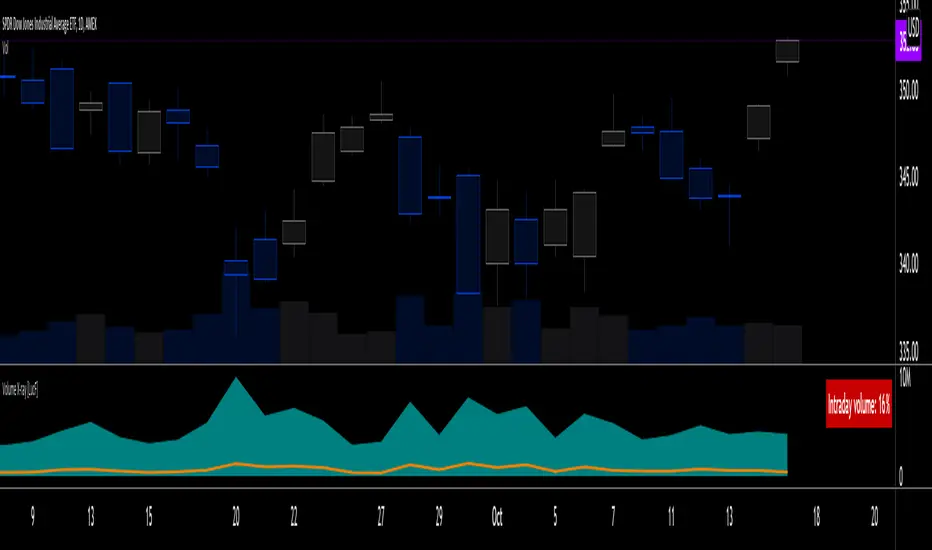
Moses Long-term Index ETF Investing StrategyMoses is a script designed for long-term Index ETF investors.
Moses Goals.
1. Alerts you when a major crash is starting or is underway (Bear Market Signal)
2. Warn you of price events in the market that may lead to increased volatility and downward price pressure (Shock Event Warning)
3. Clearly inform you when the market is in a bull phase (growing) or bear phase (decreasing) (Bull/Bear Signal)
4. Inform you if the market is showing early signs of recovery from a crash
5. Alert you to catastrophic events, which are extreme one bar price drops (typically occurring before or during a major stock market crash)
Moses Logic.
Moses is the product of years of testing, but the application of the logic is simple.
1. Moses is designed specifically to work on a weekly chart (5 days per bar). Do not use the scripts on daily, monthly, or intraday charts
2. Moses Uses 4 Moving Average Indicators
3. Moses uses the position of price and the moving averages to determine the state of the market (Bull/Bear/Recovery)
4. Moses uses price action to determine shock events and catastrophic event warnings
5. The script is hardcoded to start trading in 1997. Why? So that the script's primary goal of avoiding crashes is tested on 3 major crashes, the Dotcom 2000, the Financial Crisis 2008, and the Corona Crash in 2020.
How Moses Works
Being able to exit the market before or during a large market crash enables you to preserve a portion of your equity from decline. Buying back into the market on a Bull Market or Early Recovery Signal enables you to enter the market at a lower price. This goal is achieved during major crashes.
As with all scripts, there are false signals which may incur a losing trade; you can see in the strategy tester results the % of Winning/Losing Trades.
Strategy Setup In Tradingview
Initial Capital $10,000
Order Size 100% of equity (this is because it is a long-term strategy with only one trade in play – you are either long or not invested, using a smaller position size means you cannot meaningfully compare a Moses strategy to a Buy & Hold Strategy)
Commission is $5 per trade (this is negligible because the strategy only trades at most once per year)
Slippage – 10 ticks
This Script Displays the 5 Main MOSES Signals Directly On Your Chart To Help Your Investing Decision Making
1. Bull Market Signal - Green
2. Bear Market Signal - Red
3. Stock Market Recovery Signal - Amber/Yellow
4. Shock Event Warning - Shock Label on Price
5. Catastrophic Event Warning - Red Catastrophe Label
Includes 5 Moses Scripts
• Moses Signals 2.0 (plots all alerts directly on the price chart)
• Moses Buy on Bull - Sell on Bear (Plots a buy on the first Bull Market Signal - Closes All Positions on a Bear Market Signal)
• Moses Buy on Bull - Sell on Catastrophe (Plots a buy on the first Bull Market Signal - Closes All Positions on a Catastrophic event)
• Moses Buy on Recovery - Sell on Catastrophe (Plots a buy on the first Recovery Signal - Closes All Positions on a Catastrophic Event)
• Buy & Hold Script (Used to compare the effectiveness of the strategies versus a Buy and Hold Strategy)
As the script has 3 Moses Strategies, the idea is that you choose the strategy that best fits the ETF you are trading.
Moses is a long-term investing strategy that has historically outperformed the US and European Major Indices for the last 24 years. There is no guarantee of future performance.
Moses has outperformed the market (buy and hold strategy) from 1997 on the:
Nasdaq 100, S&P500, Russell 3000, Nasdaq Composite, EuroStoxx 50, Italian Milano Borsa, German DAX, Paris CAC40
Moses does not outperform the market on:
Nifty 50, BSE Sensex, ASX 200, Chinese Market
Backtested Performance
Test Timeframe Jan 13 1997 - Sept 21 2021
Duration Years 24.75
Initial Investment $10,000
North America Strategy-------------------------------$ Return------------CAGR-------Total %
Nasdaq 100 Buy & Hold----------------------------$176,380-----------12.30%------1664%
Buy Bull - Sell Bear------------------$288,554-----------14.55%------2786%
Buy Bull - Sell Catastrophe---------$202,491-----------12.92%------1925%
Buy Recovery - Sell Catastrophe---$229,866-----------13.50%------2199%
North America Strategy-------------------------------$ Return-----------CAGR------Total %
S&P 500 Buy & Hold----------------------------$58,122-----------7.37%------481%
Buy Bull - Sell Bear------------------$48,544-----------6.59%------385%
Buy Bull - Sell Catastrophe $59,573-----------7.48%------496%
Buy Recovery - Sell Catastrophe $64,579-----------7.83%------546%
North America Strategy-------------------------------$ Return-----------CAGR------Total %
Russell 3000 Buy & Hold----------------------------$61,363-----------7.61%------514%
Buy Bull - Sell Bear------------------$52,957-----------6.97%------430%
Buy Bull - Sell Catastrophe---------$64,027-----------7.79%------540%
Buy Recovery - Sell Catastrophe---$71,565-----------8.28%------616%
North America Strategy-------------------------------$ Return-----------CAGR------Total %
Nasdaq Composite Buy & Hold----------------------------$112,839-----------10.29%------1028%
Buy Bull - Sell Bear------------------$123,308-----------10.68%------1133%
Buy Bull - Sell Catastrophe---------$107,699-----------10.08%------977%
Buy Recovery - Sell Catastrophe---$112,453-----------10.27%------1025%
*CAGR - Compound Annual Growth Rate
From a Declaration of Principles jointly adopted by a Committee of the American Bar Association and a Committee of Publishers
This work is provided to you for informational purposes only and should not be construed as an offer to buy or sell a particular security or a solicitation of offers to buy or sell a particular security. The author may make available certain information related to the potential price movement of particular securities. By reading this report or using the training materials, you acknowledge and agree that any reliance upon the content or data available is at your own sole risk. You are strongly advised to use your own judgment, your own research, and question everything. The information is generic in nature and not targeted to individuals or individual circumstances. The author is an independent investor and is not licensed to give formal Stock advice to the individual, run funds of any type, or accept fees for individual stock advice. The Author accepts no responsibility for loss of money for following any of the lessons or systems created. Trading of securities may not be suitable for all users of this information; if in doubt, seek a professional advisor. All use of this work is at your sole risk.

Technical Ratings█ OVERVIEW
This indicator calculates TradingView's well-known "Strong Buy", "Buy", "Neutral", "Sell" or "Strong Sell" states using the aggregate biases of 26 different technical indicators.
█ FEATURES
Differences with the built-in version
• You can adjust the weight of the Oscillators and MAs components of the rating here.
• The built-in version produces values matching the states displayed in the "Technicals" ratings gauge; this one does not always, where weighting is used.
• A strategy version is also available as a built-in; this script is an indicator—not a strategy.
• This indicator will show a slightly different vertical scale, as it does not use a fixed scale like the built-in.
• This version allows control over repainting of the signal when you do not use a higher timeframe. Higher timeframe (HTF) information from this version does not repaint.
• You can configure markers on signal breaches of configurable levels, or on advances declines of the signal.
The indicator's settings allow you to:
• Choose the timeframe you want calculations to be made on.
• When not using a HTF, you can select a repainting or non-repainting signal.
• When using both MAs and Oscillators groups to calculate the rating, you can vary the weight of each group in the calculation. The default is 50/50.
Because the MAs group uses longer periods for some of its components, its value is not as jumpy as the Oscillators value.
Increasing the weight of the MAs group will thus have a calming effect on the signal.
• Alerts can be created on the indicator using the conditions configured to control the display of markers.
Display
The calculated rating is displayed as columns, but you can change the style in the inputs. The color of the signal can be one of three colors: bull, bear, or neutral. You can choose from a few presets, or check one and edit its color. The color is determined from the rating's value. Between 0.1 and -0.1 it is in the neutral color. Above/below 0.1/-0.1 it will appear in the bull/bear color. The intensity of the bull/bear color is determined by cumulative advances/declines in the rating. It is capped to 5, so there are five intensities for each of the bull/bear colors.
The "Strong Buy", "Buy", "Neutral", "Sell" or "Strong Sell" state of the last calculated value is displayed to the right of the last bar for each of the three groups: All, MAs and Oscillators. The first value always reflects your selection in the "Rating uses" field and is the one used to display the signal. A "Strong Buy" or "Strong Sell" state appears when the signal is above/below the 0.5/-0.5 level. A "Buy" or "Sell" state appears when the signal is above/below the 0.1/-0.1 level. The "Neutral" state appears when the signal is between 0.1 and -0.1 inclusively.
Five levels are always displayed: 0.5 and 0.1 in the bull color, zero in the neutral color, and -0.1 and - 0.5 in the bull color.
The levels that can be used to determine the breaches displaying long/short markers will only be visible when their respective long/short markers are turned on in the "Direction" input. The levels appear as a bright dotted line in bull/bear colors. You can control both levels separately through the "Longs Level" and "Shorts Level" inputs.
If you specify a higher timeframe that is not greater than the chart's timeframe, an error message will appear and the indicator's background will turn red, as it doesn't make sense to use a lower timeframe than the chart's.
Markers
Markers are small triangles that appear at the bottom and top of the indicator's pane. The marker settings define the conditions that will trigger an alert when you configure an alert on the indicator. You can:
• Choose if you want long, short or both long and short markers.
• Determine the signal level and/or the number of cumulative advances/declines in the signal which must be reached for either a long or short marker to appear.
Reminder: the number of advances/declines is also what controls the brightness of the plotted signal.
• Decide if you want to restrict markers to ones that alternate between longs and shorts, if you are displaying both directions.
This helps to minimize the number of markers, e.g., only the first long marker will be displayed, and then no more long markers will appear until a short comes in, then a long, etc.
Alerts
When you create an alert from this indicator, that alert will trigger whenever your marker conditions are confirmed. Before creating your alert, configure the makers so they reflect the conditions you want your alert to trigger on.
The script uses the alert() function, which entails that you select the "Any alert() function call" condition from the "Create Alert" dialog box when creating alerts on the script. The alert messages can be configured in the inputs. You can safely disregard the warning popup that appears when you create alerts from this script. Alerts will not repaint. Markers will appear, and thus alerts will trigger, at the opening of the bar following the confirmation of the marker condition. Markers will never disappear from the bar once they appear.
Repainting
This indicator uses a two-pronged approach to control repainting. The repainting of the displayed signal is controlled through the "Repainting" field in the script's inputs. This only applies when you have "Same as chart" selected in the "Timeframe" field, as higher timeframe data never repaints. Regardless of that setting, markers and thus alerts never repaint.
When using the chart's timeframe, choosing a non-repainting signal makes the signal one bar late, so that it only displays a value once the bar it was calculated has elapsed. When using a higher timeframe, new values are only displayed once the higher timeframe completes.
Because the markers never repaint, their logic adapts to the repainting setting used for the signal. When the signal repaints, markers will only appear at the close of a realtime bar. When the signal does not repaint (or if you use a higher timeframe), alerts will appear at the beginning of the realtime bar, since they are calculated on values that already do not repaint.
█ CALCULATIONS
The indicator calculates the aggregate value of two groups of indicators: moving averages and oscillators.
The "MAs" group is comprised of 15 different components:
• Six Simple Moving Averages of periods 10, 20, 30, 50, 100 and 200
• Six Exponential Moving Averages of the same periods
• A Hull Moving Average of period 9
• A Volume-weighed Moving Average of period 20
• Ichimoku
The "Oscillators" group includes 11 components:
• RSI
• Stochastic
• CCI
• ADX
• Awesome Oscillator
• Momentum
• MACD
• Stochastic RSI
• Wiliams %R
• Bull Bear Power
• Ultimate Oscillator
The state of each group's components is evaluated to a +1/0/-1 value corresponding to its bull/neutral/bear bias. The resulting value for each of the two groups are then averaged to produce the overall value for the indicator, which oscillates between +1 and -1. The complete conditions used in the calculations are documented in the Help Center .
█ NOTES
Accuracy
When comparing values to the other versions of the Rating, make sure you are comparing similar timeframes, as the "Technicals" gauge in the chart's right pane, for example, uses a 1D timeframe by default.
For coders
We use a handy characteristic of array.avg() which, contrary to avg() , does not return na when one of the averaged values is na . It will average only the array elements which are not na . This is useful in the context where the functions used to calculate the bull/neutral/bear bias for each component used in the rating include special checks to return na whenever the dataset does not yet contain enough data to provide reliable values. This way, components gradually kick in the calculations as the script calculates on more and more historical data.
We also use the new `group` and `tooltip` parameters to input() , as well as dynamic color generation of different transparencies from the bull/bear/neutral colors selected by the user.
Our script was written using the PineCoders Coding Conventions for Pine .
The description was formatted using the techniques explained in the How We Write and Format Script Descriptions PineCoders publication.
Bits and pieces were lifted from the PineCoders' MTF Selection Framework .
Look first. Then leap.

Triple Moving Average HeatmapHi everyone
I didn't publish on Friday because I was working on an Expert Advisor in MT4. The day I don't publish, some scripts spamming guys published many (not useful) scripts the same to kick me out of the TOP #1 ranking.
So what I'm going to do about it? crying or sharing more quality scripts than before? :)
I guess you know the answer :) I'm gonna share a few quality scripts that I have in my library. I noticed that you guys tend to like more the scripts useful for your trading actually making you money rather than a copy-paste (of another copy-paste)
Alright, enough for the trolling now let's introduce the Three MA heatmap which is an upgrade of that script : MA-heatmap-Double-cross-edition/
The challenge was to keep the heatmap not rolling and to make it match with the MA cross. I did it using this
```
since_ma_buy = barssince(macrossover)
since_ma_sell = barssince(macrossunder)
heatmap_color() =>
since_ma_buy < since_ma_sell ? color.new(color.green, 20) : since_ma_buy > since_ma_sell ? color.new(color.red, 20) : na
```
This is a technique that I found after drinking three glasses of red wine (#french) to keep the heatmap stable and not rolling.
To get what I'm saying I invite you to replace the piece of code above by what everyone would normally do
```
heatmap_color() =>
macrossunder() ? color.new(color.green, 20) : macrossover() ? color.new(color.red, 20) : na
```
Ah and I'm not done sharing for the day, a few scripts are coming also after that one and tonight !!!!! I want to live in a world where you guys can enjoy quality scripts (mostly) :)
PS
____________________________________________________________
Feel free to hit the thumbs up as it shows me that I'm not doing this for nothing and will motivate to deliver more quality content in the future.
- I'm an officially approved PineEditor/LUA/MT4 approved mentor on codementor. You can request a coaching with me if you want and I'll teach you how to build kick-ass indicators and strategies
Jump on a 1 to 1 coaching with me
- You can also hire for a custom dev of your indicator/strategy/bot/chrome extension/python

Fundamental Dashboard Publishing this script is a great idea because many traders in the Indian market struggle with TradingView's lack of data for SME (Small and Medium Enterprise) stocks.
Here is a professional, detailed description you can use for the Publishing Page. I have broken it down into sections that highlight the unique "Hybrid" technology of your script.
Title Idea: Fundamental Dashboard Pro: SME & Hybrid Live Valuation
Description:
Overview
The Fundamental Dashboard Pro is a high-performance financial analysis tool specifically designed for the Indian Stock Market (NSE/BSE). It solves the biggest problem faced by TradingView users in India: Missing or delayed data for SME and mid-cap stocks.
While standard TradingView indicators rely solely on built-in data feeds (which are often "N/A" for stocks like Alpex Solar, Oriana Power, or Insolation Energy), this script uses a Custom Hybrid Engine. It prioritizes a built-in, high-accuracy database of ~1,700 stocks while falling back to live TradingView data for everything else.
Key Features
📊 Accurate SME Data: Includes pre-loaded, professional-grade fundamental data (EPS, Net Profit, Debt/Equity, ROE) for over 1,600 Indian companies, including the SME segment.
⚡ Real-Time P/E Calculation: Unlike static dashboards, this script calculates the Price-to-Earnings (P/E) ratio dynamically. It takes the static EPS from the database and divides it by the live market price, ensuring your valuation metrics update every second.
🛡️ Intelligent Fallback Logic: If a ticker is not found in the custom database, the script automatically attempts to fetch live data from TradingView’s servers, ensuring you are never left without information.
🔍 Manual Ticker Search: Includes a "Manual Search" input in settings to bypass auto-detection. This is perfect for stocks that use different naming conventions between NSE and BSE (e.g., searching by code 543620 for Insolation Energy).
🚦 Automatic Rating System: A 5-point scoring system that evaluates a stock based on profitability, valuation, leverage, and efficiency, providing a visual "Buy/Sell/Neutral" rating.
How the Hybrid System Works
EPS/ROE/Debt: These metrics are quarterly and are pulled from a high-precision snapshot of Screener.in data embedded in the script.
Live Price: Pulled directly from the chart ticker.
Dynamic P/E: Calculated as Live Price / Stored EPS. This makes the valuation "Market-Live."
Scoring Criteria
The dashboard evaluates every stock against 5 fundamental pillars:
Profitability: Is the company making a Net Profit?
Earning Power: Is the EPS positive?
Valuation: Is the Live P/E below the user-defined threshold?
Debt Health: Is the Debt-to-Equity ratio below the safety limit?
Efficiency: Is the Return on Equity (ROE) above the target percentage?
Instructions for Use
Auto-Mode: Simply add the script to your chart. It will detect the ticker automatically.
Manual-Mode: If the dashboard shows "NOT FOUND" for a specific SME stock, go to Settings > Data & Thresholds and type the ticker name exactly as it appears on Screener (e.g., ALPEXSOLAR).
Customization: You can adjust the P/E, ROE, and Debt thresholds in the settings menu to match your specific investment criteria (e.g., Value vs. Growth investing).
Internal Note for Publishing (Technical):
Version: Pine Script v5
Optimization: The script uses string-compressed data chunks to remain within the 80,000 token limit while maximizing the stock database size.
Scope: Designed specifically for Indian markets but compatible with global tickers via the fallback engine.

A+ Model - Cave EducationHere is a comprehensive and detailed explanation of the "A+ Model - Cave Education" Pine Script code.
This script is a sophisticated technical analysis tool designed for TradingView. It assists traders in identifying specific institutional time windows, price ranges (sessions), and "Macro" volatility periods based on the ICT (Inner Circle Trader) or similar time-based trading concepts.
Below is the breakdown of how the code functions, organized by its logic sections.
1. General Overview
The script is an overlay indicator (it sits directly on the price chart). Its primary purpose is to:
Highlight a specific trading session (The "A+ Box") and mark its High/Low.
Mark key institutional times (07:00 NY and 09:30 NY Open).
Identify "Macro" windows (specific 20-minute periods where algorithms are active) and draw dynamic ranges around them based on volatility (ATR).
Project future times onto the chart to help the trader prepare for the next day.
2. Settings & Inputs (User Configuration)
The code begins by defining a vast array of user inputs, grouped for better usability:
General Time & Box: Allows the user to define the "A+ Session" time (default 20:00-00:00) and the Time Zone (UTC-5/New York). It also handles the visual style (colors) of the session box.
Visibility: A crucial performance and visual clutter setting. boxDays limits how far back the A+ boxes and time lines are drawn (default 14 days). Macros are strictly limited to the current week to prevent chart lagging.
Line & Text Controls: Every visual element (A+ lines, NY markers, Macros) has toggles (input.bool) to show/hide the lines or the text labels separately.
Macro Settings: Defines the time windows for three separate macros and an ATR Multiplier. The ATR multiplier determines how wide the channel lines are drawn around the macro price action.
3. Logic Breakdown by Section
Section 1: The "A+ Draw" Box (Session Range)
This is the core of the A+ Model.
Logic: The script checks if the current bar is within the user-defined sessionTime.
Box Creation:
When the session starts, it initializes a new Box (box.new).
Throughout the session, it continuously updates the Box's Top (Highest High) and Bottom (Lowest Low) to encompass the full range of that time period.
Extension Lines (Support/Resistance):
Once the session ends, the script draws two horizontal lines: one from the Session High and one from the Session Low.
Smart Break Logic: These lines are active (highActive, lowActive). They extend to the right until the price breaks them (High line is broken by a higher price, Low line by a lower price). This helps traders see if the session range is being respected or broken later in the day.
Section 2: Time Lines (NY Midnight & Open)
This section marks vertical reference points.
It checks for specific times: 07:00 and 09:30 (in the user's timezone).
If the current bar matches these times, it draws a vertical line (line.new) covering the High/Low of that bar and places a label (e.g., "NY." or "09:30") above it.
This helps the trader orient themselves regarding the New York session Open and the "Killzone" start.
Section 3: Macros (Volatility Windows)
This is the most complex calculation in the script.
Definition: Macros are specific time windows (e.g., 09:50–10:10) where price delivery is often accelerated.
Visibility Rule: To keep the script fast, this only runs if isCurrentWeek is true.
ATR Offset: The script calculates the Average True Range (ATR). It uses this to create a "channel" around the price.
Drawing Logic:
When a Macro time starts, the script tracks the Highest High and Lowest Low inside that specific 20-minute window.
It draws parallel horizontal lines above and below these prices.
The Twist: The lines are not drawn at the High/Low. They are offset by ATR * Multiplier. This creates a wider "zone" around the macro price action, visually indicating a volatility range.
Section 4: Future Projection (Tomorrow)
This feature is for planning ahead.
It runs only on the last bar of the chart (barstate.islast).
It calculates the timestamps for the next occurrence of the key times (07:00, 09:30, and all three Macros).
It draws vertical lines into the future (empty space on the right of the chart).
Benefit: The trader can see exactly where 09:30 or the next Macro will occur on the timeline before the candles even print.
4. Helper Functions
The code uses custom functions to keep the logic clean:
f_drawFuture(...): A standardized function to draw the future vertical lines and labels so the code doesn't have to repeat itself for every single time marker.
isStartTime(...) & isInTime(...): Shorthand functions to check if the current candle belongs to a specific session string (like "0950-1010").
Summary of Improvements in this Version
Compared to a standard indicator, this script is highly optimized:
Text Control: You can turn off text labels while keeping the lines (or vice versa).
Performance: It limits historical drawing (only 14 days back for boxes, only this week for macros) to prevent "Maximum Line Count" errors in Pine Script.
Visual Clarity: It uses different colors for different Macros (Blue, Red, Orange) to make them instantly distinguishable.

WOW Intraday Tracker by Dev🎯 WOW Intraday Tracker: Professional Trade Execution & R/R Analysis
The WOW Intraday Tracker (V1.30 Final) is an advanced, invite-only tool built for disciplined intraday trading. It transforms market signals into a fully managed trade, providing both real-time execution confidence and objective performance review.
************************************************************************************
✨ Core Execution Features
The Tracker automates the most critical aspects of trade management:
Automatic Entry Trigger: The script uses a proprietary multi-factor scoring system to identify high-probability setups. Once a trade signal is validated and its Score meets the Activation Threshold (which is visible in the Running Trade Table), the entry order (Long or Short) is automatically triggered and monitored.
Trade Grade Qualification: Crucially, every setup is assigned a Trade Grade (A+, A, or B) before entry, based on structural confluence, allowing traders to qualify the setup quality instantly.
Initial SL & Multiple Targets (TGTs): All trades are established with risk-defined parameters from the start.
Initial Stop-Loss (SL): Automatically calculated based on user-defined ATR Multiples to align risk with current volatility.
Multiple Take-Targets (TGTs): Two distinct target levels (TGT1 and TGT2) are set based on user-defined R-Multiples (Risk-to-Reward ratios) to facilitate a partial profit-taking strategy.
Dynamic Trailing & Stop Adjustment: As the trade progresses, the script automatically manages risk, adjusting the stop-loss upon TGT hits to lock in profit.
Signal Cancellation Feature: To protect capital, the script actively monitors the signal's health. If the internal trade score drops below the configurable Cancellation Threshold before entry, the pending order is automatically invalidated and cleared.
⚖️ Trade Exit and Weighted R/R Assumptions
The script's primary function is to track and calculate a Weighted Risk-to-Reward (R/R) based on a predetermined exit plan:
Target 1 (T1): 30% of the original position. Stop is adjusted to protect profits.
Target 2 (T2): Another 30% of the original position. Trailing Stop begins based on a volatility factor.
Final Exit: Rest 40% of the original position. Exited when the Trailing Stop is hit.
Important Note: The Trailing Stop is tracked on a closing basis within the script. While you can choose to exit the trade manually on a hit basis or book profits based on your personal judgment, the script's final Weighted R/R calculation is based on the assumption that the position exits as detailed above.
**************************************************************************************
📊 Global R/R Tracker Table (Performance by Grade)
This powerful feature provides objective, actionable data for trade review. It continuously tallies your performance, broken down by the quality (Grade) of the trade setup.
The table tracks performance for A+, A, and B grade setups, plus a TOTAL row, based on your chosen lookback (Full History or Day Start)
By separating performance by Grade, you gain a clear, evidence-based understanding of which setups truly deserve your capital and focus.
*************************************************************************************
🎨 Advanced Customization & Styling
The WOW Intraday Tracker offers extensive control over the look and feel of your workspace to ensure maximum clarity and minimal chart clutter.
Table Positioning: Freely select the on-chart location (Top Right, Bottom Left, etc.) for all three tables.
Theming: Customize the background and text colors for all tables, including the dynamic green/red backgrounds of the Global R/R Tracker.
Plot Lines: Full color control over all plotted trade lines: PDH/PDL, Entry Price, Initial Stop, Trailing Stop, and Targets.
*********************************************************************************
⏱️ Usage & Recommended Timeframes
The WOW Intraday Tracker is primarily designed and optimized for high-frequency, short-term intraday trading.
Recommended Timeframes: For optimal performance, we recommend using the script on lower-to-mid-range intraday timeframes: 5-minute, 15-minute, and 25 (or 30) minutes.
Intended Use: While the script can be applied to higher timeframes, its main purpose is to capture volatility and quick moves within the trading day.
Swing Trading: In rare instances, the tracker may generate signals suitable for a short-term swing trade (1-2 days), but this is secondary to its core intraday function.
********************************************************************************************
🔑 Access Note
The WOW Intraday Tracker utilizes proprietary logic within its scoring system and is published as an invite-only script. The source code is protected to maintain the integrity and value of the intellectual property.
To inquire about access, please contact the author directly via TradingView Private Message on this profile.
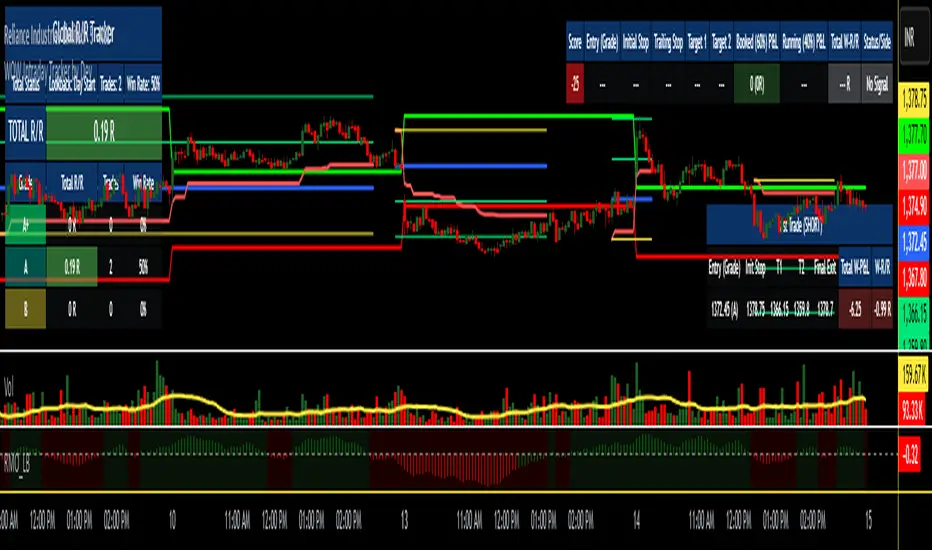
RSS-Stochastik [afterworktrading]Hi all,
this is the first script from the series "afterworktrading". The goal is to develop and provide tools for traders with a fulltime job or little time for trading/analyzing charts.
Over time some of the scripts will also be linked to complete trading systems.
Let's start with my favourite one, the "RSS-Stochastik" with alert function.
The RSS-concept (Relative Spread Strength, developed by Ian Copsey) is based on the variance between a "short" and a "long" moving averages (or "slow" and "fast"), here between two EMA.
This variance is calculated and plotted in a RSI-diagram to show "overbought" and "oversold" conditions, helping to identify an ideal entry setup for trend continuation or catching a possible reversal.
Compared to the conventional RSI etc., possible reversal or trend continuation areas are often better represented in terms of quality, as an example see the Amazon-Chart.
The EMA-values, limit value thresholds and background colors can be set in the script. As a special feature, alarms can be set to be notified when a value has reached the extreme range. This reduces the screen time to the minimum.
In my personal trading, this indicator forms the basis for almost all trades, but is not a pure signal indicator on its own.
However, the informative value can be further improved if volume or support/resistance zones etc. are linked to the RSS, see example NASDAQ future with support zone price or 200 EMA.
Example for a possible RSS-Trade-Setup:
- choose an asset with a strong trend
- set alerts for crossing the oversold or overbought condition in direction of the trend
- in case of an alert check possible support/resistance areas on the current chart level (EMA, price zones, volume zones, anchored VWAP etc.)
- trade in the direction of the trend using your preferred entry setup
In my opinion, the system can be used very well, especially in trend phases, in order to obtain optimal entries.
Does it works also on lower timeframes?
Yes, it might work on every timeframe with a strong trend of high quality. Please see attached a 5m-Chart of GPBUSD-pair, notice the signal quality in direction of the trend.
Like every trading system this is not the "holy grail setup" and you will have losing trades. But handling this indicator with care you can have better entries especially in trend direction with less screen time due to the alert function.
Good luck with it! Further indicators will be published in the coming months, some will also be based on the RSS system.
As always: no liability for losing trades, no investment advice etc. Observe the risk limit for every trade!

ZenAlgo - Golden VeinOverview and Motivation
This indicator combines multiple volume-weighted average price (VWAP) calculations from different timeframes and then merges them into a single composite line called “the Vein”. It begins by pulling a user-defined source (for instance, a typical price) and then anchors a VWAP on daily, weekly, monthly, quarterly, semiannual, and yearly intervals. By viewing all these timeframes together, the script captures multi-period trends in a way that stands apart from simpler, single-timeframe VWAP indicators. This comprehensive perspective is designed to offer practical benefits to those who monitor both short- and long-term VWAP behavior within a single tool.
Because it tracks many timeframes simultaneously, it can highlight instances when short-term and long-term VWAPs converge or diverge. Traders who need multi-timeframe validation may find this approach particularly helpful. Other free indicators typically restrict themselves to one or two timeframes, so the built-in multi-timeframe data in this script can save effort for those who rely heavily on VWAP analysis.
Core Inputs and Offsets
At the start, the script takes a single price input (e.g., the average of high, low, and close) and uses it to compute multiple VWAP lines. Users can also choose a distance factor (based on an ATR calculation) to control how far labels are placed from any crossover events. This distance sets how clearly the chart will display labels without overcrowding.
Beyond giving a cleaner visual, having a user-defined distance for labels means the script can adapt to any ticker’s volatility. If one trades assets with large intraday swings, the script leaves enough space for labels to remain readable. This flexibility is something that simpler free VWAP scripts might lack.
Multi-Timeframe VWAP Computations
The script calculates distinct VWAP lines: Daily, Weekly, Monthly, Quarterly (3-Month), Semiannual (6-Month), and Yearly (12-Month). Each line resets whenever it detects a new period has started, ensuring that each timeframe’s VWAP properly anchors to its own session window. This allows the indicator to track how the market perceives fair value (through VWAP) on multiple horizons, all at once.
Simultaneously checking these various intervals can offer added clarity to traders who want to compare immediate market conditions (e.g., daily) to broader contexts (e.g., quarterly or yearly). Tools that only show one or two timeframes may miss the nuances that arise when, say, daily VWAP aligns with monthly VWAP at a turning point.
Crossover Detection and Labeling
Whenever two different VWAP lines intersect, the script generates an internal crossover signal. It then draws small labels (e.g., D↑W or M↓Q) to highlight that a lower timeframe VWAP has moved above or below a higher timeframe VWAP. These labels use color-coding and an ATR-based offset to remain visible.
An additional subtle feature is how daily VWAP crossovers can optionally be displayed only on a specific weekday and hour. That allows users who only want to track daily crossovers under certain conditions (for example, a fixed point in the weekly cycle) to filter out other signals. This adaptability can be worth paying for if one needs advanced filtering—an area where simpler free VWAP cross indicators typically do not offer such granular control.
The “Golden VWAP” (Composite Calculation)
All six VWAP lines (daily, weekly, monthly, quarterly, semiannual, yearly) feed into a central average called “the Vein”. The script takes the midpoint of these six values on each bar, effectively combining short-, medium-, and long-term VWAP data into one. This composite serves as a reference line for overall market direction.
A volatility band (either a standard-deviation-based range or a user-defined percentage) wraps around this composite. The script thereby creates an upper and a lower boundary around the Golden VWAP, called “Resistance” and “Support.” Traders may interpret price moves beyond these levels as higher-probability expansions or contractions, but there is no guarantee of outcome. In choppier markets, breakouts above or below these bands might not lead to follow-through, so interpretation should always be combined with other evidence.
Simplified Market State Logic
By checking how price and the Golden VWAP behave from one bar to the next, the script tags the market state with labels like Bullish, Bearish, Super Bullish, or Super Bearish. These classifications hinge on whether the Golden VWAP is rising or falling, and whether price has crossed above or below the composite band. An optional table in the lower-left corner of the chart displays this label.
While such classification is convenient for scanning changing conditions quickly, it should be interpreted with caution. If the market is sideways or if volume patterns are erratic, the script can produce signals that do not align with real momentum. Treat these states as indications of potential bias rather than automatic buy or sell triggers.
Added Value
By gathering VWAP lines across multiple timeframes, generating alerts on all possible combinations of crossovers, and overlaying a composite VWAP with adjustable volatility bands, this script goes beyond typical single-timeframe VWAP indicators. It aims to let users track short-term shifts (e.g., daily crossing weekly) in the context of longer-term trends (e.g., yearly). This granularity and automation can reduce the need for multiple charts or manual recalculations of different VWAP windows.
Why It Can Be Worth Paying For
The capability to simultaneously anchor VWAP to multiple timeframes, detect crossovers, filter out daily signals by weekday/hour, and visualize a composite “Vein” with adjustable ranges represents a comprehensive feature set that free scripts often do not bundle together. For those who rely on multi-timeframe VWAP analysis, the time saved and clarity gained may justify a paid solution.
Interpreting Values
Crossover labels: Identify points where one timeframe’s VWAP moves above or below another. The direction (up or down) suggests potential momentum shifts.
Golden VWAP line: Treat it as the average “fair value” across all anchored periods. Large price moves above or below this line’s surrounding band might signal increased directional conviction—or false breakouts if volume is deceptive.
Market states: Use the Bullish/Super Bullish/Bearish/Super Bearish labels to gauge how price interacts with the composite’s slope and band.
How to Use It Best
Combine these signals with other risk-management methods.
Monitor multiple crossovers in tandem: for example, daily crossing weekly plus monthly crossing quarterly may offer stronger confluence.
Use the optional daily-label toggle to stay focused on selected higher-confidence signals if you find too many crossovers distracting.
Remember that every alert or label should be evaluated in broader market context and your own trading strategy.
Potential Shortcomings
As with any technical study, VWAP lines and crossovers are not foolproof predictors. The script can be less reliable in low-volume or fast-moving conditions. Large price shocks can cause abrupt changes that do not fit the typical patterns this indicator looks for.
In short, this script’s distinct advantage is showing multiple anchored VWAPs and a composite perspective in one place, offering fine control of alerts and appearance settings. Those who benefit most are chartists who want deeper VWAP insights across various timescales without juggling multiple separate indicators. However, like any technical tool, it should be understood as an aid rather than a guarantee of outcomes.
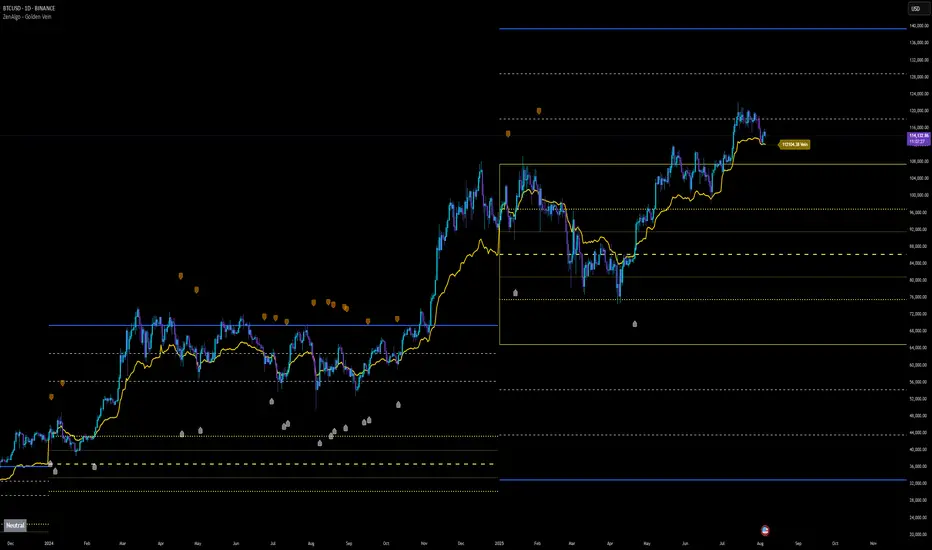
Day’s Open ForecastOverview
This Pine Script indicator combines two primary components:
1. Day’s Open Forecast:
o Tracks historical daily moves (up and down) from the day’s open.
o Calculates average up and down moves over a user-defined lookback period.
o Optionally includes standard deviation adjustments to forecast potential intraday levels.
o Plots lines on the chart for the forecasted up and down moves from the current day's open.
2. Session VWAP:
o Allows you to specify a custom trading session (by time range and UTC offset).
o Calculates and plots a Volume-Weighted Average Price (VWAP) during that session.
By combining these two features, you can gauge potential intraday moves relative to historical behavior from the open, while also tracking a session-specific VWAP that can act as a dynamic support/resistance reference.
How the Code Works
1. Collect Daily Moves
o The script detects when a new day starts using time("D").
o Once a new day is detected, it stores the previous day’s up-move (dayHigh - dayOpen) and down-move (dayOpen - dayLow) into arrays.
o These arrays keep track of the last N days (default: 126) of up/down move data.
2. Compute Statistics
o The script computes the average (f_average()) of up-moves and down-moves over the stored period.
o It also computes the standard deviation (f_stddev()) of up/down moves for optional “forecast bands.”
3. Forecast Lines
o Plots the current day’s open.
o Plots the average forecast lines above and below the open (Avg Up Move Level and Avg Down Move Level).
o If standard deviation is enabled, plots additional lines (Avg+StdDev Up and Avg+StdDev Down).
4. Session VWAP
o The script detects the start of a user-defined session (via input.session) and resets accumulation of volume and the numerator for VWAP.
o As each bar in the session updates, it accumulates volume (vwapCumulativeVolume) and a price-volume product (vwapCumulativeNumerator).
o The session VWAP is then calculated as (vwapCumulativeNumerator / vwapCumulativeVolume) and plotted.
5. Visualization Options
o Users can toggle standard deviation usage, historical up/down moves plotting, and whether to show the forecast “bands.”
o The vwapSession and vwapUtc inputs let you adjust which session (and time zone offset) the VWAP is calculated for.
________________________________________
How to Use This Indicator on TradingView
1. Create a New Script
o Open TradingView, then navigate to Pine Editor (usually found at the bottom of the chart).
o Copy and paste the entire code into the editor.
2. Save and Add to Chart
o Click Save (give it a relevant title if you wish), then click Add to chart.
o The indicator will appear on your chart with the forecast lines and VWAP.
o By default, it is overlayed on the price chart (because of overlay=true).
3. Customize Inputs
o In the indicator’s settings, you can:
Change lookback days (default: 126).
Enable or disable standard deviation (Include Standard Deviation in Forecast?).
Adjust the standard deviation multiplier.
Choose whether to plot bands (Plot Bands with Averages/StdDev?).
Plot historical moves if desired (Plot Historical Up/Down Moves for Reference?).
Set your custom session and UTC offset for the VWAP calculation.
4. Interpretation
o “Current Day Open” is simply today’s open price on your chart.
o Up/Down Move Lines: Indicate a potential forecast based on historical averages.
If standard deviation is enabled, the second set of lines acts as an extended range.
o VWAP: Helpful for determining intraday price equilibrium over the specified session.
Important Notes / Best Practices
• The script only updates the historical up/down move data once per day (when a new day starts).
• The VWAP portion resets at the start of the specified session each day.
• Standard deviation multiplies the average up/down range, giving you a sense of “volatility range” around the day’s open.
• Adjust the lookback length (dayCount) to balance how many days of data you want to average. More days = smoother but possibly slower to adapt; fewer days = more reactive but potentially less reliable historically.
Educational & Liability Disclaimers
1. Educational Disclaimer
o The information provided by this indicator is for educational and informational purposes only. It is a technical analysis tool intended to demonstrate how to use historical data and basic statistics in Pine Script.
2. No Financial Advice
o This script does not constitute financial or investment advice. All examples and explanations are solely illustrative. You should always do your own analysis before making any investment decisions.
3. No Liability
o The author of this script is not liable for any losses or damages—monetary or otherwise—that may occur from the application of this script.
o Past performance does not guarantee future results, and you should never invest money you cannot afford to lose.
By adding this indicator to your TradingView chart, you acknowledge and accept that you alone are responsible for your own trading decisions.
Enjoy using the “Day’s Open Forecast” and Session VWAP for better market insights!

[blackcat] L2 Six Round Positioning█ OVERVIEW
The script is an indicator designed to plot the direction (up, down, no change) of several moving averages (MA) on a separate chart, without overlaying the price data. It calculates Simple Moving Averages (SMA) for 3, 5, 8, 34, 60, 120, and 250 periods and uses conditional logic to determine the color and position of the plotted columns based on whether each MA is increasing, decreasing, or unchanged.
█ LOGICAL FRAMEWORK
The script is structured into three main sections:
1 — Input Parameters: None explicitly defined, but the script uses default settings for the indicator function.
2 — Calculations: Computes Simple Moving Averages (SMA) for seven different periods.
3 — Plotting: Uses conditional logic to plot columns representing the direction of each MA, with positions and colors indicating whether the MA is increasing, decreasing, or unchanged.
The flow of data is straightforward: the script calculates the SMAs, determines their direction, sets the appropriate color, and then plots the columns.
█ CUSTOM FUNCTIONS
• No custom functions are defined in this script. All calculations and plotting are done using built-in Pine Script functions such as ta.sma for SMA calculation and plot for plotting.
█ KEY POINTS AND TECHNIQUES
• Use of ta.sma: The script effectively uses the ta.sma function to calculate Simple Moving Averages for different periods.
• Conditional Logic: The script employs conditional logic (ternary operators) to determine the color and position of the plotted columns based on the direction of each MA.
• Plotting with plot: The plot function is used extensively to display the direction of each MA with different colors and positions.
• Color Transparency: The use of color.new with transparency (e.g., color.new(color.green, 50)) allows for visually distinct colors that are not too overpowering.
█ EXTENDED KNOWLEDGE AND APPLICATIONS
• Modifications: The script could be enhanced by adding input parameters to allow users to customize the periods of the moving averages, colors, and transparency levels.
• Extensions: Similar techniques could be applied to other types of moving averages (e.g., EMA, WMA) or to other technical indicators.
• Strategy Development: This indicator could serve as a component in a larger trading strategy by providing insights into the overall trend direction across multiple timeframes.
• Related Concepts: Understanding of moving averages, conditional logic, and plotting techniques in Pine Script would be beneficial for further development and customization of this script.

Top-Down Trend and Key Levels with Swing Points//by antaryaami0
Overview
The “Top-Down Trend and Key Levels with Swing Points” indicator is a comprehensive tool designed to enhance your technical analysis by integrating multiple trading concepts into a single, easy-to-use script. It combines higher timeframe trend analysis, key price levels, swing point detection, and ranging market identification to provide a holistic view of market conditions. This indicator is particularly useful for traders who employ multi-timeframe analysis, support and resistance levels, and price action strategies.
Key Features
1. Higher Timeframe Trend Background Shading:
• Purpose: Identifies the prevailing trend on a higher timeframe to align lower timeframe trading decisions with the broader market direction.
• How it Works: The indicator compares the current higher timeframe close with the previous one to determine if the trend is up, down, or ranging.
• Customization:
• Trend Timeframe: Set your preferred higher timeframe (e.g., Daily, Weekly).
• Up Trend Color & Down Trend Color: Customize the background colors for uptrends and downtrends.
• Ranging Market Color: A separate color to indicate when the market is moving sideways.
2. Key Price Levels:
• Previous Day High (PDH) and Low (PDL):
• Purpose: Identifies key support and resistance levels from the previous trading day.
• Visualization: Plots horizontal lines at PDH and PDL with labels.
• Customization: Option to show or hide these levels and customize their colors.
• Pre-Market High (PMH) and Low (PML):
• Purpose: Highlights the price range during the pre-market session, which can indicate potential breakout levels.
• Visualization: Plots horizontal lines at PMH and PML with labels.
• Customization: Option to show or hide these levels and customize their colors.
3. First 5-Minute Marker (F5H/F5L):
• Purpose: Marks the high or low of the first 5 minutes after the market opens, which is significant for intraday momentum.
• How it Works:
• If the first 5-minute high is above the Pre-Market High (PMH), an “F5H” label is placed at the first 5-minute high.
• If the first 5-minute high is below the PMH, an “F5L” label is placed at the first 5-minute low.
• Visualization: Labels are placed at the 9:35 AM candle (closing of the first 5 minutes), colored in purple by default.
• Customization: Option to show or hide the marker and adjust the marker color.
4. Swing Points Detection:
• Purpose: Identifies significant pivot points in price action to help recognize trends and reversals.
• How it Works: Uses left and right bars to detect pivot highs and lows, then determines if they are Higher Highs (HH), Lower Highs (LH), Higher Lows (HL), or Lower Lows (LL).
• Visualization: Plots small markers (circles) with labels (HH, LH, HL, LL) at the corresponding swing points.
• Customization: Adjust the number of left and right bars for pivot detection and the size of the markers.
5. Ranging Market Detection:
• Purpose: Identifies periods when the market is consolidating (moving sideways) within a defined price range.
• How it Works: Calculates the highest high and lowest low over a specified period and determines if the price range is within a set percentage threshold.
• Visualization: Draws a gray box around the price action during the ranging period and labels the high and low prices at the end of the range.
• Customization: Adjust the range detection period and threshold, as well as the box color.
6. Trend Coloring on Chart:
• Purpose: Provides a visual cue for the short-term trend based on a moving average.
• How it Works: Colors the candles green if the price is above the moving average and red if below.
• Customization: Set the moving average length and customize the uptrend and downtrend colors.
How to Use the Indicator
1. Adding the Indicator to Your Chart:
• Copy the Pine Script code provided and paste it into the Pine Script Editor on TradingView.
• Click “Add to Chart” to apply the indicator.
2. Configuring Inputs and Settings:
• Access Inputs:
• Click on the gear icon next to the indicator’s name on your chart to open the settings.
• Customize Key Levels:
• Show Pre-Market High/Low: Toggle on/off.
• Show Previous Day High/Low: Toggle on/off.
• Show First 5-Minute Marker: Toggle on/off.
• Set Trend Parameters:
• Trend Timeframe for Background: Choose the higher timeframe for trend analysis.
• Moving Average Length for Bar Color: Set the period for the moving average used in bar coloring.
• Adjust Ranging Market Detection:
• Range Detection Period: Specify the number of bars to consider for range detection.
• Range Threshold (%): Set the maximum percentage range for the market to be considered ranging.
• Customize Visuals:
• Colors: Adjust colors for trends, levels, markers, and ranging market boxes.
• Label Font Size: Choose the size of labels displayed on the chart.
• Level Line Width: Set the thickness of the lines for key levels.
3. Interpreting the Indicator:
• Background Shading:
• Green Shade: Higher timeframe is in an uptrend.
• Red Shade: Higher timeframe is in a downtrend.
• Gray Box: Market is ranging (sideways movement).
• Key Levels and Markers:
• PDH and PDL Lines: Represent resistance and support from the previous day.
• PMH and PML Lines: Indicate potential breakout levels based on pre-market activity.
• F5H/F5L Labels: Early indication of intraday momentum after market open.
• Swing Point Markers:
• HH (Higher High): Suggests bullish momentum.
• LH (Lower High): May indicate a potential bearish reversal.
• HL (Higher Low): Supports bullish continuation.
• LL (Lower Low): Indicates bearish momentum.
• Ranging Market Box:
• Gray Box Around Price Action: Highlights consolidation periods where breakouts may occur.
• Range High and Low Labels: Provide the upper and lower bounds of the consolidation zone.
4. Applying the Indicator to Your Trading Strategy:
• Trend Alignment:
• Use the higher timeframe trend shading to align your trades with the broader market direction.
• Key Levels Trading:
• Watch for price reactions at PDH, PDL, PMH, and PML for potential entry and exit points.
• Swing Points Analysis:
• Identify trend continuations or reversals by observing the sequence of HH, HL, LH, and LL.
• Ranging Market Strategies:
• During ranging periods, consider range-bound trading strategies or prepare for breakout trades when the price exits the range.
• Intraday Momentum:
• Use the F5H/F5L marker to gauge early market sentiment and potential intraday trends.
Practical Tips
• Adjust Settings to Your Trading Style:
• Tailor the indicator’s inputs to match your preferred timeframes and trading instruments.
• Combine with Other Indicators:
• Use in conjunction with volume indicators, oscillators, or other technical tools for additional confirmation.
• Backtesting:
• Apply the indicator to historical data to observe how it performs and refine your settings accordingly.
• Stay Updated on Market Conditions:
• Be aware of news events or economic releases that may impact market behavior and the effectiveness of technical levels.
Customization Options
• Time Zone Adjustment:
• The script uses “America/New_York” time zone by default. Adjust the timezone variable in the script if your chart operates in a different time zone.
var timezone = "Your/Timezone"
• Session Times:
• Modify the Regular Trading Session and Pre-Market Session times in the indicator settings to align with the trading hours of different markets or exchanges.
• Visual Preferences:
• Colors: Personalize the indicator’s colors to suit your visual preferences or to enhance visibility.
• Label Sizes: Adjust label sizes if you find them too intrusive or not prominent enough.
• Marker Sizes: Further reduce or enlarge the swing point markers by modifying the swing_marker_size variable.
Understanding the Indicator’s Logic
1. Higher Timeframe Trend Analysis:
• The indicator retrieves the closing prices of a higher timeframe using the request.security() function.
• It compares the current higher timeframe close with the previous one to determine the trend direction.
2. Key Level Calculation:
• Previous Day High/Low: Calculated by tracking the highest and lowest prices of the previous trading day.
• Pre-Market High/Low: Calculated by monitoring price action during the pre-market session.
3. First 5-Minute Marker Logic:
• At 9:35 AM (end of the first 5 minutes after market open), the indicator evaluates whether the first 5-minute high is above or below the PMH.
• It then places the appropriate label (F5H or F5L) on the chart.
4. Swing Points Detection:
• The script uses ta.pivothigh() and ta.pivotlow() functions to detect pivot points.
• It then determines the type of swing point based on comparisons with previous swings.
5. Ranging Market Detection:
• The indicator looks back over a specified number of bars to find the highest high and lowest low.
• It calculates the percentage difference between these two points.
• If the difference is below the set threshold, the market is considered to be ranging, and a box is drawn around the price action.
Limitations and Considerations
• Indicator Limitations:
• Maximum Boxes and Labels: Due to Pine Script limitations, there is a maximum number of boxes and labels that can be displayed simultaneously.
• Performance Impact: Adding multiple visual elements (boxes, labels, markers) can affect the performance of the script on lower-end devices or with large amounts of data.
• Market Conditions:
• False Signals: Like any technical tool, the indicator may produce false signals, especially during volatile or erratic market conditions.
• Not a Standalone Solution: This indicator should be used as part of a comprehensive trading strategy, including risk management and other forms of analysis.
Conclusion
The “Top-Down Trend and Key Levels with Swing Points” indicator is a versatile tool that integrates essential aspects of technical analysis into one script. By providing insights into higher timeframe trends, highlighting key price levels, detecting swing points, and identifying ranging markets, it equips traders with valuable information to make more informed trading decisions. Whether you are a day trader looking for intraday opportunities or a swing trader aiming to align with the broader trend, this indicator can enhance your chart analysis and trading strategy.
Disclaimer
Trading involves significant risk, and it’s important to understand that past performance is not indicative of future results. This indicator is a tool to assist in analysis and should not be solely relied upon for making trading decisions. Always conduct thorough research and consider seeking advice from financial professionals before engaging in trading activities.
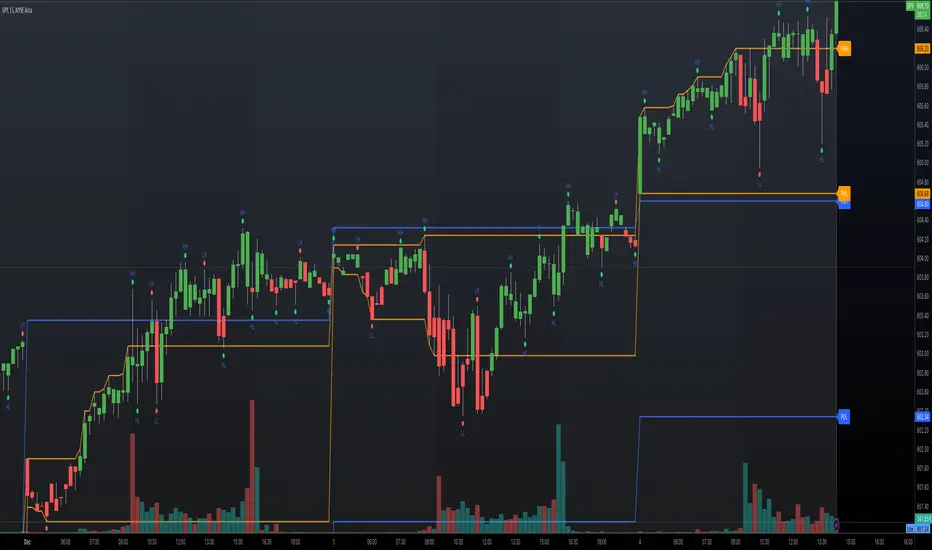
Candle Average PriceOverview
The Candle Average Price indicator is a custom tool designed to help traders identify key price levels by calculating and displaying the average price of recent candles on your TradingView chart. This indicator computes the average price based on a user-defined percentage of each candle's range over a specified number of candles. It then plots a horizontal line representing this average, covering only the last N candles as defined by you.
Key Features
Customizable Number of Candles: Define how many past candles to include in the average calculation.
Adjustable Percentage Level: Choose any percentage of each candle's range (from low to high) to calculate the price level.
Dynamic Horizontal Line: The indicator plots a horizontal line representing the calculated average, updating with each new bar and covering only the specified number of candles.
How It Works
Price at Specified Percentage:
For each candle, the indicator calculates a price level at your chosen percentage within the candle's range.
Formula: Price = Low + (Percentage Level / 100) * (High - Low)
Average Price Calculation:
It computes the average of these price levels over the last N candles.
Formula: Average Price = Sum of Price Levels over N Candles / N
Horizontal Line Plotting:
A horizontal line is drawn at the calculated average price level.
The line spans from N candles ago to the current candle, covering exactly the number of candles specified.
Input Parameters
Number of Candles (length):
Description: The number of recent candles over which the average is calculated.
Default Value: 4
Range: 1 to any positive integer.
Usage: Adjust this to include more or fewer candles in the calculation. A higher number smooths the average, while a lower number makes it more responsive to recent price changes.
Percentage Level (%):
Description: The percentage within each candle's range to calculate the price level.
Default Value: 50%
Range: 0% (candle low) to 100% (candle high).
Usage: Modify this to focus on different parts of each candle:
0%: Uses the low of each candle.
50%: Uses the midpoint of each candle.
100%: Uses the high of each candle.
Custom Percentage: Any value between 0% and 100% to target specific levels.
How to Use the Indicator
Adding the Indicator to Your Chart:
Open the TradingView chart of your preferred financial instrument.
Click on Indicators at the top of the chart.
Select Invite-Only Scripts if you've saved the script there, or use the Pine Editor to paste and apply the script.
Configuring the Settings:
After adding the indicator, click on the gear icon ⚙️ next to its name to open settings.
Adjust the Number of Candles (length) to your desired period.
Set the Percentage Level (%) (percentage) to the specific level within each candle's range you want to analyze.
Interpreting the Horizontal Line:
The horizontal line represents the average price calculated based on your inputs.
It updates with each new bar, always reflecting the most recent data over the specified number of candles.
The line only spans the last N candles, providing a focused view of recent price action.
Practical Applications
Identifying Support and Resistance Levels:
The average price line can act as a dynamic support or resistance level.
Traders can watch for price reactions around this line to make trading decisions.
Trend Analysis:
Observing how the price interacts with the average line can provide insights into the current trend's strength and potential reversals.
Entry and Exit Signals:
Use the line as a reference point for setting stop-loss orders or taking profits.
Combine it with other indicators for more robust trading signals.
In highly volatile markets, consider increasing the number of candles to avoid false signals.
Limitations and Considerations
Not a Standalone Tool:
This indicator should not be used in isolation for making trading decisions. Always consider additional analysis.
Market Conditions Matter:
The indicator may perform differently in trending markets versus ranging markets.
Data Refresh:
Ensure you have a stable internet connection and that your TradingView chart is set to the correct time frame.
Conclusion
The Candle Average Price indicator is a flexible and user-friendly tool that provides valuable insights into recent price action by calculating the average price based on your specific criteria. By adjusting the parameters to suit your trading style, you can incorporate this indicator into your technical analysis to help identify potential trading opportunities.
Disclaimer: Trading financial instruments involves risk, and past performance is not indicative of future results. This indicator is a tool to assist in analysis and should not be considered financial advice.
Happy Trading!