Topfinder Bottomfinder pivot matcher Midas- jayyMidas Technical Analysis: A VWAP Approach to Trading and Investing in Today’s Markets by
Andrew Coles, David G. Hawkins Copyright © 2011 by Andrew Coles and David G. Hawkins.
Appendix C: TradeStation Code for the MIDAS Topfinder/Bottomfinder Curves ported to tradingview
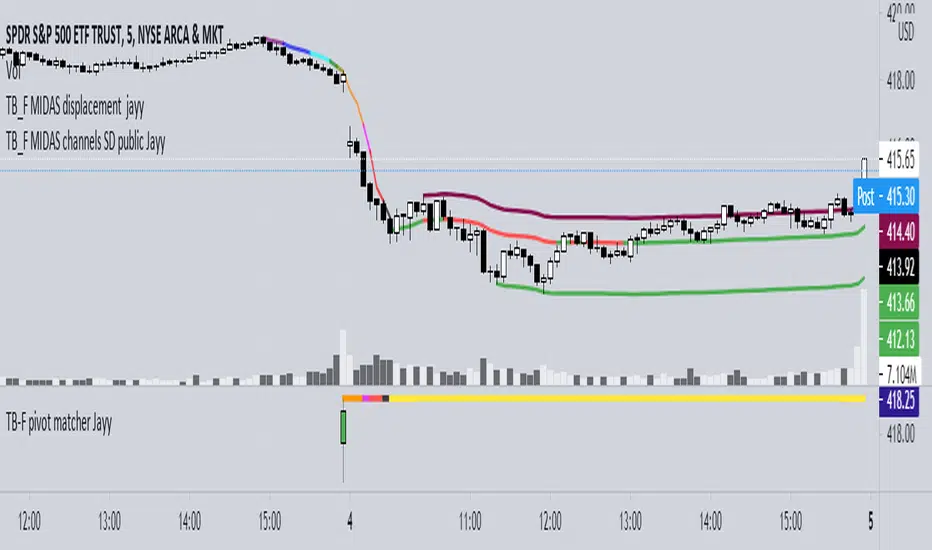
This code is used to assist in adjusting D volume to intersect pivot candle at a pivot candle when using this script: Top Bottom Finder Public version- Jayy found here:
The "n" number entered into the TB-F script is the topfinder/bottomfinder starting point or anchor
Be sure to enter the correct number in the "Topfinder bottomfinder initiation/anchor candle: 1 for CANDLE low - top finder, 2 for CANDLE high - bottom finder, 3 for CANDLE MIDPOINT (hl2) dialogue box
The location of the match point of the pivot candle is extremely important in the: "Match to PIVOT CANDLE: use 1 for CANDLE low, 2 for midtail of the candle below the BODY, 3 for candle BODY low, 4 for CANDLE HIGH, 5 for midpoint of candletail above body, 6 for candle BODY high". Do not
confuse body high with candle high. The body low will either be the candle open or close. The body high will be either the open or close.
If you expect a trend up the pivot candle is likely the low of the pivot candle ie 1 (2 and 3 are alternatives).
In a trend down the high of the pivot candle is often selected ie 4 (5 or 6 are alternatives)
If the candle body is aqua increase D volume if it is orange reduce D volume. Adjust iteratively until the candle body turns yellow. That will mean that the TB-F line passes through the pivot candle at the selected point.
Jayy
Recherche dans les scripts pour "top"
ElectroVanga v2.0The new free indicator "ElectroVanga 2.0" is better than my old indicator "ElectroVanga 1.0". Buy and sell signals.
Plots:
Red plot = hightrend
Lime plot = lowtrend
Blue plot = centertrend = (hightrend + lowtrend) / 2
Arrows:
Red arrow (down only) = market top = short entry (long exit)
Lime arrow (up only) = market bottom = long entry (short exit)
Blue arrow (up or down) = long or short entry (long or short exit) *
* If the blue arrow is against you, it is better to liquidate the position
Background:
Red background = more likely downtrend
Lime background = more likely uptrend
NA color background = 50/50
TimeFrames:
- 1D
- 1W
- 1MN
Hints:
A down arrow on a red background is a more reliable prediction than an down arrow on a lime background.
A up arrow on a lime background is a more reliable prediction than an up arrow on a red background.
The logic of this system
The price usually moves either in the upper zone (between the red plot and blue plot) or in the lower zone (between the lime plot and blue plot).
If the price is in the upper zone, then this is the uptrend. If the price is in the lower zone, then this is the downtrend.
If now the uptrend, then the red plot is the top of the market, and the blue plot is the bottom of the market.
If now the downtrend, then the blue plot is the top of the market, and the lime plot is the bottom of the market.

The Always Winning Holy Grail Strategy - Not (by ChartArt)How to win all the time if 1+1 = 2
The most upvoted strategies on Tradingview are those which seemingly work 100%, but they actually don't at all because they are repainting and would not work in live trading reality. They are using the multi-time-frame strategy testing bug and thereby trade during the backtest on close prices before the bar has closed in reality.
Top list of these cheating repainting strategies:
1569 upvotes ANN Strategy
877 upvotes Vdub FX SniperVX3 Strategy
481 upvotes Get Trend Strategy
I guess there are much more strategies among the top upvoted strategies on Tradingview which cheat with a multi-time-frame close price, but three examples are enough. The ANN Strategy uses the daily close price as multi-time-frame and cheats with that. The Vdub FX SniperVX3 Strategy uses the half-day (720 minute) close price to cheat and the Get Trend Strategy uses the 160 minute bar close for repaint cheating (at least here the author of this strategy explains that his strategy is only demo and would not work, which might be the reason why it has 1000 less upvotes than the ANN Strategy. I already wrote months ago a comment underneat these strategies to explain this issue but it hasn't stopped these strategies from getting more and more upvotes and staying in the top list.
I thought this way of cheating is lame, so I invented a new way to cheat my way to seemingly reach 100% profitable trades all the time by going long if 1+1 is equal to 2. Welcome to super wide stop losses. Simply use a extreme unrealistic large stop loss and take profit after a realistic amount of pips and according to Tradingview's current backtest module you win 100% all the time. Yay! :)
My recommendation for the Tradingview team is to add a function to let the user define a stop out and margin call level and maybe set a realistic setting as default, like 100%.
Please don't trade with this strategy!

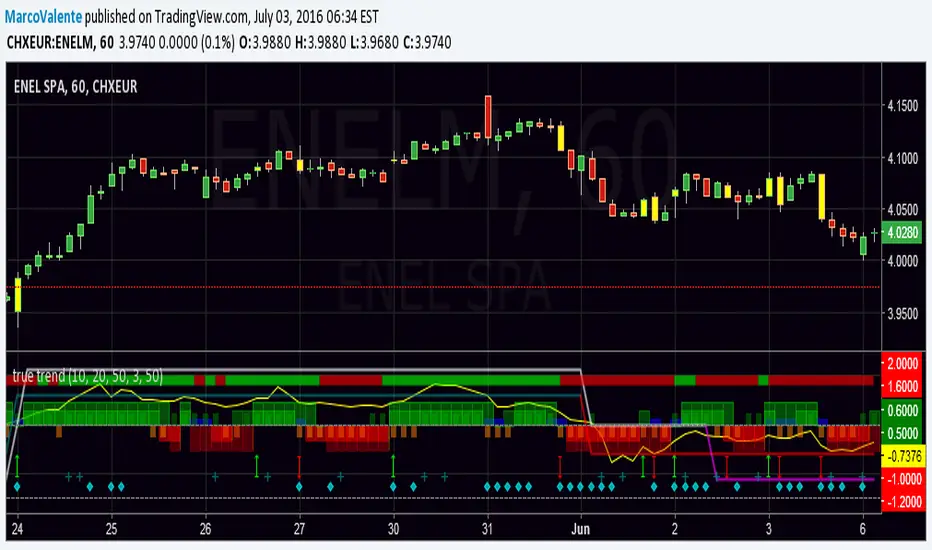
true trendEasy way to look at the Trend , but still accurate. Top bar is DI +, DI - , bars change in yellow when a swing happen, histogram show the increase/decrease of Min and Max and Open-Close; 2 lines moving between +1 and - 1 folloiwng 3 Ema crossing ; a Dot (diamond shape) appear on the botton when volatility increase and finally a " + " show when volume are much bigger the usually. Yellow line on top is Willams % and help us to find top and bottom of the market.
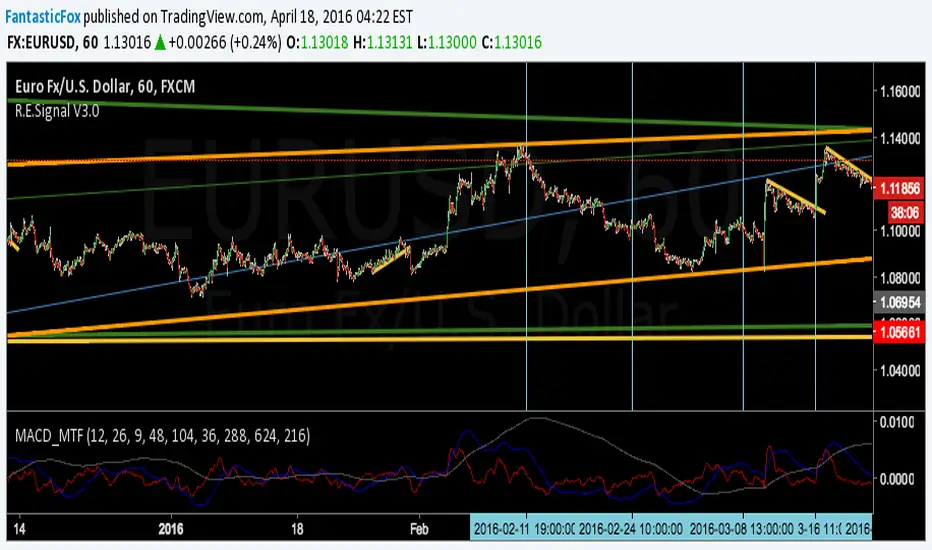
MACD MultiTimeFrame 1h4h1D [Fantastic Fox]Please insert the indicator into 1h time-frame, otherwise you need to change the lengths' inputs.
When there are tops for two of the MACDs and they are near and close* to each other, there is a big opportunity of a "Major Top" for the security, and vice versa for "Major Bottom".
This indicator can be used for tracing multi time-frame divergence. Also, it could help traders to identify the waves of Elliott Wave, and as a signal for confirmation of an impulse after a correction or retracement.
* They should be on top of each others head, not crossing each other. not necessarily touching, but not so far from each other.
EMA_ConvergenceFirst I have to give kudos to my son who I asked to take a shot at creating this little indicator. Nice work son!
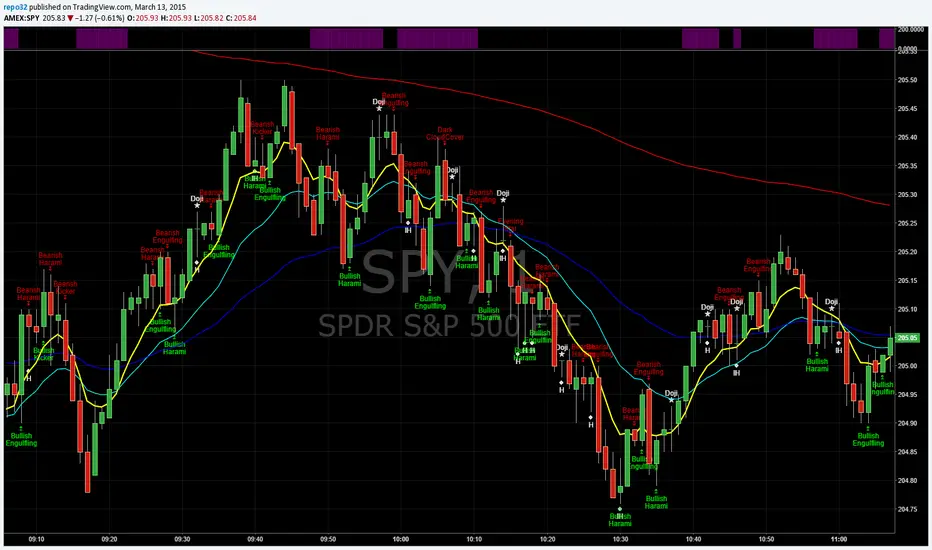
While trading, one of the things I look for is when price or certain EMA's approach another EMA. The example that I use on this 1 minute SPY chart is an 8 EMA and 20 EMA. I am looking for when the 8 and 20 are within' 3 cents of each other. Many times when they are getting close, price is approaching a top or bottom. I am looking for a candlestick reversal around that area. You may want to know when PRICE is near the 50 EMA: Use EMA 1 and 50 for that. Having it light up on top of the page, or elsewhere, makes it easier to look for the convergence when it occurs. If it lights up for a long period, price may be going sideways. I don't enter into a trade until the EMA starts separating, usually with another candlestick formation.
You are able to change the distance for convergence and two EMA's. Unfortunately you will have to adjust the convergence number up as you increase in time frames. This is designed to see when they are close, not when they cross.
The bars on top of this example are lit up purple due to the 8 and 20 EMA are within' 3 cents of each other.
If you want to overlay the price bars, instead of having it separate, just change overlay to "true"
Enjoy.
Unreached Highs/Lows Oscillator [LuxAlgo]The Unreached Highs/Lows Oscillator highlights the amount of unreached high/low prices as a percentage over time, helping visualize trend strength and momentum from bullish and bearish market participants.
🔶 USAGE
This indicator measures the strength of directional price movements, helping traders visualize the strength of both the bullish and bearish market participants.
When prices are moving up with strength, the price structure will not come back to retest previous lows. Therefore, unreached lows keep adding up.
When prices are moving down with strength, they will not retest previous highs; therefore, unreached highs keep adding up.
As we can see on the chart, high readings of unreached highs (red) and low readings of unreached lows (green) are considered bearish, and a downtrend in price confirms this bias. Conversely, high readings of unreached lows and low readings of unreached highs are considered bullish. On the chart, this is reflected as an uptrend.
Additionally, the oscillator can reveal significant breakouts on the chart, with unreached highs or lows decreasing rapidly indicating that a large number of highs/lows have been reached.
Due to the oscillator being normalized, overbought and oversold levels are included.
In this gold chart, we have different examples of how to use the tool in conjunction with price behavior to understand the market. Let's dissect it step by step:
1. Uptrend: Bullish readings are above 80, and bearish readings are below 20. The market is trending up.
2. Range: Mixed readings around 50 for both bullish and bearish; the market is ranging.
3. Uptrend: The same as before. Bullish above 80 and bearish below 20.
4. Pullback: A bullish dip below 80 to 50 and a bearish reading below 20 indicates a pullback.
5. Range: Mixed readings. In this case, it is bullish above and below 80 and bearish above and below 20. The market is ranging.
6. Uptrend: Bullish above 80 and bearish below 20; the market keeps moving up.
7. Pullback: Bullish dips below 80 and bearish rises to 50 indicate a pullback.
8. Uptrend: As before, bullish is above 80 and bearish is below 20; the market is trending up.
This Bitcoin chart shows how to use extreme readings of 0 and 100 to detect potential reversals. When both readings are at extreme opposites, we set the threshold level at 100 and 0 instead of the default levels of 80 and 20 to better identify these areas.
As we can see, extreme readings at points 1 and 5 identify major reversals that lead to a change in trend. Extreme readings at points 2, 3, 4, and 6 identify minor reversals that do not lead to a change in trend.
From the settings panel, traders can adjust the length parameter. A smaller value measures smaller price movements, while a larger value measures larger price movements. A length value of 20 is used by default.
The chart shows how different values affect bullish and bearish measures.
🔶 SETTINGS
Length: Select the maximum number of highs and lows to be used.
🔹 Style
Bullish: Select a color for unreached lows.
Bearish: Select a color for unreached highs.
Top Threshold: Select the top threshold level and color. Enable the Auto feature to choose the default color.
Bottom Threshold: Select the bottom threshold level and color. Enable the Auto feature to choose the default color.

Market Structure- Zig Zag, BoS and Supply/Demand Zones LIMITLESS// This Pine Script® code is subject to the terms of the Mozilla Public License 2.0 at mozilla.org
// © The_Forex_Steward
//@version=6
indicator("Market Structure- Zig Zag, BoS and Supply/Demand Zones", overlay=true)
// === User Inputs ===
htf = input.timeframe("", title="Timeframe")
internalShiftMode = input.string("Engulfment", title="Calculate Zig-Zag By", options= )
x = input.int(1, minval=1, maxval= 3, title="# of Candles for Zones (1-3)")
showBearishOrderBlocks = input.bool(true, title="Show Supply Zones")
showBullishOrderBlocks = input.bool(true, title="Show Demand Zones")
orderBlockDuration = input.int(10, title="Zone Duration (bars)")
deleteMitigatedBoxes = input.bool(false, title="Delete Mitigated Zones")
deleteBrokenBoxes= input.bool(true, title = "Delete Broken Zones")
dimMitigatedBoxes = input.bool(true, title="Dim Mitigated Zones")
bearishBlockColor = input.color(color.rgb(255, 82, 82, 50), title="Supply Zone Fill")
bullishBlockColor = input.color(color.rgb(76, 175, 79, 50), title="Demand Zone Fill")
lighterBullishColor = color.new(bullishBlockColor, 85) // More transparent
lighterBearishColor = color.new(bearishBlockColor, 85)
zigzagLineColor = input.color(color.black, title="ZigZag Line Color")
zigzagLineWidth = input.int(2, title="Width of Lines", minval=1, maxval=10)
zigzagLineStyle = input.string("Solid", title="ZigZag Line Style", options= )
internalShiftColor = color.new(zigzagLineColor, 75) // More transparent
bosBullishLineColor = input.color(color.green, title="Bullish BOS Line Color")
bosBearishLineColor = input.color(color.red, title="Bearish BOS Line Color")
bosLineStyle = input.string("Dotted", title="BOS Line Style", options= )
bosLineStyleConst = bosLineStyle == "Solid" ? line.style_solid : bosLineStyle == "Dotted" ? line.style_dotted : line.style_dashed
alertMode = input.string("MTF", title= "Enable/Disable for Any Alert() Function Call↓ Alert Status→", options= )
alertSupplyandDemand = input.bool(true, title= "Supply & Demand Zones")
alertHighsandLows = input.bool(true, title= "Swing Highs & Lows")
alertBoS = input.bool(true, title= "BoS")
alertMS = input.bool(true, title= "Market Shifts")
hhBackgroundColor = color.rgb(76, 175, 79, 100)
hhTextColor = color.green
lhBackgroundColor = color.rgb(0, 137, 123, 100)
lhTextColor = color.red
llBackgroundColor = color.rgb(255, 82, 82, 100)
llTextColor = color.red
hlBackgroundColor = color.rgb(255, 153, 0, 100)
hlTextColor = color.green
HtfOpen = request.security(syminfo.tickerid, htf, open)
HtfHigh = request.security(syminfo.tickerid, htf, high)
HtfLow = request.security(syminfo.tickerid, htf, low)
HtfClose = request.security(syminfo.tickerid, htf, close)
prevHtfHigh = request.security(syminfo.tickerid, htf, high )
prevHtfLow = request.security(syminfo.tickerid, htf, low )
isHTFBarClose = ta.change(HtfClose) != 0
// Track the bar_index of the current bar when HTF closes
var int HtfBarIndex = na
if isHTFBarClose
HtfBarIndex := bar_index
// === Initialization ===
var int lastSignal = 0 // 0 = none, 1 = bull, -1 = bear
var float runningLowestHigh = na
var float runningHighestLow = na
// Track engulfed ranges
var float engulfedHigh = na
var float engulfedLow = na
// === Step 1: Detect "starter" engulfing ===
starterBull = HtfClose < HtfOpen and HtfClose > HtfOpen and HtfClose > HtfHigh
starterBear = HtfClose > HtfOpen and HtfClose < HtfOpen and HtfClose < HtfLow
if lastSignal == 0
if starterBull
lastSignal := 1
runningHighestLow := HtfLow
engulfedHigh := HtfHigh
engulfedLow := HtfLow
else if starterBear
lastSignal := -1
runningLowestHigh := HtfHigh
engulfedHigh := HtfHigh
engulfedLow := HtfLow
// === Step 2: Update running references ===
if lastSignal == -1 // last was bearish → waiting for bullish
runningLowestHigh := na(runningLowestHigh) ? HtfHigh : math.min(runningLowestHigh, HtfHigh)
else if lastSignal == 1 // last was bullish → waiting for bearish
runningHighestLow := na(runningHighestLow) ? HtfLow : math.max(runningHighestLow, HtfLow)
// === Step 3: Check for new engulfment ===
newBull = lastSignal == -1 and not na(runningLowestHigh) and HtfClose > runningLowestHigh
newBear = lastSignal == 1 and not na(runningHighestLow) and HtfClose < runningHighestLow
var int lastBullIndex = na
var int lastBearIndex = na
if newBull
lastBullIndex := HtfBarIndex
// store engulfed candle values (the one we just broke over)
engulfedHigh := runningLowestHigh
engulfedLow := HtfLow // or HtfLow depending on how you define "engulfed"
if newBear
lastBearIndex := HtfBarIndex
engulfedLow := runningHighestLow
engulfedHigh := HtfHigh
// === Step 4: Confirm and flip state ===
if newBull
lastSignal := 1
runningLowestHigh := na
runningHighestLow := HtfLow
else if newBear
lastSignal := -1
runningHighestLow := na
runningLowestHigh := HtfHigh
// === Track Boxes ===
var box bullishBoxes = array.new()
var box bearishBoxes = array.new()
// === Mitigation Flags ===
var bool bullishMitigated = false
var bool bearishMitigated = false
var bool bullishBreak = false
var bool bearishBreak = false
// === Delete invalidated boxes ===
if deleteBrokenBoxes
if array.size(bullishBoxes) > 0
for i = array.size(bullishBoxes) - 1 to 0
boxItem = array.get(bullishBoxes, i)
if HtfClose < box.get_bottom(boxItem)
box.delete(boxItem)
array.remove(bullishBoxes, i)
if array.size(bearishBoxes) > 0
for i = array.size(bearishBoxes) - 1 to 0
boxItem = array.get(bearishBoxes, i)
if HtfClose > box.get_top(boxItem)
box.delete(boxItem)
array.remove(bearishBoxes, i)
// === Delete mitigated boxes (optional) ===
if deleteMitigatedBoxes
if array.size(bullishBoxes) > 0
for i = array.size(bullishBoxes) - 1 to 0
boxItem = array.get(bullishBoxes, i)
if HtfLow < box.get_top(boxItem)
bullishMitigated := true
box.delete(boxItem)
array.remove(bullishBoxes, i)
if array.size(bearishBoxes) > 0
for i = array.size(bearishBoxes) - 1 to 0
boxItem = array.get(bearishBoxes, i)
if HtfHigh > box.get_bottom(boxItem)
bearishMitigated := true
box.delete(boxItem)
array.remove(bearishBoxes, i)
if dimMitigatedBoxes
if array.size(bullishBoxes) > 0
for i = 0 to array.size(bullishBoxes) - 1
boxItem = array.get(bullishBoxes, i)
if HtfLow < box.get_top(boxItem)
bullishMitigated := true
box.set_bgcolor(boxItem, lighterBullishColor)
box.set_border_color(boxItem, lighterBullishColor)
if array.size(bearishBoxes) > 0
for i = 0 to array.size(bearishBoxes) - 1
boxItem = array.get(bearishBoxes, i)
if HtfHigh > box.get_bottom(boxItem)
bearishMitigated := true
box.set_bgcolor(boxItem, lighterBearishColor)
box.set_border_color(boxItem, lighterBearishColor)
// Peramters for boxes
zoneHigh = ta.highest(HtfHigh , x)
zoneLow = ta.lowest(HtfLow , x)
// Create new order blocks with adjusted alignment
if showBullishOrderBlocks and newBull
bullishBox = box.new(left= HtfBarIndex , right=HtfBarIndex + orderBlockDuration, top=zoneHigh, bottom=zoneLow, border_color=bullishBlockColor, bgcolor=bullishBlockColor)
array.push(bullishBoxes, bullishBox)
if showBearishOrderBlocks and newBear
bearishBox = box.new(left= HtfBarIndex , right=HtfBarIndex + orderBlockDuration, top=zoneHigh, bottom=zoneLow, border_color=bearishBlockColor, bgcolor=bearishBlockColor)
array.push(bearishBoxes, bearishBox)
// === Internal Structure Logic ===
var int bullishCount = 0
var int bearishCount = 0
var float lowestBullishPrice = na
var float highestBearishPrice = na
var float firstBullishOpen = na
var float firstBearishOpen = na
var int lastInternalShift = 0
var float lastBullishInternalShiftPrice = na
var float lastBearishInternalShiftPrice = na
var float currentSwingHigh = na
var int currentSwingHighIndex = na
var float currentSwingLow = na
var int currentSwingLowIndex = na
var float prevSwingHigh = na
var float prevSwingLow = na
var bool isHH = false
var bool isHL = false
var bool isLL = false
var bool isLH = false
var bool isLiquiditySweep = false
var float lastOpposingLow = na // For HH
var float lastOpposingHigh = na // For LL
var bool internalShiftBullish = false
var bool internalShiftBearish = false
if ((internalShiftMode == "Engulfment") or (internalShiftMode == "Market Shift (Engulfment)"))
internalShiftBullish := newBull
internalShiftBearish := newBear
allowInternalShiftBearish = internalShiftBearish and lastInternalShift != -1
allowInternalShiftBullish = internalShiftBullish and lastInternalShift != 1
var bool plotBearishInternalShift = false
var bool plotBullishInternalShift = false
// === Determine Internal Shift Based on User Input ===
plotBearishInternalShift := false
plotBullishInternalShift := false
if allowInternalShiftBearish
plotBearishInternalShift := true
lastInternalShift := -1
if allowInternalShiftBullish
plotBullishInternalShift := true
lastInternalShift := 1
// === Plot internal shift markers ==
plotshape(plotBullishInternalShift, title="Bullish Internal Shift", location=location.belowbar, color=internalShiftColor, style=shape.triangleup, size=size.tiny)
plotshape(plotBearishInternalShift, title="Bearish Internal Shift", location=location.abovebar, color=internalShiftColor, style=shape.triangledown, size=size.tiny)
// === Highest High Between Alternate Bearish Break and Last Bullish Break (Safe) ===
var float localHigh = na
var int localHighIndex = na
maxHistory = 10000
if plotBearishInternalShift and ((internalShiftMode == "Engulfment") or (internalShiftMode == "Market Shift (Engulfment)"))
float highestHigh = na
int highestIndex = na
int startIndex = math.max(lastBullIndex, bar_index - maxHistory)
int endIndex = HtfBarIndex
for i = startIndex to endIndex
int lookback = bar_index - i // Convert i to relative offset for series access
if lookback >= 0 and lookback < maxHistory and not na(HtfHigh )
if na(highestHigh) or HtfHigh > highestHigh
highestHigh := HtfHigh
highestIndex := i
localHigh := highestHigh
localHighIndex := highestIndex
// === Lowest Low Between Alternate Bullish Break and Last Bearish Break (Safe) ===
var float localLow = na
var int localLowIndex = na
if plotBullishInternalShift and ((internalShiftMode == "Engulfment") or (internalShiftMode == "Market Shift (Engulfment)"))
float lowestLow = na
int lowestIndex = na
int startIndex = math.max(lastBearIndex, HtfBarIndex - maxHistory)
int endIndex = bar_index
for i = startIndex to endIndex
int lookback = bar_index - i // Convert i to relative offset
if lookback >= 0 and lookback < maxHistory and not na(HtfLow )
if na(lowestLow) or HtfLow < lowestLow
lowestLow := HtfLow
lowestIndex := i
localLow := lowestLow
localLowIndex := lowestIndex
// === Track Last Non-Alternating Break of Structure (BoS) ===
var int lastBullishBoSBarNA = na
var int lastBearishBoSBarNA = na
var float lastBullishBoSPriceNA = na
var float lastBearishBoSPriceNA = na
var bool bullishBOSOccurred = false
var bool bearishBOSOccurred = false
var int lastLowIndex = na
var int lastHighIndex = na
var float lastSwingHigh = na
var float lastSwingLow = na
// Reset flags
var bool canBreakBullish = true
var bool canBreakBearish = true
// BoS Conditions (non-alternating)
bullishBoS = canBreakBullish and HtfOpen < localHigh and HtfClose > localHigh
bearishBoS = canBreakBearish and HtfOpen > localLow and HtfClose < localLow
if bullishBoS and internalShiftMode == "Engulfment"
lastBullishBoSBarNA := bar_index
lastBullishBoSPriceNA := HtfClose
canBreakBullish := false // prevent further BoS on same localHigh
bullishBOSOccurred := true
line.new(x1=localHighIndex, y1=localHigh, x2=bar_index, y2=localHigh, color=bosBullishLineColor, width=zigzagLineWidth, style=bosLineStyleConst)
lastSwingHigh := na
if bearishBoS and internalShiftMode == "Engulfment"
lastBearishBoSBarNA := bar_index
lastBearishBoSPriceNA := HtfClose
canBreakBearish := false // prevent further BoS on same localLow
bearishBOSOccurred := true
line.new(x1=localLowIndex, y1=localLow, x2=bar_index, y2=localLow, color=bosBearishLineColor, width=zigzagLineWidth, style=bosLineStyleConst)
lastSwingLow := na
// Reset logic — allow new break only if local high/low changes
if ta.change(localHigh) != 0
canBreakBullish := true
if ta.change(localLow) != 0
canBreakBearish := true
// === Track Last MS Event ===
var int lastBullishBoSBar = na
var int lastBearishBoSBar = na
var float lastBullishBoSPrice = na
var float lastBearishBoSPrice = na
var bool SwingHighBOSOccurred = false
var bool SwingLowBOSOccurred = false
var int lastSwingLowIndex = na
var int lastSwingHighIndex = na
var float lastSSwingHigh = na
var float lastSSwingLow = na
// Track last BoS type: 1 = bullish, -1 = bearish, 0 = none yet
var int lastBoSType = 0
// === Track Last MS Type ===
var int lastMSType = na // 1 = bullish, -1 = bearish
// === MS Detection Logic ===
rawBullishMS = HtfClose > localHigh
rawBearishMS = HtfClose < localLow
// === Enforce Alternation ===
canBullishMS = na(lastMSType) or lastMSType == -1
canBearishMS = na(lastMSType) or lastMSType == 1
bullishMS = rawBullishMS and canBullishMS
bearishMS = rawBearishMS and canBearishMS
plotshape(bullishMS, title="Bullish Market Shift", location=location.belowbar, color=zigzagLineColor, style=shape.triangleup, size=size.tiny)
plotshape(bearishMS, title="Bearish Market Shift", location=location.abovebar, color=zigzagLineColor, style=shape.triangledown, size=size.tiny)
// === Update Last MS Type and BoS Bars ===
if bullishMS
lastMSType := 1
lastBullishBoSBar := bar_index
if bearishMS
lastMSType := -1
lastBearishBoSBar := bar_index
// === Lowest Low Between Last Bearish MS and This Bullish MS ===
var float msLocalLow = na
var int msLocalLowIndex = na
msMaxHistory = 5000
if bullishMS
float msLowestLow = na
int msLowestIndex = na
int msStartIndex = na(lastBearishBoSBar) ? bar_index - msMaxHistory : lastBearishBoSBar
int msEndIndex = bar_index // safer than using HtfBarIndex unless defined
for i = msStartIndex to msEndIndex
int msLookback = bar_index - i
if msLookback >= 0 and msLookback < msMaxHistory and not na(HtfLow )
if na(msLowestLow) or HtfLow < msLowestLow
msLowestLow := HtfLow
msLowestIndex := i
msLocalLow := msLowestLow
msLocalLowIndex := msLowestIndex
// === Highest High Between Last Bullish MS and This Bearish MS ===
var float msLocalHigh = na
var int msLocalHighIndex = na
if bearishMS
float msHighestHigh = na
int msHighestIndex = na
int msStartIndex = na(lastBullishBoSBar) ? bar_index - msMaxHistory : lastBullishBoSBar
int msEndIndex = bar_index
for i = msStartIndex to msEndIndex
int msLookback = bar_index - i
if msLookback >= 0 and msLookback < msMaxHistory and not na(HtfHigh )
if na(msHighestHigh) or HtfHigh > msHighestHigh
msHighestHigh := HtfHigh
msHighestIndex := i
msLocalHigh := msHighestHigh
msLocalHighIndex := msHighestIndex
// === Persistent variables for multiple line handling ===
var line zigzagLines = array.new()
var int lastBearishShiftBar = na
var int lastBullishShiftBar = na
var float lastZigzagPrice = na
var string lastSwingType = ""
// Save shift bar indices
if plotBearishInternalShift
lastBearishShiftBar := bar_index
if plotBullishInternalShift
lastBullishShiftBar := bar_index
// Bearish shift followed by Bullish shift → Track lowest low
if plotBullishInternalShift and internalShiftMode == "Engulfment"
// Plot zigzag line
// Plot zigzag line for LL and HL separately
if not na(prevSwingLow)
if localLow < prevSwingLow // LL
if zigzagLineStyle == "Solid"
line.new(x1=localHighIndex, y1=localHigh, x2=localLowIndex, y2=localLow, color=zigzagLineColor, width=zigzagLineWidth, style=line.style_solid)
else if zigzagLineStyle == "Dotted"
line.new(x1=localHighIndex, y1=localHigh, x2=localLowIndex, y2=localLow, color=zigzagLineColor, width=zigzagLineWidth, style=line.style_dotted)
else if zigzagLineStyle == "Dashed"
line.new(x1=localHighIndex, y1=localHigh, x2=localLowIndex, y2=localLow, color=zigzagLineColor, width=zigzagLineWidth, style=line.style_dashed)
else // LH
if zigzagLineStyle == "Solid"
line.new(x1=localHighIndex, y1=localHigh, x2=localLowIndex, y2=localLow, color=zigzagLineColor, width=zigzagLineWidth, style=line.style_solid)
else if zigzagLineStyle == "Dotted"
line.new(x1=localHighIndex, y1=localHigh, x2=localLowIndex, y2=localLow, color=zigzagLineColor, width=zigzagLineWidth, style=line.style_dotted)
else if zigzagLineStyle == "Dashed"
line.new(x1=localHighIndex, y1=localHigh, x2=localLowIndex, y2=localLow, color=zigzagLineColor, width=zigzagLineWidth, style=line.style_dashed)
// Update swing low and plot label (HL or LL)
if not na(prevSwingLow)
isLL := not na(prevSwingLow) and localLow < prevSwingLow
isHL := not na(prevSwingLow) and localLow > prevSwingLow
if isLL
if bearishBOSOccurred
label.new(localLowIndex, localLow, "LL", color=llBackgroundColor, style=label.style_label_up, textcolor=llTextColor, size=size.small)
isLiquiditySweep := false // Definitely not a sweep if BOS occurred
else
label.new(localLowIndex, localLow, "LS", color=color.rgb(155, 39, 176, 100), style=label.style_label_up, textcolor=color.orange, size=size.small)
isLiquiditySweep := true
else
isLiquiditySweep := false // Reset only if not LL
lastOpposingHigh := prevSwingHigh
bearishBOSOccurred := false
if isHL
label.new(localLowIndex, localLow, "HL", color=hlBackgroundColor, style=label.style_label_up, textcolor=hlTextColor, size=size.small)
lastOpposingHigh := prevSwingHigh
bearishBOSOccurred := false
prevSwingLow := localLow
lastZigzagPrice := localLow
lastSwingLow := localLow
lastLowIndex := localLowIndex
lastBearishShiftBar := bar_index
if bullishMS and internalShiftMode == "Market Shift (Engulfment)"
// Plot zigzag line
// Plot zigzag line for LL and HL separately
if not na(prevSwingLow)
if msLocalLow < prevSwingLow // LL
if zigzagLineStyle == "Solid"
line.new(x1=msLocalHighIndex, y1=msLocalHigh, x2=msLocalLowIndex, y2=msLocalLow, color=zigzagLineColor, width=zigzagLineWidth, style=line.style_solid)
else if zigzagLineStyle == "Dotted"
line.new(x1=msLocalHighIndex, y1=msLocalHigh, x2=msLocalLowIndex, y2=msLocalLow, color=zigzagLineColor, width=zigzagLineWidth, style=line.style_dotted)
else if zigzagLineStyle == "Dashed"
line.new(x1=msLocalHighIndex, y1=msLocalHigh, x2=msLocalLowIndex, y2=msLocalLow, color=zigzagLineColor, width=zigzagLineWidth, style=line.style_dashed)
else // LH
if zigzagLineStyle == "Solid"
line.new(x1=msLocalHighIndex, y1=msLocalHigh, x2=msLocalLowIndex, y2=msLocalLow, color=zigzagLineColor, width=zigzagLineWidth, style=line.style_solid)
else if zigzagLineStyle == "Dotted"
line.new(x1=msLocalHighIndex, y1=msLocalHigh, x2=msLocalLowIndex, y2=msLocalLow, color=zigzagLineColor, width=zigzagLineWidth, style=line.style_dotted)
else if zigzagLineStyle == "Dashed"
line.new(x1=msLocalHighIndex, y1=msLocalHigh, x2=msLocalLowIndex, y2=msLocalLow, color=zigzagLineColor, width=zigzagLineWidth, style=line.style_dashed)
// Update swing low and plot label (HL or LL)
if not na(prevSwingLow)
isLL := not na(prevSwingLow) and msLocalLow < prevSwingLow
isHL := not na(prevSwingLow) and msLocalLow > prevSwingLow
if isLL
label.new(msLocalLowIndex, msLocalLow, "LL", color=llBackgroundColor, style=label.style_label_up, textcolor=llTextColor, size=size.small)
if isHL
label.new(msLocalLowIndex, msLocalLow, "HL", color=hlBackgroundColor, style=label.style_label_up, textcolor=hlTextColor, size=size.small)
lastOpposingHigh := prevSwingHigh
SwingLowBOSOccurred := false
prevSwingLow := msLocalLow
lastZigzagPrice := msLocalLow
lastSwingLow := msLocalLow
lastLowIndex := msLocalLowIndex
lastBearishShiftBar := bar_index
//========================================================================================
if plotBearishInternalShift and internalShiftMode == "Engulfment"
// Plot zigzag line
if not na(prevSwingHigh)
if localHigh > prevSwingHigh // HH
if zigzagLineStyle == "Solid"
line.new(x1=localLowIndex, y1=localLow, x2=localHighIndex, y2=localHigh, color=zigzagLineColor, width=zigzagLineWidth, style=line.style_solid)
else if zigzagLineStyle == "Dotted"
line.new(x1=localLowIndex, y1=localLow, x2=localHighIndex, y2=localHigh, color=zigzagLineColor, width=zigzagLineWidth, style=line.style_dotted)
else if zigzagLineStyle == "Dashed"
line.new(x1=localLowIndex, y1=localLow, x2=localHighIndex, y2=localHigh, color=zigzagLineColor, width=zigzagLineWidth, style=line.style_dashed)
else // LH
if zigzagLineStyle == "Solid"
line.new(x1=localLowIndex, y1=localLow, x2=localHighIndex, y2=localHigh, color=zigzagLineColor, width=zigzagLineWidth, style=line.style_solid)
else if zigzagLineStyle == "Dotted"
line.new(x1=localLowIndex, y1=localLow, x2=localHighIndex, y2=localHigh, color=zigzagLineColor, width=zigzagLineWidth, style=line.style_dotted)
else if zigzagLineStyle == "Dashed"
line.new(x1=localLowIndex, y1=localLow, x2=localHighIndex, y2=localHigh, color=zigzagLineColor, width=zigzagLineWidth, style=line.style_dashed)
// Update swing high and plot label (HH or LH)
if not na(prevSwingHigh)
isHH := not na(prevSwingHigh) and localHigh > prevSwingHigh
isLH := not na(prevSwingHigh) and localHigh < prevSwingHigh
if isHH
if bullishBOSOccurred
label.new(localHighIndex, localHigh, "HH", color=hhBackgroundColor, style=label.style_label_down, textcolor=hhTextColor, size=size.small)
isLiquiditySweep := false
else
label.new(localHighIndex, localHigh, "LS", color=color.rgb(155, 39, 176, 100), style=label.style_label_down, textcolor=color.orange, size=size.small)
isLiquiditySweep := true
else
isLiquiditySweep := false
bullishBOSOccurred := false
if isLH
label.new(localHighIndex, localHigh, "LH", color=lhBackgroundColor, style=label.style_label_down, textcolor=lhTextColor, size=size.small)
lastOpposingLow := prevSwingLow
bullishBOSOccurred := false
prevSwingHigh := localHigh
lastZigzagPrice := localHigh
lastSwingHigh := localHigh
lastHighIndex := localHighIndex
lastBullishShiftBar := bar_index
if bearishMS and internalShiftMode == "Market Shift (Engulfment)"
// Plot zigzag line
if not na(prevSwingHigh)
if msLocalHigh > prevSwingHigh // HH
if zigzagLineStyle == "Solid"
line.new(x1=msLocalLowIndex, y1=msLocalLow, x2=msLocalHighIndex, y2=msLocalHigh, color=zigzagLineColor, width=zigzagLineWidth, style=line.style_solid)
else if zigzagLineStyle == "Dotted"
line.new(x1=msLocalLowIndex, y1=msLocalLow, x2=msLocalHighIndex, y2=msLocalHigh, color=zigzagLineColor, width=zigzagLineWidth, style=line.style_dotted)
else if zigzagLineStyle == "Dashed"
line.new(x1=msLocalLowIndex, y1=msLocalLow, x2=msLocalHighIndex, y2=msLocalHigh, color=zigzagLineColor, width=zigzagLineWidth, style=line.style_dashed)
else // LH
if zigzagLineStyle == "Solid"
line.new(x1=msLocalLowIndex, y1=msLocalLow, x2=msLocalHighIndex, y2=msLocalHigh, color=zigzagLineColor, width=zigzagLineWidth, style=line.style_solid)
else if zigzagLineStyle == "Dotted"
line.new(x1=msLocalLowIndex, y1=msLocalLow, x2=msLocalHighIndex, y2=msLocalHigh, color=zigzagLineColor, width=zigzagLineWidth, style=line.style_dotted)
else if zigzagLineStyle == "Dashed"
line.new(x1=msLocalLowIndex, y1=msLocalLow, x2=msLocalHighIndex, y2=msLocalHigh, color=zigzagLineColor, width=zigzagLineWidth, style=line.style_dashed)
// Update swing high and plot label (HH or LH)
if not na(prevSwingHigh)
isHH := not na(prevSwingHigh) and msLocalHigh > prevSwingHigh
isLH := not na(prevSwingHigh) and msLocalHigh < prevSwingHigh
if isHH
label.new(msLocalHighIndex, msLocalHigh, "HH", color=hhBackgroundColor, style=label.style_label_down, textcolor=hhTextColor, size=size.small)
SwingHighBOSOccurred := false
if isLH
label.new(msLocalHighIndex, msLocalHigh, "LH", color=lhBackgroundColor, style=label.style_label_down, textcolor=lhTextColor, size=size.small)
lastOpposingLow := prevSwingLow
SwingHighBOSOccurred := false
prevSwingHigh := msLocalHigh
lastZigzagPrice := msLocalHigh
lastSwingHigh := msLocalHigh
lastHighIndex := msLocalHighIndex
lastBullishShiftBar := bar_index
// === Alert Conditions ===
alertcondition(newBull, title="New Supply Zone", message="New supply zone available.")
alertcondition(newBear, title="New Demand Zone", message="New demand zone available.")
alertcondition(plotBullishInternalShift, title="Bullish Internal Shift (All Lows)", message="Bullish Internal Shift detected! Check Swing Low.")
alertcondition(plotBearishInternalShift, title="Bearish Internal Shift (All Highs)", message="Bearish Internal Shift detected! Check Swing High.")
alertcondition(bullishBOSOccurred, title="Bullish Break of Structure", message="Bullish BoS detected.")
alertcondition(bearishBOSOccurred, title="Bearish Break of Structure", message="Bearish BoS detected.")
alertcondition(bullishMS, title="Bullish Market Shift", message="Bullish market shift detected.")
alertcondition(bearishMS, title="Bearish Market Shift", message="Bearish market shift detected.")
alertcondition(isHH and plotBearishInternalShift and not isLiquiditySweep, title="Higher High (HH)", message="Higher High (HH) detected")
alertcondition(isHL and plotBullishInternalShift, title="Higher Low (HL)", message="Higher Low (HL) detected")
alertcondition(isLL and plotBullishInternalShift and not isLiquiditySweep, title="Lower Low (LL)", message="Lower Low (LL) detected")
alertcondition(isLH and plotBearishInternalShift, title="Lower High (LH)", message="Lower High (LH) detected")
alertcondition((isLiquiditySweep and isLL and plotBullishInternalShift) or (isLiquiditySweep and isHH and plotBearishInternalShift), title="Liquidity Sweep (LS)", message="Liquidity Sweep (LS) detected")
// === Alerts ===
if alertMode == "LTF"
if isHH and plotBearishInternalShift and not isLiquiditySweep and (alertHighsandLows == true)
alert("Higher High (HH) detected (LTF)", alert.freq_once_per_bar_close)
if isHL and plotBullishInternalShift and (alertHighsandLows == true)
alert("Higher Low (HL) detected (LTF)", alert.freq_once_per_bar_close)
if isLL and plotBullishInternalShift and not isLiquiditySweep and (alertHighsandLows == true)
alert("Lower Low (LL) detected (LTF)" , alert.freq_once_per_bar_close)
if isLH and plotBearishInternalShift and (alertHighsandLows == true)
alert("Lower High (LH) detected (LTF)", alert.freq_once_per_bar_close)
if ((isLiquiditySweep and isLL and plotBullishInternalShift) or (isLiquiditySweep and isHH and plotBearishInternalShift)) and (alertHighsandLows == true)
alert("Liquidity Sweep (LS) detected (LTF)", alert.freq_once_per_bar_close)
if newBear and (alertSupplyandDemand == true)
alert("New supply zone available. (LTF)", alert.freq_once_per_bar_close)
if newBull and (alertSupplyandDemand == true)
alert("New demand zone available. (LTF)", alert.freq_once_per_bar_close)
if bullishBOSOccurred and (alertBoS == true)
alert("Bullish BoS detected. (LTF)", alert.freq_once_per_bar_close)
if bearishBOSOccurred and (alertBoS == true)
alert("Bearish BoS detected. (LTF)", alert.freq_once_per_bar_close)
if bullishMS and (alertMS == true)
alert("Bullish market shift detected (LTF).", alert.freq_once_per_bar_close)
if bearishMS and (alertMS == true)
alert("Bearish market shift detected (LTF).", alert.freq_once_per_bar_close)
if alertMode == "MTF"
if isHH and plotBearishInternalShift and not isLiquiditySweep and (alertHighsandLows == true)
alert("Higher High (HH) detected (MTF)", alert.freq_once_per_bar_close)
if isHL and plotBullishInternalShift and (alertHighsandLows == true)
alert("Higher Low (HL) detected (MTF)", alert.freq_once_per_bar_close)
if isLL and plotBullishInternalShift and not isLiquiditySweep and (alertHighsandLows == true)
alert("Lower Low (LL) detected (MTF)" , alert.freq_once_per_bar_close)
if isLH and plotBearishInternalShift and (alertHighsandLows == true)
alert("Lower High (LH) detected (MTF)", alert.freq_once_per_bar_close)
if ((isLiquiditySweep and isLL and plotBullishInternalShift) or (isLiquiditySweep and isHH and plotBearishInternalShift)) and (alertHighsandLows == true)
alert("Liquidity Sweep (LS) detected (MTF)", alert.freq_once_per_bar_close)
if newBear and (alertSupplyandDemand == true)
alert("New supply zone available. (MTF)", alert.freq_once_per_bar_close)
if newBull and (alertSupplyandDemand == true)
alert("New demand zone available. (MTF)", alert.freq_once_per_bar_close)
if bullishBOSOccurred and (alertBoS == true)
alert("Bullish BoS detected. (MTF)", alert.freq_once_per_bar_close)
if bearishBOSOccurred and (alertBoS == true)
alert("Bearish BoS detected. (MTF)", alert.freq_once_per_bar_close)
if bullishMS and (alertMS == true)
alert("Bullish market shift detected (MTF).", alert.freq_once_per_bar_close)
if bearishMS and (alertMS == true)
alert("Bearish market shift detected (MTF).", alert.freq_once_per_bar_close)
if alertMode == "HTF"
if isHH and plotBearishInternalShift and not isLiquiditySweep and (alertHighsandLows == true)
alert("Higher High (HH) detected (HTF)", alert.freq_once_per_bar_close)
if isHL and plotBullishInternalShift and (alertHighsandLows == true)
alert("Higher Low (HL) detected (HTF)", alert.freq_once_per_bar_close)
if isLL and plotBullishInternalShift and not isLiquiditySweep and (alertHighsandLows == true)
alert("Lower Low (LL) detected (HTF)" , alert.freq_once_per_bar_close)
if isLH and plotBearishInternalShift and (alertHighsandLows == true)
alert("Lower High (LH) detected (HTF)", alert.freq_once_per_bar_close)
if ((isLiquiditySweep and isLL and plotBullishInternalShift) or (isLiquiditySweep and isHH and plotBearishInternalShift)) and (alertHighsandLows == true)
alert("Liquidity Sweep (LS) detected (HTF)", alert.freq_once_per_bar_close)
if newBear and (alertSupplyandDemand == true)
alert("New supply zone available. (HTF)", alert.freq_once_per_bar_close)
if newBull and (alertSupplyandDemand == true)
alert("New demand zone available. (HTF)", alert.freq_once_per_bar_close)
if bullishBOSOccurred and (alertBoS == true)
alert("Bullish BoS detected. (HTF)", alert.freq_once_per_bar_close)
if bearishBOSOccurred and (alertBoS == true)
alert("Bearish BoS detected. (HTF)", alert.freq_once_per_bar_close)
if bullishMS and (alertMS == true)
alert("Bullish market shift detected (HTF).", alert.freq_once_per_bar_close)
if bearishMS and (alertMS == true)
alert("Bearish market shift detected (HTF).", alert.freq_once_per_bar_close)

Market State Engine V2# Market State Engine
**Deterministic Confidence-Scoring System for TradingView**
A professional-grade PineScript v5 indicator that scores market conditions from 0-100, helping traders identify high-quality trading opportunities through systematic structure analysis, VWAP positioning, order flow dynamics, and time-based context.
---
## 🎯 Overview
The **Market State Engine** is not a trading bot—it's a **noise-reduction and opportunity-ranking system** designed to filter market conditions and surface only the highest-quality setups.
Instead of blindly taking every signal, this indicator:
- ✅ **Scores** market conditions objectively (0-100 scale)
- ✅ **Filters** out low-probability setups automatically
- ✅ **Classifies** opportunities into A, A+, and A++ grades
- ✅ **Alerts** only on confirmed structure shifts with supporting context
- ✅ **Keeps the human in control** - provides intelligence, not automation
### Philosophy: Reduce Noise. Enforce Discipline. Surface Quality.
---
## 🚀 Key Features
- **Deterministic Scoring** - No black boxes, fully explainable logic
- **Multi-Factor Analysis** - Combines 4 independent market state components
- **Structure-First Approach** - Only alerts on confirmed pivot breaks
- **VWAP Mean Reversion Logic** - Directional filtering based on VWAP zones
- **Order Flow Proxy** - CVD divergence and confirmation detection
- **Session-Aware Scoring** - Prioritizes high-volume New York sessions
- **Alert De-Duplication** - One alert per unique structure shift
- **Zero Repainting** - Uses confirmed pivots only (left=2, right=2)
- **Fully Configurable** - All parameters exposed as inputs
- **Visual Feedback** - VWAP bands, setup labels, and real-time score panel
---
## 📊 Scoring System (0-100)
The Market State Engine evaluates **four independent components**, each contributing up to **25 points** for a maximum total score of **100**.
### 🎯 Component Breakdown
| Component | Max Points | Description |
|-----------|------------|-------------|
| **VWAP Context** | 25 | Measures price deviation from session VWAP |
| **Structure Shift** | 25 | Confirms pivot breakout (HARD GATE) |
| **CVD Alignment** | 25 | Detects order flow divergence/confirmation |
| **Time-of-Day** | 25 | Identifies high-probability trading sessions |
---
### 1️⃣ VWAP Context (Max 25 Points)
**Purpose:** Identifies extreme price deviations from fair value for mean-reversion opportunities.
VWAP (Volume-Weighted Average Price) is calculated session-anchored to New York market time, with standard deviation bands creating zones of opportunity.
#### Band Structure:
- **1st Band**: ±1σ from VWAP (fair value zone)
- **2nd Band**: ±2σ from VWAP (moderate deviation)
- **3rd Band**: ±3σ from VWAP (extreme deviation)
#### Scoring Logic (Exclusive):
```
Price in 3rd VWAP Band (>2σ and ≤3σ) → +25 points
Price in 2nd VWAP Band (>1σ and ≤2σ) → +15 points
Otherwise (inside 1σ or beyond 3σ) → 0 points
```
**Key Insight:** The further price stretches from VWAP, the higher the probability of mean reversion.
---
### 2️⃣ Structure Shift (Max 25 Points) — **HARD GATE**
**Purpose:** Confirms momentum shift through confirmed pivot breakouts.
⚠️ **CRITICAL:** Structure shift is **mandatory**. If no valid structure shift occurs, the **total score becomes 0** regardless of other factors.
#### Detection Method:
Uses TradingView's `ta.pivothigh()` and `ta.pivotlow()` functions with **locked parameters**:
- **Left bars**: 2
- **Right bars**: 2
- **Source**: Configurable (Wick or Body)
- **Break confirmation**: Candle close only
#### Bullish Structure Shift:
- ✅ Prior swing high exists (confirmed pivot)
- ✅ Current candle **closes above** swing high + tick buffer
- ✅ Must occur in VWAP 2nd or 3rd band
- ✅ **VWAP Filter**: Price must be **at or below VWAP** (lower bands)
#### Bearish Structure Shift:
- ✅ Prior swing low exists (confirmed pivot)
- ✅ Current candle **closes below** swing low - tick buffer
- ✅ Must occur in VWAP 2nd or 3rd band
- ✅ **VWAP Filter**: Price must be **at or above VWAP** (upper bands)
#### Scoring:
```
Valid structure shift → +25 points
No structure shift → Total score = 0
```
**Tick Buffer:** Default 5 ticks (configurable) - prevents false breaks from minor price noise.
---
### 3️⃣ CVD Alignment (Max 25 Points)
**Purpose:** Detects institutional order flow through volume delta analysis.
CVD (Cumulative Volume Delta) is a proxy for order flow:
```
Close > Open → +Volume (buying pressure)
Close < Open → -Volume (selling pressure)
```
#### Scoring Logic:
| Condition | Points | Description |
|-----------|--------|-------------|
| **Divergence** | +25 | Price makes higher high + CVD makes lower high (bearish)Price makes lower low + CVD makes higher low (bullish) |
| **Confirmation** | +20 | Price and CVD both make higher highs or lower lows |
| **Neutral** | 0 | No clear divergence or confirmation |
**Lookback Window:** Last 20 bars (configurable) - prevents stale divergences.
**Key Insight:** Divergences suggest weakening momentum, while confirmations validate the trend.
---
### 4️⃣ Time-of-Day Context (Max 25 Points)
**Purpose:** Prioritizes high-volume, high-volatility New York sessions.
#### Scored Sessions (America/New_York timezone):
| Session | Time Range (NY) | Points | Description |
|---------|-----------------|--------|-------------|
| **Pre-Market** | 03:00 - 04:00 | +25 | Early liquidity injection |
| **Market Open** | 09:30 - 11:30 | +25 | Highest volume period |
| **Off-Hours** | All other times | 0 | Lower probability setups |
**Key Insight:** Structure shifts during active sessions have higher follow-through probability.
---
## 🏆 Setup Classification
Setups are graded based on total score thresholds (configurable):
| Grade | Score Range | Typical Components | Quality Level |
|-------|-------------|-------------------|---------------|
| **A++ Setup** | ≥90 | All 4 factors aligned(VWAP 3rd band + Structure + CVD + Session) | Premium - Rare |
| **A+ Setup** | ≥75 | Structure + VWAP + CVD or Session(3 of 4 factors) | High - Select |
| **A Setup** | ≥60 | Structure + VWAP + Session(Minimum viable setup) | Good - Regular |
| **No Grade** | <60 | Insufficient confluence | Filtered out |
**Default Thresholds:**
- A Setup: 60 points
- A+ Setup: 75 points
- A++ Setup: 90 points
---
## 📥 Installation
### Step 1: Download the Indicator
Download the `market_state_engine.pine` file from this repository.
### Step 2: Add to TradingView
1. Open (www.tradingview.com)
2. Open the **Pine Editor** (bottom panel)
3. Click **"New"** → **"Blank indicator"**
4. Delete all default code
5. Paste the contents of `market_state_engine.pine`
6. Click **"Add to Chart"**
### Step 3: Configure for Your Symbol
1. Click the **gear icon** next to the indicator name
2. Adjust **Tick Size** for your instrument:
- ES futures: `0.25`
- NQ futures: `0.25`
- Stocks: `0.01`
3. Save settings
---
## ⚙️ Configuration
### Symbol Settings
| Parameter | Default | Description |
|-----------|---------|-------------|
| **Tick Size** | 0.25 | Minimum price movement for your symbol |
| **Tick Buffer Count** | 5 | Ticks beyond swing for valid break |
### VWAP Settings
| Parameter | Default | Description |
|-----------|---------|-------------|
| **VWAP Band 1 (σ)** | 1.0 | 1st standard deviation multiplier |
| **VWAP Band 2 (σ)** | 2.0 | 2nd standard deviation multiplier |
| **VWAP Band 3 (σ)** | 3.0 | 3rd standard deviation multiplier |
### Session Settings
| Parameter | Default | Description |
|-----------|---------|-------------|
| **Session 1** | 0300-0400 | Pre-market window (NY time) |
| **Session 2** | 0930-1130 | Market open window (NY time) |
### Score Thresholds
| Parameter | Default | Description |
|-----------|---------|-------------|
| **A Setup Threshold** | 60 | Minimum score for A grade |
| **A+ Setup Threshold** | 75 | Minimum score for A+ grade |
| **A++ Setup Threshold** | 90 | Minimum score for A++ grade |
### CVD Settings
| Parameter | Default | Description |
|-----------|---------|-------------|
| **CVD Divergence Lookback** | 20 | Maximum bars for divergence detection |
### Swing Settings
| Parameter | Default | Options | Description |
|-----------|---------|---------|-------------|
| **Swing Detection Method** | Wick | Wick / Body | Use high/low or open/close for pivots |
### Visual Settings
| Parameter | Default | Description |
|-----------|---------|-------------|
| **Show VWAP Bands** | ✅ | Display VWAP and standard deviation bands |
| **Show Setup Labels** | ✅ | Display setup markers on chart |
| **Show Score Panel** | ✅ | Display real-time score breakdown |
---
## 📖 How to Use
### Step 1: Apply to 1-Minute Chart
⚠️ **The indicator is locked to 1-minute timeframe** - do not use on other timeframes.
### Step 2: Understand the Visual Signals
#### Setup Labels
- **Green Triangle (▲)** - Bullish (Long) setup detected
- **Red Triangle (▼)** - Bearish (Short) setup detected
- Label shows **Grade** (A/A+/A++) and **Total Score**
#### VWAP Bands
- **Yellow Line** - Session VWAP (fair value)
- **Blue Bands** - ±1σ (fair value zone)
- **Purple Bands** - ±2σ (moderate deviation)
- **Red Bands** - ±3σ (extreme deviation)
#### Score Panel (Top Right)
Real-time breakdown of all four components:
```
Component Score
VWAP Zone 15/25
Structure 25/25
CVD 20/25
Session 25/25
TOTAL 85/100 (A+)
```
### Step 3: Interpret Signals
#### Valid Long Setup:
✅ Green triangle below candle
✅ Price in **lower VWAP bands** (below VWAP)
✅ Structure shift breaks swing high
✅ Score ≥60
#### Valid Short Setup:
✅ Red triangle above candle
✅ Price in **upper VWAP bands** (above VWAP)
✅ Structure shift breaks swing low
✅ Score ≥60
### Step 4: Set Up Alerts (See Alert Conditions section)
---
## 🚦 Signal Filters (VWAP Zone Logic)
The indicator uses **directional VWAP filtering** to prevent counter-trend signals:
### Long Signals (Green)
**Only allowed when price is AT or BELOW VWAP**
- ✅ Lower 2nd band (-2σ to -1σ)
- ✅ Lower 3rd band (-3σ to -2σ)
- ✅ At VWAP exactly
- ❌ **BLOCKED** in upper bands (above VWAP)
**Logic:** Longs when price is stretched below fair value (mean reversion)
### Short Signals (Red)
**Only allowed when price is AT or ABOVE VWAP**
- ✅ Upper 2nd band (+1σ to +2σ)
- ✅ Upper 3rd band (+2σ to +3σ)
- ✅ At VWAP exactly
- ❌ **BLOCKED** in lower bands (below VWAP)
**Logic:** Shorts when price is stretched above fair value (mean reversion)
---
## 🎨 Visual Elements
### Chart Overlays
| Element | Color | Description |
|---------|-------|-------------|
| **VWAP Line** | Yellow | Session-anchored fair value |
| **±1σ Bands** | Blue | Fair value zone (no score) |
| **±2σ Bands** | Purple | Moderate deviation (15 pts) |
| **±3σ Bands** | Red | Extreme deviation (25 pts) |
| **Swing Highs** | Red ▼ | Confirmed pivot highs |
| **Swing Lows** | Green ▲ | Confirmed pivot lows |
| **Session Background** | Light Green | Active high-value session |
### Setup Labels
**Bullish Setup:**
```
A+
▲ 75
```
Green label below candle, shows grade and score
**Bearish Setup:**
```
A++
▼ 90
```
Red label above candle, shows grade and score
### Score Panel
Real-time table in top-right corner:
- Individual component scores (0-25 each)
- Total score (0-100)
- Current setup grade (A/A+/A++)
- Updates in real-time as market conditions change
---
## 🔔 Alert Conditions
### Setting Up Alerts
#### Method 1: Built-in Alert Conditions
1. Click **"Create Alert"** in TradingView
2. Select **Market State Engine** as condition
3. Choose alert type:
- **Bullish Setup** - Long signals only
- **Bearish Setup** - Short signals only
- **Any Setup** - All signals
4. Set to **"Once Per Bar Close"**
5. Configure notification method (app, email, webhook)
#### Method 2: Custom Alert Message
Alert messages include full breakdown:
```
A+ Setup Detected (Score: 85)
Components: VWAP(25) + Structure(25) + CVD(20) + Time(15)
CVD State: Confirmation
Direction: Long
Timeframe: 1m
```
### Alert Behavior
✅ **One alert per unique pivot break** - no spam
✅ **Fires on candle close only** - no repainting
✅ **Minimum score filter** - only A grade or higher (≥60)
✅ **Direction-specific** - separate bullish/bearish conditions
⚠️ **No cooldown between different pivots** - multiple alerts per session allowed if different swing levels break
---
## 🔧 Technical Details
### Timeframe Lock
- **Required**: 1-minute chart only
- **Reason**: Scoring model calibrated for 1m micro-structure
- **Future**: Multi-timeframe support planned for v2
### Timezone Configuration
- **Hard-coded**: `America/New_York`
- **Session Detection**: Uses TradingView's native session functions
- **Consistency**: All time-based logic uses NY timezone
### Swing Detection Parameters
**Locked to specification:**
- `ta.pivothigh(source, left=2, right=2)`
- `ta.pivotlow(source, left=2, right=2)`
**Implications:**
- Pivots confirmed 2 bars after formation
- No repainting - historical pivots don't move
- 4-bar minimum swing structure (2 left + pivot + 2 right)
### VWAP Calculation
- **Type**: Session-anchored (resets daily)
- **Source**: Typical price `(high + low + close) / 3`
- **Weighting**: Volume-weighted
- **Standard Deviation**: True population standard deviation
### CVD Proxy Formula
```pine
barDelta = close > open ? volume : close < open ? -volume : 0
CVD = cumulative sum of barDelta (session-reset)
```
### Performance Limits
- **Max Labels**: 500 (TradingView limit)
- **Max Bars Back**: 500
- **Memory**: Lightweight - uses only essential variables
---
## 💡 Best Practices
### 1. **Use as a Filter, Not a Strategy**
❌ Don't: Blindly take every signal
✅ Do: Use score as confluence for your existing analysis
### 2. **Higher Grades = Better Probability**
- **A Setups (60-74)**: Regular opportunities, still require discretion
- **A+ Setups (75-89)**: High-quality, multiple factors aligned
- **A++ Setups (90-100)**: Rare premium opportunities, strongest edge
### 3. **Respect the VWAP Zone Filter**
The indicator **automatically blocks**:
- Longs in upper VWAP bands (counter-trend)
- Shorts in lower VWAP bands (counter-trend)
Trust this logic - it enforces mean reversion discipline.
### 4. **Monitor the Score Panel**
Watch which components are scoring to understand **why** a setup formed:
- Missing CVD score? → No order flow confirmation
- Missing Time score? → Outside high-volume sessions
- Low VWAP score? → Weak deviation from fair value
### 5. **Combine with Risk Management**
The indicator provides **opportunity scoring**, not position sizing:
- Use stop losses based on swing structure
- Scale position size with setup grade (larger on A++, smaller on A)
- Set profit targets at VWAP or opposing band
### 6. **Session Awareness**
Prioritize signals during **active sessions**:
- **03:00-04:00 NY**: Pre-market momentum
- **09:30-11:30 NY**: Highest volume, tightest spreads
Off-hours signals (0 time score) are lower probability but still valid if other factors strong.
### 7. **Understand the Hard Gate**
If **no structure shift** occurs:
- Total score = 0
- No alerts fire
- Other components irrelevant
**Why?** Structure shift confirms momentum change - without it, there's no tradable opportunity.
### 8. **Avoid Over-Optimization**
Default settings are well-calibrated:
- Don't chase "perfect" parameters
- Test changes on historical data before live use
- Document any modifications
### 9. **Leverage Alert De-Duplication**
The indicator prevents spam automatically:
- One alert per unique swing break
- New swing levels = new alerts
- No need to manually filter notifications
### 10. **Supplement with Price Action**
Use the indicator alongside:
- Support/resistance levels
- Order flow footprint charts
- Volume profile
- Market internals (breadth, TICK, etc.)
---
## 📚 Example Scenarios
### Example 1: A++ Premium Setup (Score: 95)
```
Price: In lower 3rd VWAP band (-2.8σ) → VWAP: 25 pts
Structure: Close breaks swing high → Structure: 25 pts
CVD: Price LL + CVD HL (bullish div) → CVD: 25 pts
Time: 10:15 AM NY (market open) → Time: 25 pts
Direction: LONG (price below VWAP) → Valid
Grade: A++ (95/100)
```
**Interpretation:** All factors aligned - premium mean-reversion long opportunity.
---
### Example 2: A+ Strong Setup (Score: 80)
```
Price: In upper 2nd VWAP band (+1.5σ) → VWAP: 15 pts
Structure: Close breaks swing low → Structure: 25 pts
CVD: Price HH + CVD LH (bearish div) → CVD: 25 pts
Time: 2:00 PM NY (off-hours) → Time: 0 pts
Direction: SHORT (price above VWAP) → Valid
Grade: A+ (65/100)
```
**Interpretation:** Strong setup despite off-hours, bearish divergence adds confidence.
---
### Example 3: Filtered Setup (Score: 0)
```
Price: In upper 3rd VWAP band (+2.5σ) → VWAP: 25 pts (if allowed)
Structure: Close breaks swing high → Structure: BLOCKED
CVD: Price HH + CVD HH (confirmation) → CVD: 20 pts (if allowed)
Time: 10:00 AM NY → Time: 25 pts (if allowed)
Direction: LONG (price ABOVE VWAP) → ❌ INVALID ZONE
Grade: None (0/100) - NO ALERT
```
**Interpretation:** VWAP filter blocked long signal in upper band - prevents counter-trend trade.
---
## 🛠️ Troubleshooting
### No Signals Appearing
- ✅ Verify you're on **1-minute chart**
- ✅ Check **Tick Size** matches your symbol
- ✅ Ensure **VWAP Bands** are visible
- ✅ Wait for confirmed pivots (requires at least 5 bars of history)
### Alerts Not Firing
- ✅ Confirm alert is set to **"Once Per Bar Close"**
- ✅ Check score threshold (must be ≥60 by default)
- ✅ Verify VWAP zone filter isn't blocking signals
- ✅ Check that structure shift is actually occurring
### Score Always Zero
- ✅ No structure shift detected (hard gate active)
- ✅ Price may not be in valid VWAP zone (2nd or 3rd band)
- ✅ Insufficient swing history (wait for pivots to form)
### Too Many/Too Few Signals
**Too many signals:**
- Increase **A Setup Threshold** (e.g., 70 instead of 60)
- Increase **Tick Buffer Count** (reduces false breaks)
**Too few signals:**
- Decrease **A Setup Threshold** (e.g., 50 instead of 60)
- Decrease **Tick Buffer Count** (more sensitive to breaks)
---
## 📜 License
This indicator is provided under the **Mozilla Public License 2.0**.
---
## 🤝 Credits
Developed as a professional trading tool for systematic opportunity identification.
**Philosophy:** Reduce noise. Enforce discipline. Keep the human in control.
---
## 📞 Support
For questions, issues, or feature requests, please consult:
1. This README documentation
2. The specification document (`pinescript_market_state_engine_spec.docx`)
3. Inline code comments in `market_state_engine.pine`
---
## 🔄 Version History
**v1.0** (Current)
- Initial release
- 4-component scoring model (VWAP + Structure + CVD + Time)
- VWAP zone directional filtering
- Alert de-duplication
- Configurable inputs
- Real-time score panel
- Session-aware logic
---
## 🎓 Understanding the Numbers
### Quick Reference Card
| Score Range | Grade | Quality | Typical Use |
|-------------|-------|---------|-------------|
| 90-100 | A++ | Premium | Highest conviction trades |
| 75-89 | A+ | High | Strong probability setups |
| 60-74 | A | Good | Acceptable with discretion |
| 0-59 | None | Filtered | Skip or wait for confluence |
### Component Contribution Examples
**Minimum A Setup (60 points):**
- Structure (25) + VWAP 3rd band (25) + Time (25) = 75 ✅
**Typical A+ Setup (75 points):**
- Structure (25) + VWAP 2nd band (15) + CVD confirm (20) + Time (25) = 85 ✅
**Maximum A++ Setup (100 points):**
- Structure (25) + VWAP 3rd band (25) + CVD divergence (25) + Time (25) = 100 ✅
---
## 🎯 Final Reminder
**This is NOT a trading bot.**
**This is NOT financial advice.**
**This is a decision-support tool.**
Always:
- ✅ Use proper risk management
- ✅ Understand the logic before trading
- ✅ Backtest on your symbols
- ✅ Keep the human in control
**Happy Trading! 📈**

TRIZONACCI_Mean reversal_signalsMarket State Engine
Deterministic Confidence-Scoring System for TradingView
A professional-grade PineScript v5 indicator that scores market conditions from 0-100, helping traders identify high-quality trading opportunities through systematic structure analysis, VWAP positioning, order flow dynamics, and time-based context.
🎯 Overview
The Market State Engine is not a trading bot—it's a noise-reduction and opportunity-ranking system designed to filter market conditions and surface only the highest-quality setups.
Instead of blindly taking every signal, this indicator:
✅ Scores market conditions objectively (0-100 scale)
✅ Filters out low-probability setups automatically
✅ Classifies opportunities into A, A+, and A++ grades
✅ Alerts only on confirmed structure shifts with supporting context
✅ Keeps the human in control - provides intelligence, not automation
Philosophy: Reduce Noise. Enforce Discipline. Surface Quality.
🚀 Key Features
Deterministic Scoring - No black boxes, fully explainable logic
Multi-Factor Analysis - Combines 4 independent market state components
Structure-First Approach - Only alerts on confirmed pivot breaks
VWAP Mean Reversion Logic - Directional filtering based on VWAP zones
Order Flow Proxy - CVD divergence and confirmation detection
Session-Aware Scoring - Prioritizes high-volume New York sessions
Alert De-Duplication - One alert per unique structure shift
Zero Repainting - Uses confirmed pivots only (left=2, right=2)
Fully Configurable - All parameters exposed as inputs
Visual Feedback - VWAP bands, setup labels, and real-time score panel
📊 Scoring System (0-100)
The Market State Engine evaluates four independent components, each contributing up to 25 points for a maximum total score of 100.
🎯 Component Breakdown
Component Max Points Description
VWAP Context 25 Measures price deviation from session VWAP
Structure Shift 25 Confirms pivot breakout (HARD GATE)
CVD Alignment 25 Detects order flow divergence/confirmation
Time-of-Day 25 Identifies high-probability trading sessions
1️⃣ VWAP Context (Max 25 Points)
Purpose: Identifies extreme price deviations from fair value for mean-reversion opportunities.
VWAP (Volume-Weighted Average Price) is calculated session-anchored to New York market time, with standard deviation bands creating zones of opportunity.
Band Structure:
1st Band: ±1σ from VWAP (fair value zone)
2nd Band: ±2σ from VWAP (moderate deviation)
3rd Band: ±3σ from VWAP (extreme deviation)
Scoring Logic (Exclusive):
Price in 3rd VWAP Band (>2σ and ≤3σ) → +25 points
Price in 2nd VWAP Band (>1σ and ≤2σ) → +15 points
Otherwise (inside 1σ or beyond 3σ) → 0 points
Key Insight: The further price stretches from VWAP, the higher the probability of mean reversion.
2️⃣ Structure Shift (Max 25 Points) — HARD GATE
Purpose: Confirms momentum shift through confirmed pivot breakouts.
⚠️ CRITICAL: Structure shift is mandatory. If no valid structure shift occurs, the total score becomes 0 regardless of other factors.
Detection Method:
Uses TradingView's ta.pivothigh() and ta.pivotlow() functions with locked parameters:
Left bars: 2
Right bars: 2
Source: Configurable (Wick or Body)
Break confirmation: Candle close only
Bullish Structure Shift:
✅ Prior swing high exists (confirmed pivot)
✅ Current candle closes above swing high + tick buffer
✅ Must occur in VWAP 2nd or 3rd band
✅ VWAP Filter: Price must be at or below VWAP (lower bands)
Bearish Structure Shift:
✅ Prior swing low exists (confirmed pivot)
✅ Current candle closes below swing low - tick buffer
✅ Must occur in VWAP 2nd or 3rd band
✅ VWAP Filter: Price must be at or above VWAP (upper bands)
Scoring:
Valid structure shift → +25 points
No structure shift → Total score = 0
Tick Buffer: Default 5 ticks (configurable) - prevents false breaks from minor price noise.
3️⃣ CVD Alignment (Max 25 Points)
Purpose: Detects institutional order flow through volume delta analysis.
CVD (Cumulative Volume Delta) is a proxy for order flow:
Close > Open → +Volume (buying pressure)
Close < Open → -Volume (selling pressure)
Scoring Logic:
Condition Points Description
Divergence +25 Price makes higher high + CVD makes lower high (bearish)
Price makes lower low + CVD makes higher low (bullish)
Confirmation +20 Price and CVD both make higher highs or lower lows
Neutral 0 No clear divergence or confirmation
Lookback Window: Last 20 bars (configurable) - prevents stale divergences.
Key Insight: Divergences suggest weakening momentum, while confirmations validate the trend.
4️⃣ Time-of-Day Context (Max 25 Points)
Purpose: Prioritizes high-volume, high-volatility New York sessions.
Scored Sessions (America/New_York timezone):
Session Time Range (NY) Points Description
Pre-Market 03:00 - 04:00 +25 Early liquidity injection
Market Open 09:30 - 11:30 +25 Highest volume period
Off-Hours All other times 0 Lower probability setups
Key Insight: Structure shifts during active sessions have higher follow-through probability.
🏆 Setup Classification
Setups are graded based on total score thresholds (configurable):
Grade Score Range Typical Components Quality Level
A++ Setup ≥90 All 4 factors aligned
(VWAP 3rd band + Structure + CVD + Session) Premium - Rare
A+ Setup ≥75 Structure + VWAP + CVD or Session
(3 of 4 factors) High - Select
A Setup ≥60 Structure + VWAP + Session
(Minimum viable setup) Good - Regular
No Grade <60 Insufficient confluence Filtered out
Default Thresholds:
A Setup: 60 points
A+ Setup: 75 points
A++ Setup: 90 points
📥 Installation
Step 1: Download the Indicator
Download the market_state_engine.pine file from this repository.
Step 2: Add to TradingView
Open TradingView
Open the Pine Editor (bottom panel)
Click "New" → "Blank indicator"
Delete all default code
Paste the contents of market_state_engine.pine
Click "Add to Chart"
Step 3: Configure for Your Symbol
Click the gear icon next to the indicator name
Adjust Tick Size for your instrument:
ES futures: 0.25
NQ futures: 0.25
Stocks: 0.01
Save settings
⚙️ Configuration
Symbol Settings
Parameter Default Description
Tick Size 0.25 Minimum price movement for your symbol
Tick Buffer Count 5 Ticks beyond swing for valid break
VWAP Settings
Parameter Default Description
VWAP Band 1 (σ) 1.0 1st standard deviation multiplier
VWAP Band 2 (σ) 2.0 2nd standard deviation multiplier
VWAP Band 3 (σ) 3.0 3rd standard deviation multiplier
Session Settings
Parameter Default Description
Session 1 0300-0400 Pre-market window (NY time)
Session 2 0930-1130 Market open window (NY time)
Score Thresholds
Parameter Default Description
A Setup Threshold 60 Minimum score for A grade
A+ Setup Threshold 75 Minimum score for A+ grade
A++ Setup Threshold 90 Minimum score for A++ grade
CVD Settings
Parameter Default Description
CVD Divergence Lookback 20 Maximum bars for divergence detection
Swing Settings
Parameter Default Options Description
Swing Detection Method Wick Wick / Body Use high/low or open/close for pivots
Visual Settings
Parameter Default Description
Show VWAP Bands ✅ Display VWAP and standard deviation bands
Show Setup Labels ✅ Display setup markers on chart
Show Score Panel ✅ Display real-time score breakdown
📖 How to Use
Step 1: Apply to 1-Minute Chart
⚠️ The indicator is locked to 1-minute timeframe - do not use on other timeframes.
Step 2: Understand the Visual Signals
Setup Labels
Green Triangle (▲) - Bullish (Long) setup detected
Red Triangle (▼) - Bearish (Short) setup detected
Label shows Grade (A/A+/A++) and Total Score
VWAP Bands
Yellow Line - Session VWAP (fair value)
Blue Bands - ±1σ (fair value zone)
Purple Bands - ±2σ (moderate deviation)
Red Bands - ±3σ (extreme deviation)
Score Panel (Top Right)
Real-time breakdown of all four components:
Component Score
VWAP Zone 15/25
Structure 25/25
CVD 20/25
Session 25/25
TOTAL 85/100 (A+)
Step 3: Interpret Signals
Valid Long Setup:
✅ Green triangle below candle
✅ Price in lower VWAP bands (below VWAP)
✅ Structure shift breaks swing high
✅ Score ≥60
Valid Short Setup:
✅ Red triangle above candle
✅ Price in upper VWAP bands (above VWAP)
✅ Structure shift breaks swing low
✅ Score ≥60
Step 4: Set Up Alerts (See Alert Conditions section)
🚦 Signal Filters (VWAP Zone Logic)
The indicator uses directional VWAP filtering to prevent counter-trend signals:
Long Signals (Green)
Only allowed when price is AT or BELOW VWAP
✅ Lower 2nd band (-2σ to -1σ)
✅ Lower 3rd band (-3σ to -2σ)
✅ At VWAP exactly
❌ BLOCKED in upper bands (above VWAP)
Logic: Longs when price is stretched below fair value (mean reversion)
Short Signals (Red)
Only allowed when price is AT or ABOVE VWAP
✅ Upper 2nd band (+1σ to +2σ)
✅ Upper 3rd band (+2σ to +3σ)
✅ At VWAP exactly
❌ BLOCKED in lower bands (below VWAP)
Logic: Shorts when price is stretched above fair value (mean reversion)
🎨 Visual Elements
Chart Overlays
Element Color Description
VWAP Line Yellow Session-anchored fair value
±1σ Bands Blue Fair value zone (no score)
±2σ Bands Purple Moderate deviation (15 pts)
±3σ Bands Red Extreme deviation (25 pts)
Swing Highs Red ▼ Confirmed pivot highs
Swing Lows Green ▲ Confirmed pivot lows
Session Background Light Green Active high-value session
Setup Labels
Bullish Setup:
A+
▲ 75
Green label below candle, shows grade and score
Bearish Setup:
A++
▼ 90
Red label above candle, shows grade and score
Score Panel
Real-time table in top-right corner:
Individual component scores (0-25 each)
Total score (0-100)
Current setup grade (A/A+/A++)
Updates in real-time as market conditions change
🔔 Alert Conditions
Setting Up Alerts
Method 1: Built-in Alert Conditions
Click "Create Alert" in TradingView
Select Market State Engine as condition
Choose alert type:
Bullish Setup - Long signals only
Bearish Setup - Short signals only
Any Setup - All signals
Set to "Once Per Bar Close"
Configure notification method (app, email, webhook)
Method 2: Custom Alert Message
Alert messages include full breakdown:
A+ Setup Detected (Score: 85)
Components: VWAP(25) + Structure(25) + CVD(20) + Time(15)
CVD State: Confirmation
Direction: Long
Timeframe: 1m
Alert Behavior
✅ One alert per unique pivot break - no spam
✅ Fires on candle close only - no repainting
✅ Minimum score filter - only A grade or higher (≥60)
✅ Direction-specific - separate bullish/bearish conditions
⚠️ No cooldown between different pivots - multiple alerts per session allowed if different swing levels break
🔧 Technical Details
Timeframe Lock
Required: 1-minute chart only
Reason: Scoring model calibrated for 1m micro-structure
Future: Multi-timeframe support planned for v2
Timezone Configuration
Hard-coded: America/New_York
Session Detection: Uses TradingView's native session functions
Consistency: All time-based logic uses NY timezone
Swing Detection Parameters
Locked to specification:
ta.pivothigh(source, left=2, right=2)
ta.pivotlow(source, left=2, right=2)
Implications:
Pivots confirmed 2 bars after formation
No repainting - historical pivots don't move
4-bar minimum swing structure (2 left + pivot + 2 right)
VWAP Calculation
Type: Session-anchored (resets daily)
Source: Typical price (high + low + close) / 3
Weighting: Volume-weighted
Standard Deviation: True population standard deviation
CVD Proxy Formula
barDelta = close > open ? volume : close < open ? -volume : 0
CVD = cumulative sum of barDelta (session-reset)
Performance Limits
Max Labels: 500 (TradingView limit)
Max Bars Back: 500
Memory: Lightweight - uses only essential variables
💡 Best Practices
1. Use as a Filter, Not a Strategy
❌ Don't: Blindly take every signal
✅ Do: Use score as confluence for your existing analysis
2. Higher Grades = Better Probability
A Setups (60-74): Regular opportunities, still require discretion
A+ Setups (75-89): High-quality, multiple factors aligned
A++ Setups (90-100): Rare premium opportunities, strongest edge
3. Respect the VWAP Zone Filter
The indicator automatically blocks:
Longs in upper VWAP bands (counter-trend)
Shorts in lower VWAP bands (counter-trend)
Trust this logic - it enforces mean reversion discipline.
4. Monitor the Score Panel
Watch which components are scoring to understand why a setup formed:
Missing CVD score? → No order flow confirmation
Missing Time score? → Outside high-volume sessions
Low VWAP score? → Weak deviation from fair value
5. Combine with Risk Management
The indicator provides opportunity scoring, not position sizing:
Use stop losses based on swing structure
Scale position size with setup grade (larger on A++, smaller on A)
Set profit targets at VWAP or opposing band
6. Session Awareness
Prioritize signals during active sessions:
03:00-04:00 NY: Pre-market momentum
09:30-11:30 NY: Highest volume, tightest spreads
Off-hours signals (0 time score) are lower probability but still valid if other factors strong.
7. Understand the Hard Gate
If no structure shift occurs:
Total score = 0
No alerts fire
Other components irrelevant
Why? Structure shift confirms momentum change - without it, there's no tradable opportunity.
8. Avoid Over-Optimization
Default settings are well-calibrated:
Don't chase "perfect" parameters
Test changes on historical data before live use
Document any modifications
9. Leverage Alert De-Duplication
The indicator prevents spam automatically:
One alert per unique swing break
New swing levels = new alerts
No need to manually filter notifications
10. Supplement with Price Action
Use the indicator alongside:
Support/resistance levels
Order flow footprint charts
Volume profile
Market internals (breadth, TICK, etc.)
📚 Example Scenarios
Example 1: A++ Premium Setup (Score: 95)
Price: In lower 3rd VWAP band (-2.8σ) → VWAP: 25 pts
Structure: Close breaks swing high → Structure: 25 pts
CVD: Price LL + CVD HL (bullish div) → CVD: 25 pts
Time: 10:15 AM NY (market open) → Time: 25 pts
Direction: LONG (price below VWAP) → Valid
Grade: A++ (95/100)
Interpretation: All factors aligned - premium mean-reversion long opportunity.
Example 2: A+ Strong Setup (Score: 80)
Price: In upper 2nd VWAP band (+1.5σ) → VWAP: 15 pts
Structure: Close breaks swing low → Structure: 25 pts
CVD: Price HH + CVD LH (bearish div) → CVD: 25 pts
Time: 2:00 PM NY (off-hours) → Time: 0 pts
Direction: SHORT (price above VWAP) → Valid
Grade: A+ (65/100)
Interpretation: Strong setup despite off-hours, bearish divergence adds confidence.
Example 3: Filtered Setup (Score: 0)
Price: In upper 3rd VWAP band (+2.5σ) → VWAP: 25 pts (if allowed)
Structure: Close breaks swing high → Structure: BLOCKED
CVD: Price HH + CVD HH (confirmation) → CVD: 20 pts (if allowed)
Time: 10:00 AM NY → Time: 25 pts (if allowed)
Direction: LONG (price ABOVE VWAP) → ❌ INVALID ZONE
Grade: None (0/100) - NO ALERT
Interpretation: VWAP filter blocked long signal in upper band - prevents counter-trend trade.
🛠️ Troubleshooting
No Signals Appearing
✅ Verify you're on 1-minute chart
✅ Check Tick Size matches your symbol
✅ Ensure VWAP Bands are visible
✅ Wait for confirmed pivots (requires at least 5 bars of history)
Alerts Not Firing
✅ Confirm alert is set to "Once Per Bar Close"
✅ Check score threshold (must be ≥60 by default)
✅ Verify VWAP zone filter isn't blocking signals
✅ Check that structure shift is actually occurring
Score Always Zero
✅ No structure shift detected (hard gate active)
✅ Price may not be in valid VWAP zone (2nd or 3rd band)
✅ Insufficient swing history (wait for pivots to form)
Too Many/Too Few Signals
Too many signals:
Increase A Setup Threshold (e.g., 70 instead of 60)
Increase Tick Buffer Count (reduces false breaks)
Too few signals:
Decrease A Setup Threshold (e.g., 50 instead of 60)
Decrease Tick Buffer Count (more sensitive to breaks)
📜 License
This indicator is provided under the Mozilla Public License 2.0.
🤝 Credits
Developed as a professional trading tool for systematic opportunity identification.
Philosophy: Reduce noise. Enforce discipline. Keep the human in control.
📞 Support
For questions, issues, or feature requests, please consult:
This README documentation
The specification document (pinescript_market_state_engine_spec.docx)
Inline code comments in market_state_engine.pine
🔄 Version History
v1.0 (Current)
Initial release
4-component scoring model (VWAP + Structure + CVD + Time)
VWAP zone directional filtering
Alert de-duplication
Configurable inputs
Real-time score panel
Session-aware logic
🎓 Understanding the Numbers
Quick Reference Card
Score Range Grade Quality Typical Use
90-100 A++ Premium Highest conviction trades
75-89 A+ High Strong probability setups
60-74 A Good Acceptable with discretion
0-59 None Filtered Skip or wait for confluence
Component Contribution Examples
Minimum A Setup (60 points):
Structure (25) + VWAP 3rd band (25) + Time (25) = 75 ✅
Typical A+ Setup (75 points):
Structure (25) + VWAP 2nd band (15) + CVD confirm (20) + Time (25) = 85 ✅
Maximum A++ Setup (100 points):
Structure (25) + VWAP 3rd band (25) + CVD divergence (25) + Time (25) = 100 ✅
🎯 Final Reminder
This is NOT a trading bot.
This is NOT financial advice.
This is a decision-support tool.
Always:
✅ Use proper risk management
✅ Understand the logic before trading
✅ Backtest on your symbols
✅ Keep the human in control
Happy Trading! 📈

TSLA Cycle Timing - 122-Day Reversal Map (Adaptive Framework)This indicator is a timing map built specifically for Tesla (TSLA) on the Daily chart. It plots a repeating set of vertical, color-coded timing markers inside a 122-bar cycle (commonly treated as ~122 trading days on the Daily timeframe). These markers highlight reversal “zones”—areas where TSLA has historically shown a tendency to pivot from high-to-low and low-to-high within the cycle.
The script includes:
23 TSLA-derived set points (Points 1–23): the core timing map used to mark the most repeatable reversal areas.
Two optional “Inversion Points” (INV A / INV B): manual markers you can enable when TSLA’s high/low sequence appears to flip due to a structural deviation.
One additional optional marker (OPT C) for user customization.
This is not an auto-buy/sell system. It is a cycle-structure framework designed to help you anticipate when a reversal is more likely to occur, so you can combine it with your own confirmation tools (price action, trend context, support/resistance, volume, etc.).
Definitions (How this script interprets highs/lows)
In the context of cycle mapping:
A High Point is the highest price reached between two neighboring high pivots.
A Low Point is the lowest price reached between two neighboring low pivots.
The vertical lines are timing markers, not “guaranteed pivot candles.” Price may top/bottom slightly before or after a line. That’s why the script includes an optional ± window (in bars) to visualize a small tolerance zone around each marker.
How it works (Conceptually)
The script defines a repeating cycle length (default 122 bars).
Inside each cycle, each point has an offset measured in bars from the cycle start.
For every cycle instance (past, current, and optional future cycles), the script draws:
a vertical dotted line at each enabled point offset
optional ± window bands around the line
optional labels (numbers for set points and “INV” labels for inversion points)
Because this is a Tesla-specific map, the default offsets for Points 1–23 are preconfigured based on TSLA’s observed structure, and the remaining optional points are user-controlled.
How to Use (Important)
1) Use the Daily chart first
This model is designed around TSLA’s Daily cycle behavior. Start with:
Symbol: TSLA
Timeframe: 1D
If you use other timeframes, the cycle “tempo” can change and may require different offsets.
2) Identify the cycle start (anchor)
Cycle mapping depends on where the current cycle is anchored.
Use “Bars Back to Current Cycle Start” to shift the cycle start so that the script’s point sequence aligns with your most recent known cycle beginning. Once aligned, the points should repeat near each 122-bar interval.
3) Read the vertical markers as reversal zones
The colored vertical lines represent areas where reversals have historically occurred, not a promise that price must reverse exactly on the line.
A practical approach:
Use the marker as a “heads-up” zone
Wait for confirmation (trend break, candle structure, momentum shift, key level reaction, etc.)
4) Understand “set points” vs “Inversion Points”
Set Points (1–23)
These are the primary TSLA reversal zones that tend to recur within the 122-bar structure. Specific numbered points often appear near the same relative position inside each cycle.
Inversion Points (INV A / INV B)
Occasionally, TSLA’s cycle behavior can flip—meaning the expected high-to-low (or low-to-high) progression temporarily swaps order. This is what I refer to as an inversion.
When you see a cycle behaving “backwards” relative to the usual sequence:
Enable INV A and/or INV B
Place their offsets at the bar locations where the flip becomes obvious
Use these markers as manual annotations so your cycle notes stay consistent even when TSLA deviates from its typical rhythm
These inversion markers do not force the script to predict a flip—they allow you to document it cleanly.
5) Use the ± Window Bands to manage real-world variance
Markets don’t pivot on perfect timestamps. If a reversal tends to happen “around” a point:
Enable ± Window Bands
Set Window ± Bars (commonly 1–3 bars on 1D)
This gives a realistic visual tolerance zone around each timing marker.
Settings Guide (Practical)
Cycle Length (bars): 122 (TSLA Daily baseline)
Lookback Bars: increase to study more history, decrease for performance
Future Cycles: use sparingly; future markers are guidance zones, not guarantees
Past Cycles: Lines Only: recommended ON for stable performance
Labels at Top: helps keep the chart clean and readable
Final Notes / Limitations
This is a historical timing framework designed to map TSLA’s repeating reversal structure. It helps estimate when reversal pressure tends to appear, but it does not replace risk management or confirmation. Cycle behavior can stretch, compress, or invert during unusual volatility regimes—hence the inclusion of optional inversion markers.

XAUUSD: Ultimate Sniper🔥 Stop Gambling, Start Trading with Logic!
Gold (XAUUSD) is not just a chart; it is a global asset driven by the Dollar (DXY) and US Yields (US10Y). Standard indicators (RSI, MACD) often fail because they ignore these macro factors. XAUUSD Ultimate Sniper is designed to solve this problem by combining Macro Economics with Statistical Math.
This script is not just a signal generator; it is a complete trading system.
🚀 KEY FEATURES:
1. Macro Correlation Filter:
The script analyzes DXY (Dollar Index) and US10Y (10-Year Yields) in the background.
Logic: If the Dollar and Yields are rising, Gold is under pressure (Bearish). If they are falling, Gold has room to fly (Bullish).
Dashboard: A live panel on the top-right shows the trend of these assets instantly.
2. Linear Regression Channel (The Tunnel):
Instead of guessing support/resistance, we use a statistical Linear Regression Channel.
The channel shows the "Fair Value" of price. Deviations outside the channel indicate "Overbought" or "Oversold" zones mathematically.
3. Smart "Re-Entry" Logic (No Repainting):
Most indicators signal too early while the price is still crashing/rallying.
Our Solution: This script waits for the price to close back inside the channel. It captures the confirmed reversal, not the falling knife.
4. ATR Based Dynamic Risk Management:
Stop Loss (SL) and Take Profit (TP) levels are automatically calculated using ATR (Average True Range).
Live Labels: When a signal appears, you will see exact price levels for your SL and TP on the chart.
🛠️ HOW TO USE:
Timeframe: Optimized for 15 Minutes (15m).
The Panel: Check the top-right table. If DXY and US10Y are GREEN, look for BUY signals. If RED, look for SELL signals.
The Signals: Wait for the "AL" (Buy) or "SAT" (Sell) labels.
Execution: Enter the trade and set your Stop Loss / Take Profit exactly where the label tells you.
Risk Warning: Past performance is not indicative of future results. This tool is for educational purposes. Always manage your risk.

BBMA By K1M4K-ID- Final Validated Re-Entry//@version=6
indicator("BBMA By K1M4K-ID- Final Validated Re-Entry", overlay=true, max_labels_count=500)
// === INPUT BB ===
lengthBB = input.int(20, title="BB Period")
devBB = input.float(2.0, title="Deviation")
src = input.source(close, title="Source")
bbColorMid = input.color(color.purple, title="Mid BB Color")
bbColorTop = input.color(color.purple, title="Top BB Color")
bbColorLow = input.color(color.purple, title="Low BB Color")
showFill = input.bool(true, title="Show BB Fill")
showReEntrySignals = input.bool(true, "Show Re-Entry Signals (✅)")
showSignalTable = input.bool(true, "Show Signal Table")
// === BB CALCULATION ===
basis = ta.sma(src, lengthBB)
dev = devBB * ta.stdev(src, lengthBB)
topBB = basis + dev
lowBB = basis - dev
// === PLOT BB ===
pMid = plot(basis, title="Mid BB", color=bbColorMid, linewidth=2)
pTop = plot(topBB, title="Top BB", color=bbColorTop, linewidth=2)
pLow = plot(lowBB, title="Low BB", color=bbColorLow, linewidth=2)
fill(pTop, pLow, color=showFill ? color.new(color.purple, 85) : na, title="BB Fill")
// === INPUT MA SETTING ===
ma_func(source, length) => ta.wma(source, length)
// === MA HIGH/LOW ===
ma5_high = ma_func(high, 5)
ma10_high = ma_func(high, 10)
ma5_low = ma_func(low, 5)
ma10_low = ma_func(low, 10)
// === PLOT MA ===
p_ma5_high = plot(ma5_high, title="MA 5 High", color=color.green, linewidth=2)
p_ma10_high = plot(ma10_high, title="MA 10 High", color=color.green, linewidth=2)
fill(p_ma5_high, p_ma10_high, color=color.new(color.green, 85), title="MA High Fill")
p_ma5_low = plot(ma5_low, title="MA 5 Low", color=color.red, linewidth=2)
p_ma10_low = plot(ma10_low, title="MA 10 Low", color=color.red, linewidth=2)
fill(p_ma5_low, p_ma10_low, color=color.new(color.red, 85), title="MA Low Fill")
// === EMA 50 ===
ema50 = ta.ema(close, 50)
plot(ema50, title="EMA 50", color=color.blue, linewidth=3)
// === CSA KUKUH (LOGIKA ASLI LU - TIDAK DIUBAH) ===
var bool hasCsaBuy = false
var bool hasCsaSell = false
isCsaKukuhBuy = close > ma5_high and close > ma10_high and close > basis
isCsaKukuhSell = close < ma5_low and close < ma10_low and close < basis
if isCsaKukuhBuy and not hasCsaBuy
hasCsaBuy := true
hasCsaSell := false
else if isCsaKukuhSell and not hasCsaSell
hasCsaSell := true
hasCsaBuy := false
showCsaBuy = isCsaKukuhBuy and not hasCsaBuy
showCsaSell = isCsaKukuhSell and not hasCsaSell
plotshape(showCsaBuy, title="CSA Kukuh Buy First", location=location.belowbar, color=color.green, style=shape.labelup, text="CSAK", textcolor=color.white, size=size.small)
plotshape(showCsaSell, title="CSA Kukuh Sell First", location=location.abovebar, color=color.red, style=shape.labeldown, text="CSAK", textcolor=color.white, size=size.small)
// === CSM (HANYA SAAT KELUAR DARI DALAM BB) ===
wasInsideBB = (close >= lowBB and close <= topBB )
csmBuySignal = wasInsideBB and close > topBB
csmSellSignal = wasInsideBB and close < lowBB
plotshape(csmBuySignal, title="CSM Buy", location=location.abovebar, color=color.green, style=shape.triangleup, text="CSM", size=size.tiny)
plotshape(csmSellSignal, title="CSM Sell", location=location.belowbar, color=color.red, style=shape.triangledown, text="CSM", size=size.tiny)
// === CSA (BREAKOUT TANPA MELEWATI MID BB) ===
isCsaBuy = close > ma5_high and close > ma10_high and close <= basis
isCsaSell = close < ma5_low and close < ma10_low and close >= basis
plotshape(isCsaBuy, title="CSA Buy", location=location.belowbar, color=color.new(color.green, 60), style=shape.circle, text="CSA", size=size.tiny)
plotshape(isCsaSell, title="CSA Sell", location=location.abovebar, color=color.new(color.red, 60), style=shape.circle, text="CSA", size=size.tiny)
// === EXTREME ===
basis_ext = ta.sma(close, 20)
dev_ext = 2 * ta.stdev(close, 20)
isExtremeBuy() => ta.wma(low, 5) < basis_ext - dev_ext
isExtremeSell() => ta.wma(high, 5) > basis_ext + dev_ext
plotshape(isExtremeBuy(), title="Extreme Buy", location=location.belowbar, color=color.green, style=shape.labelup, text="E", size=size.tiny, textcolor=color.white)
plotshape(isExtremeSell(), title="Extreme Sell", location=location.abovebar, color=color.red, style=shape.labeldown, text="E", size=size.tiny, textcolor=color.white)
// === ZZL MA ===
isZzlBuy = (ma5_high > basis and ma10_high > basis and ma5_low > basis and ma10_low > basis and
(ma5_high <= basis or ma10_high <= basis or ma5_low <= basis or ma10_low <= basis))
isZzlSell = (ma5_high < basis and ma10_high < basis and ma5_low < basis and ma10_low < basis and
(ma5_high >= basis or ma10_high >= basis or ma5_low >= basis or ma10_low >= basis))
var bool zzlBuyShown = false
var bool zzlSellShown = false
if isZzlBuy and not zzlBuyShown
label.new(bar_index, low, "Z", style=label.style_label_up, color=color.green, textcolor=color.white)
zzlBuyShown := true
if not isZzlBuy
zzlBuyShown := false
if isZzlSell and not zzlSellShown
label.new(bar_index, high, "Z", style=label.style_label_down, color=color.red, textcolor=color.white)
zzlSellShown := true
if not isZzlSell
zzlSellShown := false
// ===========================================
// === VALIDASI + RE-ENTRY (H4 & H1) ===
// ===========================================
// --- Ambil data ---
= request.security(syminfo.tickerid, "240", )
wasInside_h4 = request.security(syminfo.tickerid, "240", (close >= (ta.sma(close, lengthBB) - devBB * ta.stdev(close, lengthBB) ) and close <= (ta.sma(close, lengthBB) + devBB * ta.stdev(close, lengthBB) )))
csmBuy_h4 = wasInside_h4 and request.security(syminfo.tickerid, "240", close > (ta.sma(close, lengthBB) + devBB * ta.stdev(close, lengthBB)))
csmSell_h4 = wasInside_h4 and request.security(syminfo.tickerid, "240", close < (ta.sma(close, lengthBB) - devBB * ta.stdev(close, lengthBB)))
csakBuy_h4 = close_h4 > ma5h_h4 and close_h4 > ma10h_h4 and close_h4 > basis_h4
csakSell_h4 = close_h4 < ma5l_h4 and close_h4 < ma10l_h4 and close_h4 < basis_h4
csaBuy_h4 = close_h4 > ma5h_h4 and close_h4 > ma10h_h4 and close_h4 <= basis_h4
csaSell_h4 = close_h4 < ma5l_h4 and close_h4 < ma10l_h4 and close_h4 >= basis_h4
csmBuy_h1 = request.security(syminfo.tickerid, "60", (close >= (ta.sma(close, lengthBB) - devBB * ta.stdev(close, lengthBB) ) and close <= (ta.sma(close, lengthBB) + devBB * ta.stdev(close, lengthBB) )) and close > (ta.sma(close, lengthBB) + devBB * ta.stdev(close, lengthBB)))
csmSell_h1 = request.security(syminfo.tickerid, "60", (close >= (ta.sma(close, lengthBB) - devBB * ta.stdev(close, lengthBB) ) and close <= (ta.sma(close, lengthBB) + devBB * ta.stdev(close, lengthBB) )) and close < (ta.sma(close, lengthBB) - devBB * ta.stdev(close, lengthBB)))
csakBuy_h1 = request.security(syminfo.tickerid, "60", close > ta.wma(high,5) and close > ta.wma(high,10) and close > ta.sma(close, lengthBB))
csakSell_h1 = request.security(syminfo.tickerid, "60", close < ta.wma(low,5) and close < ta.wma(low,10) and close < ta.sma(close, lengthBB))
csaBuy_h1 = request.security(syminfo.tickerid, "60", close > ta.wma(high,5) and close > ta.wma(high,10) and close <= ta.sma(close, lengthBB))
csaSell_h1 = request.security(syminfo.tickerid, "60", close < ta.wma(low,5) and close < ta.wma(low,10) and close >= ta.sma(close, lengthBB))
csmBuy_m15 = request.security(syminfo.tickerid, "15", close > (ta.sma(close, lengthBB) + devBB * ta.stdev(close, lengthBB)))
csmSell_m15 = request.security(syminfo.tickerid, "15", close < (ta.sma(close, lengthBB) - devBB * ta.stdev(close, lengthBB)))
csakBuy_d = request.security(syminfo.tickerid, "D", close > ta.wma(high,5) and close > ta.wma(high,10) and close > ta.sma(close, lengthBB))
csakSell_d = request.security(syminfo.tickerid, "D", close < ta.wma(low,5) and close < ta.wma(low,10) and close < ta.sma(close, lengthBB))
csaBuy_d = request.security(syminfo.tickerid, "D", close > ta.wma(high,5) and close > ta.wma(high,10) and close <= ta.sma(close, lengthBB))
csaSell_d = request.security(syminfo.tickerid, "D", close < ta.wma(low,5) and close < ta.wma(low,10) and close >= ta.sma(close, lengthBB))
// --- Validasi ---
validCsakH4Buy = csakBuy_h4 and ta.highest(csmBuy_h1 ? 1 : 0, 4) == 1
validCsakH4Sell = csakSell_h4 and ta.highest(csmSell_h1 ? 1 : 0, 4) == 1
validCsakH1Buy = csakBuy_h1 and ta.highest(csmBuy_m15 ? 1 : 0, 4) == 1
validCsakH1Sell = csakSell_h1 and ta.highest(csmSell_m15 ? 1 : 0, 4) == 1
validCsmH1Buy = csmBuy_h1 and (csaBuy_h4 or csakBuy_h4) and ta.highest(csmBuy_m15 ? 1 : 0, 4) == 1
validCsmH1Sell = csmSell_h1 and (csaSell_h4 or csakSell_h4) and ta.highest(csmSell_m15 ? 1 : 0, 4) == 1
validCsmH4Buy = csmBuy_h4 and (csaBuy_d or csakBuy_d) and ta.highest(csmBuy_h1 or csmSell_h1 ? 1 : 0, 4) == 1
validCsmH4Sell = csmSell_h4 and (csaSell_d or csakSell_d) and ta.highest(csmBuy_h1 or csmSell_h1 ? 1 : 0, 4) == 1
// --- Re-Entry Area ---
inReEntryBuy = low <= math.max(ma5_low, ma10_low)
inReEntrySell = high >= math.min(ma5_high, ma10_high)
// --- Flag Valid + Hit Detection ---
var bool vCsakH4B = false, vCsakH4S = false
var bool vCsakH1B = false, vCsakH1S = false
var bool vCsmH4B = false, vCsmH4S = false
var bool vCsmH1B = false, vCsmH1S = false
var bool hitCsakH4B = false, hitCsakH4S = false
var bool hitCsakH1B = false, hitCsakH1S = false
var bool hitCsmH4B = false, hitCsmH4S = false
var bool hitCsmH1B = false, hitCsmH1S = false
// Reset hit setiap candle
hitCsakH4B := false
hitCsakH4S := false
hitCsakH1B := false
hitCsakH1S := false
hitCsmH4B := false
hitCsmH4S := false
hitCsmH1B := false
hitCsmH1S := false
// Aktifkan flag saat valid
vCsakH4B := validCsakH4Buy ? true : vCsakH4B
vCsakH4S := validCsakH4Sell ? true : vCsakH4S
vCsakH1B := validCsakH1Buy ? true : vCsakH1B
vCsakH1S := validCsakH1Sell ? true : vCsakH1S
vCsmH4B := validCsmH4Buy ? true : vCsmH4B
vCsmH4S := validCsmH4Sell ? true : vCsmH4S
vCsmH1B := validCsmH1Buy ? true : vCsmH1B
vCsmH1S := validCsmH1Sell ? true : vCsmH1S
// Deteksi & reset saat re-entry
if vCsakH4B and inReEntryBuy
hitCsakH4B := true
vCsakH4B := false
if vCsakH4S and inReEntrySell
hitCsakH4S := true
vCsakH4S := false
if vCsakH1B and inReEntryBuy
hitCsakH1B := true
vCsakH1B := false
if vCsakH1S and inReEntrySell
hitCsakH1S := true
vCsakH1S := false
if vCsmH4B and inReEntryBuy
hitCsmH4B := true
vCsmH4B := false
if vCsmH4S and inReEntrySell
hitCsmH4S := true
vCsmH4S := false
if vCsmH1B and inReEntryBuy
hitCsmH1B := true
vCsmH1B := false
if vCsmH1S and inReEntrySell
hitCsmH1S := true
vCsmH1S := false
// --- Plot Re-Entry ---
//plotshape(showReEntrySignals and hitCsakH4B, location=location.belowbar, color=color.teal, style=shape.labelup, text="✅", size=size.normal)
//plotshape(showReEntrySignals and hitCsakH4S, location=location.abovebar, color=color.orange, style=shape.labeldown, text="✅", size=size.normal)
//plotshape(showReEntrySignals and hitCsakH1B, location=location.belowbar, color=color.green, style=shape.labelup, text="✅", size=size.small)
//plotshape(showReEntrySignals and hitCsakH1S, location=location.abovebar, color=color.red, style=shape.labeldown, text="✅", size=size.small)
//plotshape(showReEntrySignals and hitCsmH1B, location=location.belowbar, color=color.green, style=shape.labelup, text="✅ CSM", size=size.tiny)
//plotshape(showReEntrySignals and hitCsmH1S, location=location.abovebar, color=color.red, style=shape.labeldown, text="✅ CSM", size=size.tiny)
//plotshape(showReEntrySignals and hitCsmH4B, location=location.belowbar, color=color.teal, style=shape.labelup, text="✅ CSM", size=size.tiny)
//plotshape(showReEntrySignals and hitCsmH4S, location=location.abovebar, color=color.orange, style=shape.labeldown, text="✅ CSM", size=size.tiny)
// ===========================================
// === TABEL SIGNAL H1 & H4 (FINAL) ===
// ===========================================
var table sigTable = table.new(position.top_right, 4, 5, border_width=1)
if barstate.islast and showSignalTable
table.cell(sigTable, 0, 0, "TF", text_color=color.white, bgcolor=color.black)
table.cell(sigTable, 1, 0, "Signal", text_color=color.white, bgcolor=color.black)
table.cell(sigTable, 2, 0, "Status", text_color=color.white, bgcolor=color.black)
table.cell(sigTable, 3, 0, "Re-Entry", text_color=color.white, bgcolor=color.black)
table.cell(sigTable, 0, 1, "H4", text_color=color.white, bgcolor=color.black)
table.cell(sigTable, 1, 1, "CSAK Buy", text_color=color.green, bgcolor=color.new(color.green, 90))
table.cell(sigTable, 2, 1, vCsakH4B ? "✅ Valid" : "-", text_color=vCsakH4B ? color.green : color.gray, bgcolor=color.new(vCsakH4B ? color.green : color.gray, 90))
table.cell(sigTable, 3, 1, hitCsakH4B ? "✅ Hit" : "-", text_color=hitCsakH4B ? color.teal : color.gray, bgcolor=color.new(hitCsakH4B ? color.teal : color.gray, 90))
table.cell(sigTable, 0, 2, "H4", text_color=color.white, bgcolor=color.black)
table.cell(sigTable, 1, 2, "CSAK Sell", text_color=color.red, bgcolor=color.new(color.red, 90))
table.cell(sigTable, 2, 2, vCsakH4S ? "✅ Valid" : "-", text_color=vCsakH4S ? color.red : color.gray, bgcolor=color.new(vCsakH4S ? color.red : color.gray, 90))
table.cell(sigTable, 3, 2, hitCsakH4S ? "✅ Hit" : "-", text_color=hitCsakH4S ? color.orange : color.gray, bgcolor=color.new(hitCsakH4S ? color.orange : color.gray, 90))
table.cell(sigTable, 0, 3, "H1", text_color=color.white, bgcolor=color.black)
table.cell(sigTable, 1, 3, "CSM Buy", text_color=color.green, bgcolor=color.new(color.green, 90))
table.cell(sigTable, 2, 3, vCsmH1B ? "✅ Valid" : "-", text_color=vCsmH1B ? color.green : color.gray, bgcolor=color.new(vCsmH1B ? color.green : color.gray, 90))
table.cell(sigTable, 3, 3, hitCsmH1B ? "✅ Hit" : "-", text_color=hitCsmH1B ? color.teal : color.gray, bgcolor=color.new(hitCsmH1B ? color.teal : color.gray, 90))
table.cell(sigTable, 0, 4, "H1", text_color=color.white, bgcolor=color.black)
table.cell(sigTable, 1, 4, "CSM Sell", text_color=color.red, bgcolor=color.new(color.red, 90))
table.cell(sigTable, 2, 4, vCsmH1S ? "✅ Valid" : "-", text_color=vCsmH1S ? color.red : color.gray, bgcolor=color.new(vCsmH1S ? color.red : color.gray, 90))
table.cell(sigTable, 3, 4, hitCsmH1S ? "✅ Hit" : "-", text_color=hitCsmH1S ? color.orange : color.gray, bgcolor=color.new(hitCsmH1S ? color.orange : color.gray, 90))

Auto Fibonacci Lines Depending on ZigZag %In the world of technical analysis, few tools are as powerful—or as misused—as Fibonacci Retracements. The Auto Fibonacci Lines Depending on ZigZag % is not just an indicator; it is a complete, automated trading system designed to eliminate subjectivity and bring institutional-grade precision to your charts.
This script automates the identification of significant market structures using a ZigZag algorithm. Once a market swing is mathematically confirmed (based on your deviation settings), it instantly projects a complete suite of Retracement and Extension levels. This allows you to stop guessing where to draw your lines and start focusing on price action.
🧠 The Logic Behind the Indicator
Understanding how your tools work is the first step to trusting them. This script operates on a three-step logic loop:
ZigZag Identification:
The script continuously monitors price action relative to the last known pivot point. It uses a user-defined Deviation % to filter out market noise. A new "Leg" is only confirmed when price reverses by this specific percentage. This ensures that the Fibonacci lines are only drawn on significant market moves, not random chop.
Automated Anchor Points:
Once a downward trend is confirmed (e.g., price drops 30% from the top), the script automatically anchors the Fibonacci tool to the Swing High (Start) and the Swing Low (End). It does this without you needing to click or drag anything.
Dynamic Cleanup:
Markets evolve. A key feature of this script is its self-cleaning mechanism. As soon as a new trend leg is confirmed, the script automatically deletes the old, invalidated Fibonacci lines and draws a fresh set for the new structure. This keeps your chart clean and focused on the now.
🎓 How to Trade This System
This indicator is color-coded to simplify your decision-making process. It moves beyond standard "rainbow" charts by categorizing price levels into three distinct actionable zones.
1. The "Reload Zone" (White Lines: 0.618 - 0.786) ⚪
Role: High-Probability Support / Entry
In institutional trading, the 0.618 (Golden Ratio) to 0.786 region is often where algorithms step in to defend a trend.
Why it works : This is the "discount" area where smart money re-accumulates positions before the next leg up.
2. The "Decision Wall" (Blue Lines: 1.382 - 1.5) 🔵
Role: Strong Resistance / Trend Check
This is a unique feature of this suite. The 1.382 and 1.5 levels often act as a "ceiling" for weak breakouts.
Strategy : If you entered in the White Zone, the Blue Zone is your first major hurdle. If price stalls here, consider securing partial profits.
Warning : A rejection from the Blue Lines often leads to a double-top formation. However, a clean break above the Blue Lines usually signals a parabolic move is beginning.
3. The "Extension Zone" (Yellow, Red, Purple > 1.618) 🟡🔴
Role : Take Profit / Exhaustion
Levels above 1.5 (starting with the 1.618 Golden Extension) are statistical extremes.
Strategy : These are Strict Take Profit levels. Do not FOMO (Fear Of Missing Out) into new long positions here. The probability of a reversal increases drastically as price climbs through these levels (2.618, 3.618, 4.618).
📐 The Mathematical Edge: Logarithmic vs. Linear
One of the most critical features of this script is the ability to toggle between Logarithmic and Linear calculations.
Why use Logarithmic?
If you are trading Crypto (Bitcoin, Altcoins) or high-growth Tech Stocks, linear Fibonacci levels are mathematically incorrect over large moves. A 50% drop from $100 is different than a 50% drop from $10.
This script calculates the percentage difference (Log Scale), ensuring your targets are accurate even during 100%+ parabolic runs.
Why use Linear?
For mature markets like Forex (EURUSD) or Indices (SPX500) where volatility is lower, Linear scaling is the industry standard.
🛠️ Configuration & Best Practices
Deviation % : This is the heartbeat of the indicator.
Swing Trading : Set to 20-30%. This filters out noise and only draws Fibs on major macro moves.
Scalping : Set to 3-5%. This will catch smaller intraday waves.
Text Place : Keeps your chart clean by pushing labels to the right, ensuring they don't overlap with the current price action.
👤 Who Is This Indicator For?
The Disciplined Trader : Who wants to remove emotional bias from their charting.
The Crypto Investor : Who needs accurate Logarithmic targets for long-term holding.
The Confluence Trader : Who combines these automated levels with Order Blocks, RSI, or Volume to find the perfect entry.
⚠️ RISK DISCLAIMER & TERMS OF USE
For Educational Purposes Only:
This script and the strategies described herein are provided strictly for educational and informational purposes. They do not constitute financial, investment, or trading advice. The "Auto Fibonacci Lines" indicator is a tool for technical analysis and should not be used as the sole basis for any trading decision.
No Guarantees:
Past performance of any trading system or methodology is not necessarily indicative of future results. Financial markets are inherently volatile, and trading involves a high level of risk. You could lose some or all of your capital.
User Responsibility:
By using this script, you acknowledge that you are solely responsible for your own trading decisions and risk management. The author assumes no liability for any losses or damages resulting from the use of this tool or the information provided. Always consult with a qualified financial advisor before making investment decisions.

Alert 2d 2Alert 2 Tops/bottoms in a Strong mommentum for other symbols
1. There is a strong wave including many same color bars.
2. There are 2 Tops/bottoms pattern inside that wave with the same dirrection.

Alert 2dAlert 2 Tops/bottoms in a Strong mommentum.
1. There is a strong wave including many same color bars.
2. There are 2 Tops/bottoms pattern inside that wave with the same dirrection.

Script Title: FX Exchange Simulator: Two Investors (Gain vs. LosDescriptionOverviewThis educational tool is designed to help traders and beginners understand the mechanics of currency exchange rates in the EUR/USD pair. It simulates two distinct investor scenarios based on the highest and lowest prices over a user-defined period (default: 100 bars).The Two ScenariosThe script compares how the direction of exchange and the timing of the trade impact final purchasing power:Investor 1 (Starting with USD - The Strategic Entry):At the Low: Converts $1,000 USD into EUR by dividing the amount by the exchange rate.At the High: Converts those EUR back into USD by multiplying.Result: Demonstrates how buying a currency when it is "cheap" (at the low) increases your total capital in dollars.Investor 2 (Starting with EUR - The Timing Error):At the Low: Panics and converts 1,000€ into USD by multiplying.At the High: Tries to recover the 1,000€ by dividing the USD back at a higher rate.Result: Demonstrates how selling a currency when it is "cheap" and buying it back when it is "expensive" leads to a significant loss of purchasing power.FeaturesDynamic Historical Analysis: Automatically finds the highest and lowest points within the selected lookback period.Step-by-Step Calculation Table: A clean, top-centered table showing the initial amount, the exchange process, the final total, and the ROI (Return on Investment) percentage.Visual Annotations: Labels on the chart pinpoint exactly where the "Minimum" and "Maximum" occurred to provide visual context for the trade simulation.Fully Customizable: Users can adjust the initial capital amount and the lookback period via the settings menu.Mathematics Behind the ScriptThe script uses the following formulas for the calculations:Profit Scenario (USD to EUR):$$\text{Total USD} = \left( \frac{\text{Initial USD}}{\text{Price}_{min}} \right) \times \text{Price}_{max}$$Loss Scenario (EUR to USD):$$\text{Total EUR} = \left( \text{Initial EUR} \times \text{Price}_{min} \right) / \text{Price}_{max}$$InstructionsAdd the script to your chart (best used on EUR/USD).Look at the labels to see where the period extremes are.Check the table at the top to see the financial outcome of both investors.Use the "Settings" to change the initial amount or the bar period to test different market cycles.DisclaimerThis script is for educational purposes only. It is intended to illustrate currency exchange mechanics and does not constitute financial advice.

Accumulation/Distribution Oscillator [MarkitTick]💡 This script presents a statistically normalized evolution of the classic Accumulation/Distribution (A/D) indicator, designed to transform unbounded volume flow into a bounded, actionable oscillator. By integrating Relative Volume (RVOL) weighting and Z-Score standardization, this tool isolates genuine institutional buying and selling pressure from market noise, offering a clear view of volume momentum regimes.
✨ Originality and Utility
The standard Accumulation/Distribution line is a cumulative total of volume flow, which often results in an unbounded line that drifts indefinitely with price trends. This makes it difficult for traders to identify overextended conditions or specific turning points.
This script solves that problem through a three-stage quantitative process:
Smart Volume Weighting: Instead of treating all volume equally, this indicator amplifies the impact of high-volume nodes using a Relative Volume (RVOL) filter. This ensures that significant institutional activity carries more weight than low-liquidity chopping.
Detrending: It subtracts a smoothed average (using ALMA, EMA, or others) from the raw A/D line to create a raw oscillator.
Normalization: Finally, it applies a Z-Score calculation to normalize the data. This bounds the oscillator around a zero mean, allowing for the application of Bollinger Bands to detect statistical extremes (2 or 3 standard deviations).
🔬 Methodology and Concepts
The calculation logic follows a strict quantitative pipeline:
● Money Flow Multiplier (MFM)
The core engine is the classic MFM calculation, which determines the location of the Close relative to the High-Low range. A Close near the High results in +1, while a Close near the Low results in -1.
● Advanced Volume Filtering
Before accumulation, the volume is processed through two filters:
RVOL Multiplier: If the current bar's volume exceeds its simple moving average (`rvol_len`), the volume is multiplied by a user-defined factor (`rvol_mult`). This emphasizes breakout candles.
Candle Strength (Optional): If enabled, weight is increased based on how close the price closes to the absolute high or low, rewarding decisive candle shapes.
● Z-Score Standardization
The script calculates the "Raw Oscillator" by subtracting a moving average (Signal Line) from the cumulative A/D Line. It then calculates the Z-Score of this raw value over a lookback period (`z_len`).
Formula: Z = (Value - Mean) / Standard Deviation
🎨 Visual Guide
The indicator renders a complex data set into an easy-to-read interface:
• The Oscillator (Line & Histogram)
The primary output is the Z-Score value.
Teal Histogram/Line: Represents Bullish momentum (Accumulation). Darker Teal indicates accelerating momentum (`osc > previous`), while lighter Teal indicates decaying momentum.
Red Histogram/Line: Represents Bearish momentum (Distribution). Darker Red indicates accelerating selling pressure, while lighter Red indicates exhaustion.
Gray: If the Trend Filter (200 EMA) or VWAP Filter is enabled and the signal opposes the trend, the histogram turns Gray to indicate a low-probability counter-trend signal.
• Bollinger Bands (Blue Bands)
These bands wrap around the oscillator line.
Upper Band: Usually set to +2 Standard Deviations. When the oscillator pierces this band, accumulation is statistically extreme (potential mean reversion or strong breakout).
Lower Band: Usually set to -2 Standard Deviations. Indicates statistically extreme distribution.
• Divergences
The script automatically detects and plots structural divergences:
Green Lines/Labels: Bullish Divergence. Price makes a Lower Low while the Oscillator makes a Higher Low.
Red Lines/Labels: Bearish Divergence. Price makes a Higher High while the Oscillator makes a Lower High.
• Multi-Timeframe (MTF) Dashboard
Located in the top right, this table displays the momentum status (BULL/BEAR) of the oscillator across three user-defined timeframes (default: 60min, 240min, Daily), allowing for fractal trend analysis.
📖 How to Use
This tool is best used for identifying trend exhaustion and hidden volume strength.
1. Trend Continuation
In a strong uptrend, look for the Histogram to remain Teal and above the Zero line. A pullback to the Zero line that bounces back up suggests buyers are stepping in to defend the trend.
2. Statistical Extremes
When the oscillator line breaks outside the Bollinger Bands, volume flow is significantly deviated from the norm.
If price is ranging, this often signals a reversal (Reversion to Mean).
If price is breaking out, this confirms strong impulse participation.
3. Divergence Reversals
A divergence is a leading signal. If price is pushing new highs but the A/D Oscillator fails to make a new high (Red Divergence Line), it indicates that the volume supporting the move is drying up, often preceding a correction.
⚙️ Inputs and Settings
● Oscillator Settings
Smoothing Type/Length: Choose between ALMA, EMA, SMA, etc., to smooth the A/D line. ALMA is default for its zero-lag properties.
ALMA Offset/Sigma: Fine-tune the responsiveness of the Arnaud Legoux Moving Average.
● Quant Filters
RVOL Lookback & Multiplier: Determines the threshold for "High Volume." Default is 1.5x average volume.
Z-Score Lookback: The period used to establish statistical significance (Default: 100).
Use VWAP/Trend Filter: Logical switches to gray out signals that contradict the macro trend (200 EMA) or the intraday mean (VWAP).
● Dashboard
Customize the three timeframes displayed in the MTF table to match your trading horizon (e.g., Scalpers might use 5m, 15m, 1h).
🔍 Deconstruction of the Underlying Scientific and Academic Framework
This indicator relies on the Law of Supply and Demand quantified through Standard Score (Z-Score) Statistics .
Standard Accumulation/Distribution is derived from the work of Marc Chaikin, positing that the proximity of the close to the high/low on high volume indicates the "smart money" flow. However, raw cumulative data suffers from heteroscedasticity (varying variance).
By applying Z-Score normalization:
Z = (x - μ) / σ
We transform the data into a standard normal distribution. This allows us to apply probability theory to volume analysis. A value of +2.0 is not merely "high"; it represents a volume flow intensity that falls within the top 2.2% of the data set (assuming normal distribution), providing a mathematically robust definition of "Overbought" or "Oversold" volume conditions.
⚠️ Disclaimer
All provided scripts and indicators are strictly for educational exploration and must not be interpreted as financial advice or a recommendation to execute trades. I expressly disclaim all liability for any financial losses or damages that may result, directly or indirectly, from the reliance on or application of these tools. Market participation carries inherent risk where past performance never guarantees future returns, leaving all investment decisions and due diligence solely at your own discretion.

Reversal RadarReversal Radar
Unified exhaustion detection across 5 distinct reversal patterns — see confluence at a glance.
What It Does
Reversal Radar consolidates 5 independent reversal detection algorithms into a single indicator with a stacked diamond visualization. When any detector fires, you see a vertical stack of diamonds — colored diamonds show which specific patterns triggered, ghost (white) diamonds show which didn't.
More colored diamonds = stronger confluence = higher conviction setup.
The 5 Detectors
Diamond Detector What It Finds
🔴 Red Liquidity Trap Pivot reversal with wick rejection, liquidity sweep, and momentum trap (fading trapped traders)
🟠 Orange Structural Divergence Pivot at new extreme with RSI divergence against major structure
🔵 Light Blue Band Rejection Full candle body outside Bollinger Bands with rejection wick
🟢 Green Panic Snap 5-bar waterfall (consecutive lower lows) snapping back during VIX spike — Long only
🟣 Purple Capitulation Engulf Bullish engulfing at lower BB with steep band decline during elevated VIX — Long only
How To Read It
Long Signals (below bar): 5-diamond stack
• Bottom to top: Liquidity Trap → Structural Divergence → Band Rejection → Panic Snap → Capitulation Engulf
Short Signals (above bar): 3-diamond stack
• Bottom to top: Band Rejection → Structural Divergence → Liquidity Trap
Ghost diamonds (faded white) = that detector did NOT fire Colored diamonds = that detector fired
Colors are consistent between long and short — same detector = same color regardless of direction.
Key Features
• Confluence visualization — instantly see how many independent patterns agree
• No parameter tweaking — all detector settings are pre-tuned and hardcoded
• VIX-aware — the two "capitulation" detectors (Panic Snap, Capitulation Engulf) only fire during elevated VIX conditions
• Session filtering — built-in BOD/EOD blocking to avoid noisy open/close periods
• MTF Bias Table — optional multi-timeframe trend bias display (5m/15m/1H/4H/D)
• Detector Legend — on-chart reference showing what each color means (adjustable size and position)
• Bollinger Bands — optional BB overlay display
Settings
Module Toggles — Enable/disable each of the 5 detectors independently:
• Enable Liquidity Trap
• Enable Structural Divergence
• Enable Band Rejection
• Enable Panic Snap (Long Only)
• Enable Capitulation Engulf (Long Only)
Session Blocking — Define trading session and minutes to block at open/close
Display — Toggle Bollinger Bands, MTF Bias Table position
Legend — Toggle detector legend, adjust position and text size (tiny/small/normal)
Best Used For
• Identifying high-probability reversal zones where multiple exhaustion signatures align
• Filtering out weak signals (single detector) vs strong setups (2-3+ detectors)
• Spotting capitulation bottoms during VIX spikes (Panic Snap + Capitulation Engulf)
• Mean reversion plays at Bollinger Band extremes
Notes
• This indicator is designed for intraday reversal trading on liquid instruments (SPY, QQQ, ES, NQ, etc.)
• The VIX-gated detectors (Panic Snap, Capitulation Engulf) are long-only by design — they're specifically tuned for capitulation bottoms
• Works best on 3m-15m timeframes
• All detector parameters are locked to tested values — this is intentional to keep the indicator simple and consistent
"When multiple exhaustion patterns converge, the market is telling you something."

Renko Velocity Meter [Chris Chapman]Here is the comprehensive copy for your Renko Velocity Meter indicator. This is structured to be used in a TradingView description, a manual, or a product listing.
Renko Velocity Meter
What is this Indicator?
The Renko Velocity Meter is a specialized momentum dashboard designed strictly for Renko Charts. Unlike standard oscillators (like RSI or MACD) which often fail on Renko due to the lack of time-based data, this tool uses "Brick Physics" to measure the actual speed and efficiency of price movement.
It answers the most critical question in Renko trading: "Is this a real trend, or just a choppy consolidation?"
Instead of giving you lagging signals, it provides a real-time Velocity Score (0-100) displayed on a dashboard directly on your chart. It automatically filters out "fake" moves and highlights high-probability "TURBO" conditions when the market enters a powerful extension phase.
How It Is Calculated
The Velocity Score is derived from a proprietary blend of three distinct mathematical checks:
1. Trend Efficiency ("The Snake Logic") The script calculates the ratio between the Net Price Move and the Total Distance Traveled over a lookback period.
High Efficiency: Price is moving in a straight line (Strong Trend).
Low Efficiency: Price is winding back and forth (Chop/Range).
2. Momentum Deviation (Auto-Brick Detection) The indicator automatically detects your specific Renko brick size (whether 2 pips, 10 points, or custom) without manual input. It then measures how many "Bricks" the price has pulled away from the baseline Moving Average.
If price is 6+ bricks away from the average, it signals a high-momentum extension.
3. HTF Trend Lock (Multi-Timeframe Filter) It internally checks a Higher Timeframe (default: 15-minute) to ensure you are trading with the dominant trend.
HTF LOCK: The Renko trend and the 15m trend are aligned (Green).
HTF MIX: The trends are conflicting. The score is automatically capped at 60 to prevent false signals.
4. The "Counter-Trend" Penalty To prevent buying tops or selling bottoms, the script instantly penalizes the score if a "Retracement Brick" forms.
Example: If the trend is UP, but a RED brick forms, the score is forced down to the "Yellow/Neutral" zone until the trend resumes.
Requirements
To use this indicator effectively, you must meet the following chart conditions:
Chart Type: Renko (This is mandatory. The math relies on fixed-size bricks).
Timeframe: Works on all timeframes, but optimized for standard scalping setups (e.g., 2-pip fixed bricks on EURUSD/Gold).
Data Feed: High-quality data is recommended. For maximum precision, use a 1-second (1s) interval setting for your Renko box generation if your TradingView plan allows it.
The Inputs (Settings)
You can customize the sensitivity of the meter to fit your specific asset class:
Trend Efficiency Period (Default: 14):
The number of bricks used to calculate how "straight" the trend is. Lower numbers make the score faster; higher numbers make it smoother.
Momentum Baseline (Default: 20):
The length of the internal Moving Average used as the "mean" price.
Max Momentum in Bricks (Default: 6):
How many bricks of extension are required to hit a "100% Score"? Increase this for volatile assets like Gold or Bitcoin.
HTF Support (Default: 15):
The Higher Timeframe used for the Trend Lock filter.
Meter Position:
Choose where the dashboard appears on your screen (Top Right, Bottom Left, etc.).
Dashboard Legend
GREEN (Score > 70): TURBO – Strong trend alignment. High probability of continuation.
YELLOW (Score 50-70): TREND – Active trend, but potentially stalling or retracing.
RED (Score < 50): CHOP – No clear direction or conflicting signals. Stay flat.
POSITION: Shows the current logic state (LONG/SHORT/FLAT).

Vector Sniper What this script does
This indicator highlights high‑energy “vector” candles and marks optional Absolute Reversal candles (possible bottoms/tops) based on wick rejection, structure, and volume. It is designed for visual context, not automatic trade entries.
How it works (core logic)
The script combines volatility, volume, and price‑structure filters:
Vector candles: Require strong candle body, high volatility (true range Z‑score), high volume (volume Z‑score), and directional delta imbalance.
Structure filters: Optional break‑of‑structure and trap detection help remove noise.
Pre‑signals: A scoring system tracks early conditions (volume, imbalance, structure proximity, and EMA/VWAP alignment) and requires persistence across recent bars.
HTF confluence (optional): Uses higher‑timeframe EMA alignment with no lookahead bias.
Absolute Reversal candles
These are designed to mark potential local tops/bottoms and require:
Long wick rejection
Small body size
Strong close back into the range
Local structural extreme
Above‑average volume
Optional EMA trend bias (to confirm exhaustion)
How to use it
Use vector candles to spot high‑momentum activity.
Use pre‑signals as early warnings before vectors appear.
Use Absolute Reversal candles for potential turning points at extremes.
Adjust thresholds per timeframe and instrument.
Notes
Designed for standard candlesticks (not Heikin Ashi / Renko / Kagi / P&F).
No performance claims or guarantees.
HTF data uses lookahead_off to avoid repainting.

Flexible S/R Channels🟩 Flexible S/R Channels is a visualization tool that draws curved support and resistance boundaries through user-defined anchor points. Unlike traditional trendlines and channels that force linear interpretation onto price action, this indicator captures the curved structures that markets frequently form—rounded tops and bottoms, parabolic advances and declines, arcing rallies and pullbacks. Three anchor points per curve define the shape; the indicator fits a smooth mathematical curve through these points and projects it forward. The approach is simple: draw what you see. Curved market structure that resists precise definition with traditional tools can now be rendered with mathematical accuracy.
The indicator bridges the gap between static drawing tools and programmable indicators. TradingView's arc tool draws curves but produces only visual pixels with no analytical value. Flexible S/R Channels creates live data series that integrate with other analysis tools. Four curve-fitting methods—Quadratic, Quadratic-Linear, Weighted Linear, and Natural Cubic Spline—accommodate different market structures. The curved levels naturally lend themselves to breakout and reversion strategies—applications left to the trader's discretion. The open-source code invites experimentation and customization.
💡 THEORY AND CONCEPT 💡
Traders have long relied on horizontal levels and diagonal trendlines to define support and resistance. Linear tools assume constant slope—a property rarely exhibited by actual market movement. When momentum accelerates or decelerates, price trajectories curve rather than hold to fixed angles. The resulting structures—parabolic advances during expansion phases, arcing pullbacks during consolidation, rounded formations at reversal points—represent changes in the rate of change itself. Traditional drawing tools cannot accommodate this variable geometry without sacrificing mathematical precision..
Flexible S/R Channels extends familiar support and resistance concepts into curved space. The approach is simple: draw what you see. When the eye recognizes a curved boundary in price action, this indicator provides the means to define it precisely. Three anchor points per curve—an initial point, an intermediate point, and a recent point—are all that is required. The indicator fits a smooth mathematical curve through these points and extends it forward as a projection.
This indicator represents a blend of human pattern recognition and algorithmic precision. Fully automated indicators make decisions without user input—efficient but detached from trader discretion. Manual drawing tools rely entirely on freehand skill—expressive but imprecise. Flexible S/R Channels occupies the middle ground. The trader identifies the curved structure; the algorithm renders it mathematically. The result is human insight expressed with computational accuracy—for traders who recognize curved structure in price action but lack precise tools to define it.
This projection is not a prediction. It is a visual hypothesis—a structured way of asking "if this trajectory continues, where would price be?" The underlying assumption is simple: like Newton's first law of motion, a trajectory in motion tends to continue unless acted upon by an external force. Future price action validates or invalidates the projection, just as it does with any trendline or channel.
TradingView offers an arc drawing tool for freehand curved lines, but these are purely visual—static pixels on a screen with no programmable value. Flexible S/R Channels bridges this gap. The fitted curves exist as data series that can generate alerts, trigger signals, and interact with other analysis tools. The visual drawing becomes operational structure.
🔁 CURVE METHODS 🔁
The indicator offers four curve-calculation methods, each producing different shapes suited to different market structures:
Quadratic — Fits a parabolic arc through the three anchor points. Best for smooth, continuous curves such as rounded tops and bottoms. It captures the natural "swing" of the market, assuming the momentum will maintain its current rate of acceleration or deceleration.
Quadratic-Linear — Uses a parabolic curve through the anchor points, then transitions to a straight line after the final anchor. Useful when curved structure gives way to linear trend continuation. This is the "bridge" between a turning market and a steady, directed move, preventing the projection from curving back on itself when the price begins to run.
Weighted Linear — Connects anchor points with straight line segments rather than a smooth curve. Suited for angular market structures with distinct inflection points. It treats the market as a series of rigid shifts, providing a clear "corridor" when the price is bouncing between sharp, diagonal levels.
Natural Cubic Spline — Produces the smoothest curve by minimizing abrupt directional changes. Ideal for organic, flowing market movements. It acts as a flexible spine that adapts to complex transitions without the rigid constraints of a fixed geometric shape.
Quadratic Fitting : A smooth, parabolic arc defines a curved resistance boundary. By fitting a mathematical path through three anchor points, the curve captures rounded structures and arcing price action that traditional linear trendlines fail to represent.
Weighted Linear Fitting : This method produces an angular, segmented path by connecting anchor points with distinct linear slopes. Unlike the continuous smoothness of a quadratic arc, the weighted linear approach creates a more jointed geometry, allowing for a precise match to market structures that exhibit sharp, localized changes in trajectory.
Natural Cubic Spline Fitting : This method creates a highly fluid, elastic curve that can accommodate complex price oscillations. In this instance, the curves define a narrowing range as support and resistance converge, highlighting the volatility compression that often precedes a significant breakout or breakdown from established structures.
🖱️ HOW IT WORKS 🖱️
1️⃣ Initial Setup
Unlike traditional indicators that calculate values automatically from price data, Flexible S/R Channels requires user-defined anchor points. This is intentional. The trader's eye is the pattern recognition engine—no algorithm can see the curved structure that experience and intuition reveal. The indicator waits for this input, then applies mathematical precision to render what the trader has identified.
The Recognition of Natural Structure : Effective analysis begins when a curved rhythm becomes visible within price action that traditional trendlines cannot satisfy. Identifying the specific swing highs and swing lows that define these boundaries is the first step in organizing a chart. By isolating three key pivots for resistance and three for support, the underlying framework of the market's trajectory is established, providing the necessary coordinates to accurately map the path.
Interactive Setup Workflow : Upon loading, the indicator prompts for the sequential selection of six points—three swing highs and three swing lows—to serve as the raw data for the calculation. While the chart remains blank during this initial phase, the curves generate instantly once the final anchor is confirmed. These points are not permanent; they appear as interactive grips that can be dragged in real time to refine the boundaries as the market structure evolves.
The indicator prompts for six sequential selections—three for resistance, three for support. The first three selections define the resistance boundary; the final three define support. This sequential grouping is distinct from zigzag-style selection patterns. Within each group, clicking order is flexible—the algorithm automatically sorts points chronologically, allowing traders to select visually prominent pivots in whatever sequence feels natural.
Structural Anchor Identification : Identifying three key swing highs and three key swing lows provides the foundation for the dual-curve geometry. These specific structural peaks and troughs serve as the coordinates for the mathematical models, ensuring that the resulting boundaries accurately reflect the underlying skeleton of the market action.
2️⃣ Interactive Adjustment
After the initial setup, all six anchor points are fully adjustable:
Points are automatically sorted chronologically regardless of selection order
Grip handles appear at each anchor location
Any point can be repositioned by clicking and dragging its grip handle
The curves recalculate instantly as points are adjusted
The algorithm produces a mathematically perfect curve based on the anchor points provided. If the result does not match the trader's vision, adjustments are immediate. This iterative refinement—see, adjust, refine—continues until the rendered curve represents what the trader sees in the price action. The user remains in control; the algorithm remains in service.
Interactive Channel Boundaries : Six user-defined anchor points—three for resistance and three for support —establish a non-linear range that moves beyond the constraints of a flat, horizontal channel. This configuration captures the arcing trajectory of the market while showing price action respecting the curved boundaries in a classic reversion pattern. By manually positioning these anchors, a dynamic dimension is added to the chart that maintains structural integrity even as the price follows a rounded path.
🛠️ SETTINGS 🛠️
Customizable Visual Feedback : Beyond the core geometry, the visualization offers various user-defined settings to tailor the chart's information density. From identifying specific price targets to toggling structural labels, these options allow the trader to adjust the level of detail to suit their personal analysis style while maintaining a clear view of the non-linear boundaries.
Configuration Options
Curve Method — Select the curve-fitting algorithm: Quadratic, Quadratic-Linear, Weighted Linear, or Natural Cubic Spline.
Projection Length — Number of bars to project the curves beyond current price action. Projections appear as dashed lines.
Visual Settings
Grip Size — Size of the draggable handles displayed at each anchor point. Set to zero to hide grips entirely.
Line Width — Thickness of the support and resistance curves.
Support Color / Resistance Color — Color settings for each curve.
Show Info Table — Toggle display of the info table showing the current curve method in the chart corner.
Advanced: Time/Price Coordinates
The settings panel includes precise time and price values for each of the six anchor points, grouped under Resistance Time/Price and Support Time/Price. These values are populated automatically when points are selected on the chart.
Adjusting anchor points by dragging the grip handles directly on the chart is faster and more intuitive. The time/price fields are available for situations requiring exact coordinate entry—such as aligning an anchor to a specific candle timestamp or a precise price level. These fields can be safely ignored unless fine-tuning is necessary.
🖼️ CHART EXAMPLES 🖼️
The Flexible S/R Channels indicator adapts to diverse market structures across multiple timeframes and instruments. Curved boundaries can define subtle momentum shifts in near-linear trends, dramatic reversals in rounding formations, or volatility compression as channels converge toward breakout points. The four curve-fitting methods accommodate different geometries—smooth parabolic arcs for continuous momentum changes, segmented linear paths for angular structures, and elastic splines for complex oscillations. Each anchor point adjustment instantly recalculates the curves, allowing iterative refinement until the rendered boundaries align with the trader's interpretation of market structure. Forward projections extend these mathematical relationships into future territory, providing visual context for hypothetical support and resistance levels if current trajectories persist.
Subtle Curve Alignment : Even in structures that appear linear, subtle curvature allows the channel boundaries to breathe with the market’s internal momentum. By utilizing three anchor points rather than two, the channel adapts to the slight acceleration of a trend, providing a more precise fit than a rigid, straight corridor.
Decelerating Momentum and Convergence : This classic rounding structure illustrates a transition where the initial wide oscillations between highs and lows begin to contract. As the boundaries converge, the curve captures the diminishing volatility and the shift in market energy, providing a clear visual representation of a trend losing its expansive momentum as it approaches a potential turning point.
Organic Trend Modeling : In an accelerating uptrend, the Natural Cubic Spline provides a highly adaptable boundary that mirrors the organic flow of momentum. This non-traditional approach allows the channel to follow complex price pulses that a standard linear trendline would likely cut through, maintaining a precise fit even as the angle of the trend shifts over time.
Non-Linear Projections : Unlike standard trendlines that converge at a fixed rate, curved projections adapt to the historical momentum of the move. This allows the indicator to map a dynamic squeeze, capturing the subtle nuances of how price action tightens toward an apex. It provides a more sophisticated view of future convergence points that traditional linear channels often fail to anticipate.
The "Draw What You See" Philosophy : Market structures are rarely perfect, and this example highlights the indicator’s ability to map unconventional rhythms. Rather than forcing price into a predefined category, the tool remains flexible enough to define any structural path the trader identifies. If you can see a trend's trajectory, the indicator can provide the mathematical framework to support it.
Comparative Projection Modeling : Using identical anchor points as above, this example demonstrates how selecting a different calculation method can alter the projected path. While the historical fit remains precise, the variation in the forward-looking trajectory allows traders to explore multiple mathematical interpretations of the same market structure, choosing the model that best aligns with the current volatility and trend behavior.
Extended Timeframe Channel Definition : This multi-year perspective demonstrates the indicator's ability to define curved channel boundaries across extended timeframes spanning hundreds of bars and multiple market cycles. The resistance curve captures the rounded distribution of swing highs while the support curve follows the accelerating base formation, creating a non-linear channel that frames long-term structural trends more precisely than traditional parallel channels or static trendlines.
Rounding Bottom Reversal and Channel Convergence : This example captures a classic rounding bottom formation—a reversal pattern that linear tools cannot adequately define. The Quadratic method produces a smooth parabolic arc through the resistance anchors, tracing the deceleration of the downtrend, the capitulation low, and the subsequent re-acceleration upward as a single continuous curve. The support boundary mirrors this momentum shift from below, creating a curved channel that narrows toward current price. This convergence represents structural compression—the boundaries tightening as volatility contracts and directional resolution approaches. Price action oscillates within these non-linear boundaries, demonstrating that channel behavior persists even when the geometry is curved rather than parallel. The projection extends both curves forward, mapping the hypothetical trajectory if the current momentum structure continues, providing visual context for potential breakout or breakdown levels as the channel reaches its apex.
Built-in Precision vs. Algorithmic Power : While TradingView offers basic curve drawing tools (shown here as dashed lines), the Flexible S/R Channels indicator elevates this concept into a functional analytical framework. By converting manual observations into mathematical models, it moves beyond mere drawing to provide a data-driven structure that can be utilized for advanced technical analysis and future Pine Script trading logic.
⚙️ TECHNICAL DETAILS ⚙️
Curve Fitting vs. Overfitting: The term curve fitting often carries negative connotations in quantitative analysis due to its association with overfitting—the practice of adjusting a model until it perfectly matches historical data, producing an illusion of accuracy that fails when applied to new data. The application here is fundamentally different. Flexible S/R Channels does not optimize parameters to maximize historical fit; it constructs a mathematical curve through user-selected anchor points, then projects that curve into unknown territory. The curve is not fitted to price data—it is fitted to structural pivots identified by the trader. The projection represents a hypothesis about trajectory continuation, not a prediction derived from statistical optimization. Future price action validates or invalidates this hypothesis in real time, exactly as it does with any trendline or channel. The anchor points remain fixed unless manually adjusted, ensuring the curve does not adapt to new data retroactively.
Non-Repainting Behavior: The indicator does not repaint historical bars. The mathematical coefficients that define each curve are calculated once—when the final anchor point is set—and stored as fixed values. These coefficients remain constant unless an anchor point is manually repositioned. The backfit polyline is drawn once using these coefficients, spanning the known range from the first to last anchor point. The plot() function applies the same coefficients to each subsequent bar, updating in real-time as new bars form but never altering previously plotted values. The projection polyline extends forward from the current bar using the same fixed coefficients, projecting a user-defined number of future bars (maximum 500). This projection redraws on each tick to maintain its position relative to the moving current bar, but the mathematical trajectory remains constant—only the starting point advances. The current bar's curve value will update tick-by-tick as price develops, which is standard real-time behavior, not repainting. Once a bar closes, all curve values on that bar are permanent. The hybrid architecture (backfit polyline for known history, plot() for unlimited real-time range, projection polyline for controlled forward extension) prevents overflow errors while maintaining non-repainting integrity across all components.
🗒️ NOTES 🗒️
The indicator renders curves based on any anchor points provided without validation. Unusual anchor placement produces mathematically accurate but potentially non-useful results. Adjustment is iterative—if the curve doesn't match expectations, reposition the anchors.
Because anchor points are stored as specific time and price coordinates, a new instance of the indicator should be added when analyzing a different chart or timeframe.
Grip handles can be hidden by setting Grip Size to zero in the settings. This is useful for clean chart screenshots or presentations where interactive elements are not needed.
Projection length can be set to zero if forward-looking curves are not desired. The indicator will still render the backfit curves through the anchor points and continue plotting in real-time without the dotted projection extensions.
Anchor points remain fixed at their selected time-price coordinates as new bars form. The curves extend forward automatically from these historical anchors, allowing observation of how projected trajectories align with developing price action.
⚠️ DISCLAIMER ⚠️
The Flexible S/R Channels indicator is a visual analysis tool designed to illustrate geometric market inertia and serve as a framework for understanding dynamic support and resistance. While the indicator generates structural channels and projected paths, no guarantee is made regarding the accuracy or profitability of these projections. Like all technical indicators, the curves and boundaries generated by this tool may appear to align with favorable trading opportunities in hindsight. However, these visualizations are not intended as standalone recommendations for trading decisions. This indicator is intended for educational and analytical purposes, complementing other tools and methods of market analysis.
🧠 BEYOND THE CODE 🧠
Flexible S/R Channels is part of a broader collection of tools designed to provide structured market analysis. This includes the Grid Bot Simulator , the Grid Bot Auto , the Grid Bot Parabolic , and the Gridbot Ping Pong . While each tool serves a distinct purpose, they all utilize dynamic anchor mechanics and non-linear boundaries to adapt to evolving market conditions.
This indicator shares the same educational philosophy as the Fibonacci Time-Price Zones and the Fibonacci Geometry Series - providing frameworks for understanding market concepts through visualization and experimentation rather than black-box signals.
The Flexible S/R Channels indicator, like other xxattaxx indicators , is designed to encourage both education and community engagement. Feedback and insights are invaluable to refining and enhancing this tool. We look forward to the creative applications, observations, and discussions this indicator inspires within the trading community.

Trinity Multi-Timeframe MA TrendUser Guide: Trinity Multi-Timeframe MA Trend - 10 MAs Indicator
Welcome to the Trinity Multi-Timeframe MA Trend indicator! This is a versatile TradingView tool designed for traders who rely on moving averages to gauge trend direction across multiple timeframes. It supports up to 10 customizable moving averages (MAs), displays their trend directions in a compact dashboard, plots the MAs on the chart with color-coded trend indications, and optionally fills the areas between consecutive MAs for visual clarity. The indicator is built to help you quickly assess alignment between short-term and long-term trends, making it ideal for multi-timeframe analysis in strategies like trend following, swing trading, or confirming entry/exit points.
The core idea is to show whether each MA is in an uptrend (price above the MA's previous value) or downtrend (price below), not only on the current chart timeframe but also on up to 5 higher timeframes. This allows you to spot trend convergence or divergence at a glance, reducing the need to switch charts manually. The indicator is fully customizable, so you can tailor it to your preferred lengths, types, and visuals without cluttering your chart.
#### Key Features
- **Multi-Timeframe Dashboard**: A resizable and repositionable table that shows trend directions (↑ for up, ↓ for down) for each enabled MA across 5 user-defined timeframes. The cells are color-coded (green for up, red for down) with subtle background shading for easy reading.
- **Customizable Moving Averages**: Up to 10 MAs, each with independent length, type (EMA, SMA, or HMA), visibility, and transparency settings. You can enable/disable individual MAs to focus on specific ones.
- **Trend-Based Coloring**: Lines and fills change color based on the trend direction of the MA (green for uptrend, red for downtrend).
- **Background Fills**: Optional fills between consecutive MAs, colored according to the faster MA's trend, to highlight crossovers or trend strength visually.
- **Direction Change Arrows**: Small up/down arrows appear on the chart when an MA changes trend direction on the current timeframe, helping spot potential reversals.
- **Dynamic and Lightweight**: The dashboard adjusts automatically if you disable MAs (rows are hidden), and the indicator won't disappear from the chart even if all plots are turned off.
- **No Repainting Option**: Uses `lookahead_on` for security calls, so trends from higher timeframes are consistent but may repaint in realtime (standard for MTF indicators).
This indicator is particularly useful for traders using Fibonacci-based lengths (like your defaults: 5, 8, 13, 21, 34, 50, 100, 144, 200, 244), which align with natural market cycles. It's flexible for any asset class, from stocks and forex to crypto.
#### How the Indicator Works
The indicator calculates 10 moving averages on the current chart timeframe. For each MA, it determines the trend direction by comparing the current value to its value two bars ago (a simple slope check). It then fetches the same trend calculation from 5 higher timeframes using `request.security`, allowing you to see if the trend is aligned across scales.
The dashboard summarizes this in a grid:
- Rows: Each enabled MA (labeled as "Type Length", e.g., "EMA 5").
- Columns: The 5 timeframes (labeled with converted names, e.g., "5m" for 5-minute, "1D" for daily).
- Cells: ↑ (uptrend, green) or ↓ (downtrend, red), with background shading for emphasis.
On the chart:
- MAs are plotted as lines with trend colors and user-set transparency.
- Fills (if enabled) shade the area between MAs, inheriting the color from the faster MA's trend.
- Arrows appear above/below bars when an MA's trend changes on the current timeframe.
#### Setting Up the Indicator
Add the indicator to your chart in TradingView, then customize via the Inputs tab. The inputs are grouped for ease:
- **Timeframes Group**: Set the 5 higher timeframes for MTF analysis (defaults: 5m, 15m, 1h, 4h, 1D). Use standard TradingView notation like "15" for 15 minutes or "D" for daily.
- **Moving Averages Group**: Adjust lengths and types for each of the 10 MAs. Start with the Fibonacci defaults, but experiment (e.g., shorter for scalping, longer for investing).
- **Visibility Group**: Toggle "Show MA#" to enable/disable individual lines on the chart. Disabling hides the row in the dashboard too.
- **Background Fills Group**: Toggle fills between MAs. These are great for visualizing ribbon-like setups but can clutter busy charts—turn off if not needed.
- **Colors Group**: Set the uptrend (default lime) and downtrend (default red) colors for lines, fills, and dashboard cells.
- **Transparency Group**: Adjust opacity for each MA line (0 = fully opaque/solid, 100 = fully transparent/invisible). Defaults start low for visibility and increase for slower MAs to reduce clutter.
- **Dashboard Group**: Choose position (e.g., "Top Right") and size (e.g., "Normal") for the table. Resize to fit your screen.
After customizing, apply and refresh the chart if needed.
#### Interpreting the Dashboard
The dashboard is the heart of the indicator—use it to confirm trend alignment:
- **Strong Uptrend Signal**: Most cells in a row (or column) show ↑ in green, indicating the MA is upward on multiple timeframes.
- **Strong Downtrend Signal**: Mostly ↓ in red.
- **Divergence**: Mixed ↑/↓ across timeframes suggests caution (e.g., short-term up but long-term down could mean a pullback).
- **Trend Flip**: Watch for rows where the current timeframe cell changes—combine with arrows on the chart for entries.
For example, if you're on a 5m chart and the dashboard shows ↑ on all timeframes for your fast MAs (e.g., MA1-MA3), it's a good buy signal in an uptrend strategy.
#### Using the Chart Plots and Fills
- **MA Lines**: Each enabled MA is plotted with its trend color. Use transparency to layer them without overwhelming the price action—faster MAs (low transparency) stand out, slower ones (high transparency) fade into the background.
- **Fills**: These highlight the space between MAs. In an uptrend, green fills expanding mean strengthening momentum. In a downtrend, red fills contracting could signal a squeeze or reversal. Disable fills if you prefer clean lines.
- **Arrows**: Up arrow (↑) means the MA turned bullish; down (↓) means bearish. These are only on the current timeframe and can be used for alerts (e.g., set TradingView alerts on crossover conditions).
To avoid double lines, ensure no other indicators are plotting similar MAs. If you disable all "Show MA#" toggles, the chart should be clean, but the dashboard remains.
#### Customization and Advanced Usage
- **Strategy Integration**: Use the dashboard for confluence. For example, enter long only when 80% of cells are ↑. Pair with oscillators like RSI for overbought/oversold filters.
- **Scalping vs. Swing**: For short-term trading, focus on fast MAs (1–5) and lower timeframes. For long-term, emphasize slow MAs (6–10) and higher timeframes.
- **HMA vs. EMA/SMA**: HMA is smoother for noisy markets; EMA for responsiveness; SMA for simplicity. Test combinations.
- **Transparency Tips**: Start with low values (0–30) for key MAs to make them prominent. Increase for others to layer without clutter.
- **Dashboard Tips**: Position in "Top Right" for quick glances. Use "Small" size on mobile or crowded screens. If the table is too wide, reduce timeframes.
- **Performance Notes**: With 10 MAs and 5 timeframes, it uses 5 security calls—efficient but may lag on very old devices. Disable unused MAs to optimize.
- **Alerts**: Set alerts on trend changes, e.g., "MA1 trend up" via TradingView's alert setup on the indicator.
#### Troubleshooting
- **No Dashboard**: Ensure at least one MA is enabled and the chart has enough bars (zoom out if needed).
- **Double Lines**: Check for overlapping indicators or duplicates. Reload the chart or TradingView.
- **Repainting**: Higher timeframe trends may repaint in realtime—use for confirmation, not sole signals.
- **Transparency Not Working**: Adjust sliders in Inputs; values above 80 make lines faint. Test on a white background chart if using dark mode.
This indicator is inspired by multi-timeframe trend analysis tools like BigBeluga's original, with these modifications for transparency, fills, extra MA lines, more MA selections and dynamic table.
Original script: Multi-Timeframe Trend Analysis
All credit to the original author: www.tradingview.com
Modifications by 34EMATRADER
